
The best portable hard drive docking stations make it easier to access bare SATA drives, clone disks, recover files, and expand desktop storage without installing drives inside a computer.
We selected 10 models ranging from compact single-bay docks to dual-bay cloners, USB-C hubs, and versatile stations that support both SATA and M.2 NVMe drives.
Best 10 Portable Hard Drive Docking Stations Picks for 2026
Best Dual-Bay Cloner

- Dual-bay access for 2.5-inch and 3.5-inch SATA drives
- Offline cloning without a computer
- USB 3.0 transfer speeds up to 5Gbps
Best For: Drive cloning and two-drive workflows
Best Lay-Flat Cooling Design
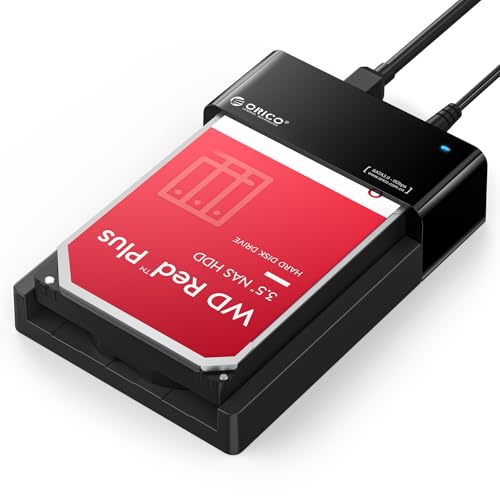
- Supports one SATA HDD or SSD up to 24TB
- Lay-flat design supports natural convection cooling
- Tool-free use across Windows, macOS, and Linux
Best For: Single-drive access and extended data sessions
Best Simple SATA Reader

- Supports 2.5-inch and 3.5-inch SATA drives
- Tool-free hot-swapping and plug-and-play setup
- Includes required 12V power for 3.5-inch drives
Best For: Basic access to bare SATA HDDs and SSDs
Best High-Capacity Offline Cloner

- Supports up to 44TB across two SATA drives
- Offline cloning without a computer
- Works with PCs, TVs, routers, and game consoles
Best For: High-capacity drive duplication and migration
Best Portable Hub-Drive Combo
Nexus 500GB Portable Docking Station

- Built-in storage and 5-in-1 USB-C hub
- SD and MicroSD readers work simultaneously
- USB 3.1 Gen 2 ports rated up to 10Gbps
Best For: Travelers and creators needing storage, card readers, and USB-C expansion
Best Dual-Bay Cloning Dock
UGREEN Dual-Bay SATA Docking Station

- Holds two 2.5-inch or 3.5-inch SATA drives
- Supports offline cloning without a computer
- USB 3.0 connectivity up to 5Gbps
Best For: Drive cloning, migration, and high-capacity desktop backups
Best for Offline Cloning
MAIWO Dual-Bay HDD Docking Station

- Clones between two SATA drives without a computer
- Supports 2.5- and 3.5-inch HDDs and SSDs
- Adds three USB 3.0 hub ports
Best For: Drive backups, cloning, and multi-device data handling
Best Universal Drive Compatibility

- Supports SATA HDDs, SATA SSDs, and M.2 NVMe SSDs
- Reaches up to 10Gbps over USB 3.2 Gen 2
- Includes USB-C and USB-A connection options
Best For: Mixed-drive access across computers and Android devices
Best Protected Dual-Bay Design

- Holds two 2.5- or 3.5-inch SATA drives
- Supports offline cloning without a computer
- Fixed bezels improve drive stability and protection
Best For: SATA backups, transfers, and straightforward cloning
Best Dual-Bay Cloner – SABRENT USB 3.0 Dual Bay Dock
For users comparing portable hard drive docking stations, the SABRENT EC-HD2B stands out as a dual-bay option with offline cloning. It accepts 2.5-inch and 3.5-inch SATA HDDs or SSDs, supports drives up to 10TB per bay, and connects over USB 3.0 at up to 5Gbps.
Best For: Users who need to access two SATA drives or clone one drive to another without a computer.
Pros:
- Supports both 2.5-inch and 3.5-inch SATA HDDs and SSDs.
- Offline cloning works without connecting to a computer.
- Plug-and-play setup requires no drivers.
- Includes a power supply and USB 3.0 cable.
Cons:
- Compatible with SATA drives, not a broad range of drive interfaces.
- Offline cloning supports transfer speeds up to 60Mbps.
- Its dual-bay design is larger than a single-drive dock.
The EC-HD2B is a practical choice when cloning and two-drive access matter more than compact size. Its USB 3.0 connection and support for large-capacity SATA storage make it useful for backups, migrations, and drive reading.
Best Lay-Flat Cooling Design – ORICO 24TB SATA Dock
The ORICO lay-flat dock is a streamlined option among portable hard drive docking stations. It supports one 2.5-inch or 3.5-inch SATA HDD or SSD up to 24TB, uses USB 3.0 with UASP, and is designed for tool-free drive access and natural convection cooling.
Best For: Users who want a single-drive dock with high capacity support, broad operating-system compatibility, and a space-conscious lay-flat design.
Pros:
- Supports a single SATA drive up to 24TB.
- Compatible with 2.5-inch and 3.5-inch HDDs and SSDs.
- Tool-free, plug-and-play operation with hot-swapping support.
- Lay-flat design promotes natural heat dissipation.
Cons:
- Only supports one drive at a time.
- Requires the included 12V power adapter for operation.
- Does not provide an offline cloning function in the supplied features.
With its broad OS support, included accessories, and 24TB single-drive capacity, this ORICO model is a flexible everyday dock. The lay-flat construction is especially appealing for users who expect longer data-access sessions.
Best Simple SATA Reader – SABRENT USB 3.0 Lay-Flat Dock
The SABRENT EC-DFLT is a straightforward choice among portable hard drive docking stations for bare SATA drives. It accepts 2.5-inch and 3.5-inch SATA HDDs or SSDs, supports USB 3.0 with UASP, and provides tool-free, plug-and-play access without requiring drivers on current Windows, macOS, or Linux systems.
Best For: Users who need an uncomplicated single-bay dock for bare SATA drives and do not need USB-C, M.2, or IDE support.
Pros:
- Works with SATA I, II, and III 2.5-inch and 3.5-inch drives.
- Tool-free hot-swapping with an LED for power and activity.
- Includes a 12V power adapter for 3.5-inch drives.
- Supports USB 3.0 and UASP for compatible hosts.
Cons:
- Uses a USB Type-A host cable rather than USB-C.
- Does not support IDE/PATA, M.2, NVMe, M.2 SATA, or SAS drives.
- S.M.A.R.T. diagnostics do not pass through the USB bridge.
This dock is best viewed as a focused SATA reader rather than an all-purpose storage adapter. Its clear interface limitations are worth noting, but for compatible bare drives it offers simple setup, external power, and convenient swapping.
Best High-Capacity Offline Cloner – ORICO Dual-Bay SATA Dock
The ORICO DD28U3-C combines dual-bay drive access with offline cloning, making it a capable pick among portable hard drive docking stations. It supports 2.5-inch and 3.5-inch SATA HDDs and SSDs up to 22TB per drive, for a stated total capacity of 44TB, and connects through USB 3.0 with UASP and TRIM support.
Best For: Users who need high-capacity two-drive management, offline duplication, and compatibility with computers, TVs, routers, and game consoles.
Pros:
- Supports up to 44TB total across two SATA drives.
- Offline cloning operates without a computer connection.
- Compatible with 2.5-inch and 3.5-inch SATA HDDs and SSDs.
- Includes a 36W power adapter and USB 3.0 cable.
Cons:
- The target disk must be larger than the source disk for cloning.
- The dock will not power on without a hard drive inserted.
- Uses a USB-A connection, which may require an adapter for USB-C-only computers.
For large-drive backups and migrations, the DD28U3-C offers more capacity headroom than many single-bay docks. Its offline clone button and independent power supply make it particularly useful for repeat duplication tasks.
Best Portable Hub-Drive Combo – Nexus 500GB Portable Docking Station
The Nexus combines portable storage with a USB-C docking station, making it a practical choice for shoppers who want a hard drive, card readers, and expansion ports in one compact device. It includes USB 3.1 Gen 2 data ports rated up to 10Gbps, exFAT formatting for Windows and Mac, and bus-powered operation.
Best For: Travelers, photographers, and laptop users who need portable storage plus USB-C connectivity.
Pros:
- Combines a built-in hard drive with a 5-in-1 USB-C hub.
- Includes SD and MicroSD readers that can operate simultaneously.
- Offers USB 3.1 Gen 2 data ports and a dedicated USB-C power input.
- Compact 123 × 80 × 15mm design weighs 160g.
Cons:
- Its integrated storage is less flexible than a dock with replaceable drive bays.
- Full operation of all six ports requires a connected USB-C power source.
Choose the Nexus when portability and multifunction connectivity matter more than installing multiple internal drives. Its built-in card readers and USB-C expansion make it especially useful for compact mobile workstations.
Best Dual-Bay Cloning Dock – UGREEN Dual-Bay SATA Docking Station
The UGREEN dual-bay docking station is designed for accessing or duplicating two SATA drives at once. It accepts both 2.5-inch and 3.5-inch HDDs or SSDs, supports offline cloning without a computer, and connects over USB 3.0 at speeds up to 5Gbps.
Best For: Users who need two-drive access, offline cloning, or a high-capacity desktop backup setup.
Pros:
- Supports two 2.5-inch or 3.5-inch SATA drives simultaneously.
- Offline cloning works without connecting to a computer.
- Supports up to 32TB per drive according to the supplied specifications.
- Includes a 12V/3A power adapter and USB-C data cable.
Cons:
- USB 3.0 transfer speeds are rated at up to 5Gbps, below newer 10Gbps docks.
- Offline cloning requires the destination drive to have equal or greater capacity.
- It is a powered desktop dock rather than a pocket-sized portable unit.
The UGREEN is a strong fit for drive migration and bulk storage workflows. Its dual bays and offline cloning function are more important advantages here than maximum USB bandwidth or travel portability.
Best Simple Single-Bay Dock – ORICO 2.5/3.5-Inch SATA Dock
The ORICO DD18 is a straightforward single-bay option among portable hard drive docking stations. Its tool-free slot accepts 2.5-inch and 3.5-inch SATA HDDs or SSDs, while UASP support, a 5Gbps USB 3.0 connection, and included power supply support everyday file access and backups.
Best For: Users who want a simple, hot-swappable dock for one SATA drive at a time.
Pros:
- Works with 2.5-inch and 3.5-inch SATA I/II/III drives up to 22TB.
- Tool-free design supports hot-swapping.
- UASP and USB 3.0 provide transfer speeds up to 5Gbps.
- Compatible with Windows, macOS, Linux, and several connected devices.
Cons:
- Supports only one drive at a time.
- Does not support IDE or SAS drives.
- New or unallocated drives must be initialized and formatted before use.
The ORICO makes sense for buyers who want uncomplicated access to a single bare SATA drive. Automatic sleep mode, anti-skid pads, and dust protection add practical touches, but it lacks the dual-drive features of the UGREEN model.
Best for Offline Cloning – MAIWO Dual-Bay HDD Docking Station
The MAIWO K3082H is a versatile option for portable hard drive docking stations when you need two-bay SATA access, offline drive cloning, and extra USB connectivity. It supports 2.5- and 3.5-inch SATA HDDs and SSDs, with up to 24TB per bay and 48TB total capacity.
Best For: Users who regularly clone, back up, format, or transfer data between two SATA drives without connecting to a computer.
Pros:
- Supports both 2.5- and 3.5-inch SATA HDDs and SSDs.
- Offline cloning works without drivers or a computer.
- Three USB 3.0 hub ports add convenient peripheral and flash-drive access.
- USB 3.0 provides up to 5Gbps bandwidth and includes a 2.4A charging port.
Cons:
- Designed for SATA drives and does not support M.2 NVMe SSDs.
- Requires the included 12V 3A power adapter for operation.
With its dual bays, high stated capacity, and standalone cloning controls, the MAIWO is a practical choice for backup workflows and drive maintenance. Its integrated USB hub is especially useful if your desk setup needs additional USB-A ports.
Best Universal Drive Compatibility – ICY BOX M.2 and SATA Dock
The ICY BOX IB-1123M-CU31-A stands out among portable hard drive docking stations by combining support for 2.5- and 3.5-inch SATA drives with an M.2 NVMe SSD slot. Its USB 3.2 Gen 2 connection offers up to 10Gbps transfer speeds for compatible hardware.
Best For: Users who need one dock for legacy SATA drives and newer M.2 NVMe SSDs across Windows, macOS, Linux, or Android devices.
Pros:
- Reads 3.5-inch HDDs, 2.5-inch SSDs, and M.2 NVMe SSDs.
- USB 3.2 Gen 2 supports transfer speeds up to 10Gbps.
- Screwless vertical design makes drive swaps quick and tool-free.
- Includes an 80cm USB-C-to-C and USB-A cable for flexible connections.
Cons:
- Its single-bay design does not support simultaneous two-drive docking.
- Offers one USB port rather than an expanded hub.
The ICY BOX is the most flexible pick here for mixed drive collections, particularly if you use both older SATA disks and modern NVMe storage. Its open design simplifies swapping and can help airflow during extended transfers.
Best Protected Dual-Bay Design – WAVLINK SATA Drive Dock
The WAVLINK ST341UA is a practical choice among portable hard drive docking stations for users who want two SATA bays with fixed bezels for added drive stability. It supports 2.5- and 3.5-inch SATA I, II, and III HDDs and SSDs, with capacities up to 20TB per bay.
Best For: Users who want a stable dual-bay SATA dock for backups, file transfers, and computer-free drive cloning.
Pros:
- Supports two 2.5- or 3.5-inch SATA HDDs or SSDs simultaneously.
- Offline clone function works without a computer.
- Fixed bezels provide added protection and stability for inserted drives.
- USB 3.0 with UASP supports up to 5Gbps transfer rates.
Cons:
- Offline cloning requires the target drive to be at least as large as the source.
- Compatibility is limited to SATA drives and does not include M.2 SSDs.
- The stated maximum is 20TB per bay, lower than some larger-capacity docks.
WAVLINK balances straightforward operation with useful physical protection, making it a solid fit for routine cloning and backup work. The included USB-A-to-C adapter also broadens connection options, while plug-and-play support keeps setup simple.
How We Picked These Portable Hard Drive Docking Stations
We focused on practical differences that affect everyday use: drive compatibility, bay count, connection speed, offline cloning, portability, capacity support, cooling, and extra connectivity. The selection includes simple single-drive readers for occasional access, dual-bay models for cloning or drive-to-drive transfers, and more specialized docks with USB hubs or M.2 support.
Product listings and specifications can vary by revision, so confirm the included power adapter, supported drive types, operating-system compatibility, and maximum capacity before buying. A docking station is not a backup by itself; it is a convenient interface for drives that still need a separate backup strategy.
Quick Comparison
| Best For | Recommended Type | What to Look For |
|---|---|---|
| Occasional drive access | Single-bay SATA dock | Broad 2.5- and 3.5-inch support, reliable power supply |
| Disk cloning | Dual-bay offline cloner | Source-to-target cloning without a computer |
| Fast file transfers | USB 3.1 or 10Gbps model | UASP support and a matching host port |
| Mixed modern storage | M.2 and SATA dock | Correct NVMe or SATA M.2 compatibility |
| Travel or compact desks | Portable single-bay dock or hub | Small footprint, durable construction, bus-powered operation where supported |
Key Buying Factors for Portable Hard Drive Docking Stations
Drive Compatibility
Most docks support 2.5-inch and 3.5-inch SATA HDDs and SSDs, but not every model handles every interface. Check whether the dock supports SATA I, II, and III, the drive thickness you use, and the stated maximum capacity. M.2 support requires extra care: NVMe and SATA M.2 drives are different protocols and are not automatically interchangeable.
Connection Speed and Power
USB 3.0 is adequate for many hard drives, while USB 3.1 Gen 2 or 10Gbps connections can better serve SATA SSDs. Actual speeds depend on the drive, computer port, cable, and UASP support. 3.5-inch drives normally require an external power adapter; a bus-powered dock may be more convenient for 2.5-inch drives but should be checked for current limits.
Cloning and Bay Design
Offline cloning is useful when replacing a drive and you want a direct disk copy without running cloning software. Verify that the target drive is at least as large as the source and understand that cloning generally overwrites the target. Dual-bay docks also make it easier to mount two drives simultaneously, but they are usually larger than single-bay designs.
Useful Extras
USB hub ports, SD card readers, fixed bezels, status indicators, and tool-free insertion can improve convenience. These features should complement—not replace—core compatibility and safe drive handling.
Who Should Buy Which Portable Hard Drive Docking Stations?
Choose a compact single-bay SATA dock if you occasionally retrieve files from old drives or need a simple maintenance tool. Pick a dual-bay model if you regularly clone disks, compare drives, or move data between two bare SATA devices. A 10Gbps dock is the better choice for frequent SSD transfers, provided your computer supports the faster connection.
For photographers and creators, a model with card-reader or hub functions can reduce desktop clutter. If your workflow includes newer M.2 storage, choose a dock explicitly designed for the exact NVMe or SATA format you use. Finally, prioritize a stable powered enclosure-style design when working with multiple 3.5-inch hard drives or performing long transfers.