
The right SSD enclosure can turn an unused NVMe or SATA drive into a fast, portable workspace for editing footage, backing up projects, and moving large media libraries.
We compared 10 standout models across interface speed, drive compatibility, cooling, portability, and practical workflow features to help you choose an enclosure that matches your editing setup.
Best 10 SSD Enclosures for Video Editing Picks for 2026
High-Capacity Speed Hub
ORICO 40Gbps 4-Bay NVMe Enclosure

- Four M.2 NVMe bays and up to 32TB capacity
- USB 4.0 supports up to 40Gbps aggregate bandwidth
- Fan-assisted aluminum cooling for sustained workloads
Best For: Multi-drive 4K/8K editing and DIT workflows
Budget SATA Workhorse
SABRENT Tool-Free 2.5-Inch Enclosure

- Tool-free enclosure for one 2.5-inch SATA drive
- USB 3.0 supports up to 5Gbps transfers
- UASP support and broad Windows/Mac compatibility
Best For: Affordable SATA SSD project storage and backups
Cool SATA-C Option
UGREEN Aluminum 2.5-Inch Enclosure

- USB-C Gen 2 interface with UASP support
- Fanless aluminum body helps manage heat quietly
- Tool-free support for one 2.5-inch SATA drive
Best For: Quiet USB-C editing storage using a SATA SSD
Fastest Future-Ready Pick
ACASIS 80Gbps M.2 NVMe Enclosure

- Up to 6000 MB/s with compatible SSDs
- Active fan cooling for sustained workloads
- 60W PD charging and 80Gbps connectivity
Best For: High-end Thunderbolt 5 and USB4 V2 editing setups
Quiet 40Gbps Workhorse
UGREEN 40Gbps M.2 NVMe Enclosure
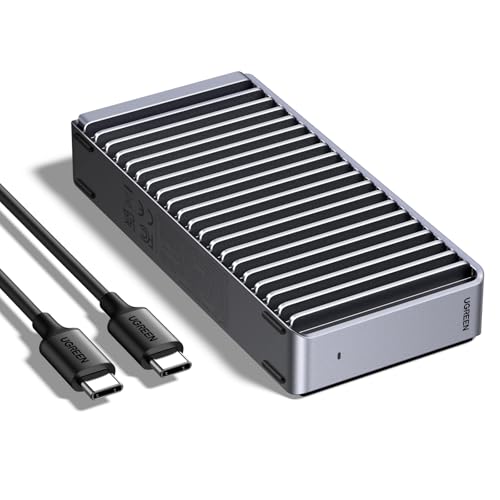
- Up to 3600MB/s with Thunderbolt 4
- Fanless finned aluminum cooling
- Supports multiple NVMe sizes up to 8TB
Best For: Quiet portable editing drives and project backups
Best Status Monitoring
MOKiN 80Gbps M.2 NVMe Enclosure

- LCD shows temperature and fan status
- Active three-speed cooling fan
- Supports PCIe Gen5 NVMe drives up to 8TB
Best For: Editors who want real-time thermal monitoring
Best High-Speed Pick
Yottamaster 40Gbps NVMe Enclosure

- 40Gbps USB4/Thunderbolt 4 connectivity
- Active cooling for sustained workloads
- Tool-free support for several M.2 sizes
Best For: 4K editing and demanding professional transfers
Best Budget Flexibility
SABRENT Tool-Free NVMe/SATA Enclosure

- Supports NVMe and SATA M.2 SSDs
- Tool-free, bus-powered design
- Slim aluminum case with thermal pad
Best For: Portable editing and mixed M.2 drive collections
Best Dual-Format Design
ASUS ROG Strix Aiolos SSD Enclosure

- 20Gbps USB-C transfer capability
- Supports NVMe PCIe and SATA M.2 SSDs
- Includes thermal pad and SSD monitoring dashboard
Best For: Creators wanting flexible, monitored portable storage
High-Capacity Speed Hub – ORICO 40Gbps 4-Bay NVMe Enclosure
For demanding SSD enclosures for video editing, the ORICO 8848U4 combines four M.2 NVMe bays with a USB 4.0 connection and up to 40Gbps bandwidth. It supports 2230, 2242, 2260, and 2280 M-Key NVMe drives, making it suited to large project libraries and fast media transfers.
Best For: Editors and DIT professionals who need multi-drive NVMe storage, high capacity, and portable 4K/8K workflow support.
Pros:
- Four NVMe bays support up to 32TB total with compatible drives.
- USB 4.0 interface provides up to 40Gbps bandwidth.
- Aluminum housing, fan, and vents support sustained workloads.
- Compact, shock-resistant, and quieter than mechanical storage.
Cons:
- SSD drives are not included.
- Single-disk operation is listed at up to 10Gbps, rather than the full 40Gbps aggregate bandwidth.
- The built-in fan adds some operating noise, though it is rated below 30dB.
The ORICO is the most expandable option here, especially for editors managing multiple NVMe drives or large footage archives. Its cooling design and four-bay capacity make it better suited to sustained production work than a basic single-drive enclosure.
Budget SATA Workhorse – SABRENT Tool-Free 2.5-Inch Enclosure
The SABRENT EC-UASP is a straightforward choice among SSD enclosures for video editing when you are working with a 2.5-inch SATA SSD. Its tool-free design, UASP support, and USB 3.0 connection make it convenient for moving footage, project files, or backups.
Best For: Editors who already have a 2.5-inch SATA SSD and want an inexpensive, portable external enclosure.
Pros:
- Tool-free installation simplifies drive setup.
- USB 3.0 supports transfer rates up to 5Gbps.
- UASP support is optimized for SATA III SSD performance.
- Plug-and-play compatibility with Windows and Mac systems.
Cons:
- Supports only one 2.5-inch SATA drive.
- USB 3.0 is slower than newer USB 4 and USB-C NVMe options.
- Plastic construction offers less heat dissipation than aluminum designs.
This enclosure is best viewed as a practical SATA solution rather than a high-end editing-speed upgrade. It works well for portable project storage and backups, but NVMe enclosures are a better match for intensive high-resolution workflows.
Professional Portable Pick – OWC Express 1M2 USB4 NVMe Enclosure
The OWC Express 1M2 is a premium option for SSD enclosures for video editing, with USB4 connectivity and claimed real-world speeds above 6000MB/s. It supports PCIe Gen 3, Gen 4, and selected Gen 5 2242 or 2280 NVMe SSDs, while its bus-powered design keeps the setup portable.
Best For: Creative professionals who want near-internal-storage performance in a compact, upgradeable NVMe enclosure.
Pros:
- USB4 design delivers claimed peak real-world speeds above 6000MB/s.
- Compatible with Macs, PCs, iPad Pros, Chromebooks, and Surface devices.
- Supports PCIe Gen 3.0, 4.0, and selected 5.0 NVMe M.2 drives.
- Patented passive cooling design operates silently without a fan.
Cons:
- PCIe Gen 5 SSD selection requires attention to sustained power consumption.
- Only one M.2 SSD is supported.
- Actual performance depends on the host computer, cable, and installed SSD.
With its fast USB4 interface, broad device compatibility, and silent cooling, the Express 1M2 is a strong fit for active editing work and high-speed media transfers. Its single-drive format favors portability and performance over multi-drive capacity.
Cool SATA-C Option – UGREEN Aluminum 2.5-Inch Enclosure
The UGREEN aluminum enclosure offers a balanced option for SSD enclosures for video editing when your drive is a 2.5-inch SATA SSD. Its USB-C connection, UASP support, tool-free installation, and fanless aluminum body suit portable editing storage, backups, and file transfers.
Best For: Editors who need a compact USB-C enclosure for a single 2.5-inch SATA SSD or HDD.
Pros:
- USB 3.1 Gen 2 USB-C interface supports up to 10Gbps, while SATA supports up to 6Gbps.
- Aluminum construction helps dissipate heat without a fan.
- Tool-free, plug-and-play installation requires no additional power supply.
- Works with Windows, Mac, Linux, and selected consoles and smart devices.
Cons:
- Limited to one 2.5-inch SATA drive.
- Maximum supported capacity is listed as 6TB.
- SATA performance is slower than high-end NVMe enclosures.
UGREEN is a sensible middle ground for SATA-based editing storage: more modern and thermally refined than a basic plastic enclosure, but not intended to match NVMe speeds. Choose it for reliable USB-C portability and quiet operation with an existing 2.5-inch drive.
Fastest Future-Ready Pick – ACASIS 80Gbps M.2 NVMe Enclosure
For demanding video editing workflows, the ACASIS is one of the most capable ssd enclosures for video editing. Its 80Gbps interface, PCIe 5.0 support, active cooling fan, and up to 60W power delivery are designed for fast transfers and mobile workstation setups.
Best For: Editors with Thunderbolt 5 or USB4 V2 systems who need maximum transfer performance and laptop power delivery.
Pros:
- Supports transfer speeds up to 6000 MB/s with a suitable PCIe 4.0 x4 or faster NVMe SSD.
- 80Gbps Thunderbolt 5 and USB4 V2 connectivity with backward compatibility for several slower standards.
- Smart fan cooling helps maintain performance during sustained workloads.
- 60W PD charging can power a compatible laptop through the enclosure.
Cons:
- Not compatible with Thunderbolt 3 devices.
- Actual performance depends on the SSD, computer port, and cable.
- The enclosure can become warm during large transfers and needs ventilation.
The ACASIS stands out for high-end editing rigs and future-focused setups. It is especially compelling when your computer supports the required 80Gbps connection, but users with older Thunderbolt hardware should verify compatibility first.
Quiet 40Gbps Workhorse – UGREEN 40Gbps M.2 NVMe Enclosure
The UGREEN 40Gbps enclosure is a practical choice among ssd enclosures for video editing when quiet operation and broad device compatibility matter. Its ASM2464PD chip can reach up to 3600MB/s with the right Thunderbolt 4 equipment, while the finned aluminum design provides passive cooling without fan noise.
Best For: Video editors who want a portable, silent enclosure for NVMe project drives and backups.
Pros:
- Up to 3600MB/s performance with compatible Thunderbolt 4 cables and devices.
- Silent, fanless cooling uses a double-sided fin design and three-dimensional heat dissipation.
- Supports 2230, 2242, 2260, and 2280 NVMe drives up to 8TB.
- Works with Windows, macOS, Linux, Android, USB, and Thunderbolt systems.
Cons:
- SSD is not included.
- Does not support SATA NGFF or mSATA drives.
- Some thicker SSDs may require thinner thermal pads for proper fit.
UGREEN is a sensible middle-ground option for editors who value portability and quiet operation over the highest available interface speed. Confirm that your SSD is NVMe and that your system and cable support the desired performance level.
Best Status Monitoring – MOKiN 80Gbps M.2 NVMe Enclosure
The MOKiN combines an 80Gbps connection with a built-in LCD, making it a useful option among ssd enclosures for video editing when you want visibility into temperature and fan activity. Its active cooling system is designed to reduce throttling during large transfers and other intensive tasks.
Best For: Editors who want real-time temperature and fan-status information while moving large media files.
Pros:
- Supports PCIe Gen5 NVMe SSDs and transfer rates up to 80Gbps.
- LCD displays temperature status and fan speed during operation.
- Three-speed active fan starts at 40°C to help manage heat.
- Supports NVMe drives in 2230, 2242, 2260, and 2280 sizes up to 8TB.
Cons:
- 80Gbps performance requires a Thunderbolt 5 port and cable.
- Actual speeds vary with the connected system and SSD.
- Supports NVMe drives, not SATA M.2 B-Key drives.
The MOKiN is a strong fit for editors who prefer visible thermal feedback instead of guessing when an enclosure is under load. Its display and active fan add practical monitoring features, while compatibility should be checked before pairing it with an older computer.
Best High-Speed Pick – Yottamaster 40Gbps NVMe Enclosure
For demanding video workflows, this Yottamaster enclosure is one of the fastest SSD enclosures for video editing in this lineup. Its USB4 and Thunderbolt 4 compatibility, active cooling fan, and ASM2464PD controller are designed for sustained transfers, with real-world read/write speeds typically reaching 2800–3200 MB/s when paired with a suitable 40Gbps host, cable, and SSD.
Best For: 4K video editors and professionals who need very fast transfers from an M.2 2280 NVMe SSD.
Pros:
- 40Gbps USB4/Thunderbolt 4 connectivity with strong real-world performance.
- Active cooling fan and protection against overheating and overcurrent.
- Tool-free installation supports 2230, 2242, 2260, and 2280 NVMe SSDs.
- Transparent cover makes the activity LED and fan status easy to see.
Cons:
- Requires a compatible Thunderbolt 4 or USB4 host and 40Gbps-rated cable for top speeds.
- Supports NVMe drives, not the broader NVMe-and-SATA range offered by some alternatives.
This is the strongest choice when editing speed is the priority, but its performance depends heavily on the host system, cable, SSD, and workload. The active cooling design also makes it a practical option for sustained transfers.
Best Budget Flexibility – SABRENT Tool-Free NVMe/SATA Enclosure
The SABRENT EC-SNVE is a practical choice among SSD enclosures for video editing if you want compatibility with both M.2 NVMe and M.2 SATA drives. Its USB 3.2 Type-C connection supports up to 10Gbps, while the slim aluminum case, thermal pad, and bus-powered design make it convenient for mobile editing setups.
Best For: Editors who reuse different M.2 drives and want a compact, tool-free enclosure for laptops or tablets.
Pros:
- Supports both M.2 NVMe and SATA SSDs in 2242, 2260, and 2280 lengths.
- Tool-free installation makes swapping bare SSDs quick and easy.
- USB 3.2 Type-C supports up to 10Gbps, with backward compatibility.
- Slim aluminum construction includes a thermal pad for heat transfer.
Cons:
- Slower than 20Gbps and 40Gbps alternatives, with real transfers up to about 1000MB/s.
- Does not provide clearance for SSDs with pre-installed heatsinks.
- Does not support 2.5-inch SATA drives or mSATA SSDs.
This enclosure offers useful drive-format flexibility at the expense of peak throughput. It is a sensible everyday option when your editing projects do not require the fastest possible external storage performance.
Best Dual-Format Design – ASUS ROG Strix Aiolos SSD Enclosure
The ASUS ROG Strix Aiolos combines broad M.2 compatibility with a 20Gbps USB-C connection, making it a feature-rich option among SSD enclosures for video editing. It accepts both PCIe NVMe and SATA drives, adds a thermal pad and heat-resistant silicone coating, and includes the ROG SSD Dashboard for performance monitoring.
Best For: Creators who want dual NVMe/SATA support, monitoring tools, and a durable portable enclosure.
Pros:
- USB 3.2 Gen 2×2 supports transfer speeds up to 20Gbps.
- Supports M.2 NVMe PCIe and SATA SSDs in 2242, 2260, and 2280 sizes.
- Tool-free push-to-open design simplifies drive installation and removal.
- Thermal pad, heat-resistant coating, and ROG SSD Dashboard support sustained use.
Cons:
- Full 20Gbps performance requires a compatible USB 3.2 Gen 2×2 host and cable.
- Operating-system support is listed as Windows 10/11 and macOS 14.4 or later.
The Aiolos is a well-rounded middle ground: faster than a 10Gbps enclosure and more flexible than an NVMe-only model. Its dashboard and rugged, portable design add appeal for creators who value monitoring and convenience alongside editing performance.
How We Picked the Best SSD Enclosures for Video Editing
We focused on the features that have the greatest impact on real editing workflows: sustained transfer performance, interface compatibility, drive support, thermal management, installation, and portability. The lineup includes USB 3.0 SATA enclosures for affordable upgrades, 40Gbps USB4 and Thunderbolt-compatible NVMe models for demanding projects, and newer 80Gbps options for systems equipped to use them.
We also considered whether each enclosure supports tool-free installation, bus-powered operation, active cooling, power delivery, or multiple drive types. Advertised bandwidth is only part of the picture, so buyers should check the host computer, cable, SSD, and filesystem before expecting maximum speeds.
Quick Comparison
| Best For | Recommended Type | What to Look For |
|---|---|---|
| 4K editing on modern laptops | 40Gbps NVMe | USB4 or Thunderbolt compatibility and strong cooling |
| High-end 8K or large project transfers | 80Gbps NVMe | USB4 v2 or USB4 80Gbps host support |
| Existing 2.5-inch SATA SSDs | SATA USB enclosure | USB 3.0 or faster, UASP, and tool-free access |
| Mixed drive collections | NVMe and SATA-compatible model | Clear interface and keying compatibility |
| Two-drive workflows | Dual-M.2 enclosure | Independent drive support, cooling, and reliable power |
Key Buying Factors for SSD Enclosures for Video Editing
Interface and Real-World Speed
A 40Gbps enclosure is often the practical sweet spot for editing directly from an external NVMe SSD. An 80Gbps model can offer more headroom, but only when the computer, cable, and drive support the newer standard. USB-C describes the connector, not the speed, so verify the actual USB, USB4, or Thunderbolt specification.
Drive Compatibility
NVMe M.2 and SATA M.2 drives are not interchangeable in every enclosure. Check the drive length, typically 2230, 2242, 2260, or 2280, as well as PCIe generation and M-key or B-key requirements. A 2.5-inch SATA enclosure is a different category from an M.2 enclosure.
Heat, Power, and Durability
Video transfers can sustain heavy loads long enough to trigger thermal throttling. Aluminum bodies, thermal pads, heatsinks, and active fans can help maintain performance. Also confirm whether the enclosure is bus-powered, requires extra power, or supports pass-through charging when used with a laptop or tablet.
Workflow Features
Tool-free installation is convenient for frequent drive changes, while a display, SSD dashboard, dual-drive design, or protective casing may matter more for specialized setups. Use a short, certified high-speed cable to avoid limiting performance.
Who Should Buy Which SSD Enclosures for Video Editing?
Choose a 40Gbps NVMe enclosure if you edit 4K footage, use a recent Mac or Windows laptop, and want a strong balance of speed, price, and portability. Choose an 80Gbps model if your workstation supports USB4 v2 or USB4 80Gbps and you regularly move exceptionally large project files.
A 2.5-inch SATA enclosure is the sensible choice for repurposing an older SSD or hard drive at low cost. Select a SATA-and-NVMe-compatible model if your drive collection is mixed. For editors who need separate working and backup drives in one portable unit, a dual-M.2 enclosure can simplify the setup, provided the computer and power supply support its demands.