
Photographers need more than simple external storage: a useful drive dock should make importing, organizing, backing up, and swapping SATA drives quick and dependable. The right model can also reduce cable clutter while giving you room to expand your archive.
We selected 10 hard drive docking stations covering dual-bay docks, offline cloners, card-reader-equipped models, and multi-drive enclosures. Below, compare their capacity, connectivity, compatibility, and workflow features before choosing the best fit for your photo library.
Best 10 Hard Drive Docking Stations for Photo Storage Picks for 2026
Best Dual-Bay Clone Dock

- Two bays for 2.5- and 3.5-inch SATA drives
- Offline cloning without a computer
- USB 3.0 with speeds up to 5Gbps
Best For: Photographers who need dual-drive access and offline cloning
Best High-Capacity Enclosure
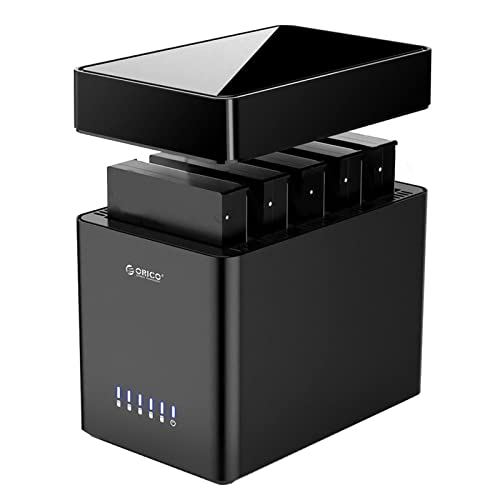
- Five bays and up to 110TB total capacity
- Tool-free magnetic cover design
- Fan-assisted cooling and USB 3.0
Best For: Large photo archives using multiple SATA drives
Best Simple Single-Drive Dock

- Accepts one 2.5- or 3.5-inch SATA drive
- Tool-free hot-swapping and plug-and-play use
- USB 3.0 with included 12V adapter
Best For: Swapping and reading individual bare SATA photo drives
Best Fast Multi-Bay Enclosure

- Four SATA bays with up to 128TB stated capacity
- 10Gbps USB-C and aluminum cooling design
- Hot-swappable bays with independent switches
Best For: Large photo workflows needing fast USB-C and multi-drive expansion
Best Dual-Bay Cloner
Sabrent USB 3.0 Docking Station

- Dual bays for 2.5-inch and 3.5-inch SATA drives
- Offline cloning without a computer
- USB 3.0 transfers up to 5Gbps
Best For: Photographers duplicating and organizing SATA photo-storage drives
Best Multifunction Dock

- Built-in SD and TF card readers
- Two USB 3.0 ports for accessories
- Works with Windows, Mac OS, and Linux
Best For: Photographers managing memory cards and SATA drives together
Best Hot-Swap Design
StarTech.com Dual-Bay SATA Dock

- Two tool-less bays for SATA HDDs and SSDs
- Independent power buttons support hot-swapping
- USB 3.2 Gen 1 transfers up to 5Gbps
Best For: Frequent drive rotation, backup, and photo-file transfers
High-Capacity Cloner

- Supports 2.5- and 3.5-inch SATA HDDs and SSDs
- Offline cloning without a computer
- Three USB 3.0 hub ports and up to 48TB total capacity
Best For: High-capacity photo storage and drive duplication
Easy Migration Pick

- Dual bays read and write two SATA drives
- Offline cloning requires no computer
- USB-C, UASP, and speeds up to 5Gbps
Best For: USB-C workflows and routine photo-library migrations
Protected Dual-Bay Choice

- Supports SATA I/II/III 2.5- and 3.5-inch drives
- Fixed bezels improve drive stability
- Offline cloning and UASP support up to 5Gbps
Best For: Stable, cross-platform SATA photo backups
Best Dual-Bay Clone Dock – FIDECO Dual-Bay SATA Dock
For photographers who need flexible hard drive docking stations for photo storage, the FIDECO offers two SATA bays, USB 3.0 connectivity, and offline cloning. It supports both 2.5-inch and 3.5-inch SATA HDDs and SSDs, making it useful for moving, duplicating, or accessing photo archives without installing drives in a computer.
Best For: Photographers who want two-drive access and computer-free SATA drive cloning.
Pros:
- Supports two 2.5-inch or 3.5-inch SATA HDDs or SSDs simultaneously.
- Offline clone function works without a computer.
- USB 3.0 supports transfer rates up to 5Gbps, with UASP support.
- Plug-and-play compatibility with Windows, macOS, and Linux.
Cons:
- Supports SATA drives only, not IDE or M.2 drives.
- New drives must be initialized before the computer can recognize them.
- Cloning requires inserting drives into the correct bays and holding the Clone button.
The FIDECO is a practical choice for photographers maintaining a working drive and a backup copy. Its dual-bay design and offline cloning are especially convenient, although its SATA-only compatibility should be confirmed before purchase.
Best High-Capacity Enclosure – ORICO 5-Bay Storage Enclosure
The ORICO 5-bay enclosure is built for photographers with expanding archives and multiple SATA drives. It accepts 2.5-inch and 3.5-inch HDDs or SSDs, supports up to 110TB in total, and adds active cooling for extended storage, backup, and editing workflows.
Best For: Large photo libraries that require several drives in one desktop enclosure.
Pros:
- Five bays support 2.5-inch and 3.5-inch SATA drives up to 110TB total.
- Tool-free magnetic cover simplifies drive installation.
- USB 3.0 provides transfer rates up to 5Gbps.
- 60mm fan, ventilation holes, and multiple protection features support sustained use.
Cons:
- The enclosure is relatively large and weighs about 2.2kg.
- Linux systems can read only one hard drive at a time according to the product notes.
- It uses USB 3.0 rather than a faster 10Gbps interface.
With five bays and substantial stated capacity, the ORICO is well suited to a desktop photo-storage setup that may grow over time. Its cooling and tool-free access add convenience, while Linux users should account for the stated multi-drive limitation.
Best Simple Single-Drive Dock – SABRENT SATA Hard Drive Dock
For straightforward access to one drive, the SABRENT is a compact option among hard drive docking stations for photo storage. Its tool-free lay-flat bay accepts 2.5-inch and 3.5-inch SATA HDDs or SSDs, while USB 3.0 and UASP support help move photo files between a bare drive and a computer.
Best For: Photographers who regularly swap or read one bare SATA drive at a time.
Pros:
- Works with SATA I, II, and III 2.5-inch and 3.5-inch drives.
- Tool-free, hot-swappable design requires no drivers on Windows 10/11, macOS, or Linux.
- Compact lay-flat form factor with power and activity indicators.
- Includes a 12V power adapter required for 3.5-inch drives.
Cons:
- Supports only one drive at a time.
- It uses a USB Type-A host cable, not a USB-C port; an adapter is needed for USB-C-only computers.
- Does not support IDE/PATA, M.2, NVMe, SAS, or drives already inside USB enclosures.
The SABRENT keeps the workflow simple and portable for photographers who need occasional access to individual archive drives. Its broad SATA support is useful, but connector compatibility and the need for external power with 3.5-inch drives are important considerations.
Best Fast Multi-Bay Enclosure – WAVLINK 4-Bay USB-C Enclosure
The WAVLINK combines four SATA bays with a 10Gbps USB-C connection, making it a strong fit for photographers transferring large image libraries. Its aluminum construction, temperature-controlled fans, hot-swappable bays, and extra HDMI and USB-C connectivity make it suited to a more capable desktop storage workspace.
Best For: Photo professionals who want four-drive expansion, faster USB-C transfers, and workspace connectivity.
Pros:
- Four bays support 3.5-inch and 2.5-inch SATA HDDs or SSDs, up to 128TB stated capacity.
- USB 3.2 Type-C supports transfer rates up to 10Gbps.
- Temperature-controlled fans activate at 48°C for additional cooling.
- Independent bay power switches support hot-swappable drive management.
Cons:
- 2.5-inch drives require mounting brackets, which are not included.
- The HDMI output requires a host USB-C port that supports video output and a USB-C-to-C cable.
- It has more features and a larger footprint than a basic single-drive dock.
The WAVLINK is the most feature-rich option here for a multi-drive photo workflow, particularly when fast USB-C transfers and cooling matter. Buyers should verify host video support for HDMI and budget for brackets if using 2.5-inch drives.
Best Dual-Bay Cloner – Sabrent USB 3.0 Docking Station
For photographers comparing hard drive docking stations for photo storage, the Sabrent EC-HD2B offers two bays for accessing or cloning 2.5-inch and 3.5-inch SATA hard drives and SSDs. Its USB 3.0 connection supports transfers up to 5Gbps, while plug-and-play setup avoids driver installation.
Best For: Photographers who need dual-drive access and offline cloning for SATA storage devices.
Pros:
- Supports both 2.5-inch and 3.5-inch SATA HDDs and SSDs.
- Supports drives up to 10TB, with 20TB total storage capacity listed.
- Enables offline cloning without a computer.
- Includes a USB 3.0 cable, power supply, and one-year warranty extendable to two years with registration.
Cons:
- Limited to SATA drives rather than IDE drives.
- Offline cloning is listed at up to 60Mbps, slower than its USB 3.0 transfer rating.
The Sabrent is a practical choice when straightforward two-drive handling and offline duplication matter more than extra card-reader or hub features.
Best Multifunction Dock – FIDECO Aluminum HDD Dock
The FIDECO docking station combines SATA drive access with SD and TF card readers and two USB 3.0 ports, making it a versatile option among hard drive docking stations for photo storage. It works with Windows, Mac OS, and Linux and supports USB 3.0 speeds up to 5Gbps.
Best For: Photographers who want one desktop station for SATA drives, memory cards, and USB accessories.
Pros:
- Includes SD and TF card slots for convenient photo-media access.
- Offers two USB 3.0 ports for peripherals or flash drives.
- Supports 2.5-inch and 3.5-inch SATA HDDs and SSDs.
- Supports offline cloning and includes non-slip feet with an aluminum-and-ABS design.
Cons:
- Supports SATA drives only, not IDE drives.
- Offline cloning requires the target drive to have capacity equal to or greater than the source.
With its built-in card readers and USB ports, the FIDECO is especially useful for photographers who regularly move images from cards and external SATA drives at the same workstation.
Best Hot-Swap Design – StarTech.com Dual-Bay SATA Dock
The StarTech.com SDOCK2U33 provides two tool-less, top-loading bays for quickly accessing 2.5-inch or 3.5-inch SATA HDDs and SSDs. For photo storage workflows involving backups, disk imaging, or transfers, its USB 3.2 Gen 1 connection delivers up to 5Gbps and supports hot-swapping an idle drive.
Best For: Photographers and technically minded users who frequently rotate SATA drives for backup or file transfer.
Pros:
- Dual bays support 2.5-inch and 3.5-inch SATA I/II/III drives.
- Tool-less, tray-less design makes drive changes straightforward.
- Independent power buttons allow an idle drive to be hot-swapped while the other bay remains in use.
- Includes LED activity lights, eject buttons, and a two-year warranty with lifetime 24/5 multilingual technical assistance.
Cons:
- IDE drives require a separately sold adapter.
- It does not list built-in SD or TF card readers.
- The supplied USB cable is USB-A.
The StarTech.com dock stands out for repeatable drive rotation and hands-on backup workflows, making it a strong fit for users who value durable, accessible bays over integrated card-reading features.
High-Capacity Cloner – MAIWO Dual-Bay SATA Dock
For photographers building a dependable workflow around hard drive docking stations for photo storage, the MAIWO offers two SATA bays, offline cloning, and three USB 3.0 hub ports. It supports both 2.5-inch and 3.5-inch SATA HDDs and SSDs, with up to 24TB per bay according to the product listing.
Best For: Photographers and IT users who need high-capacity drive access, offline duplication, and extra USB-A connectivity.
Pros:
- Supports 2.5-inch and 3.5-inch SATA HDDs and SSDs.
- Offline cloning works without connecting to a computer.
- Three USB 3.0 hub ports add convenient peripheral and storage connectivity.
- Independent 12V/3A power supply supports stable operation.
Cons:
- Designed for SATA drives rather than NVMe storage.
- Offline cloning requires a separate target drive and overwrites the target during duplication.
- The listed capacity and features may be more than needed for a simple single-drive setup.
The MAIWO stands out when capacity and versatility matter. Its dual-bay design, cloning function, and integrated USB hub make it useful for managing large photo libraries, backups, and drive migrations from one desktop station.
Easy Migration Pick – BENFEI USB-C Dual-Bay Dock
The BENFEI is a practical option among hard drive docking stations for photo storage if your computer uses USB-C. Its dual bays accept 2.5-inch and 3.5-inch HDDs or SSDs, while UASP support and offline cloning help streamline backups and drive migrations.
Best For: USB-C users who regularly read, write, back up, or clone two SATA drives.
Pros:
- Dual-bay design supports simultaneous work with two drives.
- One-button offline cloning does not require a computer.
- USB 3.2 Gen 1 and UASP support provide transfer speeds up to 5Gbps.
- Includes an 18-month warranty and dedicated 12V/2.5A power adapter.
Cons:
- The target drive must have greater capacity than the source for cloning.
- It is intended for SATA HDDs and SSDs, not NVMe drives.
- Users should switch off the dock before connecting or disconnecting drives.
BENFEI’s main advantage is a straightforward two-drive workflow with USB-C connectivity. It is well suited to photographers who want to copy a photo archive, migrate to a larger disk, or access two SATA drives without installing them in a computer.
Protected Dual-Bay Choice – WAVLINK SATA Dock
The WAVLINK dual-bay dock is a flexible choice for hard drive docking stations for photo storage, supporting SATA I, II, and III 2.5-inch or 3.5-inch drives. Its fixed bezels help hold drives securely, while offline cloning and UASP support cover common backup and transfer tasks.
Best For: Photographers who want a stable dual-bay SATA dock with broad operating-system compatibility and offline duplication.
Pros:
- Supports 2.5-inch and 3.5-inch SATA I/II/III HDDs and SSDs.
- Fixed bezels provide added drive stability and protection.
- Offline cloning works without a computer when the target is at least as large as the source.
- Compatible with Windows, macOS, Chrome OS, Linux, and Android with OTG support.
Cons:
- Listed support is for SATA drives, not NVMe storage.
- Offline cloning requires the target drive to be equal to or larger than the source.
- The listing specifies a SATA-interface-only warranty.
WAVLINK is a strong all-purpose option for accessing and backing up SATA photo drives. The fixed bezels are useful for desktop organization, and the included USB-A-to-C adapter expands connection options, though its SATA-only scope should be considered before buying.
How We Picked the Best Hard Drive Docking Stations for Photo Storage
We focused on features that affect real photography workflows: compatibility with both 2.5-inch and 3.5-inch SATA drives, connection speed, bay count, cloning support, build quality, and ease of swapping drives. We also considered whether each dock suits occasional transfers, active editing, or a growing local archive.
Because photo backups are often performed in batches, we gave extra attention to stable power, tool-free installation, USB 3.x or USB-C connectivity, and features such as offline cloning, card readers, cooling, and expansion hubs. A dock is not a substitute for a complete backup strategy, but it can make maintaining multiple copies much easier.
Quick Comparison
- Single-bay docks: Best for occasional imports, drive testing, and simple access to one bare SATA drive.
- Dual-bay docks: A practical choice for photographers who rotate source and backup drives or want offline cloning.
- Four- and five-bay enclosures: Better for larger archives, several active drives, and centralized desktop storage.
- Card-reader models: Convenient if you want to move photos from SD or TF cards without a separate reader.
- USB-C and 10Gbps models: The strongest fit for newer computers and high-volume RAW or video transfers.
Key Buying Factors for Hard Drive Docking Stations for Photo Storage
Drive Compatibility and Capacity
Confirm that the dock accepts both the drive sizes you use. Most listed models support 2.5-inch and 3.5-inch SATA HDDs or SSDs, but maximum capacity and supported drive configurations can vary. Multi-bay enclosures are preferable for extensive libraries, while a compact dual-bay unit is easier to store and move.
Speed and Connection Type
USB 3.0 is adequate for many backups, but USB 3.2 Gen 2 or 10Gbps USB-C can reduce transfer times when paired with a fast SSD and compatible computer. Your real-world speed is limited by the slowest link, including the drive, cable, port, and file workload.
Cloning, Cooling, and Usability
Offline cloning can copy one drive to another without a computer, which is useful for straightforward mirror backups. Look for clear clone controls and understand that cloning normally erases the destination drive. For multi-drive use, ventilation or temperature-controlled fans can help manage heat. Tool-free bays, fixed bezels, and stable power supplies also improve daily convenience.
Who Should Buy Which Hard Drive Docking Stations for Photo Storage?
Choose a single-bay dock if you need an inexpensive way to access loose drives or transfer occasional photo shoots. Choose a dual-bay cloner if you maintain a working drive and a backup copy and want a simple swapping routine. Choose a card-reader dock if minimizing desk accessories matters. Choose a four- or five-bay enclosure if your library spans several drives or you want a more permanent desktop archive. Finally, prioritize USB-C and faster interfaces when your computer supports them and you regularly move large RAW, TIFF, or video files.