
Photo editing is easier when your canvas, tools, previews, and reference images do not compete for space on one laptop display. A portable screen extender can add one or two extra panels without requiring a full desktop setup.
We selected 10 models across common sizes, resolutions, connection types, and portability levels to help photographers and visual creators find a more productive mobile workspace.
Best 10 Laptop Screen Extenders for Photo Editing Picks for 2026
Best for Color-Aware Mobile Editing
Blackview 14.1-inch Triple Screen Extender

- Advertised 100% sRGB coverage
- Light 2-pound travel design
- One-cable USB-C setup
Best For: Mobile editors seeking portability and wider stated color coverage
Best for Flexible Connections
KEFEYA 14.2-inch FHD IPS Extender

- USB-C, HDMI, and USB-A support
- Rotates 0–180 degrees
- Includes carrying case and cables
Best For: Editors using varied laptops and connection types
Best for Maximum Vertical Space
AetherSpark 16-inch 1200P Extender

- 16:10 1920×1200 IPS display
- 350-nit brightness
- Supports 12–17.3-inch laptops
Best For: Editors wanting more vertical room for palettes and documents
Compact Color-Editing Companion
APILDELLA 14-Inch Screen Extender

- 14-inch 1080p IPS display with HDR controls
- Fits 13- to 16-inch laptops with a zero-contact frame
- Supports USB-C, USB-A, and HDMI connections
Best For: Traveling photo editors who need a compact second screen
Large Triple-Screen Workspace
Synnov 15.6-Inch Laptop Extender

- 15.6-inch 1080p IPS display with 178° viewing angle
- Supports extend, mirror, and portrait modes
- Includes cables, power adapter, and carry bag
Best For: Photo editors wanting a larger portable triple-screen setup
Color-Focused Triple Display
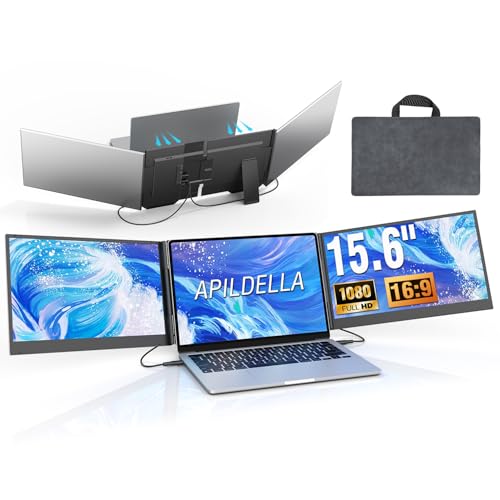
- 15.6-inch 1080p IPS display with HDR and stated 120% sRGB gamut
- Two-cable connection design reduces setup clutter
- Thin aluminum body with travel bag and included accessories
Best For: Compatible laptops used for color-conscious photo editing
Best Lightweight Pick
Ultra-Portable 14.2-inch FHD Extender

- 1.87-pound, 0.27-inch-thin design
- 1080p IPS display with 300-nit brightness
- Supports extended, mirrored, and portrait modes
Best For: Traveling photo editors and remote workers
Best Triple-Screen Color Option

- Dual 1080p IPS displays for a triple-screen setup
- Stated 100% sRGB color gamut
- Supports portrait, presentation, and extended modes
Best For: Photo editors and designers needing more workspace
Best for a Large FHD Workspace – KEFEYA 15.6-inch Triple Monitor Extender
For shoppers comparing laptop screen extenders for photo editing, this KEFEYA model emphasizes a larger 15.6-inch Full HD display in a slim, portable design. It supports laptops from 13 to 17.3 inches and is intended for Windows, Mac, DeX, Chrome, and Surface setups.
Best For: Photo editors who want a larger supplemental FHD screen for palettes, timelines, reference images, or multitasking.
Pros:
- 15.6-inch 1920×1080 display provides substantial workspace.
- Ultra-thin 0.16-inch design is easier to pack and carry.
- Broad compatibility includes Windows, Mac, DeX, Chrome, and Surface devices.
Cons:
- The supplied information does not specify color-gamut coverage or color-calibration features.
- Compatibility and connection requirements may vary by laptop and operating system.
This is a practical choice when screen size and portability matter more than specialized color-management specifications. Before buying, confirm that your laptop supports the required display connection and that the screen size fits your setup.
Best for Color-Aware Mobile Editing – Blackview 14.1-inch Triple Screen Extender
Among laptop screen extenders for photo editing, the Blackview DCM6 Pro stands out for its 100% sRGB claim, Full HD IPS panel, and travel-focused design. Its one-cable USB-C connection and 2-pound weight are useful for editors who move between home, office, and remote workspaces.
Best For: Mobile photo editors who value broad sRGB coverage, a lighter triple-screen setup, and simpler USB-C connectivity.
Pros:
- Advertised 100% sRGB color gamut supports more color-conscious workflows.
- 1920×1080 IPS display with 300-nit brightness and 178-degree viewing angle.
- 2-pound design and one-cable USB-C connection improve portability.
- TÜV-certified flicker-free and low-blue-light features may be more comfortable for long sessions.
Cons:
- The initial driver installation may take about one minute.
- Full one-cable operation depends on a compatible full-featured USB-C port.
- The supplied details do not mention factory calibration.
With its stated sRGB coverage and low weight, this is one of the more editing-oriented options in the group. It is still important to verify your laptop’s USB-C capabilities and remember that advertised gamut coverage is not the same as professional calibration.
Best for Flexible Connections – KEFEYA 14.2-inch FHD IPS Extender
This KEFEYA is a versatile option for shoppers seeking laptop screen extenders for photo editing across different devices. Its 14.2-inch 1920×1080 IPS screen can connect through USB-C, HDMI, or USB-A, while the rotating design and included carrying case support desk and travel use.
Best For: Editors who need flexible connectivity and a portable secondary display for mixed-device workflows.
Pros:
- Full HD IPS panel offers wide viewing angles and adjustable image settings.
- Supports Type-C, HDMI, and USB-A connections with included cables.
- Rotates 0–180 degrees and includes a carrying case for travel.
- Tool-free attachment and a 0–90-degree kickstand tilt support ergonomic positioning.
Cons:
- At 2.77 kg, it is heavier than the Blackview option listed here.
- MacBook models with M1 through M4 Pro chips require a dedicated H5-T cable for full triple-screen functionality.
- The glossy finish may be less suitable for controlling reflections in bright rooms.
This model makes the most sense when connection flexibility is a priority or when you use more than one type of device. Its Full HD IPS panel is useful for editing support tasks, but users needing calibrated color should look for dedicated calibration specifications.
Best for Maximum Vertical Space – AetherSpark 16-inch 1200P Extender
For photo editors who want more room for panels and documents, this AetherSpark uses a 16:10 1920×1200 IPS display rather than a standard 16:9 Full HD format. The 16-inch screen, 350-nit brightness, and support for laptops from 12 to 17.3 inches make it a spacious travel-oriented option.
Best For: Editors who prefer a larger 16:10 workspace for vertical tools, image details, folders, and reference material.
Pros:
- 1920×1200 resolution provides extra vertical space compared with 1920×1080.
- 16-inch IPS display with 350-nit brightness is designed for clearer viewing in bright rooms.
- Supports mirror, extend, and presentation modes with 180-degree rotation.
- Compatible with Windows, macOS, Chrome OS, Android, and Linux, plus HDMI devices.
Cons:
- At 4.4 pounds, it is heavier than the 2-pound Blackview extender.
- Full-featured devices require two USB-C cables rather than a single cable.
- The supplied information does not specify color-gamut coverage or calibration.
This is the strongest fit when screen area and vertical workspace are more important than minimum carry weight. Its 16:10 layout can reduce scrolling around editing panels, though buyers should confirm port compatibility and account for the higher travel weight.
Compact Color-Editing Companion – APILDELLA 14-Inch Screen Extender
For photographers who need more workspace without carrying a bulky setup, this 14-inch APILDELLA is a practical option among laptop screen extenders for photo editing. Its 1080p IPS display, HDR mode, adjustable image controls, and compact design make it useful for keeping editing tools or reference images open beside your main canvas.
Best For: Mobile photo editors using 13- to 16-inch laptops who want a compact second screen for editing controls, email, or reference material.
Pros:
- 14-inch 1920×1080 IPS display with HDR and adjustable brightness, contrast, and backlight.
- Supports extend and mirror modes, with a foldable 0–225° design for flexible positioning.
- Zero-contact frame and adjustable support arm fit 13- to 16-inch laptops while helping avoid screen scratches.
- Includes USB-C, USB-A, and HDMI connection options, plus a one-year replacement promise.
Cons:
- At 250 cd/m², brightness may be less suitable for especially bright environments.
- Connection and power requirements may require troubleshooting if the display reports no signal or appears dim.
- The 14-inch workspace is smaller than the 15.6-inch alternatives in this roundup.
This is a sensible travel-focused choice when portability and straightforward compatibility matter more than maximum editing area. Confirm your laptop’s available ports and follow the recommended cable configuration for the most reliable setup.
Large Triple-Screen Workspace – Synnov 15.6-Inch Laptop Extender
The Synnov 15.6-inch model is built for photo editors who want a larger portable workspace and a triple-screen arrangement. Its 1080p IPS panel, 178-degree viewing angle, portrait support, and lightweight aluminum construction can help separate the image, editing panels, and reference material.
Best For: Photographers and creative professionals who want a large portable triple-monitor setup for editing, research, meetings, or multitasking.
Pros:
- Large 15.6-inch 1080p IPS screen with 178-degree viewing angles and adjustable brightness.
- Supports extend, mirror, and portrait modes for flexible photo-editing layouts.
- Designed to fit 12- to 17.3-inch laptops and supports Windows, macOS, Chrome, Linux, and Android.
- Thin aluminum construction, metal stand, power adapter, cables, and leather carry bag are included.
Cons:
- Requires at least one full-featured USB-C port; compatibility is specifically limited for MacBooks with M1, M2, or M3 chips.
- At about 4 pounds, it is portable but heavier than a basic standalone travel monitor.
- The glossy screen finish may produce more reflections than a matte display.
Choose this Synnov when screen size and a broad multitasking layout are priorities. Its port requirement is the key purchase check, so verify that your laptop has the necessary full-featured USB-C connection before ordering.
Color-Focused Triple Display – APILDELLA 15.6-Inch Extender
For editing workflows that benefit from extra screen space and vivid color, this 15.6-inch APILDELLA stands out among laptop screen extenders for photo editing. It combines a 1080p IPS display with HDR, a stated 120% sRGB color gamut, and a two-cable connection approach for a more organized portable workstation.
Best For: Photo editors using compatible 13- to 17.3-inch laptops who want a larger color-oriented display alongside their main screen.
Pros:
- 15.6-inch 1080p IPS display includes HDR and a stated 120% sRGB color gamut.
- Two-cable setup can connect the two monitors while sharing power, reducing cable clutter.
- Supports expansion, mirroring, and second-screen modes with a foldable 0–180° design.
- Thin 0.16-inch aluminum body, rear bracket, travel bag, cables, and power adapter are included.
Cons:
- Requires either two USB-C ports with DisplayPort support or one USB-C port plus HDMI.
- M1–M4 MacBooks require the specified H5-T accessory, adding a compatibility consideration.
- The glossy finish may be more reflective in bright rooms or outdoor locations.
This is the strongest fit here for users who prioritize a larger panel and the supplied wide-gamut specification. Check your laptop’s video-capable ports—and Mac compatibility in particular—before buying.
Best Lightweight Pick – Ultra-Portable 14.2-inch FHD Extender
For shoppers comparing laptop screen extenders for photo editing, this model emphasizes portability without giving up a Full HD IPS display. Its 14.2-inch screen, 300-nit brightness, matte finish, and 1080p resolution provide a practical second workspace for palettes, references, or other editing tools while traveling.
Best For: Photo editors, remote workers, and travelers using 14- to 17.3-inch laptops.
Pros:
- Lightweight 1.87-pound, 0.27-inch-thin design is easy to carry.
- 1080p IPS display with 300 nits of brightness and a matte finish.
- Supports extended, mirrored, and portrait modes with a 0–226° viewing adjustment.
- Includes USB-C, HDMI, and USB-A connection options with no driver required for full-function USB-C setups.
Cons:
- Full-function USB-C is needed for the simplest setup.
- Its 60Hz refresh rate is suited to work rather than high-refresh applications.
This is a strong choice when carrying weight matters as much as adding screen space. The 1080p IPS panel is useful for organizing an editing workflow, though color-critical users should still calibrate their overall setup independently.
Best Triple-Screen Color Option – 14-inch 100% sRGB Extender
Among laptop screen extenders for photo editing, this model stands out for its dual additional 1080p IPS displays and stated 100% sRGB coverage. The triple-screen arrangement can keep an image canvas, editing controls, and reference material visible at the same time, reducing window switching during creative work.
Best For: Designers and photo editors who want a triple-screen workflow with wide-gamut coverage.
Pros:
- Two 1080p IPS panels create a triple-screen laptop setup.
- Stated 100% sRGB color gamut, 300-nit brightness, and 1000:1 contrast ratio.
- Supports extended, mirrored, portrait, and presentation modes.
- Built-in telescopic stand adjusts up to 90° and fits 13- to 17-inch laptops.
Cons:
- At about 3.37 pounds, it is heavier than the 1.87-pound option.
- M1/M2/M3 MacBooks and laptops without full-featured USB-C may require an additional H5-T cable and setup steps.
The combination of triple-screen workspace and stated 100% sRGB coverage makes this the most directly targeted option for color-aware creative workflows. Its extra screen area comes with more weight and more demanding compatibility requirements, so check your laptop ports before buying.
Best Flexible Triple-Screen Design – Ultra-Slim 14-inch FHD Extender
This laptop screen extender for photo editing pairs two 14-inch 1080p IPS screens with a clamp-on design and built-in stand. HDR mode, anti-glare technology, and multiple orientation options make it useful for keeping editing panels, reference images, and other applications visible across a portable workstation.
Best For: Photo editors and multitaskers who want flexible triple-screen positioning for 13- to 17.3-inch laptops.
Pros:
- Two 14-inch 1080p IPS screens provide a triple-screen workspace.
- Supports extended, mirrored, duplicate, portrait, and landscape modes.
- 0.27-inch-thin design weighs about 3 pounds and includes a built-in stand adjustable to 90°.
- HDR mode, blue-light filtering, anti-glare technology, and a 178° viewing angle support comfortable viewing.
Cons:
- Screen finish is listed as glossy, despite the included anti-glare technology.
- Laptops without full-featured USB-C and M1/M2/M3 MacBooks may need an additional H5-T cable.
- External power may be needed if the display reports no signal or appears too dim.
This option is appealing when screen positioning and orientation flexibility are priorities. It offers a broad feature set for portable editing, but buyers should verify port compatibility and be prepared to supply external power when required.
How We Picked the Best Laptop Screen Extenders for Photo Editing
We compared these Laptop Screen Extenders for Photo Editing based on display resolution, panel size, connection options, laptop compatibility, portability, and likely usefulness in real editing workflows. We also considered whether a model adds one or two screens, how much desk or travel space it requires, and whether its advertised setup is genuinely convenient for mobile work.
These products are portable productivity displays rather than professional reference monitors. Specifications such as color gamut, factory calibration, brightness, and viewing angles can vary, so photographers doing print-critical or color-managed work should verify the manufacturer’s detailed measurements before buying.
Quick Comparison
- Best overall flexibility: The 15.6-inch 1080p and 16-inch 1200p options offer a useful balance of workspace and portability.
- Best for lighter travel: Ultra-light 14-inch models reduce the load in a camera or laptop bag.
- Best for a triple-screen setup: Models marketed as triple laptop monitor extenders can place two additional displays beside the laptop panel.
- Best for broad compatibility: Look for USB-C and HDMI support, plus explicit compatibility with your laptop’s operating system and port configuration.
Key Buying Factors for Laptop Screen Extenders for Photo Editing
Resolution and Usable Workspace
Full HD 1080p is adequate for palettes, file browsers, timelines, and reference windows. A 1200p display provides additional vertical space, which can be helpful when editing portrait-oriented images or keeping tool panels visible. Screen size also matters: 15.6- and 16-inch panels provide a more comfortable working area, while 14-inch models are easier to carry.
Color and Image Quality
For serious photo work, check more than the resolution. Prioritize an IPS panel, credible color-gamut coverage, consistent brightness, and stable viewing angles. A screen extender is most useful for secondary tasks unless its color performance is documented well enough for your editing standards.
Connections and Power
USB-C video output is convenient, but not every USB-C port supports DisplayPort video. Some setups need HDMI for video plus USB for power, while others may require drivers. Confirm the exact cable arrangement, available ports, operating-system support, and whether your laptop can power the display without a separate adapter.
Weight, Mounting, and Durability
Check the extender’s weight, thickness, supported laptop dimensions, hinge or mounting design, and maximum opening angle. A lightweight unit is valuable for travel, but a sturdier frame may be preferable for frequent daily use. Make sure the combined screen width will fit your desk or shooting location.
Who Should Buy Which Laptop Screen Extenders for Photo Editing?
Traveling photographers should favor ultra-slim 14-inch models or lightweight 15.6-inch designs that fit easily with camera equipment. Editors who work from hotels or coworking spaces may prefer a 15.6-inch or 16-inch extender for a larger, more comfortable secondary workspace. Power users who keep Lightroom, Photoshop, file management, and references open at once should consider a triple-screen model, provided their laptop supports the required connections and power demand. Color-critical professionals should treat these extenders as productivity screens and verify color specifications carefully before using one for final grading or print decisions.