
Moving video projects, RAW photo libraries, game files, and backups demands more than a basic USB drive case. The right SSD enclosure can turn an internal drive into a fast, portable workspace while helping manage heat and sustained transfer speeds.
These 10 picks cover compact NVMe enclosures, USB4 and 80Gbps models, SATA-compatible cases, and multi-bay storage options. Use the guide below to match interface speed, drive format, cooling, capacity, and portability to your workflow.
Best 10 SSD Enclosures for Large Files Picks for 2026
Best Value High-Speed Pick
UGREEN USB-C M.2 NVMe/SATA Enclosure

- Supports NVMe and SATA NGFF M.2 drives up to 8TB
- USB 3.2 Gen 2x2 interface rated up to 20Gbps
- Aluminum case with thermal pad and plug-and-play setup
Best For: Flexible M.2 storage expansion across multiple operating systems
Fastest Capacity Champion
Satechi USB4 NVMe Pro Enclosure

- USB4 connectivity supports transfer rates up to 40Gbps
- Fits single-sided NVMe drives up to 16TB
- Includes thermal pad, tool-free pin, case, and USB4 cable
Best For: High-capacity file transfers on USB4-equipped systems
Maximum Multi-Drive Storage
Yottamaster 5-Bay SATA Enclosure

- Holds five SATA HDDs or SSDs for up to 110TB total
- Built-in 80mm fan and aluminum shell support cooling
- USB-C 5Gbps connection with no hardware RAID
Best For: Desktop archives and large multi-drive SATA storage
Best Silent 40Gbps Design
UGREEN USB4 M.2 NVMe Enclosure
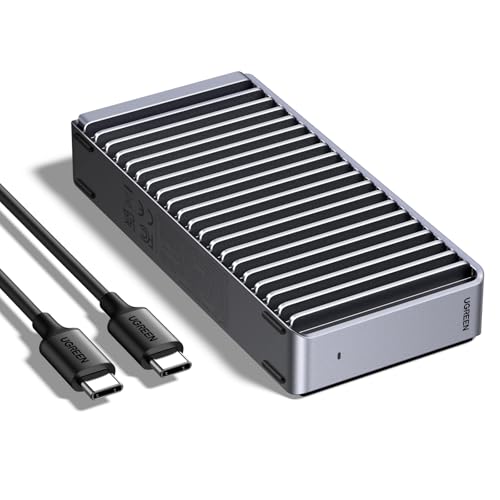
- USB4 interface supports speeds up to 3600MB/s
- Fanless fin design provides quiet heat dissipation
- Supports NVMe drives from 2230 to 2280 up to 8TB
Best For: Quiet, portable large-file transfers with USB4 or Thunderbolt
Maximum-Capacity Workstation

- Four SATA bays for up to 128TB total capacity
- 10Gbps USB-C for large file transfers
- Cooling fans and optional 4K HDMI output
Best For: Desktop users managing multiple large-capacity drives
Professional-Speed Pick

- Up to 80Gbps bandwidth for demanding workflows
- Passive cooling operates without fan noise
- Supports M.2 NVMe 2280 SSDs up to 8TB
Best For: Quiet professional video editing and high-speed transfers
Portable Value Option
SABRENT Tool-Free M.2 Enclosure

- Tool-free support for M.2 NVMe and SATA SSDs
- 10Gbps USB-C and bus-powered operation
- Slim aluminum design for portable storage
Best For: Travelers reusing compatible M.2 SSDs
Top-Speed Pick

- USB4 supports up to 40Gbps
- Fits M-key NVMe SSDs up to 8TB
- Finned aluminum case aids cooling
Best For: Fast large-file transfers with USB4 or Thunderbolt hosts
Versatile Value Pick

- Supports compatible NVMe and SATA M.2 drives
- USB 3.2 Gen 2 reaches 10Gbps
- Includes USB-C and USB-A cables
Best For: Portable use across mixed M.2 drive types and USB ports
Best Value High-Speed Pick – UGREEN USB-C M.2 NVMe/SATA Enclosure
For shoppers comparing ssd enclosures for large files, this UGREEN model offers a flexible M.2 design with USB 3.2 Gen 2×2 connectivity and support for both NVMe and SATA NGFF drives. Its rated 20Gbps interface and included thermal pad make it a practical choice for fast file transfers, though Mac systems may operate at up to 10Gbps.
Best For: Users who need broad M.2 compatibility and fast external storage for Windows, Mac, Linux, Android, or iOS devices.
Pros:
- Supports PCIe NVMe and SATA NGFF M.2 SSDs up to 8TB in common sizes from 2230 to 2280.
- USB 3.2 Gen 2×2 supports transfers up to 20Gbps on compatible hosts.
- Aluminum housing, thermal pad, UASP, and TRIM support help with cooling and stable operation.
- Plug-and-play setup includes a USB-C cable, silicone case, and mounting screw.
Cons:
- Does not support mSATA drives.
- Mac mini and MacBook connections are limited to up to 10Gbps, including through Thunderbolt 3 or 4.
- SSD is not included.
This is a versatile option when you want one enclosure for either NVMe or SATA NGFF M.2 storage. Its value is strongest for compatible USB 3.2 Gen 2×2 systems; otherwise, host limitations may reduce the practical speed.
Fastest Capacity Champion – Satechi USB4 NVMe Pro Enclosure
Designed for demanding transfers, this Satechi enclosure is a strong contender among ssd enclosures for large files. Its USB4 interface supports transfer rates up to 40Gbps and accommodates single-sided M.2 NVMe drives up to 16TB, making it well suited to large media libraries and project files.
Best For: Users with a USB4-capable computer who want high-speed access to a large-capacity single-sided M.2 NVMe SSD.
Pros:
- Supports PCIe Gen 4×4 performance with read/write speeds up to 3840MB/s and a 40Gbps transfer rate.
- Accepts 2230, 2242, 2260, and 2280 single-sided NVMe drives up to 16TB.
- Includes a thermal pad, tool-free silicone pin, clear case, and USB4 cable.
- Backward compatible with USB 3.2, USB 3.1, and USB 2.0 connections.
Cons:
- Supports single-sided M.2 NVMe SSDs only; double-sided drives are not supported.
- Full performance depends on a compatible USB4 host and drive.
- SSD is not included.
With its 16TB capacity rating and USB4 bandwidth, this enclosure is one of the better fits for very large files and high-throughput workflows. Check your SSD type and host ports carefully before buying, especially if you use a double-sided drive.
Maximum Multi-Drive Storage – Yottamaster 5-Bay SATA Enclosure
For managing many large files at once, this Yottamaster 5-bay enclosure takes a different approach from portable M.2 cases. It supports up to five 2.5-inch or 3.5-inch SATA HDDs or SSDs, with a total stated capacity of up to 110TB, making it useful for archives, video projects, and expanded desktop storage.
Best For: Desktop users who need a large multi-drive SATA storage enclosure for archiving, editing, backups, or media libraries.
Pros:
- Five bays support up to 22TB per drive and 110TB total capacity.
- Accepts both 2.5-inch and 3.5-inch SATA HDDs and SSDs.
- Aluminum housing and an 80mm cooling fan help manage heat across multiple drives.
- USB-C connectivity provides up to 5Gbps transfer performance, with stated SSD speeds up to 260MB/s.
Cons:
- This is a non-RAID model; only software RAID is available through the operating system.
- It requires its included 78W power adapter and has a total drive power limit of 78W.
- New drives may need formatting and partitioning before they are recognized.
This enclosure is the practical choice when capacity and drive count matter more than maximum interface speed. It is less portable than an M.2 enclosure, but five removable bays make it better suited to large desktop archives and multi-drive workflows.
Best Silent 40Gbps Design – UGREEN USB4 M.2 NVMe Enclosure
This UGREEN enclosure is aimed at fast, quiet handling of large files, using a USB4 40Gbps interface and the ASM2464PD chip. Its fanless, double-sided fin design is intended to improve heat dissipation while supporting M.2 NVMe drives up to 8TB.
Best For: Users who want a portable, quiet NVMe enclosure for USB4 or Thunderbolt-connected file transfers.
Pros:
- Supports transfer speeds up to 3600MB/s with compatible Thunderbolt 4 cables and devices.
- Works with 2230, 2242, 2260, and 2280 NVMe drives up to 8TB.
- Fanless double-sided fins provide a quiet cooling design without fan noise.
- Compatible with USB4, USB 3.2, USB 3.1, USB 3.0, USB 2.0, and Thunderbolt 3/4.
Cons:
- Does not support SATA NGFF or mSATA solid-state drives.
- Achieving the maximum 3600MB/s requires Thunderbolt 4 cables and devices.
- SSD is not included, and some thicker SSDs may require a thinner thermal pad.
For users prioritizing quiet operation and fast access to large NVMe files, this is a compelling portable option. Its performance depends heavily on the cable, host, and SSD, so it is best paired with a modern USB4 or Thunderbolt setup.
Maximum-Capacity Workstation – WAVLINK 4-Bay SATA Enclosure
For buyers comparing ssd enclosures for large files, the WAVLINK 4-Bay offers a high-capacity approach with four SATA bays, USB-C 3.2 transfer speeds up to 10Gbps, and support for both 3.5-inch and 2.5-inch drives. Its cooling fans and extra connectivity make it suited to demanding desktop storage setups.
Best For: Expanding desktop storage for multimedia projects, large file transfers, and extensive game libraries.
Pros:
- Four SATA bays support up to 128TB total capacity when populated with compatible drives.
- USB-C 3.2 supports data transfers up to 10Gbps.
- Built-in temperature-controlled fans help cool drives during intensive use.
- Includes HDMI output up to 4K at 60Hz when the host USB-C port supports video output.
Cons:
- 2.5-inch drives require separate 2.5-to-3.5-inch mounting brackets.
- Its multi-bay design is less portable than a single-drive enclosure.
- HDMI functionality depends on compatible host video output and a USB-C-to-C connection.
The WAVLINK is the most versatile choice here for users who need several drives and substantial capacity in one enclosure. It is better suited to a permanent workstation than a lightweight travel setup.
Professional-Speed Pick – TERRAMASTER D1 SSD Pro 80Gbps
The TERRAMASTER D1 SSD Pro is built for users who need exceptionally fast ssd enclosures for large files. Its 80Gbps USB-C connection, support for M.2 NVMe 2280 drives, and fanless aluminum cooling are designed for demanding video workflows and sustained performance.
Best For: Professional 8K or 12K editing, fast external storage, and quiet studio workspaces.
Pros:
- Supports up to 80Gbps bandwidth and reported read speeds up to 7061MB/s with compatible hardware and SSDs.
- Works with Thunderbolt 5/4/3, USB4, and USB 3.2/3.1/3.0 connections.
- Fanless CNC aluminum body and dual-fin heatsink provide silent passive cooling.
- Compatible with Windows, macOS, and Linux, with a protective case included.
Cons:
- Diskless design requires a separate M.2 NVMe 2280 SSD.
- Maximum performance depends on the host connection and installed SSD.
- Supports up to 8TB, making it less suitable for multi-drive expansion.
The D1 SSD Pro is the strongest performance-focused option in this roundup, especially for compatible Thunderbolt or USB4 systems. Choose it when speed and silent operation matter more than multiple bays or maximum total capacity.
Portable Value Option – SABRENT Tool-Free M.2 Enclosure
For a compact way to reuse an existing drive, the SABRENT EC-SNVE is a practical choice among ssd enclosures for large files. It accepts both M.2 NVMe and M.2 SATA SSDs, installs without tools, and uses USB 3.2 Type-C for transfers up to 10Gbps.
Best For: Portable storage, drive upgrades, and users who want to reuse compatible M.2 SSDs without an external power supply.
Pros:
- Tool-free installation makes swapping compatible SSDs quick and convenient.
- Supports M.2 NVMe and SATA drives in 2242, 2260, and 2280 lengths.
- USB 3.2 Type-C supports up to 10Gbps, with reported real-world transfers up to 1000MB/s.
- Slim aluminum and ABS construction is bus-powered and includes a thermal pad.
Cons:
- SSD is not included.
- Does not support 2.5-inch SATA drives or mSATA drives.
- There is no clearance for an SSD with a pre-installed heatsink.
The SABRENT is an affordable, travel-friendly enclosure for users who already have a compatible M.2 drive. Its 10Gbps ceiling is well suited to everyday large-file transfers, though it cannot match the speed of the TERRAMASTER on USB4 or Thunderbolt systems.
Top-Speed Pick – ORICO USB4 M.2 NVMe Enclosure
For shoppers comparing ssd enclosures for large files, the ORICO M2V01 stands out with USB4 connectivity and a claimed maximum transfer rate of 40Gbps. It supports one M-key NVMe SSD up to 8TB and includes cooling-focused construction for demanding transfers.
Best For: Users moving large files with a compatible USB4 or Thunderbolt 3/4 host and an M-key NVMe SSD.
Pros:
- USB4 interface supports up to 40Gbps; lab testing reported sequential reads up to 3700MB/s and writes up to 2999MB/s.
- Supports M.2 2230, 2242, 2260, and 2280 NVMe drives up to 8TB.
- Finned aluminum shell and included silicone thermal pad help manage heat.
- Plug-and-play design includes USB-C to USB-A/C cable and works with Windows, macOS, and Linux.
Cons:
- Works only with M-key NVMe SSDs, not M.2 SATA or mSATA drives.
- Actual speeds depend on the host interface and cable.
The ORICO is the strongest performance-oriented choice here, provided your computer and SSD can take advantage of USB4 speeds. Its compatibility limitations are important, but the high bandwidth and heat-dissipating case suit large-file workflows.
Versatile Value Pick – SSK M.2 NVMe/SATA Enclosure
The SSK SHE-C325 PRO is a practical option among ssd enclosures for large files when you need broader M.2 compatibility without moving to a higher-speed USB4 enclosure. Its USB 3.2 Gen 2 connection supports up to 10Gbps and it includes both USB-C and USB-A cables.
Best For: Users who need one portable enclosure for compatible M.2 NVMe or SATA drives and different USB host ports.
Pros:
- Supports compatible NVMe PCIe and SATA M-key/B+M-key M.2 SSDs in 2242, 2260, and 2280 sizes.
- USB 3.2 Gen 2 supports up to 10Gbps and is backward compatible with USB 3.1 Gen 1 and USB 3.0.
- Includes USB-C and USB-A cables, two thermal pads, and a screwdriver.
- Aluminum shell, UASP, and TRIM support help with cooling and enclosure performance.
Cons:
- Does not support M.2 PCIe AHCI SSDs, mSATA drives, or non-M.2 SSDs.
- Its 10Gbps interface has a lower ceiling than USB4 enclosures.
Choose the SSK when flexibility and included accessories matter more than maximum interface speed. Verify your SSD type before buying, since the enclosure supports specific NVMe and SATA M.2 configurations.
Maximum-Capacity Pick – CENMATE Hybrid Four-Bay Enclosure
For storage-heavy users seeking ssd enclosures for large files, the CENMATE hybrid enclosure combines one 2.5/3.5-inch SATA HDD or SSD bay with three M.2 NVMe slots. Its claimed maximum combined capacity is 46TB, making it suited to consolidating several drives in one enclosure.
Best For: Users who prioritize multi-drive capacity and want HDD/SSD and M.2 NVMe storage in a single USB-connected unit.
Pros:
- Holds one SATA HDD/SSD plus three M.2 NVMe drives.
- Supports up to 22TB per SATA drive and up to 8TB per M.2 SSD, for a stated 46TB maximum total.
- USB 3.2 Gen 2 provides up to 10Gbps, with stated full-load read rates of 200–300MB/s.
- Tool-free tray, USB-A/C cable, aluminum construction, and continuously running cooling fans.
Cons:
- The built-in fans continuously run and may be noticeable to users sensitive to sound.
- It is larger and less portable than a single-drive M.2 enclosure.
- Actual performance depends on the installed drives and host system.
The CENMATE is the capacity specialist rather than the fastest single-drive option. Its four-drive layout is compelling for large collections and mixed storage, while the always-on fans trade quieter operation for continuous cooling.
How We Picked the Best SSD Enclosures for Large Files
We focused on enclosures suited to sustained transfers rather than occasional document sharing. Selection criteria included advertised interface speed, compatibility with NVMe and SATA drives, support for 2.5-inch and 3.5-inch disks where applicable, cooling design, installation convenience, power requirements, and stated capacity limits.
We also considered practical differences between compact single-drive enclosures and multi-bay units. A portable NVMe case is usually the better choice for editing on the go, while a powered enclosure with several bays can provide considerably more usable capacity for backups and media archives.
Quick Comparison
- Best for maximum bandwidth: USB4 and 80Gbps NVMe enclosures, provided your computer supports the matching standard.
- Best portable option: A compact 10Gbps or 20Gbps M.2 NVMe enclosure with tool-free installation.
- Best for mixed drive collections: Hybrid M.2 and SATA enclosures that accept more than one drive type.
- Best for large archives: Powered four- or five-bay SATA enclosures with active cooling.
Key Buying Factors for SSD Enclosures for Large Files
Interface Speed and Real-World Limits
USB 3.2 Gen 2 tops out at 10Gbps, while 20Gbps USB 3.2 Gen 2×2, 40Gbps USB4, and newer 80Gbps designs can offer substantially higher peak bandwidth. Both the enclosure and host computer must support the same standard, and the cable must be rated for it. Drive speed, file size, thermal throttling, and the computer’s port can all reduce actual performance.
Drive Compatibility
Check whether the enclosure accepts NVMe PCIe drives, SATA M.2 drives, standard 2.5-inch SATA disks, or 3.5-inch desktop drives. M.2 keying also matters: an M-key NVMe drive is not automatically compatible with a B-key SATA module. Confirm supported lengths such as 2230, 2242, 2260, or 2280 before buying.
Cooling and Sustained Workloads
Large-file transfers can expose heat problems quickly. Look for a finned aluminum body, thermal pad, heatsink, or temperature-controlled fan. Active cooling is especially valuable for multi-drive enclosures and long backup sessions, although it may add noise and require a separate power adapter.
Power, Portability, and Security
Bus-powered M.2 cases are convenient for laptops, but multi-bay SATA units normally need wall power. Consider cable quality, tool-free access, sleep behavior, build quality, and whether the enclosure supports your operating system. RAID, encryption, and backup features should be verified separately rather than assumed from the enclosure’s drive count.
Who Should Buy Which SSD Enclosures for Large Files?
Choose a compact NVMe enclosure if you need a fast scratch disk, portable project drive, or simple way to reuse an M.2 SSD. Choose USB4 or 80Gbps when your workstation, cable, and SSD can exploit the extra bandwidth; otherwise, a less expensive 10Gbps or 20Gbps model may deliver better value.
Choose a hybrid enclosure if you regularly rotate M.2 and 2.5-inch drives. Choose a four- or five-bay powered enclosure for centralized backups, large media libraries, or several SATA drives. Before ordering, match the drive interface, physical size, capacity rating, host port, and cooling system to your longest and most demanding transfer jobs.