
The right SSD enclosure can turn an unused internal drive into fast portable storage, a convenient backup device, or a practical way to migrate data.
We selected 10 of the best SSD enclosures for 2026, covering NVMe and SATA drives, USB4 and 40Gbps performance, tool-free designs, and affordable everyday options.
Best 10 SSD Enclosures Picks for 2026
Best Tool-Free M.2 Flexibility

- Supports M.2 NVMe and SATA drives
- Tool-free installation
- 10Gbps USB-C connectivity
Best For: Mixed M.2 drive collections and quick drive swaps
Best High-Speed Cooling
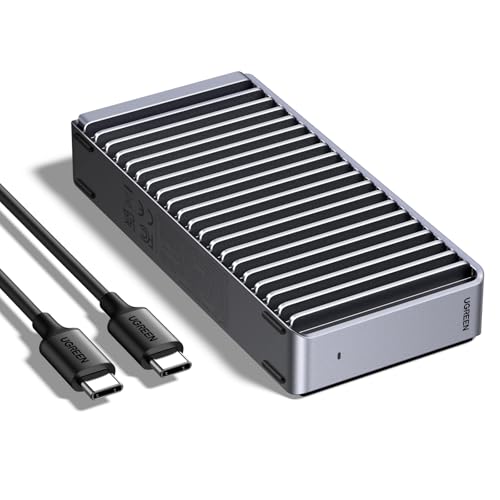
- Up to 3600MB/s with compatible hardware
- USB4 and Thunderbolt support
- Fanless finned aluminum cooling
Best For: USB4 and Thunderbolt users seeking fast NVMe storage
Best 2.5-Inch SATA Value
BENFEI Tool-Free Drive Enclosure

- Fits 2.5-inch SATA drives up to 6TB
- Includes Type-C and Type-A connectivity
- Tool-free plug-and-play setup
Best For: Repurposing 2.5-inch SATA SSDs or hard drives
Best Versatile 20Gbps Option

- Supports NVMe and SATA NGFF SSDs
- 20Gbps USB 3.2 Gen 2x2 interface
- Fits four common M.2 sizes
Best For: Mixed M.2 drives and compatible 20Gbps systems
Best for Everyday Use

- Fits 2.5-inch SATA SSDs and HDDs
- Tool-free installation with no extra power
- Aluminum body supports passive cooling
Best For: Repurposing SATA drives as portable storage
Best Easy-Access NVMe Pick

- Flip-open, tool-free NVMe installation
- USB 3.2 Gen 2 up to 10Gbps
- Thermal pad contacts the aluminum cover
Best For: Portable NVMe storage and frequent drive access
Best Budget Pick
SABRENT 2.5-Inch SATA Enclosure

- Tool-free 2.5-inch SATA drive installation
- USB 3.0 speeds up to 5 Gbps
- Plug-and-play with broad OS compatibility
Best For: Affordable external storage using a 2.5-inch SATA SSD or hard drive
Premium NVMe Pick
ASUS ROG Strix Arion M.2 Enclosure

- USB 3.2 Gen 2 speeds up to 10 Gbps
- Aluminum body with thermal pads
- Includes USB-C to C and USB-C to A cables
Best For: M.2 NVMe users seeking fast USB-C performance and ROG styling
Best Tool-Free NVMe Value

- Supports four common M.2 NVMe sizes
- Tool-free sandwich-style installation
- USB 3.2 Gen 2 with UASP support
Best For: Portable, flexible use of M.2 NVMe SSDs on Windows, Mac, or Linux
Best Tool-Free M.2 Flexibility – SABRENT NVMe & SATA Enclosure
If you want one of the more flexible ssd enclosures for spare M.2 drives, this SABRENT model supports both NVMe and SATA versions. Its tool-free design makes drive installation quick, while USB 3.2 Type-C provides up to 10Gbps connectivity.
Best For: Users who need a compact enclosure for bare M.2 NVMe or SATA SSDs in 2242, 2260, or 2280 sizes.
Pros:
- Supports both M.2 NVMe and SATA SSDs.
- Tool-free installation takes seconds.
- USB 3.2 Type-C supports up to 10Gbps transfers.
- Slim aluminum build includes a thermal pad and an 8-inch Type-C cable.
Cons:
- SSD is not included.
- Does not fit 2.5-inch, mSATA, or heatsink-equipped drives.
- Requires a compatible USB-C connection for its highest rated speed.
This is a practical all-around pick when your M.2 drive type may vary. It is especially convenient for frequent drive swaps, though users with a pre-installed heatsink or a 2.5-inch SATA drive will need another enclosure format.
Best High-Speed Cooling – UGREEN 40Gbps NVMe Enclosure
This UGREEN model is a high-performance choice among ssd enclosures, using USB4 connectivity and the ASM2464PD chip for speeds up to 3600MB/s under suitable conditions. Its finned aluminum design focuses on passive cooling without fan noise.
Best For: Power users with M.2 NVMe drives who have USB4 or Thunderbolt 3/4 hardware and want fast external storage.
Pros:
- Supports USB4 and Thunderbolt 3/4 connections.
- Rated for up to 3600MB/s with compatible cables and devices.
- Works with 2230, 2242, 2260, and 2280 NVMe drives.
- Finned aluminum cooling operates without a fan.
Cons:
- Supports NVMe only; SATA and mSATA drives are not compatible.
- SSD is not included.
- Maximum speed requires Thunderbolt 4 cables and compatible devices.
Choose this enclosure when performance is the priority and your computer can support its faster interface. It is less suitable for SATA drives or systems limited to slower USB standards, but the passive cooling design is appealing for sustained use.
Best 2.5-Inch SATA Value – BENFEI Tool-Free Drive Enclosure
For a traditional 2.5-inch drive, this BENFEI enclosure is a straightforward option among ssd enclosures. It accepts 2.5-inch SATA SSDs or hard drives, includes Type-C and Type-A connection options, and uses a tool-free, plug-and-play design.
Best For: Anyone repurposing a 2.5-inch SATA SSD or hard drive as portable storage for computers, laptops, or a PS4.
Pros:
- Fits 2.5-inch SATA I/II/III drives up to 6TB.
- Tool-free installation with no driver required.
- Supports USB Type-C and Type-A connections.
- UASP support enables up to 5Gbps USB transfer rates.
Cons:
- Not compatible with M.2 SSDs.
- Designed for 7mm or 9.5mm-thick 2.5-inch drives.
- USB performance depends on the connected port and drive.
This is a sensible, budget-friendly format for older laptop drives and standard 2.5-inch SATA SSDs. Its dual connector approach adds convenience, while the simple tool-free shell makes drive reuse uncomplicated.
Best Versatile 20Gbps Option – UGREEN NVMe & SATA Enclosure
This UGREEN enclosure combines broad M.2 compatibility with a USB 3.2 Gen 2×2 interface rated for up to 20Gbps. For shoppers comparing ssd enclosures, it stands out by supporting both PCIe NVMe and SATA NGFF drives in several common lengths.
Best For: Users who want one enclosure for M.2 NVMe and SATA NGFF drives and have a 20Gbps-capable host device.
Pros:
- Supports NVMe and SATA NGFF SSDs up to 8TB.
- Fits 2230, 2242, 2260, and 2280 sizes.
- Includes UASP, TRIM, thermal padding, and over-current protection.
- Compatible with Windows, macOS, Linux, Android, and iOS systems.
Cons:
- Does not support mSATA drives.
- SSD is not included.
- Mac computers and MacBooks operate at up to 10Gbps, even through Thunderbolt 3/4.
This is a strong middle ground for mixed M.2 collections, particularly when broad compatibility matters more than reaching USB4-class speeds. Just confirm that your host supports USB 3.2 Gen 2×2 before expecting the full 20Gbps rating.
Fastest USB4 Pick – SABRENT USB4 NVMe Enclosure
For buyers comparing SSD enclosures, the SABRENT EC-U4TN is a high-speed choice for PCIe NVMe drives. It supports USB4 transfer rates up to 3,900 MB/s, with compatibility across Thunderbolt 3, Thunderbolt 4, and USB-C connections.
Best For: Creators, editors, and mobile power users transferring large files with compatible USB4 or Thunderbolt hardware.
Pros:
- Up to 3,900 MB/s over USB4 and up to 2,700 MB/s over Thunderbolt 3/4.
- Tool-free support for 2230, 2242, 2260, and 2280 PCIe NVMe SSDs.
- Built-in active cooling fan helps maintain performance during large transfers.
- Works with Windows and macOS without drivers or external power.
Cons:
- Supports PCIe NVMe SSDs only; M.2 SATA drives are not compatible.
- Its highest speeds require a USB4 or compatible Thunderbolt connection.
The EC-U4TN is a strong premium option when fast external NVMe storage matters. Its active cooling and broad host compatibility add practicality, though buyers should verify both their SSD type and port capabilities before purchasing.
Best for Everyday Use – UGREEN USB-C SATA Enclosure
The UGREEN 2.5-inch enclosure is a practical option among SSD enclosures for repurposing or upgrading a SATA drive. Its USB 3.1 Gen 2 interface supports up to 10Gbps on the USB-C connection, while the SATA interface supports drives up to 6Gbps.
Best For: Users converting a 2.5-inch SATA SSD or HDD into portable storage, backup media, or a replacement external drive.
Pros:
- Supports most 2.5-inch SATA I, II, and III SSDs and HDDs up to 6TB.
- Tool-free, plug-and-play installation requires no drivers or extra power supply.
- Aluminum construction helps dissipate heat without a cooling fan.
- Compatible with Windows, macOS, Linux, consoles, routers, and smart TVs.
Cons:
- Designed for 2.5-inch SATA drives, not M.2 NVMe SSDs.
- Maximum performance is limited by the SATA interface.
- Devices with USB-A ports require a suitable USB-C-to-USB-A cable.
This enclosure is a sensible choice for existing 2.5-inch SATA hardware and broad device compatibility. It will not match NVMe enclosure speeds, but its simple installation and aluminum build make it useful for storage upgrades and drive recovery.
Best Easy-Access NVMe Pick – SABRENT 10Gbps NVMe Enclosure
The SABRENT EC-PNVO is a compact option for users who want straightforward NVMe storage without screws. This USB-C enclosure supports M.2 PCIe NVMe drives in common sizes and uses a thermal pad pressed against the aluminum top to help manage heat during longer transfers.
Best For: Laptop, desktop, gaming handheld, and console users who need portable 10Gbps NVMe storage with quick drive access.
Pros:
- Flip-open design installs 2230, 2242, 2260, and 2280 NVMe SSDs without tools.
- USB 3.2 Gen 2 supports up to 10Gbps through USB-C.
- Thermal pad and aluminum construction help transfer heat away from the SSD.
- Works with many computers, gaming devices, and compatible phones and tablets.
Cons:
- Compatible with M.2 NVMe drives only, not M.2 SATA SSDs.
- Requires a USB-C connection for its stated 10Gbps interface speed.
The EC-PNVO balances portability, cooling, and convenience for everyday NVMe use. Its flip-open design is especially useful for upgrades, cloning, and troubleshooting, while the 10Gbps ceiling makes it better suited to mainstream USB-C systems than USB4 workstations.
Best Budget Pick – SABRENT 2.5-Inch SATA Enclosure
If you need a straightforward option among SSD enclosures, the SABRENT EC-UASP is designed for 2.5-inch SATA SSDs and notebook hard drives. Its tool-free installation, plug-and-play setup, and USB 3.0 connectivity make it practical for upgrading or reusing a compatible drive.
Best For: Users who need an affordable, tool-free enclosure for a 2.5-inch SATA SSD or hard drive.
Pros:
- Tool-free installation with hot-swappable, plug-and-play operation.
- Supports 2.5-inch SATA and SATA II drives and is optimized for SSDs.
- USB 3.0 supports transfer rates up to 5 Gbps, with USB 2.0 and 1.1 backward compatibility.
Cons:
- Compatible with 2.5-inch SATA drives, not M.2 NVMe SSDs.
- The enclosure uses a plastic exterior.
The SABRENT EC-UASP is a sensible pick for basic external storage, drive transfers, or repurposing a 2.5-inch SATA drive. Choose another enclosure if you need M.2 compatibility or USB-C connectivity.
Premium NVMe Pick – ASUS ROG Strix Arion M.2 Enclosure
The ASUS ROG Strix Arion is a premium choice among SSD enclosures for M.2 PCIe NVMe drives. It combines a USB 3.2 Gen 2 Type-C interface with an aluminum alloy body, thermal pads, two included cables, and Aura Sync RGB lighting.
Best For: M.2 NVMe users who want a durable aluminum enclosure with fast USB-C connectivity and ROG styling.
Pros:
- USB 3.2 Gen 2 supports transfer speeds up to 10 Gbps.
- Fits PCIe NVMe M.2 drives in 2230, 2242, 2260, and 2280 sizes with M or B+M keys.
- Includes USB-C to C and USB-C to A cables, plus thermal pads for heat transfer.
- Aluminum alloy construction and customizable Aura Sync RGB lighting.
Cons:
- The M.2 NVMe SSD is not included.
- Its ROG-focused styling and features may be more than needed for a basic enclosure.
With fast connectivity, broad supported M.2 sizes, and included cables, the ROG Strix Arion is well suited to high-speed portable NVMe storage. Its main appeal is the combination of performance, cooling features, and gaming-oriented design.
Best Tool-Free NVMe Value – FIDECO M.2 NVMe Enclosure
The FIDECO M210 is a versatile option among SSD enclosures for M.2 NVMe drives. Its sandwich-style, tool-free design supports several drive lengths, while USB 3.2 Gen 2, UASP, and a thermal pad help make it suitable for portable high-speed storage.
Best For: Users who want a compact, tool-free enclosure for M.2 NVMe SSDs across multiple drive sizes.
Pros:
- Supports M and M+B key NVMe SSDs in 2230, 2242, 2260, and 2280 sizes.
- USB 3.2 Gen 2 and UASP support theoretical speeds up to 10 Gbps.
- Sandwich-style installation requires no tools and improves thermal-pad contact.
- Works with Windows, Mac OS, and Linux and includes a USB-C cable with an attached USB-A adapter.
Cons:
- Does not support M.2 SATA SSDs.
- A new SSD may need to be initialized before the computer recognizes it.
The FIDECO M210 offers broad NVMe size compatibility and a convenient tool-free setup in a pocket-sized design. It is a strong fit for users who need flexibility, though buyers must confirm that their drive is NVMe rather than M.2 SATA.
How We Picked the Best SSD Enclosures
We compared these SSD Enclosures by drive compatibility, interface speed, installation method, construction, thermal management, included cables, and overall value. The selection includes enclosures for M.2 NVMe drives, 2.5-inch SATA SSDs, and models that support more than one drive standard.
Rated transfer speeds are theoretical maximums. Real-world performance depends on the SSD, host computer, USB port, cable, file sizes, operating system, and heat buildup during sustained transfers.
Quick Comparison
| Best For | Recommended Type | What to Look For |
|---|---|---|
| Maximum NVMe speed | USB4 or 40Gbps enclosure | USB4/USB 4 support, quality cable, thermal control |
| Everyday portable storage | 10Gbps NVMe enclosure | Tool-free installation and USB-C connectivity |
| Older 2.5-inch SSDs | SATA enclosure | USB 3.x, UASP, and a secure drive fit |
| Mixed drive collections | NVMe/SATA-compatible enclosure | Clear key and protocol compatibility |
| Frequent travel | Compact aluminum enclosure | Durable shell, passive cooling, included adapters |
Key Buying Factors for SSD Enclosures
Drive Compatibility
Confirm the enclosure matches your drive before buying. M.2 NVMe and M.2 SATA drives may look similar but use different protocols. Also check the supported form factor, such as 2230, 2242, 2260, or 2280. A 2.5-inch SATA enclosure is not compatible with an M.2 drive.
Connection Speed
For basic backups and document storage, 5Gbps or 10Gbps USB is usually sufficient. USB 3.2 Gen 2 models offer a useful balance of price and performance. USB4 and 40Gbps enclosures make more sense for large video files, frequent cloning, and high-end NVMe SSDs, provided your computer supports the required standard.
Heat and Sustained Performance
Fast NVMe drives can become hot during long transfers. Aluminum shells, thermal pads, heatsinks, and ventilation help maintain consistent speeds. Do not choose an enclosure solely by its advertised peak rate if you regularly move large files.
Installation and Portability
Tool-free designs simplify installation and make it easier to swap drives, while screw-secured models can provide a more rigid fit. Check whether the package includes USB-C and USB-A cables, since adapters and cable quality affect compatibility and performance.
Who Should Buy Which SSD Enclosures?
Choose a USB4 or 40Gbps NVMe enclosure if you need the fastest practical transfers and own a compatible computer. A 10Gbps NVMe model is the better value for routine backups, photo libraries, and general portable storage. Pick a 2.5-inch SATA enclosure when you are reusing a laptop SSD or older SATA drive. If you are unsure which M.2 drive you have, select a clearly labeled multi-compatible model and verify its supported protocol before installation.