
The right enclosure can turn an internal SSD into a fast, portable photo library for editing, backups, and on-location transfers. However, compatibility, thermal performance, and connector speed matter just as much as headline bandwidth.
We compare 10 SSD enclosures for photo storage across NVMe and 2.5-inch SATA formats, from compact everyday models to rugged options built for travel and demanding workflows.
Best 10 SSD Enclosures for Photo Storage Picks for 2026
Best Tool-Free NVMe Pick

- Tool-free flip-open installation
- USB 3.2 Gen 2 speeds up to 10Gbps
- Aluminum cooling for sustained transfers
Best For: Creators using one M.2 NVMe SSD
Best Portable 10Gbps Value

- 10Gbps USB 3.2 Gen 2 interface
- Supports four common NVMe sizes
- Includes silicone case and two cables
Best For: Traveling photographers using NVMe SSDs
Best for High-Speed Workflows

- USB4 interface with speeds up to 40Gbps
- Advertised reads up to 3840MB/s
- Cooling vents and hidden cable storage
Best For: Professionals moving large photo libraries on USB4 systems
Best Budget SATA Pick
BENFEI 2.5-Inch Tool-Free Enclosure

- Tool-free installation for 2.5-inch SATA drives
- Supports up to 6TB and UASP
- Includes USB-C and USB-A cable options
Best For: Affordable 2.5-inch SATA photo storage
Best High-Speed NVMe Pick
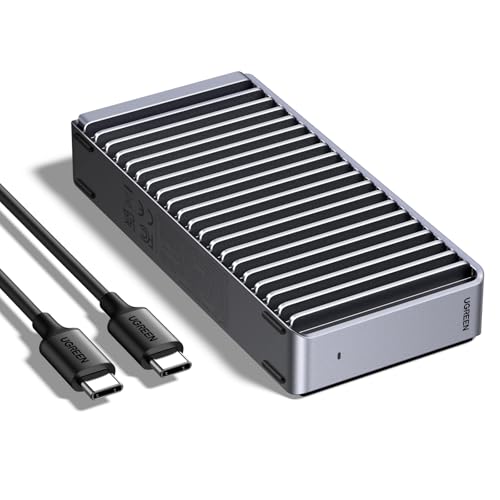
- USB4 enclosure with up to 3600MB/s claimed speed
- Supports 2230 through 2280 NVMe drives
- Fanless aluminum cooling and up to 8TB capacity
Best For: Fast NVMe-based photo workflows
Best RGB NVMe Enclosure

- 10Gbps USB 3.2 Gen 2 interface
- Fits 2230, 2242, 2260, and 2280 NVMe SSDs
- Includes two cables and thermal pads
Best For: Stylish portable NVMe photo storage
Compact Speed Pick
Satechi Mini 2230 NVMe Enclosure

- 10Gbps USB-C transfer speeds
- Active cooling with temperature-responsive fan
- Pocket-size design with write lock
Best For: Travel photographers using 2230 NVMe SSDs
High-Capacity SATA Value
UGREEN USB-C 2.5-inch Enclosure

- Supports SATA SSDs and HDDs up to 6TB
- Tool-free installation with no extra power
- Aluminum body with fanless heat dissipation
Best For: Affordable 2.5-inch SATA photo archives
Rugged All-Format Choice
ASUS TUF Gaming A1 SSD Enclosure
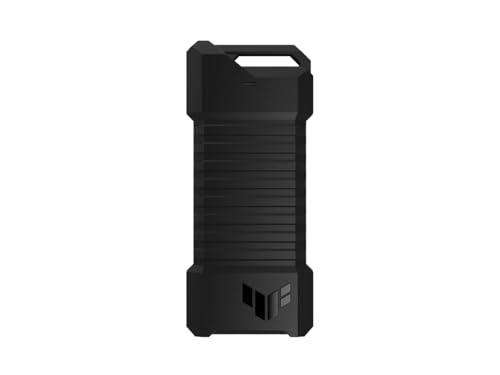
- Supports M.2 NVMe and SATA SSDs
- IP68 water and dust resistance
- Up to 10Gbps USB-C performance
Best For: Outdoor and mobile photo workflows
Best Tool-Free NVMe Pick – SABRENT 10Gbps NVMe Enclosure
For photographers choosing SSD enclosures for photo storage, the SABRENT EC-PNVO combines a quick tool-free installation with USB 3.2 Gen 2 connectivity. Its aluminum top and thermal pad help transfer heat away from the NVMe drive during longer transfers.
Best For: Creators who want a compact, tool-free enclosure for one M.2 NVMe SSD and fast USB-C transfers.
Pros:
- Supports 2230, 2242, 2260, and 2280 NVMe SSDs up to at least 8TB.
- Up to 10Gbps USB-C connectivity with no drivers or external power required.
- Aluminum construction and direct thermal-pad contact support cooler operation.
Cons:
- Supports NVMe drives only; M.2 SATA SSDs are not compatible.
- Maximum real-world speed depends on the host device and cable.
This is a practical choice when fast photo-library transfers and easy drive swapping matter more than supporting multiple drives or SATA media.
Best Multi-Drive Archive Option – GODO Dual-Bay RAID Enclosure
The GODO dual-bay enclosure is a flexible option among SSD enclosures for photo storage, especially if you want two 2.5-inch SATA SSDs in one desktop-oriented unit. Its four selectable modes include RAID 0, RAID 1, JBOD, and normal operation.
Best For: Photographers building a two-drive SATA setup for expanded capacity or mirrored storage.
Pros:
- Holds two 2.5-inch 7mm or 9.5mm SATA I/II/III HDDs or SSDs.
- Supports RAID 0, RAID 1, JBOD, and normal modes.
- Aluminum housing, fan-assisted cooling, and up to 16TB total capacity.
Cons:
- Requires an additional power connection.
- Uses USB 3.0 and is less compact than single-drive enclosures.
- Designed for 2.5-inch SATA drives, not M.2 NVMe SSDs.
Choose this model when redundancy or combining two SATA drives is useful. Its powered, fan-cooled design makes it better suited to a desk than a travel kit.
Best Portable 10Gbps Value – UGREEN USB-C NVMe Enclosure
UGREEN’s USB-C enclosure is a straightforward choice for SSD enclosures for photo storage when portability and broad device compatibility are priorities. It supports common M.2 NVMe sizes and includes both USB-C-to-C and USB-C-to-A cables.
Best For: Travelers and photographers who need a slim NVMe enclosure that can connect to newer and older USB ports.
Pros:
- USB 3.2 Gen 2 supports transfer rates up to 10Gbps.
- Supports M and B&M key NVMe drives in sizes 2230 through 2280, up to 8TB.
- Includes a silicone case, thermal pad, and two USB cable options.
Cons:
- Does not support SATA NGFF or mSATA SSDs.
- 10Gbps performance requires a compatible USB-C 3.2 Gen 2 data cable and host.
With its protective accessories and dual cable setup, this is a versatile pick for moving photo files between computers, tablets, and compatible phones without carrying a bulky enclosure.
Best for High-Speed Workflows – Satechi USB4 NVMe Enclosure
For demanding photo workflows, the Satechi USB4 enclosure stands out among SSD enclosures for photo storage with advertised speeds up to 40Gbps. It is designed for high-volume libraries and editing projects, provided your computer supports USB4 or a compatible Thunderbolt connection.
Best For: Professionals transferring large image libraries or editing projects on USB4, Thunderbolt 3, 4, or 5 systems.
Pros:
- Advertised read speeds reach up to 3840MB/s and write speeds up to 3200MB/s.
- Supports 2230, 2242, 2260, and 2280 NVMe SSDs up to 8TB.
- Includes cooling vents, a thermal pad, and a hidden cable compartment.
Cons:
- Actual performance depends on the host hardware, configuration, and usage.
- Requires a compatible USB4 or Thunderbolt host to access its highest speeds.
- The included host cable may be too short for some setups.
This is the performance-focused option in the group. It makes the most sense for photographers with a USB4-capable workstation who regularly move very large batches of high-resolution images.
Best Budget SATA Pick – BENFEI 2.5-Inch Tool-Free Enclosure
For shoppers comparing ssd enclosures for photo storage, the BENFEI is a straightforward option for repurposing a 2.5-inch SATA SSD. Its tool-free design, included USB Type-C/Type-A cable, and support for drives up to 6TB make it practical for moving and accessing photo files across compatible computers.
Best For: Photographers who need an affordable enclosure for a 2.5-inch SATA SSD or HDD.
Pros:
- Tool-free, plug-and-play installation with hot-swapping support.
- Supports 2.5-inch SATA I/II/III drives up to 6TB.
- Includes both USB Type-C and Type-A connectivity, with UASP support.
- Compatible with Windows, Linux, and macOS 8.0 and above.
Cons:
- Only supports 2.5-inch SATA drives, not M.2 NVMe SSDs.
- Actual performance depends on the computer, port, and installed drive.
This is a sensible choice when you already own a 2.5-inch SATA SSD and want simple external photo storage without tools or complicated setup. Its 18-month warranty is an added benefit for regular file-transfer use.
Best High-Speed NVMe Pick – UGREEN 40Gbps M.2 Enclosure
The UGREEN enclosure is designed for photographers who want fast external access to an M.2 NVMe SSD. For ssd enclosures for photo storage, it stands out with USB4 compatibility, a claimed maximum speed of 3600MB/s with the required setup, and a finned aluminum cooling design.
Best For: Users with an M.2 NVMe SSD and a USB4 or Thunderbolt 3/4 system who prioritize fast file transfers.
Pros:
- Supports M.2 sizes 2230, 2242, 2260, and 2280.
- Supports drives up to 8TB for large photo libraries.
- Aluminum double-sided fins and a three-dimensional cooling design operate without a fan.
- Works with USB4, USB 3.x, USB 2.0, and Thunderbolt 3/4 connections.
Cons:
- NVMe SSD is not included.
- It does not support SATA NGFF or mSATA drives.
- The 3600MB/s maximum requires compatible Thunderbolt 4 cables and devices.
This enclosure makes the most sense for a modern high-speed workflow where large RAW files or video projects need quick transfers. Confirm that your SSD is NVMe and that your host device and cable support the speeds you expect.
Best RGB NVMe Enclosure – ASUS ROG Strix Arion
The ASUS ROG Strix Arion is a compact aluminum enclosure for PCIe NVMe SSDs, pairing 10Gbps USB 3.2 Gen 2 connectivity with thermal pads and built-in Aura Sync RGB lighting. It is a suitable option among ssd enclosures for photo storage when you want portable storage with a distinctive gaming-oriented design.
Best For: NVMe users who want a durable aluminum enclosure, broad M.2 size support, and RGB customization.
Pros:
- Supports PCIe NVMe M.2 drives in 2230, 2242, 2260, and 2280 sizes.
- USB 3.2 Gen 2 provides transfer speeds up to 10Gbps.
- Includes both USB-C and USB-C-to-USB-A cables.
- Aluminum construction and thermal pads help draw heat away from the SSD.
Cons:
- NVMe SSD is not included.
- It is limited to a 10Gbps interface rather than USB4-class speeds.
- RGB lighting may be unnecessary for a purely utilitarian photo-storage setup.
This is a polished choice for photographers who also value visual customization and flexible cable connectivity. Its 10Gbps ceiling is appropriate for compatible USB 3.2 systems, but it is not intended as the fastest enclosure in this group.
Compact Speed Pick – Satechi Mini 2230 NVMe Enclosure
For photographers who want highly portable ssd enclosures for photo storage, the Satechi Mini NVMe Enclosure pairs USB-C Gen 2 connectivity with an unusually small 2230 NVMe format. It supports transfers up to 10Gbps and includes active cooling to help maintain performance during larger photo transfers.
Best For: Travel photographers using an M-key M.2 2230 NVMe SSD with USB-C devices.
Pros:
- Up to 10Gbps transfer speeds with USB-C Gen 2.
- Supports swappable storage up to 2TB.
- Built-in temperature-responsive fan and ventilation help limit thermal throttling.
- Very compact 35g design with a write-lock switch for data protection.
Cons:
- Works only with M-key M.2 2230 NVMe SSDs.
- Maximum supported capacity is 2TB.
- The active fan adds a potential source of noise.
This is a strong choice when portability and fast photo transfers matter most, provided your SSD matches the less-common 2230 NVMe format. The write lock and included two-year limited warranty add useful reassurance for mobile workflows.
High-Capacity SATA Value – UGREEN USB-C 2.5-inch Enclosure
The UGREEN USB-C enclosure is a practical option among ssd enclosures for photo storage if you already own a 2.5-inch SATA SSD or want a larger-capacity external archive. Its aluminum body, tool-free installation, and support for drives up to 6TB make it well suited to straightforward backups and file transfers.
Best For: Photographers repurposing a 2.5-inch SATA SSD for desktop backups or portable photo storage.
Pros:
- Supports 2.5-inch SATA I, II, and III SSDs and HDDs up to 6TB.
- USB-C connectivity with UASP and transfer rates up to 6Gbps.
- Tool-free plug-and-play installation without extra power.
- Aluminum construction helps dissipate heat without a cooling fan.
Cons:
- Limited to 2.5-inch SATA drives rather than faster NVMe SSDs.
- Maximum stated transfer rate is 6Gbps.
- USB-A-only devices require a separate USB-C-to-USB-A cable.
Choose this enclosure for compatibility, capacity, and simple setup rather than maximum speed. It is especially sensible for photographers building an affordable archive from an existing 2.5-inch SATA drive.
Rugged All-Format Choice – ASUS TUF Gaming A1 SSD Enclosure
For photographers working outdoors or carrying drives between locations, the ASUS TUF Gaming A1 is one of the more rugged ssd enclosures for photo storage. It accepts both M.2 NVMe PCIe and SATA SSDs in several lengths, while its USB-C 3.2 Gen 2×1 interface supports transfers up to 10Gbps.
Best For: Mobile photographers who need broad M.2 compatibility and added resistance to drops, water, and dust.
Pros:
- Supports both M.2 NVMe PCIe and SATA SSDs.
- Fits 2242, 2260, and 2280 M.2 form factors.
- IP68 water and dust resistance plus MIL-STD-810H drop resistance.
- Q-latch design simplifies SSD installation, and USB-C supports up to 10Gbps.
Cons:
- Heavier than the compact alternatives at 249g.
- Only one SSD can be installed at a time.
- Warranty coverage is listed as one year.
The TUF Gaming A1 is the most versatile and protective option here, particularly for field use. Its dual-interface support can also make it easier to reuse different M.2 drives, though its added durability comes with a bulkier design.
How We Picked the Best SSD Enclosures for Photo Storage
We focused on the factors that affect real photography workflows: SSD compatibility, interface speed, sustained transfer potential, portability, protection, installation, and value. The selection includes NVMe enclosures for modern M.2 drives, SATA enclosures for older or more affordable SSDs, and dual-bay designs for users who need additional flexibility.
Advertised speeds represent the enclosure interface, not guaranteed file-copy performance. Your SSD, computer port, cable, operating system, and thermal conditions can all limit results.
Quick Comparison
| Best For | Recommended Type | What to Prioritize |
|---|---|---|
| Fast photo transfers | USB4 NVMe | 40Gbps interface, cooling, quality cable |
| Everyday editing and backups | 10Gbps NVMe | Broad compatibility and thermal management |
| Existing 2.5-inch SSD | SATA USB enclosure | Tool-free installation and UASP support |
| Travel and field work | Rugged NVMe or SATA | Drop and water resistance, compact size |
| Multiple SATA drives | Dual-bay enclosure | Drive support, RAID features, power design |
Key Buying Factors for SSD Enclosures for Photo Storage
SSD Format and Compatibility
Check whether your drive is an M.2 NVMe PCIe SSD or a 2.5-inch SATA SSD. These formats are not interchangeable. Some M.2 enclosures support only NVMe drives, while others support both NVMe and SATA; verify the specifications before buying. Also check supported drive length, such as 2280.
Connection Speed
A 10Gbps USB 3.2 enclosure is usually sufficient for photo imports, catalogs, and backups. USB4 40Gbps models can provide much higher throughput with compatible computers and cables, but they cost more and may generate additional heat. A fast enclosure connected to a slower USB port will operate at the port’s limit.
Heat and Sustained Transfers
Large RAW archives and video files can expose thermal limitations. Aluminum housings often help dissipate heat, while thermal pads or other cooling provisions can reduce throttling. For long transfers, a stable sustained speed is more useful than a brief peak benchmark.
Portability and Protection
Photographers who work away from a desk should consider size, cable quality, connector durability, and resistance to drops or moisture. Rugged protection is valuable in a camera bag, but a slim enclosure may be preferable for everyday travel and quick access.
Installation and Convenience
Tool-free covers, simple latches, and included USB-C or USB-A cables make an enclosure easier to use across computers. UASP support can improve performance with compatible systems, while encryption and backup features may require separate software.
Who Should Buy Which SSD Enclosures for Photo Storage?
Choose a USB4 NVMe enclosure if you regularly move large photo catalogs, edit directly from an external drive, or own a computer with a compatible USB4 port. A 10Gbps NVMe model is the practical choice for most photographers seeking a balance of speed, price, and compatibility.
Choose a 2.5-inch SATA enclosure if you already have a SATA SSD or want an inexpensive external backup drive. A dual-bay model makes more sense for users managing multiple SATA drives or needing additional drive-management options. For frequent outdoor work, prioritize rugged construction and environmental protection over maximum advertised speed.