
The best portable SSD enclosures turn an internal M.2 or 2.5-inch drive into fast, reusable external storage. They are useful for upgrading older SSDs, recovering data, expanding laptop capacity, and building a compact backup drive.
This roundup compares 10 enclosures across USB 3.2, USB4, NVMe, SATA, tool-free installation, and rugged protection. Use the guide below to match the enclosure to your SSD, host device, and performance needs.
Best 10 Portable SSD Enclosures Picks for 2026
Best Versatile M.2 Pick
Tool-Free NVMe & SATA Enclosure

- Supports M.2 NVMe and SATA drives
- 10Gbps USB 3.2 Type-C connection
- Tool-free, slim aluminum design
Best For: Users reusing different M.2 SSD types
Best Protected Travel Option

- Supports four common M.2 NVMe lengths
- Includes silicone case and two cables
- Protection features plus UASP and TRIM
Best For: Travelers carrying an NVMe SSD
Best 2.5-Inch Drive Option

- Fits 2.5-inch SATA SSDs and HDDs
- Supports drives up to 6TB
- Tool-free and bus powered
Best For: Repurposing a 2.5-inch SATA drive
Smart Protection Pick
DOCKCASE Explorer M.2 NVMe Enclosure

- HD display reports SSD health and capacity
- 10-second power-loss protection
- 10Gbps USB-C with thermal management
Best For: NVMe users who want drive monitoring and added data protection
Simple SATA Value
SABRENT 2.5-Inch Tool-Free Enclosure

- Tool-free 2.5-inch SATA drive installation
- USB 3.0 supports up to 5Gbps
- Plug-and-play with hot-swapping
Best For: Repurposing a 2.5-inch SATA SSD or HDD
Gaming-Ready Design
ASUS ROG Strix Arion NVMe Enclosure

- 10Gbps USB 3.2 Gen 2 connectivity
- Fits common M.2 NVMe sizes
- Aluminum body, thermal pads, and RGB lighting
Best For: Gamers and ROG users building portable NVMe storage
Compact NVMe Pick

- 10Gbps USB 3.2 Gen 2 interface
- Tool-free sandwich-style installation
- Supports 2230 through 2280 NVMe drives
Best For: Travelers using different-size M.2 NVMe SSDs
Rugged Dual-Format Pick
ASUS TUF Gaming A1 SSD Enclosure
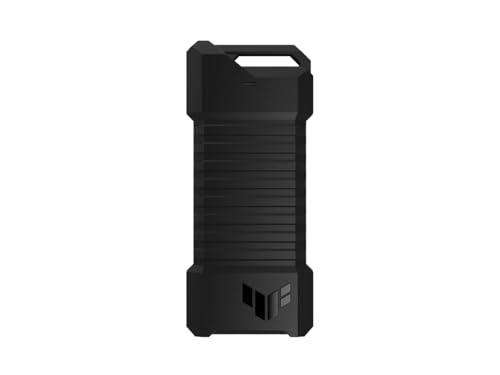
- Supports NVMe PCIe and SATA M.2 SSDs
- IP68 water and dust resistance
- Q-Latch installation and console support
Best For: Gamers and users needing added enclosure durability
Versatile Value Pick

- Supports compatible NVMe and SATA SSDs
- Includes USB-C and USB-A cables
- Aluminum shell with thermal pads
Best For: Users wanting flexible drive and cable compatibility
Best Versatile M.2 Pick – Tool-Free NVMe & SATA Enclosure
For shoppers comparing portable ssd enclosures, the SABRENT EC-SNVE is a flexible option when you want to reuse either an M.2 NVMe or M.2 SATA drive. Its tool-free design, USB 3.2 Type-C connection, and slim aluminum build make it convenient for travel and everyday file transfers.
Best For: Users who need one enclosure for both M.2 NVMe and M.2 SATA SSDs.
Pros:
- Supports M.2 NVMe and SATA drives in 2242, 2260, and 2280 sizes.
- Tool-free installation takes seconds and requires no screwdriver.
- USB 3.2 Type-C supports up to 10Gbps, with a thermal pad and slim aluminum case.
Cons:
- Enclosure only; an SSD is not included.
- Does not support 2.5-inch SATA, mSATA, or drives with pre-installed heatsinks.
This is a practical choice for anyone with bare M.2 drives in different interface types. Confirm your SSD has no attached heatsink and that your host device has a compatible USB port.
Best Protected Travel Option – UGREEN 10Gbps NVMe Enclosure
Among portable ssd enclosures, the UGREEN NVMe model stands out for its compact aluminum body, included silicone case, and broad support for short and standard M.2 drive lengths. It is designed for quick, tool-free installation and 10Gbps transfers when paired with the right USB-C connection.
Best For: Travelers who want a portable NVMe enclosure with added exterior protection.
Pros:
- Supports NVMe M-key and B&M-key SSDs in 2230, 2242, 2260, and 2280 sizes.
- Includes a silicone case, thermal pad, and both USB-C to USB-C and USB-C to USB-A cables.
- RTL9210 chipset provides UASP, TRIM, and short-circuit and over-current protection.
Cons:
- Supports NVMe drives only, not SATA NGFF or mSATA SSDs.
- 10Gbps performance requires a compatible USB 3.2 Gen 2 data cable and port.
With accessories for both USB-C and USB-A systems, this enclosure is easy to add to a travel kit. Verify your drive uses the NVMe protocol before ordering.
Best High-Speed Choice – SABRENT USB4 NVMe Enclosure
If maximum transfer speed is the priority in portable ssd enclosures, the SABRENT EC-U4TN is built for USB4 and Thunderbolt systems. It supports PCIe NVMe drives, includes active cooling, and can reach up to 3,900MB/s with a compatible USB4 host and SSD.
Best For: Creators, editors, and mobile power users moving large files frequently.
Pros:
- Rated for up to 3,900MB/s over USB4 and up to 2,700MB/s over Thunderbolt 3 or 4.
- Supports PCIe NVMe SSDs in 2230, 2242, 2260, and 2280 sizes.
- Integrated active cooling helps maintain performance during large transfers.
Cons:
- Does not support SATA M.2 SSDs.
- Top speeds require compatible USB4 or Thunderbolt hardware and a suitable NVMe SSD.
This enclosure makes the most sense when your computer supports USB4 or Thunderbolt and your workflow benefits from high sustained transfer speeds. It also remains compatible with slower USB-C generations, though performance will be limited by the host port.
Best 2.5-Inch Drive Option – UGREEN USB-C SATA Enclosure
Not all portable ssd enclosures use compact M.2 drives. This UGREEN model is designed for 2.5-inch SATA SSDs and hard drives, providing a tool-free way to reuse older storage for backups, upgrades, or portable file storage through USB-C.
Best For: Users converting a 2.5-inch SATA SSD or HDD into external storage.
Pros:
- Fits most 2.5-inch SATA I, II, and III SSDs and HDDs up to 6TB.
- Tool-free, plug-and-play installation requires no drivers or external power supply.
- Aluminum construction and the ASM235CM chipset support heat dissipation and UASP.
Cons:
- Designed for 2.5-inch SATA drives, not M.2 or mSATA storage.
- Maximum drive interface speed is 6Gbps, and USB-A-only devices need a separate USB-C-to-USB-A cable.
This is a sensible enclosure for repurposing a spare laptop drive or 2.5-inch SATA SSD. Its included USB-C-to-USB-C cable suits newer systems, while compatibility with USB-A devices depends on using the appropriate cable.
Smart Protection Pick – DOCKCASE Explorer M.2 NVMe Enclosure
For portable SSD enclosures, the DOCKCASE Explorer stands out by combining 10Gbps USB-C connectivity with an onboard display for drive information. It supports 2230, 2242, 2260, and 2280 M.2 NVMe SSDs and includes thermal-management features for sustained transfers.
Best For: Users who want visible SSD health information, power-loss protection, and fast NVMe storage in a portable enclosure.
Pros:
- HD display shows drive health, power-on times, remaining capacity, and estimated life.
- 10-second power-loss protection can help prevent writing data loss after power failure.
- USB 3.2 Gen 2 supports up to 10Gbps, with included USB-C to USB-C cable.
- Graphite thermal pad and temperature-control features help manage heat.
Cons:
- Designed for M.2 NVMe drives, not 2.5-inch SATA SSDs or hard drives.
- The display and power-loss features may be more than casual users need.
- Auxiliary power may be needed when available power is below 15W.
The DOCKCASE is a feature-rich choice for NVMe owners who value drive monitoring and added protection. Its 10Gbps interface and cooling design make it particularly practical for frequent file transfers.
Simple SATA Value – SABRENT 2.5-Inch Tool-Free Enclosure
The SABRENT EC-UASP is a straightforward option among portable SSD enclosures for 2.5-inch SATA drives. Its tool-free design, plug-and-play setup, and USB 3.0 connection make it useful for repurposing a notebook SSD or hard drive as external storage.
Best For: Users who need an affordable, easy-install enclosure for a 2.5-inch SATA SSD or HDD.
Pros:
- Tool-free installation makes drive insertion quick and simple.
- Supports standard 2.5-inch SATA and SATA II hard drives and SSDs.
- USB 3.0 delivers transfer rates up to 5Gbps and remains backward-compatible with USB 2.0 and 1.1.
- Hot-swappable, plug-and-play operation requires no drivers.
Cons:
- It uses USB 3.0 rather than a newer USB-C interface.
- Limited to 2.5-inch SATA drives, so it does not fit M.2 NVMe SSDs.
- The plastic enclosure may feel less substantial than aluminum alternatives.
Choose the SABRENT when compatibility and simplicity matter more than the latest interface. It is a practical way to turn a spare 2.5-inch SATA drive into portable storage without tools or additional drivers.
Gaming-Ready Design – ASUS ROG Strix Arion NVMe Enclosure
The ASUS ROG Strix Arion brings a gaming-focused look and aluminum construction to portable SSD enclosures. It supports M.2 PCIe NVMe SSDs in common 2230 through 2280 sizes, connects over USB 3.2 Gen 2, and includes both USB-C and USB-A cables.
Best For: Gamers and ROG users who want a portable NVMe enclosure with RGB lighting, broad host compatibility, and aluminum heat management.
Pros:
- USB 3.2 Gen 2 supports transfer speeds up to 10Gbps.
- Fits M.2 PCIe NVMe SSDs in 2230, 2242, 2260, and 2280 form factors.
- Includes USB-C and USB-C-to-USB-A cables for flexible connectivity.
- Aluminum alloy body and thermal pads help draw heat away from the drive.
Cons:
- The enclosure does not include an M.2 NVMe SSD.
- RGB lighting may be unnecessary for users seeking a discreet storage accessory.
- It is intended for PCIe NVMe drives, not 2.5-inch SATA models.
The ROG Strix Arion is a strong fit for users already invested in ASUS ROG hardware or those who want a more distinctive enclosure. Its dual-cable bundle and aluminum thermal design also make it convenient for use across USB-C and USB-A systems.
Compact NVMe Pick – FIDECO M.2 NVMe Enclosure
For shoppers comparing portable ssd enclosures, the FIDECO M.2 NVMe enclosure is a compact option for M-Key and M+B Key NVMe drives. USB 3.2 Gen 2 supports transfers up to 10Gbps in theory, while the tool-free sandwich design simplifies installation and helps the thermal pad contact the drive.
Best For: Travelers and users who need a small, tool-free enclosure for multiple-size M.2 NVMe SSDs.
Pros:
- Supports M.2 NVMe sizes 2230, 2242, 2260, and 2280.
- USB 3.2 Gen 2, UASP, and TRIM support.
- Includes a USB-C cable with an attached USB-A adapter.
- Works with Windows, macOS, and Linux.
Cons:
- Does not support M.2 SATA SSDs.
- A new SSD must be initialized before the computer can recognize it.
Choose this FIDECO model when compact portability and straightforward NVMe installation matter most. Its compatibility is focused, so confirm that your drive is NVMe rather than SATA before buying.
Rugged Dual-Format Pick – ASUS TUF Gaming A1 SSD Enclosure
The ASUS TUF Gaming A1 stands out among portable ssd enclosures for its rugged construction and broad M.2 support. Its USB-C 3.2 Gen 2 interface reaches up to 10Gbps, while the enclosure accepts both NVMe PCIe and SATA SSDs in several common lengths.
Best For: Gamers and mobile users who want a durable enclosure for NVMe or SATA M.2 drives.
Pros:
- Supports M.2 NVMe PCIe and SATA SSDs in 2242, 2260, and 2280 sizes.
- Q-Latch mechanism makes SSD installation easier.
- MIL-STD-810H drop resistance and IP68 water and dust resistance.
- Compatible with PCs, laptops, mobile devices, PS5, Xbox, and other current consoles.
Cons:
- At 249 g, it is heavier than many compact enclosures.
- Its USB 3.2 Gen 2 interface is rated for up to 10Gbps, so actual speeds depend on the host and SSD.
The ASUS is a strong choice when protection and format flexibility are higher priorities than minimum weight. The Q-Latch design also makes it appealing for users who frequently swap compatible M.2 drives.
Versatile Value Pick – SSK M.2 NVMe SATA Enclosure
For a flexible portable ssd enclosures setup, the SSK M.2 enclosure supports compatible NVMe PCIe and SATA M-Key or B+M Key drives. It combines a 10Gbps USB 3.2 Gen 2 connection with an aluminum shell, thermal pads, and both USB-C and USB-A cables.
Best For: Users who want one enclosure for compatible NVMe and SATA M.2 SSDs with flexible cable options.
Pros:
- Supports NVMe PCIe and SATA M-Key/B+M Key SSDs in 2242, 2260, and 2280 sizes.
- Includes USB-C and USB-A cables, two thermal pads, and a screwdriver.
- Aluminum shell helps with heat dissipation and portability.
- Supports UASP, TRIM, Windows, Linux, and macOS.
Cons:
- Does not support M.2 PCIe AHCI SSDs, mSATA drives, Wi-Fi or capture cards, or non-M.2 SSDs.
- New media must be formatted before use.
- Maximum performance requires a compatible 10Gbps USB-C or Thunderbolt 3 connection.
The SSK offers useful accessories and broad compatibility for its supported drive types. Check your SSD interface carefully, particularly if it is an older AHCI or mSATA model, before choosing this enclosure.
How We Picked These Portable SSD Enclosures
We focused on enclosure compatibility, interface speed, installation convenience, construction, included cables, and practical use cases. The selection includes NVMe-only models, SATA-compatible options, 2.5-inch drive enclosures, and higher-speed USB4 hardware. We also considered features such as tool-free access, thermal design, protective ratings, and support for both M-Key and B+M-Key SSDs.
Advertised transfer rates represent the enclosure interface’s theoretical maximum. Actual speeds depend on the SSD, USB port, cable, operating system, and sustained heat management.
Quick Comparison
| Best For | Recommended Type | What to Look For |
|---|---|---|
| Most NVMe upgrades | USB 3.2 Gen 2 NVMe enclosure | 10Gbps support and M-Key compatibility |
| Maximum external speed | USB4 NVMe enclosure | USB4 host port, capable SSD, and quality cable |
| Older 2.5-inch drives | SATA enclosure | 2.5-inch fit, USB 3.0 or faster, and UASP |
| Mixed SSD collections | NVMe/SATA-compatible enclosure | Support for the correct protocols and key types |
| Travel and field work | Rugged aluminum enclosure | Shock, dust, and water resistance where available |
Key Buying Factors for Portable SSD Enclosures
SSD Type and Physical Size
Confirm whether your drive is NVMe PCIe or SATA before buying. M.2 describes the shape, not the protocol, so an M.2 SATA drive will not automatically work in an NVMe-only enclosure. For a 2.5-inch SSD or hard drive, choose a dedicated SATA enclosure instead. Most M.2 models support the common 2280 length, but shorter drives may require checking the mounting system.
USB Interface and Real-World Speed
A 10Gbps USB 3.2 Gen 2 enclosure is a strong general-purpose choice and can deliver substantially better performance than older USB 3.0 models. USB4 enclosures offer greater headroom, but they make the most sense with a USB4-compatible computer and a fast NVMe SSD. Check whether the product includes USB-C-to-C and USB-C-to-A cables for use across devices.
Cooling, Build, and Installation
Aluminum bodies can help spread heat during large file transfers. Tool-free designs make drive swaps easier, while screw-mounted models may hold the SSD more securely. If you regularly travel with the drive, prioritize a sturdy shell and, where offered, water or drop protection.
Who Should Buy Which Portable SSD Enclosures?
Choose a 10Gbps NVMe enclosure for everyday backups, photo libraries, game storage, and laptop upgrades. Pick a USB4 model if you routinely move large video projects or other high-volume files and own compatible host hardware. A 2.5-inch SATA enclosure is the practical choice for repurposing an older SSD or hard drive. For mixed M.2 collections, select a model explicitly supporting the drive’s protocol and key configuration. Finally, frequent travelers and field users should favor rugged construction and secure installation over peak benchmark numbers.