
Graphic designers often need more workspace than a laptop display can provide, but a full desktop monitor is not always practical. A portable screen extender can keep tools, references, timelines, and design files visible at once.
These 10 options focus on useful screen sizes, portable designs, IPS panels, resolution, connectivity, and compatibility so you can choose a setup that fits your workflow and travel needs.
Best 10 Laptop Screen Extenders for Graphic Design Picks for 2026
Flexible Dual-Screen Pick
15.6-inch Detachable FHD Monitor

- 15.6-inch FHD IPS panel with 100% sRGB
- Detaches for desktop use
- 360-degree rotation and wide stand
Best For: Designers wanting a stable, adjustable second display
Vertical Workspace Pick
AetherSpark 16-inch 1200P Triple Monitor

- Dual 16-inch 1920×1200 IPS displays
- 16:10 ratio adds vertical workspace
- 350-nit brightness and two-cable setup
Best For: Designers needing taller screens for panels and documents
Best Triple-Screen Color Accuracy
14-inch FHD IPS Triple Extender

- Triple-screen productivity with portrait support
- 100% sRGB, 300-nit IPS display
- 3.0 pounds and 0.3 inches thin
Best For: Designers needing portable workspace and higher stated color coverage
Best Lightweight Dual-Screen Option
14.2-inch FHD Portable Extender

- Only 1.87 pounds and 0.27 inches thin
- 1080p IPS display with 300-nit brightness
- Supports extended, mirrored, and portrait modes
Best For: Traveling designers needing a lightweight second display
Best Large Triple-Screen Setup
15.6-inch FHD Clip-Free Extender

- Large 15.6-inch FHD IPS triple display
- Clip-free design avoids pressure on the laptop
- Matte finish and included travel accessories
Best For: Designers wanting larger mobile panels and clip-free mounting
Best One-Cable Option
15.6-Inch Triple-Screen Extender

- Two 15.6-inch 1080p IPS screens
- One-cable USB-C connection option
- Ultra-thin design with carrying bag
Best For: Designers needing a spacious, flexible triple-screen setup
Best Standalone Design
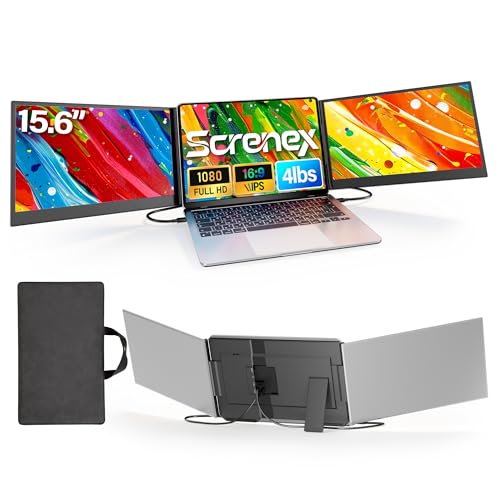
- Free-standing, non-clamping construction
- Two 1080p IPS panels with portrait mode
- Simple two-USB-C setup on compatible laptops
Best For: Designers wanting stable placement without stressing laptop hinges
Color-Forward Triple-Screen Pick – KEFEYA 15.6-inch FHD Triple Monitor
For graphic design workflows that benefit from multiple canvases, this laptop screen extender for graphic design combines two 15.6-inch FHD IPS displays with 100% sRGB coverage. Its triple-screen layout, adjustable display settings, and foldable design make it useful for comparing references, keeping tools open, and working while traveling.
Best For: Designers who prioritize color coverage and a portable triple-monitor workspace.
Pros:
- Two 15.6-inch 1920×1080 IPS screens with 100% sRGB coverage.
- Triple-screen setup supports extended, mirrored, landscape, and portrait modes.
- Ultra-thin 0.16-inch design includes a leather carrying bag.
- Includes USB-C and HDMI connection cables for supported devices.
Cons:
- Weighs about 3.9 pounds, so it adds noticeable travel weight.
- Standard Mac M1/M2/M3 systems require a separate H6 adapter.
- Full-featured USB-C or suitable HDMI connectivity is required.
The KEFEYA is a strong choice when color coverage and maximum screen area matter more than minimizing carry weight. Confirm your laptop ports and Mac compatibility before ordering.
Flexible Dual-Screen Pick – 15.6-inch Detachable FHD Monitor
This detachable laptop screen extender for graphic design offers a practical second screen for keeping palettes, references, or communication tools visible beside a design application. Its 15.6-inch FHD IPS panel, wide stand, and desktop-use option suit both mobile and stationary setups.
Best For: Designers who want a stable, detachable second display with flexible positioning.
Pros:
- 15.6-inch FHD IPS display provides 300-nit brightness and 100% sRGB coverage.
- Detachable stand supports laptop-mounted or desktop use.
- 360-degree rotation and 192-degree angle adjustment offer flexible positioning.
- At 2.73 pounds and 0.22 inches thick, it is relatively easy to carry.
Cons:
- It is a dual-screen extender rather than a triple-screen system.
- HDMI setups require additional USB-A or USB-C power connectivity.
- Compatibility depends on having the appropriate full-featured USB-C or HDMI ports.
Choose this model if a detachable, adjustable second screen is more useful than adding two displays. Its 100% sRGB specification is appealing for general design work, while the stand adds setup flexibility.
Vertical Workspace Pick – AetherSpark 16-inch 1200P Triple Monitor
The AetherSpark is a useful laptop screen extender for graphic design when extra vertical space helps with documents, timelines, or interface panels. Its dual 16-inch 1920×1200 IPS displays use a 16:10 ratio and 350-nit brightness, while rotation supports different viewing and sharing arrangements.
Best For: Designers who want a taller triple-screen workspace for interface-heavy projects and multitasking.
Pros:
- 16:10 1920×1200 resolution provides more vertical space than standard 16:9 screens.
- Dual 16-inch IPS displays reach 350 nits brightness.
- Two USB-C cables can provide plug-and-play operation on supported devices.
- Aluminum construction and a hollow frame support portability and heat dissipation.
Cons:
- At 4.4 pounds, it is heavier than several smaller portable options.
- The glossy finish may be less suitable for brightly lit environments.
- Users should confirm compatibility with their specific ports and operating system.
This is the most compelling option here for designers who value vertical workspace and a larger 16-inch format. Its weight and glossy screen are trade-offs for the higher 1920×1200 resolution and triple-screen layout.
Stand-Alone Travel Pick – 15.6-inch FHD Aluminum Triple Monitor
This laptop screen extender for graphic design is designed as a stand-alone triple-screen workstation rather than a lid-mounted accessory. The 15.6-inch FHD IPS display, adjustable screens, aluminum body, and included carry bag make it suitable for designers who move between offices, cafés, and hotel workspaces.
Best For: Mobile designers who want a freestanding triple-screen setup with display controls.
Pros:
- 15.6-inch 1920×1080 IPS display offers 300-nit brightness and a 1000:1 contrast ratio.
- Freestanding bracket avoids attaching weight directly to the laptop lid.
- Displays fold from 0 to 180 degrees for flexible viewing.
- Built-in software includes brightness, contrast, color temperature, eye-care, and split-screen controls.
Cons:
- At 3.9 pounds, it is not the lightest travel accessory.
- Laptops generally need two video-output connections or a separately obtained H5 cable.
- Standard MacBook M1/M2/M3 models need the H5 cable for dual-screen functionality.
The stand-alone design is a practical advantage for laptops whose lids should not carry an extender. Consider it if you need three displays on the road and are comfortable checking connection requirements before purchase.
Best Triple-Screen Color Accuracy – 14-inch FHD IPS Triple Extender
For graphic designers who need maximum workspace without carrying a conventional monitor, this laptop screen extender adds two side displays to compatible 13- to 17.3-inch laptops. Its 14-inch FHD IPS panel combines 100% sRGB coverage with a 300-nit brightness rating, making it a strong choice for layouts, reference material, and creative multitasking.
Best For: Designers who prioritize expanded workspace and stronger stated color coverage in a portable triple-screen setup.
Pros:
- Triple-screen setup supports extended, mirrored, and portrait modes.
- 14-inch 1920×1080 IPS display lists 100% sRGB color accuracy and 178° viewing angles.
- Thin 0.3-inch, 3.0-pound design is travel-friendly.
- Includes USB-C, USB-A, and HDMI connection options with no driver installation required.
Cons:
- M1/M2/M3 MacBooks support only a single screen without a DisplayLink adapter.
- A separate 5V/3A-or-higher power adapter may be needed to address flickering or low brightness.
- The glossy finish may reflect more light than a matte panel.
This model stands out among laptop screen extenders for graphic design because its stated 100% sRGB coverage is more compelling for color-conscious work than the lower gamut specification of some competing options. Confirm your laptop’s ports and Mac compatibility before buying.
Best Lightweight Dual-Screen Option – 14.2-inch FHD Portable Extender
This dual laptop screen extender is a practical pick for graphic designers who want a second canvas for references, tool panels, meetings, or file management without a heavy travel load. The 14.2-inch 1080p IPS display weighs 1.87 pounds and supports both USB-C and HDMI-based connections.
Best For: Traveling designers and students who want a lightweight second screen for creative multitasking.
Pros:
- Very portable at 1.87 pounds and 0.27 inches thick.
- 1080p IPS panel offers 300 nits of brightness and a 226° adjustable viewing range.
- Supports extended, mirrored, and portrait display modes.
- Includes cables for full-function USB-C, HDMI, and USB-A setups.
Cons:
- Provides a dual-screen setup rather than the triple-screen workspace offered by some alternatives.
- The supplied notes do not specify a color-gamut rating, so color-critical buyers have less information to compare.
- Compatibility is listed for laptops measuring 14 to 17.3 inches, limiting fit for smaller models.
Choose this extender when portability matters more than adding two extra displays. For graphic-design workflows centered on references and panels, its flexible viewing adjustment and low weight make it easy to use on the road.
Best Large Triple-Screen Setup – 15.6-inch FHD Clip-Free Extender
For graphic designers who prefer larger side panels, this 15.6-inch laptop screen extender creates a three-screen workspace without clamping onto the laptop display. Its FHD IPS panels are designed for multitasking, while the matte finish helps reduce glare in bright office or travel environments.
Best For: Designers who want larger triple-screen panels and a clip-free mounting approach for frequent travel or mobile work.
Pros:
- 15.6-inch FHD IPS triple-display format provides substantial workspace.
- Clip-free design avoids clamping pressure on the laptop display.
- Matte panels, 300 cd/m² brightness, and 178° viewing angles suit varied lighting conditions.
- Includes a carrying bag, cables, power adapter, and a 365-day warranty.
Cons:
- At 4 pounds and 0.86 inches thick, it is heavier and thicker than the other listed options.
- The specified 63% sRGB gamut is less suited to color-critical design work than a wider-gamut display.
- M1-M4 MacBook users may need to contact customer service for a separate H5 cable.
This is the better fit when screen size and a pressure-free attachment matter more than minimizing bag weight or maximizing color gamut. Its matte 15.6-inch panels can make panels, references, and supporting applications easier to view across a spacious mobile setup.
Best One-Cable Option – 15.6-Inch Triple-Screen Extender
For graphic design workflows that benefit from more canvas space, this laptop screen extender for graphic design provides two additional 15.6-inch 1080p IPS screens. Its one-full-featured-USB-C setup can connect both displays at once, while USB-A and separate power are available when needed.
Best For: Designers who want a large triple-screen workspace with flexible connection options and a travel bag.
Pros:
- Two 15.6-inch FHD IPS displays provide substantial room for design tools, references, and palettes.
- One full-featured USB-C cable can connect both screens; USB-A and an adapter offer an alternative power setup.
- 4mm-thin individual screens, matte finish, 178-degree viewing angle, and included carrying bag support mobile use.
Cons:
- Driver installation is required before use.
- Some laptops may need extra power if they cannot provide enough through the connection.
- Compatibility and setup should be checked carefully across Windows, Mac, Chrome, Android, Linux, and DeX devices.
This model is compelling when screen size and connection flexibility matter most. The included cables, power adapter, and case make it a practical workstation expansion, but buyers should plan for driver installation and possible supplemental power.
Best Standalone Design – 15.6-Inch IPS Triple Monitor
This laptop screen extender for graphic design uses a free-standing design rather than hanging from the laptop display. Its two 15.6-inch 1080p IPS panels offer wide viewing angles and a stable setup for arranging design applications, references, and communication tools.
Best For: Creatives who prioritize laptop protection, stable placement, and straightforward two-cable setup.
Pros:
- Free-standing base avoids clamping onto the laptop screen and is designed to reduce hinge stress and scratches.
- Two FHD IPS panels provide 178-degree viewing angles and support extended, mirrored, and portrait modes.
- Two full-function USB-C cables can provide plug-and-play operation without a dock or driver on compatible laptops.
- Aluminum-alloy construction, non-slip pads, and included carry case suit mobile workspaces.
Cons:
- Laptops without suitable full-function USB-C ports require additional cables, power, and driver installation.
- M1–M3 MacBooks specifically require an H5-T cable according to the compatibility notes.
- The 3.9-pound weight is portable but heavier than smaller screen-extender designs.
The free-standing format is a useful distinction for designers concerned about putting weight on a laptop lid. It is especially convenient with two full-function USB-C ports, while other systems may involve a more involved connection process.
Best Lightweight Choice – 14-Inch Ultra-Slim Triple Monitor
For designers who travel frequently, this laptop screen extender for graphic design combines two 14-inch 1080p IPS displays with a roughly 3-pound portable design. Its USB-C-and-HDMI connection approach, adjustable stand, and multiple viewing modes are aimed at quick workspace expansion.
Best For: Mobile designers who want a lighter triple-screen setup with adjustable viewing angles and broad device compatibility.
Pros:
- Two 14-inch FHD IPS screens keep the setup lighter while adding workspace for design tasks.
- Supports extended, mirrored, duplicate, portrait, and landscape modes for flexible layouts.
- Built-in aluminum stand adjusts up to 90 degrees, and the screens support 180-degree rotation.
- Includes HDR mode, blue-light filtering, anti-glare technology, and a 178-degree viewing angle.
Cons:
- An H5-T cable is required for laptops without full-featured USB-C ports and for M1–M3 MacBooks.
- External power may be needed if the screen shows no signal or insufficient brightness.
- The listed screen finish is glossy, which may be less suitable for brightly lit workspaces.
This is the most travel-focused option of the three, with a lighter 3-pound design and adjustable support. Its smaller panels trade some workspace for portability, while the compatibility notes make checking ports essential before purchase.
How We Picked the Best Laptop Screen Extenders for Graphic Design
We compared these laptop screen extenders by looking at the factors that matter most in a mobile design setup: display size, resolution, panel type, portability, laptop compatibility, connection options, and ease of installation. The selected models primarily offer 1080p FHD or 1200p FHD+ resolution, with several using IPS panels for more consistent viewing angles.
Because product listings can vary by computer, operating system, and included cables, confirm the exact requirements before buying. A USB-C port may support only data or charging rather than video, while some laptops require HDMI plus USB power or a compatible DisplayLink solution.
Quick Comparison
| Feature | What to Look For | Why It Matters |
|---|---|---|
| Screen size | 14 to 16 inches | Balances workspace and portability |
| Resolution | 1080p FHD or 1200p FHD+ | Keeps panels and text reasonably sharp |
| Panel | IPS where possible | Provides wider viewing angles |
| Connections | USB-C, HDMI, and USB power | Improves compatibility across laptops |
| Weight | About 2 to 3 pounds | Makes regular travel easier |
Key Buying Factors for Laptop Screen Extenders for Graphic Design
Color and Image Quality
For layout, illustration, photo editing, and branding work, prioritize an IPS display with a sharp image and dependable brightness. These extenders are useful for arranging panels and references, but they may not replace a professionally calibrated monitor for color-critical proofing. Check color coverage and calibration information if accurate color matching is central to your work.
Size, Resolution, and Workspace
A 15.6-inch model gives you more room for tool panels and reference images, while a 14-inch extender is usually easier to carry. FHD is adequate for most mobile workflows; FHD+ models can provide additional vertical space for long canvases, menus, and timelines.
Compatibility and Setup
Check whether your laptop supports video over USB-C, has an available HDMI port, and meets the extender’s operating-system requirements. Also verify the supported laptop size range. “Plug and play” generally means simple setup, not universal one-cable compatibility.
Portability and Ergonomics
Consider total weight, folded thickness, hinge adjustment, and how securely the unit attaches to your laptop. A lightweight model is preferable for commuting, while a larger triple-screen design may be better for a fixed travel workstation.
Who Should Buy Which Laptop Screen Extenders for Graphic Design?
- Frequent travelers: Choose a lightweight 14-inch model with a slim folded profile.
- Designers needing maximum workspace: Consider a 15.6-inch or 16-inch triple-screen extender.
- Color-conscious creatives: Prioritize IPS panels and independently verify color specifications.
- Mixed-device users: Select a model with both USB-C and HDMI, plus clear power requirements.
- Minimal-cable setups: Look for one-cable USB-C support, but confirm that your laptop’s port supports video output.
Ultimately, the best choice is the model that matches your laptop’s ports, your preferred screen size, and the amount of workspace you genuinely use. For graphic design, a reliable connection and comfortable viewing angle are often more valuable than simply choosing the largest extender.