
Adding a second or third display can make a laptop workspace easier to organize, but a poorly positioned screen may increase neck movement and visual fatigue. The best laptop screen extenders for eye comfort combine sharp Full HD images with practical adjustability, suitable brightness, and a setup that fits your desk or travel routine.
We compared these 10 portable extenders by screen quality, portability, compatibility, connection options, and ergonomic flexibility to help you choose a more comfortable multi-screen setup for work, study, or travel.
Best 10 Laptop Screen Extenders for Eye Comfort Picks for 2026
Best Lightweight Eye-Care Monitor
KYY 15.6-inch FHD Portable Screen
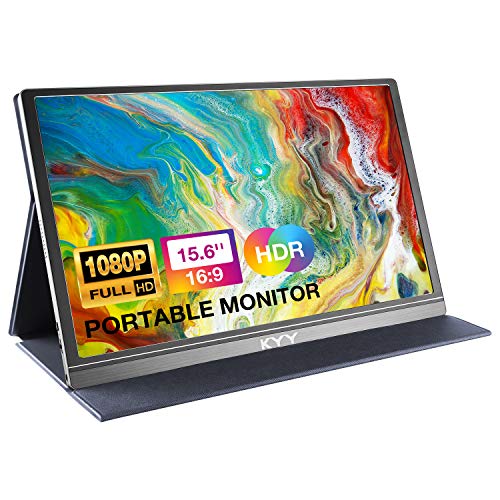
- 1.7-pound, 0.3-inch portable design
- Blue-light filter and flicker-free operation
- Cover doubles as a stand
Best For: Travel-friendly single-screen expansion
Best Ultra-Slim HDR Option
KEFEYA 15.6-inch FHD Eyes-Care Extender
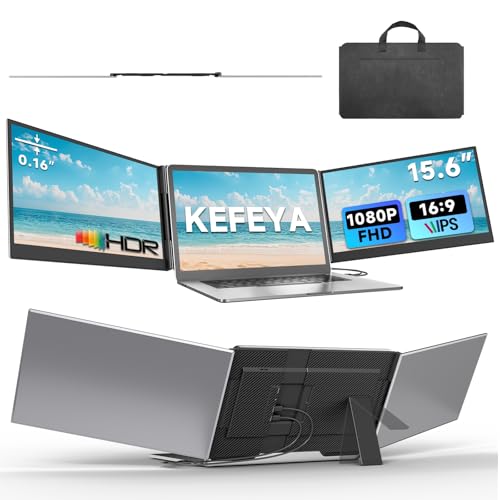
- 0.16-inch panels and aluminum construction
- FHD IPS HDR with 100% sRGB color
- Anti-glare and low-blue-light features
Best For: Portable triple-screen work and travel
Travel-Ready Flexibility
15.6-inch FHD Detachable Extender

- Bright 15.6-inch IPS display with adjustable controls
- Rotates, tilts, clips on, or works standalone
- Slim travel design with cables included
Best For: Travelers wanting a large, flexible second screen
Eye-Care Productivity Pick

- Blue-light and flicker reduction for comfortable viewing
- Lightweight 1.87-pound travel-friendly design
- Supports extended, mirrored, and portrait modes
Best For: Mobile users prioritizing portability and eye-care features
Triple-Screen Workstation

- Adds two 1080p IPS screens for a triple-screen setup
- Eye-protective features and independent display adjustments
- Matte finish and multiple viewing modes
Best For: Power users needing extensive multitasking space
Best Vertical Workspace
CIDETTY 15.6-Inch FHD Screen Extender

- Vertical stacked design saves desk space
- 15.6-inch FHD IPS display with speakers
- Supports multiple display modes and operating systems
Best For: Compact workspaces and vertical multitasking
Best for Travel
Ultra-Portable 14.2-Inch FHD Monitor Extender

- Lightweight 1.87-pound travel-friendly design
- Matte 1080p IPS screen with 300 nits brightness
- Adjustable 226-degree viewing angle
Best For: Frequent travel and mobile dual-screen work
Best Premium Build
Aefieoy 15.6-Inch Eye-Care Monitor Extender

- Sturdy aluminum-alloy construction with rotating stand
- 15.6-inch 1080p IPS display with adjustable brightness
- Slim 2.2-pound design and included connection cables
Best For: Flexible workstations and demanding multitaskers
Best Overall Triple-Screen Comfort – KEFEYA 15.6-inch FHD Triple Monitor Extender
For shoppers comparing laptop screen extenders for eye comfort, the KEFEYA combines two 15.6-inch FHD IPS displays with independently adjustable brightness, contrast, and backlight settings. Its matte finish, low-blue-light technology, and 178-degree viewing angle support a more comfortable multi-screen setup, while the foldable design is suited to travel.
Best For: Remote workers, programmers, traders, and frequent travelers who want a portable triple-screen workstation.
Pros:
- Two 15.6-inch 1080p IPS screens with 100% sRGB color and 300-nit listed brightness.
- Matte finish, low-blue-light features, and independent display adjustments support viewing comfort.
- Foldable 180-degree design with landscape and portrait modes, plus included cables and carrying bag.
- Works with laptops featuring full-featured USB-C or HDMI ports across several operating systems.
Cons:
- Mac laptops with standard M1, M2, or M3 chips require a separate H6 adapter.
- At about 3.9 to 4 pounds, it is less lightweight than a single portable monitor.
This is a strong choice when eye-comfort controls and maximum workspace matter more than minimizing carry weight. Check your laptop’s video-output ports and Mac compatibility before buying.
Best Lightweight Eye-Care Monitor – KYY 15.6-inch FHD Portable Screen
The KYY K3 is a practical option for shoppers seeking laptop screen extenders for eye comfort without carrying a full triple-monitor system. Its 15.6-inch 1080p IPS display includes a blue-light filter and flicker-free operation, while the slim 1.7-pound body and protective cover make it easy to take between workspaces.
Best For: Travelers, students, and remote workers who need one lightweight second screen.
Pros:
- FHD 1080p IPS panel with a 178-degree viewing angle and HDR support.
- Blue-light filtering and flicker-free features are designed for longer viewing sessions.
- 0.3-inch profile, 1.7-pound weight, and included cover support portability and positioning.
- Supports landscape and portrait use and includes built-in speakers and a 3.5mm audio input.
Cons:
- It adds one external display rather than providing a complete triple-screen setup.
- USB-C video requires a compatible Thunderbolt 3 or 3.1 USB-C device; other connections may need mini-HDMI.
The KYY is the simplest, lightest pick here for adding screen space while retaining eye-focused features. Its cover provides only a limited selection of viewing angles, so desk positioning may take some adjustment.
Best Flexible Positioning – 15.6-inch Detachable Triple Monitor Extender
This detachable extender stands out among laptop screen extenders for eye comfort with broad positioning flexibility. Its 15.6-inch FHD IPS screens offer low-blue-light, anti-glare, and flicker-free features, while the stand rotates horizontally and vertically for landscape, portrait, or stacked arrangements.
Best For: Multitaskers who need adjustable viewing angles or want to use one screen independently while traveling.
Pros:
- 235-degree horizontal and 90-degree vertical rotation supports customized screen placement.
- Detachable design allows each side to be used independently at about 2.1 pounds per side.
- FHD 1080p IPS displays include low-blue-light, anti-glare, and flicker-free features.
- Plug-and-play support includes USB-C, USB-A, and HDMI connection options.
Cons:
- HDMI use requires an additional USB-A-to-USB-C connection for power.
- Standard M1, M2, and M3 Mac models are not supported according to the supplied compatibility notes.
- The listed screen finish is glossy, which may be less suitable for bright or reflective spaces.
Choose this model if adjustability and detachable use are more valuable than a simpler setup. Its eye-comfort features are useful, but buyers should verify both laptop compatibility and available power connections.
Best Ultra-Slim HDR Option – KEFEYA 15.6-inch FHD Eyes-Care Extender
The KEFEYA ultra-slim extender is designed for buyers who want laptop screen extenders for eye comfort in a travel-ready triple-screen format. Its 15.6-inch FHD IPS HDR displays offer anti-glare and low-blue-light features, independent adjustments, and a 178-degree viewing angle, while the aluminum construction keeps the panels slim.
Best For: Remote workers and travelers who want a thin, portable triple-monitor setup with HDR-capable displays.
Pros:
- Each panel is listed at 0.16 inches thick, with a total product weight of about 3.9 pounds.
- FHD 1080p IPS HDR screens provide 100% sRGB color, 1000:1 contrast, and a 178-degree viewing angle.
- Anti-glare and low-blue-light features support more comfortable viewing.
- Includes essential USB-C and HDMI cables, a power adapter, and a soft leather carrying bag.
Cons:
- MacBook models with M1, M2, M3, or A18 Pro chips require an H6 hub that is not included.
- Triple-screen operation requires a laptop with two video-output ports.
- At 3.9 pounds, it is substantially heavier than a single portable monitor.
This model is a good fit when thin construction, screen quality, and eye-care settings are priorities. Confirm your laptop’s port count and power requirements, especially if you plan to use HDMI connections.
Travel-Ready Flexibility – 15.6-inch FHD Detachable Extender
For shoppers comparing laptop screen extenders for eye comfort, this 15.6-inch model combines a bright 1080p IPS display with adjustable brightness and contrast controls. Its detachable design, rotating bracket, and included cable set make it a versatile choice for work, study, and travel.
Best For: Remote workers and travelers who want a large, flexible second screen that can also operate independently.
Pros:
- 15.6-inch 1080p IPS screen with a wide viewing angle and adjustable brightness.
- 360-degree rotating bracket and 192-degree tilt adjustment support landscape, portrait, clipped, or standalone use.
- Works with Windows, Mac, Android, Chrome OS, and Linux, with multiple connection cables included.
- Ultra-slim 0.27-inch design and 2.8-pound weight are practical for travel.
Cons:
- The larger 15.6-inch size and 2.8-pound weight may be less convenient than smaller extenders.
- Some setups may require an external 5V/2A power adapter for stable signal.
- The glossy screen finish may reflect surrounding light.
This model stands out when screen size and positioning flexibility matter most. Its adjustable display controls can support more comfortable viewing, while the detachable format gives you more ways to arrange your workspace.
Eye-Care Productivity Pick – 14-inch FHD Portable Monitor
This 14-inch extender is a practical option for shoppers seeking laptop screen extenders for eye comfort in a compact package. Its eye-care technology is designed to reduce blue light and flicker, while the 1080p IPS panel and adjustable viewing positions support everyday multitasking.
Best For: Students, mobile professionals, and home-office users who prioritize portability and eye-comfort features.
Pros:
- Eye-care technology is designed to reduce blue light and flicker.
- 1080p IPS display offers 300 nits brightness, a 60Hz refresh rate, and a wide viewing angle.
- Supports extended, mirrored, and portrait modes for flexible multitasking.
- Lightweight 1.87-pound, 0.27-inch design fits easily in a backpack.
Cons:
- The 14-inch screen provides less workspace than larger 15.6-inch models.
- Connection may require either one full-function USB-C cable or two cables using USB and HDMI.
- Compatibility and power requirements should be checked for the intended laptop or console.
With explicit eye-care features and a lightweight build, this is one of the more comfort-focused choices in the group. It is especially appealing when you need a second screen for travel without adding much weight.
Triple-Screen Workstation – 14-inch Dual-Display Extender
For users who want maximum workspace, this 14-inch laptop extender adds dual 1080p IPS displays to create a triple-screen setup. Its eye-caring display claims, independent brightness controls, and wide viewing angle make it a compelling productivity-focused option among laptop screen extenders for eye comfort.
Best For: Programmers, traders, designers, and remote workers who need multiple screens for simultaneous tasks.
Pros:
- Dual 1080p IPS displays provide a triple-screen configuration with the laptop.
- Eye-protective design and independent brightness, contrast, and backlight adjustments support customized viewing.
- Supports extended, mirrored, portrait, and presentation modes.
- Matte screen finish helps limit reflections compared with glossy displays.
Cons:
- At about 3.37 pounds, it is heavier than the single-screen extenders listed here.
- Some laptops, including M1/M2/M3 MacBooks or models without full-featured USB-C, may need an additional H5-T cable.
- Certain connection arrangements may require external power and driver installation.
This is the strongest fit for users who value screen real estate over minimum carry weight. Its matte finish and adjustable display settings are useful for comfort, but compatibility should be verified before purchase.
Best Vertical Workspace – CIDETTY 15.6-Inch FHD Screen Extender
For shoppers comparing laptop screen extenders for eye comfort, the CIDETTY stands out with a vertical stacked design intended to save desk space while supporting a more comfortable viewing posture. Its 15.6-inch FHD IPS panel is suited to multitasking, meetings, content editing, and entertainment.
Best For: Users who want a larger vertical second screen for multitasking in compact workspaces.
Pros:
- 15.6-inch 1920×1080 IPS display with built-in speakers
- Vertical stacked layout can help conserve desk space and support neck comfort
- Supports extend, mirror, and second-screen modes
- Works with Windows, Mac, Chrome, Android, Linux, Dex, and Switch
Cons:
- Some setups require both HDMI and USB connections
- Compatibility depends on having suitable full-function USB-C or HDMI ports
- Glossy screen finish may reflect surrounding light
The CIDETTY is a practical pick when vertical screen placement and workspace efficiency matter most. Check your laptop’s ports before ordering, especially if you plan to use a single-cable connection.
Best for Travel – Ultra-Portable 14.2-Inch FHD Monitor Extender
Among laptop screen extenders for eye comfort, this model combines a matte 1080p IPS display with a lightweight 1.87-pound design. Its adjustable viewing angle and slim profile make it a convenient option for building a dual-screen setup while traveling or working remotely.
Best For: Frequent travelers, remote workers, students, and programmers who prioritize low carry weight.
Pros:
- Ultra-portable 1.87-pound, 0.27-inch-thin design
- 1080p IPS display with 300 nits brightness and matte finish
- Viewing angle adjusts from 0 to 226 degrees
- Supports extend, mirror, and portrait modes
Cons:
- Designed for laptops measuring 14 to 17.3 inches
- Non-full-function USB-C setups require HDMI and USB-A connections
- Specific display specifications beyond the supplied details should be verified before purchase
This is a strong mobility-focused choice for shoppers who want a lighter extender without giving up adjustable positioning. Confirm your laptop size and available ports to ensure a straightforward setup.
Best Premium Build – Aefieoy 15.6-Inch Eye-Care Monitor Extender
If you are shopping for laptop screen extenders for eye comfort, the Aefieoy pairs a vertical, space-saving layout with a bright 15.6-inch FHD IPS panel. Its aluminum-alloy construction, reinforced rotating stand, and included cables make it well suited to flexible workstations at home or on the road.
Best For: Multitaskers who want a sturdy, adjustable extender with a large screen and broad compatibility.
Pros:
- 15.6-inch 1080p IPS display with 300 nits brightness
- Vertical stacked design supports space efficiency and neck-friendly positioning
- Lightweight 2.2-pound body with a slim 0.16-inch profile
- Aluminum-alloy build and 360-degree rotating rear stand
Cons:
- Some laptops require HDMI and USB-A cables rather than one USB-C cable
- Its larger 15.6-inch size may be less convenient in very small bags
- Port compatibility should be confirmed before purchase
The Aefieoy offers a useful balance of screen size, portability, adjustability, and sturdy construction. It is especially appealing for users who want a reliable vertical setup and frequently switch between work locations.
How We Picked the Best Laptop Screen Extenders for Eye Comfort
We focused on features that can contribute to a more comfortable viewing experience rather than treating “eye care” marketing claims as a guarantee. Each model was evaluated for resolution, panel type, brightness controls, viewing flexibility, portability, and connection requirements.
We also considered practical compatibility. Most extenders are designed for laptops in a stated size range, but fit depends on bezel thickness, hinge design, laptop weight, and the extender’s mounting method. USB-C models may require a full-featured video-capable port, while HDMI setups commonly need a separate USB connection for power.
Quick Comparison
- Best for maximum workspace: Triple-screen models with two attached displays.
- Best for portability: Ultra-thin 14-inch options weighing about two pounds.
- Best balance of size and usability: 15.6-inch FHD extenders with IPS panels.
- Best for flexible positioning: Detachable or rotating screens that can be used vertically.
- Best for simple setup: Plug-and-play models with USB-C video support and included cables.
Key Buying Factors for Laptop Screen Extenders for Eye Comfort
Resolution, Panel, and Brightness
Full HD 1080p is a sensible minimum for a 14- or 15.6-inch portable display because text and interface elements remain reasonably sharp. IPS panels generally provide more consistent color and viewing angles than basic alternatives. Look for adjustable brightness and, when available, low-blue-light or flicker-reduction modes. These features can improve comfort for some users, but frequent breaks and appropriate room lighting still matter.
Ergonomics and Viewing Angle
A screen that sits too low, angles inward, or forces constant head turning may undermine the benefits of extra workspace. Rotation, tilt adjustment, detachable screens, and vertical-orientation support are useful for matching the display to your posture and task. Keep the primary screen directly in front of you when possible, with secondary screens close to eye level.
Compatibility, Cables, and Power
Check your laptop’s operating system, available USB-C ports, HDMI output, and whether USB-C supports DisplayPort Alt Mode. Some laptops cannot drive two external screens without a compatible dock or adapter. Also verify the extender’s supported laptop size and account for cable clutter, power draw, and whether your charger occupies the only suitable port.
Weight and Travel Design
Choose a lighter 14-inch model for frequent commuting, or a 15.6-inch model when workspace and readability matter more than pack weight. Covers, rigid frames, and protective sleeves add useful durability but may increase bulk.
Who Should Buy Which Laptop Screen Extenders for Eye Comfort?
Frequent travelers should prioritize the lightest, thinnest extender with a protective cover and one-cable operation. Remote workers and students will usually prefer a 15.6-inch FHD IPS model for comfortable text size and a larger secondary workspace. Multitaskers should choose a triple-screen design, provided their laptop can support the required displays and power demands. Writers, programmers, and researchers may benefit from a detachable or rotating display that can be positioned vertically for documents or code. Finally, anyone sensitive to glare or visual strain should favor adjustable brightness, a matte or low-glare surface, flexible positioning, and a setup that allows regular breaks rather than relying on an “eye-care” label alone.