
Choosing among hard drive duplicators for Mac depends on whether you need a standalone disk-to-disk clone, a versatile docking station, or simple external storage for backups. The right option can simplify drive upgrades, migration, recovery, and routine data protection.
Our roundup covers ten practical choices, from SATA and NVMe duplicators to Mac-ready portable hard drives. Use the buying guide below to match capacity, connection type, cloning method, and security features to your workflow.
Best 10 Hard Drive Duplicators for Mac Picks for 2026
Best Overall
SABRENT Dual-Bay HDD/SSD Dock and Cloner

- Supports 2.5-inch and 3.5-inch SATA drives
- Offline cloning with no drivers required
- Up to 10TB drive support and USB 3.0
Best For: Everyday SATA drive cloning and docking
Best Standalone Option
Vinpower 1-to-2 SATA Drive Duplicator

- No PC required for duplication
- Smart, Raw, and error-skip copy modes
- Includes secure erase functionality
Best For: Technicians handling field copying and drive erasure
Best High-Capacity Dock
ORICO 44TB Dual-Bay Drive Cloner

- Supports up to 44TB across two drives
- Offline cloning without a computer
- Compatible with Mac and multiple platforms
Best For: High-capacity SATA docking and cross-platform use
Best for Professional Workflows
Acumen Disc HD Pal Pro Duplicator

- Duplication speeds up to 600MB/s
- Four copy and six erase modes
- Supports HPA/DCO handling and source protection
Best For: Professional duplication, analysis, and erasure workflows
Most Versatile
StarTech Dual-Bay M.2/SATA Duplicator

- Supports NVMe, M.2 SATA, and 2.5/3.5-inch SATA drives
- Standalone cloning with multiple duplication modes
- Secure erase options include NIST SP 800-88 Rev. 1 compliance
Best For: Mixed-format drive cloning and secure erasure
Best Portable Storage Companion
WD Elements 2TB Portable Drive

- Offers 2TB of portable storage
- Plug-and-play USB connection for PC and Mac
- Useful as a destination for cloned files and backups
Best For: Portable backup and cloned-data storage
Best SATA Value

- Handles 2.5- and 3.5-inch SATA HDDs and SSDs
- Copies files, systems, or entire drives standalone
- Includes DoD 5220.22-M-compliant erasure
Best For: Basic SATA drive duplication and sanitization
Best Portable Value
Seagate 2TB Portable Hard Drive

- 2TB portable storage
- Mac and Windows compatible
- USB 3.0 plug-and-play setup
Best For: Everyday Mac backups and portable file storage
Best Secure Mac Pick
WD My Passport Ultra 5TB for Mac
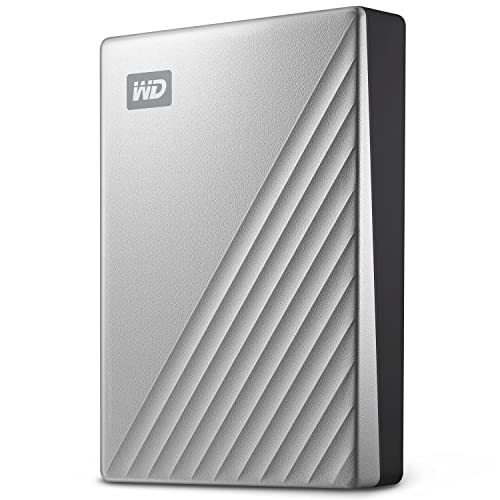
- 5TB portable capacity
- Formatted for Mac
- 256-bit AES hardware encryption
Best For: Secure Mac backups and large file libraries
Best Plug-and-Play Capacity
WD Elements Portable 5TB Hard Drive

- 5TB portable storage
- USB 3.2 Gen 1 connectivity
- Plug-and-play expansion
Best For: Simple high-capacity storage for Mac and PC
Best Overall – SABRENT Dual-Bay HDD/SSD Dock and Cloner
For shoppers comparing hard drive duplicators for mac, the SABRENT EC-HD2B is a practical dual-bay option for SATA drives. It supports 2.5-inch and 3.5-inch HDDs or SSDs, works without drivers, and can clone drives offline.
Best For: Home users and Mac owners who need a straightforward SATA drive dock with offline cloning.
Pros:
- Supports standard 2.5-inch and 3.5-inch SATA HDDs and SSDs.
- Offline cloning requires no computer or drivers.
- Supports drives up to 10TB and USB 3.0 transfer speeds up to 5Gbps.
Cons:
- Designed for SATA drives rather than other drive interfaces.
- Offline cloning speed is listed at up to 60Mbps.
The SABRENT combines docking and cloning in a compact design, making it a sensible general-purpose choice for drive access, backups, and upgrades.
Best Standalone Option – Vinpower 1-to-2 SATA Drive Duplicator
The Vinpower HDDMINI is a standalone choice for hard drive duplicators for mac, operating without a PC and supporting SATA HDDs and SSDs. Its copy modes, error skipping, and secure erase features make it suited to more specialized duplication work.
Best For: Field technicians and users who need standalone copying, bad-sector handling, or drive erasure.
Pros:
- Operates independently without a computer.
- Supports Smart Copy and bit-by-bit Raw Mode.
- Includes read-error skipping and a DoD 5220.22-M-style secure erase process.
Cons:
- Its listed read speed is lower than some higher-speed duplicators.
- Supports SATA interfaces, so it is not a universal drive duplicator.
With support for 3TB-and-larger drives and up to two connected drives, the Vinpower offers useful control for recovery-oriented copying, archival tasks, and secure disposal.
Best High-Capacity Dock – ORICO 44TB Dual-Bay Drive Cloner
The ORICO DD28U3-C is a flexible pick among hard drive duplicators for mac, with dual-bay support for 2.5-inch and 3.5-inch SATA drives. It can clone offline, connect over USB 3.0, and accommodate up to 44TB across two drives.
Best For: Mac users and multi-device households that need high-capacity SATA docking, transfers, and offline cloning.
Pros:
- Supports up to 44TB using two drives up to 22TB each.
- Works with Windows, Mac, Linux, iPadOS, and Android devices.
- Offers offline cloning, UASP, and transfer speeds up to 5Gbps.
Cons:
- The target disk must be larger than the source for offline cloning.
- The dock will not power on without a hard drive inserted.
The ORICO is especially appealing when capacity and cross-platform flexibility matter. Its tool-free bays and independent power supply also support convenient drive swapping and sustained use.
Best for Professional Workflows – Acumen Disc HD Pal Pro Duplicator
The Acumen Disc HD Pal Pro is a business-oriented option among hard drive duplicators for mac, built for repeated duplication and analysis tasks. It supports 2.5-inch and 3.5-inch HDDs and SSDs, with multiple copy and erase modes and speeds listed up to 600MB/s.
Best For: IT departments, labs, and professional workflows requiring fast multi-drive duplication and controlled erasure.
Pros:
- Duplicates at speeds up to 600MB/s, or 36GB per minute.
- Provides four copy modes and six erase modes.
- Supports HPA/DCO duplication and removal while protecting the source from modification.
Cons:
- At 11 pounds, it is substantially less portable than compact docks.
- The supplied platform details identify it as PC hardware rather than explicitly Mac hardware.
The HD Pal Pro is a specialized, higher-capacity workflow tool rather than a casual desktop dock. Its speed, source protection, and HPA/DCO support are valuable for structured professional operations.
Most Versatile – StarTech Dual-Bay M.2/SATA Duplicator
For shoppers comparing hard drive duplicators for Mac, the StarTech SM2DUPE11 is a particularly flexible standalone option. It supports M.2 NVMe, M.2 SATA, and 2.5- or 3.5-inch SATA drives, so it can handle a broad mix of modern SSDs and traditional hard drives without a computer or cloning software.
Best For: Mac users, technicians, and IT teams working with mixed M.2 and SATA drive formats.
Pros:
- Supports M.2 PCIe NVMe, M.2 SATA, and 2.5/3.5-inch SATA drives.
- Offers system/file, partition, whole-drive, and percentage duplication modes.
- Includes multiple erase options, including secure erase compliant with NIST SP 800-88 Rev. 1.
- Standalone operation with an on-screen display and tool-less design.
Cons:
- Its broad feature set may be more than occasional home users need.
- IDE and mSATA drives require separate adapters.
Choose this model when compatibility and configurable sanitization matter more than keeping the setup minimal. Its dual-bay design and support for both NVMe and SATA make it the most adaptable option in this group.
Best Portable Storage Companion – WD Elements 2TB Portable Drive
The WD Elements is not a standalone duplicator, but it can be a practical companion when using hard drive duplicators for Mac. Its 2TB capacity and USB 3.2 Gen 1 connection provide a straightforward place to store cloned files, backups, photos, videos, and documents.
Best For: Mac users who need an affordable portable destination drive for personal files and backups.
Pros:
- Provides 2TB of storage in a compact portable enclosure.
- Uses plug-and-play USB connectivity for simple setup.
- Works with PC and Mac according to the supplied product description.
- USB 3.2 Gen 1 supports data transfer rates up to 5Gbps.
Cons:
- It is an external storage drive, not a standalone drive-to-drive duplicator.
- The mechanical 5400 RPM design is less purpose-built for high-volume cloning than a dedicated duplicator.
This is best viewed as a portable storage target rather than a cloning appliance. It makes sense for Mac owners who already have a duplication method and want a simple 2TB USB drive for keeping copied data.
Best SATA Value – Systor 1:1 HDD/SSD Duplicator
For straightforward SATA cloning, the Systor SYS101HS-DP is a dedicated standalone choice among hard drive duplicators for Mac. It accepts both 2.5- and 3.5-inch SATA HDDs and SSDs, copies systems or files as well as whole drives, and does not require a computer or software.
Best For: Home users and small businesses duplicating standard SATA hard drives and SSDs.
Pros:
- Works with both 2.5- and 3.5-inch SATA drives without an adapter.
- Standalone operation eliminates the need for a computer or cloning software.
- Supports data-only or whole-drive duplication.
- Includes DoD 5220.22-M-compliant drive erasure and hot-swappable drive support.
Cons:
- Supports SATA drives but not M.2 NVMe or M.2 SATA formats.
- Its listed transfer rate is up to 90MB per second, slower than newer high-speed duplicators.
- The duplication capacity is limited to two drives at a time.
The Systor is a sensible pick when your Mac workflow involves conventional SATA drives and you want a simple, dedicated copier. It lacks modern M.2 support, but its direct controls, hot-swap design, and sanitization function cover essential SATA duplication tasks.
Best Portable Value – Seagate 2TB Portable Hard Drive
For shoppers comparing hard drive duplicators for Mac, the Seagate Portable 2TB is a straightforward external storage option for backups, file transfers, and on-the-go access. It is designed to work with Mac and Windows computers, connects over USB 3.0, and requires no software for setup.
Best For: Mac users who want an affordable, compact drive for everyday storage and drag-and-drop backups.
Pros:
- Works with both Mac and Windows computers.
- Plug-and-play setup with automatic recognition and no software required.
- Portable 2TB capacity with an included 18-inch USB 3.0 cable.
Cons:
- Offers less capacity than the 5TB alternatives in this roundup.
- As a mechanical hard drive, it may be less rugged than solid-state storage.
The Seagate is a practical choice when simple Mac compatibility and portability matter more than maximum capacity or advanced security features.
Best Secure Mac Pick – WD My Passport Ultra 5TB for Mac
Among hard drive duplicators for Mac, the WD My Passport Ultra stands out as a Mac-focused portable drive with 5TB of capacity. It arrives formatted for Mac and adds password protection with 256-bit AES hardware encryption, while supporting USB-C and USB 3.1 connections.
Best For: Mac users who need high-capacity portable storage with built-in hardware encryption and password protection.
Pros:
- Large 5TB capacity for backups and personal or business files.
- Formatted for Mac for a more convenient out-of-the-box setup.
- Includes password protection with 256-bit AES hardware encryption.
- Supports USB-C and USB 3.1 connectivity.
Cons:
- Its Mac-focused formatting may require reformatting for other workflows.
- It is a mechanical portable drive rather than a solid-state drive.
With its generous capacity, refined metal cover, and security features, the My Passport Ultra is the strongest fit here for Mac users who prioritize protected portable storage.
Best Plug-and-Play Capacity – WD Elements Portable 5TB Hard Drive
For Mac owners researching hard drive duplicators for Mac, the WD Elements Portable provides 5TB of simple external storage in a compact enclosure. Its plug-and-play design and USB 3.2 Gen 1 connectivity make it suited to expanding storage on compatible Mac and PC systems.
Best For: Mac and PC users who want substantial portable capacity without bundled encryption or complicated setup.
Pros:
- Provides 5TB of portable storage.
- Supports USB 3.2 Gen 1/USB 3.0 with up to 5Gbps SuperSpeed connectivity.
- Plug-and-play design simplifies storage expansion.
- Compatible with Mac and PC platforms.
Cons:
- Does not list hardware encryption or password protection.
- The supplied USB-A cable may require an adapter or hub for some newer Macs.
The WD Elements is a sensible capacity-first option for users who want easy Mac-compatible storage and fast interface support without extra security software or features.
How We Picked These Hard Drive Duplicators for Mac
We selected products for compatibility, cloning functionality, drive-format support, ease of use, and practical value. The list includes offline duplicators that can copy one drive directly to another, dual-bay docks for flexible desktop use, and portable hard drives suited to Time Machine, file transfers, and general backups on macOS.
We also considered drive interfaces and form factors. Some models support 2.5-inch and 3.5-inch SATA drives, while more advanced units accommodate M.2 SATA or NVMe media. Because not every product is a true standalone duplicator, check the intended workflow before buying.
Quick Comparison
- Best for straightforward SATA cloning: Sabrent, Orico, and Systor docking or duplicating solutions.
- Best for repeated or multi-drive work: Vinpower and Acumen standalone duplicators.
- Best for mixed modern drive types: StarTech’s SATA and M.2 SATA/NVMe duplicator.
- Best for simple Mac backups: WD Elements, Seagate Portable, and WD My Passport Ultra drives.
Key Buying Factors for Hard Drive Duplicators for Mac
Standalone Cloning Versus Computer-Assisted Copying
A standalone duplicator copies data without requiring cloning software or a Mac, which is useful for drive upgrades and repeat jobs. A docking station may offer more flexibility, but you may need macOS software for cloning, partition management, or recovery.
Drive Compatibility
Confirm whether the unit accepts 2.5-inch, 3.5-inch, SATA, M.2 SATA, or NVMe drives. SATA and NVMe are different interfaces, so a bay or adapter designed for one may not accept the other. Also check maximum capacity and whether the target drive must be equal to or larger than the source.
Speed and Connection
USB 3.0 and USB 3.2 Gen 1 connections are adequate for many backup tasks, but real-world speed depends on the source drive, destination drive, file sizes, and the Mac’s ports. A fast duplicator cannot eliminate slower media or adapters.
Erasure and Data Security
If you are disposing of or repurposing drives, choose a model with verified erasing functions rather than relying on a basic format. For portable backups, password protection and ransomware defenses can add useful security, but they do not replace an independent backup.
Who Should Buy Which Hard Drive Duplicators for Mac?
Choose a standalone duplicator if you regularly migrate drives, prepare multiple copies, or need computer-free operation. A dual-bay dock is better for occasional cloning, drive access, and flexible desktop storage. Select the StarTech model when your collection includes both traditional SATA drives and M.2 media, provided its supported interfaces match your hardware.
For Mac users who mainly need extra capacity or automated backups, a portable WD or Seagate drive is simpler and often more economical than a dedicated cloner. Pick capacity based on your backup history and expected growth, and format the drive appropriately for macOS. For important files, keep at least one additional copy in another location or cloud service.