
A drawing tablet with screen lets you draw directly on the image, making digital illustration, photo editing, animation, and design feel more intuitive than using a traditional pen tablet.
This roundup compares 10 options across portable standalone tablets, compact pen displays, and larger professional-focused models. We considered display quality, pen performance, shortcuts, portability, compatibility, and overall value.
Best 10 Drawing Tablet with Screen Picks for 2026
Best Overall Control

- 13.3-inch laminated Full HD display
- 16384 pressure levels and 99% sRGB
- Dual dial, shortcut keys, and stand included
Best For: Artists who want color accuracy and hardware workflow controls
Best Standalone Option

- Works independently without a computer
- 11-inch laminated 2K display
- Includes apps, tutorials, case, and glove
Best For: Beginners and students seeking a portable all-in-one tablet
Best for Shortcut-Heavy Workflows

- Fully laminated 13.3-inch FHD display
- 16384 pressure levels and 60-degree tilt
- Red dial plus eight customizable keys
Best For: Artists who want extensive physical workflow controls
Best Budget-Friendly Starter

- 11.6-inch Full HD matte display
- 8192 pressure levels and tilt support
- Eight programmable keys and battery-free pen
Best For: Beginners and students using Windows or Mac
Beginner-Friendly Pick

- Paper-like nano-etched, full-laminated screen
- 16K pressure-sensitive magnetic stylus
- Eight shortcut keys and one-cable USB-C setup
Best For: Beginners, students, and portable creative work
Serious Artists' Choice

- 16-inch QHD display with 2560x1600 resolution
- 99% DCI-P3 and 100% sRGB coverage
- Pro Pen 3 with tilt and 8,192 pressure levels
Best For: Detailed illustration, animation, design, and 3D work
Color-Focused Value Pick

- 143% sRGB coverage with four color modes
- 15.4-inch full-laminated anti-glare display
- 16K battery-free stylus and shortcut wheel
Best For: Color-focused drawing, painting, students, and teachers
Best Pro-Level Pen Display

- Full-laminated Canvas Glass 2.0 surface
- 16,384-level PenTech 4.0 stylus
- 99% sRGB and ΔE<1.5 calibration
Best For: Color-focused artists who already use a computer
Best Portable Value
- 11.6-inch 1080p full-laminated display
- Battery-free 16,384-level pens included
- Six customizable shortcut keys
Best For: Portable computer-connected drawing and study
Best Simple Pick
- Standalone Android 16 drawing tablet
- 12.2-inch 2K+ display with 90Hz refresh
- 8GB RAM and expandable 256GB storage
Best For: Mobile artists, students, and multitaskers
Best Overall Control – HUION Kamvas 13 (Gen 3)
The HUION Kamvas 13 (Gen 3) is a strong drawing tablet with screen for artists who want accurate color, a laminated display, and physical workflow controls. Its 13.3-inch Full HD screen must be connected to a compatible computer or laptop, although it also supports certain Android devices.
Best For: Designers, illustrators, animators, and digital artists who want a compact pen display with a dial, shortcut keys, and an included stand.
Pros:
- Fully laminated Canvas Glass 2.0 display is designed to reduce glare and parallax.
- 16384 pressure levels, 2g initial activation force, tilt support, and three pen buttons support controlled strokes.
- 99% sRGB coverage and factory calibration report support color-conscious work.
- Includes five shortcut keys, dual dial buttons, and an adjustable stand.
Cons:
- It is not standalone and requires a computer, laptop, or compatible Android device.
- A full-featured USB-C cable is sold separately.
With its high pressure sensitivity, strong stated color coverage, and built-in controls, the Kamvas 13 (Gen 3) is a well-rounded choice for creators building a computer-based drawing setup.
Best Standalone Option – PicassoTab X11 Drawing Tablet
The PicassoTab X11 stands apart from most drawing tablet with screen models because it works without a computer. This portable 11-inch tablet includes creative apps, tutorials, expandable storage, and a laminated 2K display aimed at accessible sketching and illustration.
Best For: Students, beginners, and artists who want an all-in-one drawing device for home, school, or travel.
Pros:
- Standalone design does not require connection to a computer.
- Laminated 11-inch 2K display is designed to reduce parallax and glare.
- Includes 6GB RAM, 128GB storage, and expansion up to 1TB.
- Comes with creative apps, tutorials, case, glove, adapter, and screen protector.
Cons:
- The stylus provides 4096 pressure levels, fewer than several dedicated pen displays.
- Its custom graphics tablet operating system may offer a different app experience from a desktop setup.
The X11 is the practical pick when portability and simplicity matter most. Its included learning tools and accessories make it especially approachable for beginners who do not want to manage a separate computer.
Best for Shortcut-Heavy Workflows – XPPen Artist 13.3 Pro V2
The XPPen Artist 13.3 Pro V2 is a drawing tablet with screen for computer-based creative work, combining a fully laminated 13.3-inch FHD display with a red dial and eight customizable shortcut keys. It requires a computer or laptop, with a 3-in-1 cable included.
Best For: Digital artists, animators, photo editors, and concept artists who rely on customizable controls and tilt-enabled shading.
Pros:
- Fully laminated display is designed to minimize parallax.
- Supports up to 60 degrees of tilt and includes a battery-free stylus with 16384 pressure levels.
- Red dial and eight shortcut keys can streamline zooming, brush sizing, and canvas control.
- Supports Windows, macOS, Chrome OS, and Linux, plus major creative software.
Cons:
- It is not standalone and must be connected to a computer.
- The 13.3-inch display uses Full HD resolution rather than 2K or higher.
For creators who prefer physical controls, the dial and eight programmable keys are the main attraction. The wide stated color gamut, tilt support, and battery-free pen round out a capable computer-connected setup.
Best Budget-Friendly Starter – GAOMON PD1161 Drawing Tablet
The GAOMON PD1161 is a compact drawing tablet with screen for beginners, students, and artists who want to draw directly on an 11.6-inch display. It connects to a Windows or Mac computer and includes a matte film, battery-free pen, shortcut keys, and connection accessories.
Best For: Beginners and students seeking an affordable computer-connected pen display for drawing, image editing, notes, and online teaching.
Pros:
- Full HD IPS display includes a pre-installed matte film for reduced glare and a paper-like feel.
- Battery-free stylus offers 8192 pressure levels and tilt functionality.
- Eight programmable press keys and two pen buttons support shortcut-based workflows.
- Works with Windows and macOS and supports applications such as Krita, Photoshop, Blender, and OneNote.
Cons:
- It is not standalone and requires a compatible computer with available HDMI and USB ports, or an adapter.
- The display is smaller and has lower stated color gamut coverage than some larger or newer options.
The PD1161 keeps the essentials straightforward: an on-screen drawing surface, battery-free pen, useful shortcut keys, and broad software compatibility. It is a sensible entry point for computer-based creative work.
Beginner-Friendly Pick – XP-Pen Artist 12 3rd
The XP-Pen Artist 12 3rd is a compact drawing tablet with screen designed to make digital art approachable for beginners. Its full-laminated, nano-etched display offers paper-like resistance, while the one-cable USB-C connection helps keep a study or creative workspace tidy.
Best For: Beginner artists, students, online educators, and creators who want a portable, easy-to-use display tablet.
Pros:
- 16,384 pressure levels and 60° tilt support enable responsive, controlled strokes.
- AG+AF nano-etched glass reduces glare and adds a paper-like drawing feel.
- Eight customizable shortcut keys provide quick access to common tools.
- Includes a magnetic stylus, replacement nibs, drawing glove, and foldable stand.
Cons:
- Its 1920×1080 display is less detailed than the higher-resolution alternatives in this roundup.
- The compact screen may feel limiting for artists who prefer a larger canvas.
- One-cable operation depends on a compatible full-featured USB-C device and port.
With its beginner-focused controls, tactile surface, and broad Windows, Mac, Android, ChromeOS, and Linux support, this is a practical entry point for learning digital drawing without a complicated setup.
Serious Artists' Choice – Wacom Cintiq 16
The Wacom Cintiq 16 is a premium drawing tablet with screen for detailed illustration, animation, design, and 3D work. Its 16-inch QHD display combines a wide color gamut with Wacom’s Pro Pen 3 for a focused, high-resolution workspace.
Best For: Serious digital artists, designers, animators, and 3D creators working on compatible Mac or Windows computers.
Pros:
- 2560×1600 resolution provides a sharp, detailed 16-inch canvas.
- Display covers 99% DCI-P3 and 100% sRGB for broad color representation.
- Pro Pen 3 offers 8,192 pressure levels, tilt support, and three shortcut keys.
- Built-in fold-out legs provide a 20-degree working angle.
Cons:
- It requires a Windows or Mac computer with DisplayPort Alt Mode or Thunderbolt 3/4 for the included USB-C connection.
- Computers without the required video input need additional cables.
- At 4.5 pounds, it is less portable than the smaller option in this roundup.
The Cintiq 16 prioritizes display quality, color coverage, and pen control over minimal portability. It is a strong choice when a detailed canvas and professional-oriented workflow matter most.
Color-Focused Value Pick – UGEE UE16
The UGEE UE16 is a large drawing tablet with screen that emphasizes vivid color reproduction and flexible controls. Its 15.4-inch full-laminated display offers 143% sRGB coverage, multiple color modes, and a battery-free 16K pressure stylus for drawing, design, and painting.
Best For: Students, teachers, and digital artists who want a large, color-rich display with physical shortcuts.
Pros:
- 143% sRGB coverage and four color-space options support varied visual workflows.
- 15.4-inch full-laminated, anti-glare screen provides a generous drawing area.
- Battery-free stylus delivers 16,384 pressure levels and includes a pressure-sensitive eraser.
- Eight shortcut keys and a scroll wheel offer tactile tool access.
Cons:
- The 1920×1080 resolution is lower than the Wacom’s QHD display.
- Its HDMI and USB connectivity uses a 3-in-1 cable rather than a single USB-C connection.
- The supplied dimensions list the tablet as 15.4 inches by 15.4 inches, so desk space should be checked carefully.
For buyers who value color flexibility and a spacious workspace, the UE16 offers a compelling feature set. Its broad operating-system compatibility and dedicated controls also suit classroom and general creative use.
Best Pro-Level Pen Display – HUION Kamvas 13 (Gen 3)
If you want a color-focused drawing tablet with screen for computer-based art, the HUION Kamvas 13 (Gen 3) combines a full-laminated, anti-glare display with a highly sensitive pen and extensive shortcut controls. Note that it must be connected to a computer or laptop and is not standalone.
Best For: Artists, designers, and editors who prioritize accurate color, a paper-like drawing surface, and portable computer-connected workflow.
Pros:
- Canvas Glass 2.0, full lamination, and nano-etching reduce glare and parallax.
- PenTech 4.0 provides 16,384 pressure levels, tilt auto-alignment, and 2g initial activation force.
- 99% sRGB coverage, 90% Adobe RGB coverage, and factory calibration to ΔE<1.5 support color-sensitive work.
- Two dials, five press keys, and an 11.7mm-thin, 865g design support efficient portable use.
Cons:
- It requires connection to a compatible computer or laptop.
- Compatibility depends on supported operating systems and suitable USB-C or included cable connections.
The Kamvas 13 (Gen 3) is a strong fit when display quality and color consistency matter more than standalone convenience. Its controls and compact design also make it practical for creators who work across locations.
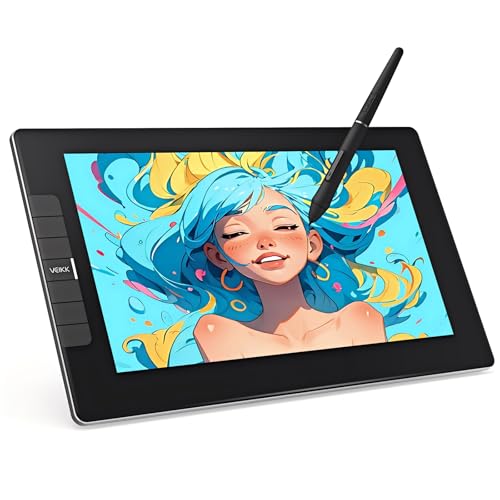
Best Portable Value – VEIKK VK1200V2
The VEIKK VK1200V2 is a compact drawing tablet with screen for creators who want a full-laminated 1080p display, broad software compatibility, and customizable shortcut keys. It must be connected to a computer for normal use.
Best For: Artists and students seeking a lightweight, computer-connected pen display with vivid color and a backup stylus.
Pros:
- 11.6-inch full-laminated IPS display offers 1920×1080 resolution and 120% sRGB color gamut.
- Battery-free pens provide 16,384 pressure levels, 60° tilt support, and 290 PPS tracking.
- Six customizable hotkeys help streamline common drawing and editing actions.
- Lightweight 1.78-pound design, two included pens, and lifetime driver updates add convenience.
Cons:
- It is not standalone and requires a connected computer.
- The smaller 11.6-inch workspace may feel limiting for users who prefer larger displays.
- Connection uses HDMI and USB, so the available ports on your computer matter.
Choose the VK1200V2 if portability and included accessories are priorities. Its color-rich display and battery-free backup pen make it a practical option for everyday digital drawing without charging a stylus.
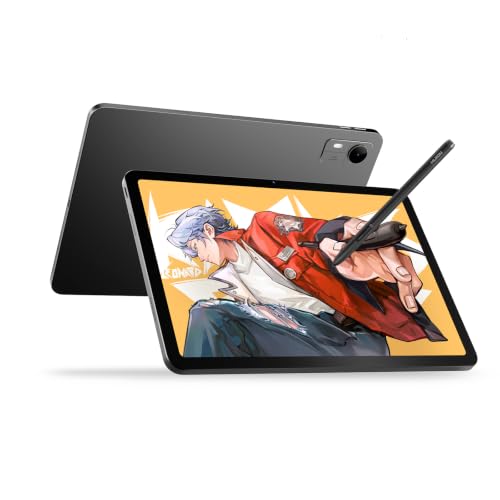
Best Simple Pick – HUION KAMVAS Pad 12
Unlike many computer-dependent displays, the HUION KAMVAS Pad 12 is a standalone drawing tablet with screen designed for mobile creation. Its Android platform, 2K+ display, 90Hz refresh rate, and generous storage support drawing, note-taking, and general tablet use without a separate computer.
Best For: Artists, students, and families who want a portable drawing device that also handles apps, entertainment, and multitasking.
Pros:
- 12.2-inch 3:2 2K+ display delivers 236 PPI, 350 nits brightness, and more vertical space than a typical 16:9 screen.
- PenTech 4.0 offers 16,384 pressure levels, ±60° tilt, 2g initial activation force, and tilt auto-alignment.
- Standalone Android 16 operation includes preloaded drawing and note-taking apps.
- 8GB RAM, 256GB storage expandable to 1TB, an 8000mAh battery, and a 1.47-pound design support mobile work.
Cons:
- It may be less suitable for users who specifically want a traditional desktop pen display workflow.
- Android app availability and workflows can differ from desktop software setups.
The KAMVAS Pad 12 is the clearest choice for creators who need independence from a computer. Its larger 3:2 canvas, fast refresh rate, and tablet features make it useful for both art and everyday mobile tasks.
How We Picked the Best Drawing Tablet with Screen
We focused on the features that most affect everyday creative work: screen size and resolution, color coverage, pen pressure sensitivity, hover and tilt performance, parallax, shortcut controls, connectivity, build quality, and software compatibility. We also separated standalone tablets from display tablets that require a Windows, macOS, or compatible host device.
Specifications can vary by configuration and retailer, so verify included cables, stands, operating-system support, and current pricing before buying. A higher pressure-sensitivity number alone does not guarantee a better drawing experience; pen tracking and driver stability matter just as much.
Quick Comparison
| Best For | Look For | Featured Types |
|---|---|---|
| Beginners and students | Simple setup, reliable pen, manageable price | Compact 11.6- to 13.3-inch models |
| Portable, computer-free work | Built-in operating system, battery life, storage | Standalone PicassoTab and Kamvas Pad models |
| Illustration and design | Full lamination, accurate color, shortcut keys | Mid-size pen displays with etched or anti-glare glass |
| Professional workflows | Larger workspace, strong color performance, premium pen | Wacom Cintiq 16 and larger 15.4-inch options |
Key Buying Factors for a Drawing Tablet with Screen
Screen Size and Resolution
Compact 11.6- to 13.3-inch screens are easier to carry and often cost less, but larger displays provide more room for detailed linework and timelines. QHD or 2K resolution can make fine details and interface text look sharper, especially on larger screens.
Pen Feel and Accuracy
Pressure sensitivity, tilt support, low initial activation force, and consistent tracking all affect control. A full-laminated display can reduce the visible gap between the pen tip and cursor, while etched or anti-glare surfaces help control reflections.
Color and Connections
Artists working for print or professional delivery should prioritize dependable color coverage and calibration options. Check whether the tablet uses USB-C, a proprietary cable, or HDMI, and confirm that your computer has the required ports. Some models need a separate power connection.
Controls, Stand, and Software
Dial controls and shortcut keys can reduce keyboard travel during long sessions. A stable adjustable stand is also valuable. Confirm compatibility with your preferred apps, such as Photoshop, Clip Studio Paint, Krita, Blender, or other creative software.
Who Should Buy Which Drawing Tablet with Screen?
Choose a compact display if you are a student, beginner, or traveling artist who already owns a compatible computer. Pick a standalone model if you want to sketch away from a desk without connecting another device. For detailed illustration, animation, or design, prioritize a full-laminated screen, strong color reproduction, comfortable shortcuts, and a stand. Professional users who spend many hours creating may benefit most from a larger display and a premium pen system, while occasional creators can save money with a smaller model that still offers accurate pressure control.