
The best wireless drawing tablets give artists more freedom to work without adding cables to an already crowded desk. The right model depends on whether you prefer a compact pen tablet, a larger active area, shortcut controls, or a built-in display.
We compared 10 popular options across connectivity, pressure sensitivity, workspace, software compatibility, portability, and value to help you choose a tablet that fits your workflow.
Best 10 Wireless Drawing Tablets Picks for 2026
Best Overall

- Wireless or USB-A connectivity
- Battery-free pen with 4,096 pressure levels
- Includes software access and training
Best For: Students and creators wanting a versatile medium tablet
Best for Shortcuts
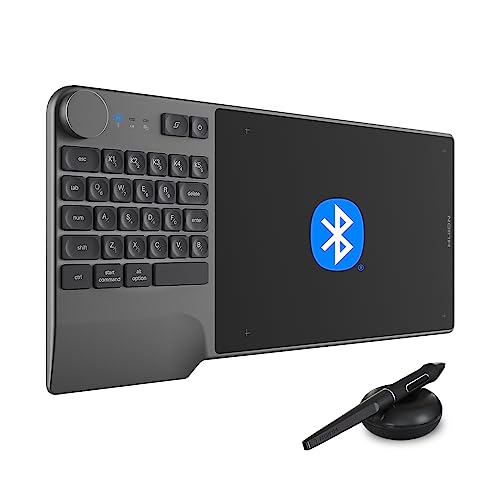
- Bluetooth 5.0 with up to 18-hour battery life
- 23-key keyboard, dial, and five custom keys
- Battery-free pen with 8,192 pressure levels
Best For: Shortcut-heavy editing and design workflows
Best Compact Pick

- Compact 6-by-3.7-inch active area
- Bluetooth or USB-A connectivity
- Battery-free pen and four ExpressKeys
Best For: Beginners and mobile users with limited desk space
Best Screened Option

- 13.3-inch full-laminated pen display
- 16,384 pressure levels and accurate color
- Dual dials plus five silent keys
Best For: Artists wanting direct-on-screen drawing and color control
Best Wireless Value

- Bluetooth 5.0 wireless connection
- Battery-free stylus with 8,192 pressure levels
- Eight customizable shortcut keys
Best For: Students, teachers, and hobbyist artists
Best Professional Pick

- Pro Pen 3 with 8,192 pressure levels
- Ten ExpressKeys and two mechanical dials
- Bluetooth and USB connectivity
Best For: Professional artists, animators, and designers
Best High-Sensitivity Controls

- 16,384-level battery-free pen
- Bluetooth 5.0 and USB connectivity
- Dial plus eight customizable keys
Best For: Creators and students wanting tactile controls and high sensitivity
Best Budget Pick

- Battery-free stylus with 8192 pressure levels
- Slim, portable 6 x 4-inch active area
- Compatible with Windows, macOS, and ChromeOS
Best For: Beginners, educators, and casual digital artists
Best for Large Workspaces

- Bluetooth 5.0 and USB-C dual-mode connection
- Large 10 x 6.25-inch textured surface
- 16,384 pressure levels, tilt support, and 16 shortcut keys
Best For: Artists and editors who want workspace and workflow controls
Best Portable Wireless Option
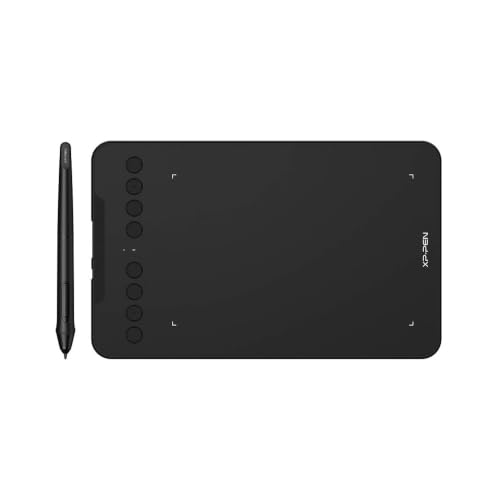
- Bluetooth 5.0 and wired connectivity
- 16,384 pressure levels with tilt support
- Eight customizable keys and broad device compatibility
Best For: Mobile creators, teachers, and students
Best Overall – Wacom Intuos Medium Bluetooth
For creators who want dependable wireless drawing tablets with a comfortable working area, the Wacom Intuos Medium combines Bluetooth connectivity, a battery-free pressure-sensitive pen, and four shortcut keys. It also works with Mac, Windows, and Chromebook devices and includes access to creative software and training after registration.
Best For: Students, teachers, and creators who want a versatile medium-size tablet for drawing, photo editing, design, and document markup.
Pros:
- Bluetooth or USB-A connectivity supports flexible use.
- Battery-free pen uses Wacom EMR technology with 4,096 pressure levels.
- Four ExpressKeys provide convenient shortcuts.
- Software and online training are included after registration.
Cons:
- The 8.5-by-5.31-inch active area may be larger than necessary for basic tasks.
- The pen tablet has no built-in display.
The Medium Intuos is a strong all-around choice when you want more drawing room than a compact tablet without giving up wireless convenience. Its pen technology, broad software compatibility, and included learning resources make it particularly practical for students and developing creators.
Best for Shortcuts – HUION Inspiroy Keydial KD200
The HUION Inspiroy Keydial KD200 stands out among wireless drawing tablets by pairing an 8.9-by-5.6-inch drawing area with a shortcut keyboard, dial, and programmable keys. Bluetooth 5.0 provides a wireless connection to compatible computers and Android devices, while the battery supports at least 18 hours of use per charge.
Best For: Artists, editors, designers, and other users who rely on frequent keyboard shortcuts, dial adjustments, and efficient creative workflows.
Pros:
- Bluetooth 5.0 connection reaches up to 33 feet.
- Battery lasts at least 18 hours and charges in about 1.2 hours.
- Includes 23 standard keyboard keys, five customizable keys, and a dial.
- Battery-free pen offers tilt support and 8,192 pressure levels.
Cons:
- The combined keyboard-and-tablet layout may feel more complex than a basic pad.
- It has no built-in display.
Choose the KD200 if reducing menu trips and keyboard reach is a priority. Its control-heavy design is especially useful for photo and video editing, animation, and other software workflows where shortcuts and brush adjustments are part of nearly every task.
Best Compact Pick – Wacom Intuos Small Bluetooth
The Wacom Intuos Small is a compact option for shoppers seeking wireless drawing tablets that are easy to fit on a crowded desk or carry between locations. It connects through Bluetooth or USB-A, includes a battery-free pen with 4,096 pressure levels, and works with Mac, Windows, and ChromeOS.
Best For: Beginners, students, remote workers, and creators who prefer a smaller tablet for digital art, photo editing, note-taking, and online education.
Pros:
- Compact 6-by-3.7-inch active area is easy to transport.
- Bluetooth and USB-A connection options add flexibility.
- Battery-free pen and four ExpressKeys support precise work and shortcuts.
- Software and Wacom online training are available after registration.
Cons:
- The smaller active area provides less room for broad strokes.
- The tablet does not include an integrated screen.
The Small Intuos makes sense when portability and desk space matter more than a large canvas. It offers the same core battery-free pen approach as the larger model while keeping the footprint and weight down for everyday study, work, and creative use.
Best Screened Option – HUION Kamvas 13 Gen 3
Unlike most wireless drawing tablets, the HUION Kamvas 13 Gen 3 is a pen display that lets you draw directly on its 13.3-inch screen. Its full-laminated Canvas Glass 2.0 surface, 16,384 pressure levels, factory-calibrated color, dual dials, and five press keys target creators who want a more immersive setup. It must be connected to a computer or laptop to work.
Best For: Artists, designers, and animators who prioritize direct-on-screen drawing, accurate color, and physical workflow controls.
Pros:
- 13.3-inch full-laminated display has an anti-glare, paper-textured surface.
- PenTech 4.0 provides 16,384 pressure levels and tilt support.
- Covers 99% sRGB/Rec.709 and 90% Adobe RGB, with factory calibration to ΔE<1.5.
- Two dials and five silent keys support adjustable creative controls.
Cons:
- It is not standalone and requires a connected computer or laptop.
- Its connection setup relies on cable-based interfaces rather than built-in wireless operation.
The Kamvas 13 Gen 3 is the strongest fit when screen-based drawing and color fidelity outweigh the convenience of a cable-free tablet. Its thin, 865-gram design remains portable, while the symmetrical body accommodates left- or right-handed users.
Best Wireless Value – XPPen Deco MW
The XPPen Deco MW is a practical choice among wireless drawing tablets for artists, students, and remote learners who want a compact 8 x 5-inch workspace without a cable permanently attached. Bluetooth 5.0, a battery-free stylus, and broad operating-system compatibility make it flexible for everyday drawing and design.
Best For: Students, teachers, and hobbyist artists seeking wireless flexibility, customizable shortcuts, and compatibility across computers, Android devices, and major creative software.
Pros:
- Bluetooth 5.0 enables cable-free drawing.
- Battery-free X3 stylus provides 8,192 pressure levels and 60-degree tilt support.
- Eight customizable shortcut keys help streamline common commands.
- Supports Windows, macOS, Android, Chrome OS, Linux, and popular art applications.
Cons:
- The 8 x 5-inch active area may feel limited for users who prefer a larger workspace.
- The listed native resolution is 1920 x 1080, which may not suit every specialized workflow.
With useful wireless connectivity and strong compatibility, the Deco MW is a well-rounded entry-level and intermediate option. Its compact surface and shortcut-focused design favor portability and everyday productivity over a large professional canvas.
Best Professional Pick – Wacom Intuos Pro Medium
The Wacom Intuos Pro Medium is a premium option among wireless drawing tablets, pairing Bluetooth connectivity with a professional-grade build and a large 8.7 x 5.8-inch active area. Its Pro Pen 3 and dedicated controls are designed for artists, animators, designers, and other demanding creative workflows.
Best For: Professional artists, animators, photographers, video editors, and 3D designers who want precise pen control and extensive hardware shortcuts.
Pros:
- Pro Pen 3 offers 8,192 pressure levels, tilt support, and lag-free tracking.
- Ten customizable ExpressKeys and two mechanical dials support efficient workflows.
- Bluetooth allows wireless use, while USB provides a wired alternative.
- Magnesium construction and a slim 4 mm profile provide a durable, portable design.
Cons:
- Compatibility is limited to Windows 10 or later and macOS 13 or later.
- Its professional feature set may be more than casual users need.
The Intuos Pro Medium stands out for precision, customization, and build quality. It is the strongest fit for users who will actively use its dials, ExpressKeys, and adjustable Pro Pen 3 rather than simply needing a basic wireless pad.
Best High-Sensitivity Controls – GAOMON WH851
The GAOMON WH851 combines wireless convenience with a full 8 x 5-inch active area, a central dial, and eight programmable keys. For shoppers comparing wireless drawing tablets, its battery-free 16,384-level pen and wired-or-Bluetooth operation offer a versatile setup for drawing, annotation, e-signatures, and learning.
Best For: Creators and students who want high pen sensitivity, tactile controls, and the option to use the tablet with Windows, macOS, Android, or a smartphone.
Pros:
- Bluetooth 5.0 and USB Type-C support wireless and wired use.
- Battery-free pen provides 16,384 pressure levels and tilt detection.
- Central dial and eight customizable keys support zooming, scrolling, and other commands.
- Built-in battery is rated for up to 18 hours of operation.
Cons:
- Operating-system support differs between wired and wireless use in the supplied specifications.
- The tablet has no display, so drawing requires a connected compatible device.
- The warranty is listed as one year.
The WH851 is compelling for users who value sensitivity and hands-on controls at a compact size. Its adjustable aspect ratios and broad device compatibility add flexibility, while the no-display design keeps it dependent on an external screen.
Best Budget Pick – XP-Pen StarG640
The XP-Pen StarG640 is a compact, straightforward choice for anyone seeking wireless drawing tablets for basic digital art, handwriting, teaching, or remote work. Its battery-free pen and slim design keep setup simple, although this model connects through USB rather than wirelessly.
Best For: Beginners, online educators, remote workers, and casual digital artists who want a lightweight tablet for drawing, annotations, and signatures.
Pros:
- Battery-free stylus requires no charging.
- 8192 pressure levels support smooth drawing and handwriting.
- Works with Windows, macOS, and ChromeOS.
- Very slim and portable at approximately 2 mm thick.
Cons:
- Uses USB connectivity instead of wireless connection.
- Its 6 x 4-inch active area is smaller than larger drawing tablets.
The StarG640 focuses on portability and dependable everyday functionality. It is a sensible low-complexity option when you do not need shortcut keys, Bluetooth, or a large workspace.
Best for Large Workspaces – DIGIDRAW TW610
The DIGIDRAW TW610 is a feature-rich option among wireless drawing tablets, pairing Bluetooth 5.0 with a spacious 10 x 6.25-inch work area. It is designed for artists who want a paper-like surface, extensive shortcut controls, and detailed pressure response.
Best For: Digital artists, illustrators, photo editors, and users who prefer a large workspace with wireless flexibility.
Pros:
- Supports Bluetooth 5.0 and USB-C wired use.
- Large anti-glare, textured 10 x 6.25-inch drawing surface.
- 16,384 pressure levels and 60-degree tilt recognition.
- Includes 16 programmable shortcut keys and two pen buttons.
Cons:
- At approximately 1 kg, it is less portable than smaller tablets.
- Full pressure and customization features require the official driver.
- Remote control is sold separately.
With its larger active area, long stated battery life, and extensive controls, the TW610 is aimed at a more demanding workflow. Choose it when drawing comfort and shortcuts matter more than minimal size.
Best Portable Wireless Option – XP-Pen Deco mini7W
The XP-Pen Deco mini7W balances portability with wireless convenience, making it a practical pick among wireless drawing tablets for users who work across computers and compatible mobile devices. It combines Bluetooth 5.0, a battery-free stylus, and customizable shortcut keys in a compact format.
Best For: Mobile creators, online teachers, students, and artists who need wireless use across Windows, Mac, Android, ChromeOS, or Linux devices.
Pros:
- Supports Bluetooth 5.0 as well as wired connections.
- Battery-free pen provides 16,384 pressure levels and 60-degree tilt support.
- Eight customizable shortcut keys can speed up common tasks.
- Includes adapters for flexible USB-C and USB connections.
Cons:
- The 7 x 4-inch format offers less workspace than the TW610.
- Wireless computer use relies on the included USB dongle or Bluetooth setup.
- Listed warranty coverage is one year.
The Deco mini7W is a strong middle ground for users who value wireless connectivity without moving to a full-size tablet. Its broad compatibility and shortcut keys add versatility for teaching, writing, and creative work.
How We Picked the Best Wireless Drawing Tablets
We focused on tablets that support wireless computer use through Bluetooth or a dedicated wireless connection, while also considering models that offer a dependable wired fallback. Our comparison looks at active drawing area, pen technology, pressure sensitivity, shortcut controls, battery-free styluses, operating-system compatibility, and overall portability.
Because artists have different needs, this list includes compact entry-level tablets, medium-size general-purpose models, professional pen tablets, and a display tablet for users who want to draw directly on the screen.
Quick Comparison
| Type | Best For | What to Prioritize |
|---|---|---|
| Small pen tablet | Beginners, travel, limited desks | Portability, reliable wireless connection, affordable replacement pens |
| Medium pen tablet | General digital art and editing | Comfortable active area, shortcut keys, stable Bluetooth |
| Professional pen tablet | Frequent creative work | Pen accuracy, build quality, customization, low-latency response |
| Display tablet | Direct-on-screen drawing | Screen quality, viewing angle, color accuracy, cable requirements |
Key Buying Factors for Wireless Drawing Tablets
Active Area and Size
A larger active area provides more room for broad strokes and can feel more natural on a large monitor. Smaller tablets are easier to carry and often work well for note-taking, photo adjustments, and compact setups.
Pen Performance
Look for a battery-free stylus, high pressure sensitivity, tilt support, and consistent tracking. Pressure numbers alone do not guarantee a better experience; pen accuracy and driver stability matter just as much.
Wireless Connectivity and Battery Life
Bluetooth is convenient for desk use and reduces cable clutter, but check whether the tablet can also operate while charging. A wired fallback is useful if the battery runs low or wireless interference affects your workspace.
Controls and Compatibility
Shortcut keys, dials, and customizable buttons can speed up zooming, undoing, brush changes, and canvas rotation. Confirm support for your operating system and preferred apps, such as Photoshop, Illustrator, Clip Studio Paint, Krita, or other creative software.
Screen Versus Screenless Design
Screenless tablets are usually lighter, more affordable, and easier to position ergonomically. A display tablet can shorten the adjustment period because you draw where the cursor appears, but it may require more desk space and additional cables.
Who Should Buy Which Wireless Drawing Tablets?
Beginners and students: Choose a compact or medium screenless model with a battery-free pen and straightforward drivers. It offers the lowest-cost way to learn digital art.
Traveling artists: A small wireless tablet is easier to pack and works well with laptops, provided its active area is large enough for comfortable strokes.
Illustrators and designers: A medium tablet with customizable keys provides a useful balance of control, precision, and desk space.
Professional creators: Prioritize premium pen tracking, durable construction, expanded controls, and dependable driver support over maximum pressure-sensitivity figures.
Artists transitioning from paper: A screen tablet may feel more intuitive, especially for detailed line work, painting, and animation. Compare display size and color quality carefully before buying.