
Choosing among the best 3D scanners for sculpture means balancing fine-detail capture with the practical demands of working around complex forms, undercuts, textured surfaces, and changing studio conditions.
This roundup compares 10 handheld scanners across accuracy, scanning modes, object-size range, color capture, portability, and ease of use, so you can choose a model that fits your sculpture workflow and budget.
Best 10 3d Scanners for Sculpture Picks for 2026
Precision Pick

- Up to 0.03mm accuracy for detailed scans
- Captures 24-bit color and texture
- Includes turntable and tripod
Best For: Medium-sized sculptures and detailed 3D-printing scans
Metrology Choice

- Up to 0.01mm precision
- Five scanning modes for complex forms
- Wireless Wi-Fi 6 streaming
Best For: Professional sculpture scanning and reverse engineering
Versatile Color Pick

- Scans objects from 0.8 to 78 inches
- Captures 24-bit color textures
- Handles dark and metallic surfaces without spray
Best For: Artists scanning sculptures of varied sizes and materials
Portable Outdoor Pick

- Lightweight 190g wireless design
- Works outdoors up to 20,000 lux
- Offers optical zoom and photorealistic workflows
Best For: Mobile sculpture scanning and outdoor restoration work
Best Wireless Sculpture Scanner
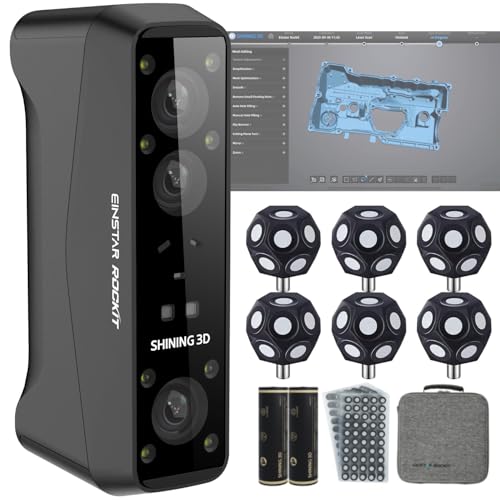
- Dual blue-laser and IR modes for varied sculpture sizes
- Wireless scanning with up to three hours of battery runtime
- 5 MP color camera for realistic texture capture
Best For: Outdoor statues, medium-to-large sculptures, and mobile scanning workflows
Best High-Precision Sculpture Scanner

- Up to 0.02 mm accuracy with blue-light scanning
- NIR mode supports marker-free faces, bodies, and artifacts
- Scans objects from 5 mm to 2,000 mm at up to 60 fps
Best For: Detailed sculpture reproduction across small and large subjects
Best Lightweight Sculpture Scanner

- 250 g portable design for easy handheld scanning
- Up to 0.05 mm accuracy and 0.10 mm resolution
- Works with Android, iOS, Windows, and macOS
Best For: Portable scanning of small-to-medium sculptures and detailed models
Best Portable Color Scanner

- Up to 0.1mm precision and 0.16mm resolution
- Captures full-color textures
- Supports wide-range and fine-detail scanning
Best For: Portable sculpture scanning with color capture
Best Entry-Level Scanner
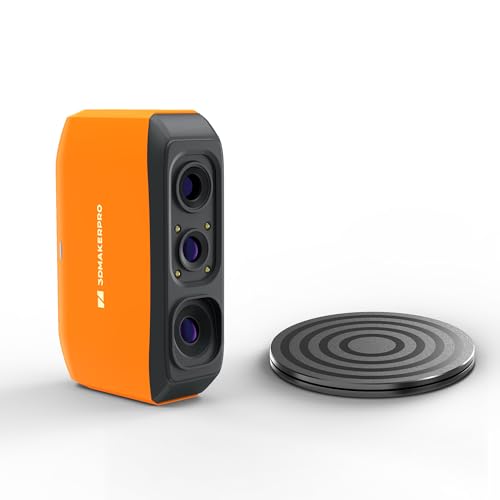
- Up to 0.07mm accuracy
- Markerless tracking with anti-shake technology
- Scans objects from 40mm to 1200mm
Best For: Learning 3D scanning for prototypes and smaller sculptures
Best Beginner-Friendly Scanner

- AI visual tracking with automated model repair
- Optical anti-shake and marker-free scanning
- Compatible with Android, iOS, Windows, and macOS
Best For: Beginners seeking a forgiving handheld scanning workflow
Precision Pick – 3DMakerpro Moose Premium
For artists seeking 3d scanners for sculpture, the 3DMakerpro Moose Premium offers a focused balance of detail, color capture, and manageable object sizing. Its blue LED structured light system reaches up to 0.03mm accuracy and is designed for objects from 15mm to 1500mm.
Best For: Sculptors scanning medium-sized artwork, figurines, and detailed forms for 3D printing or digital editing.
Pros:
- Up to 0.03mm accuracy and 0.07mm resolution for detailed captures
- 24-bit color acquisition helps preserve realistic tones and textures
- Includes a turntable, tripod, and 65W power adapter
- JMStudio supports automatic alignment, visual tracking, and multiple export formats
Cons:
- Handheld scanning requires practice to master
- Works best indoors and needs a capable computer
- Optimal working distance is relatively specific at 150–400mm
The Moose Premium is a strong choice when surface detail and color matter more than scanning very large sculptures. Its included accessories and lifetime software updates add value, though beginners should expect a learning period.
Metrology Choice – Revopoint MetroY Pro
Among 3d scanners for sculpture, the Revopoint MetroY Pro stands out for demanding detail work and complex surfaces. Its blue laser system offers up to 0.01mm precision, while five scanning modes provide flexibility for both broad forms and recessed details.
Best For: Experienced sculptors, fabricators, and studios that need highly precise scans for restoration, reverse engineering, or production.
Pros:
- Up to 0.01mm precision and 0.02mm accuracy
- Five modes cover fast, detailed, deep-hole, structured-light, and turntable scanning
- Can scan shiny and dark surfaces without scanning spray in laser modes
- Wi-Fi 6 enables wireless PC connections and real-time streaming
Cons:
- Requires a powerful Windows or macOS computer
- Some professional software, including Revo Design and Revo Measure, is sold separately
- Its advanced feature set may be more than casual users need
The MetroY Pro is the most precision-oriented option in this group. It is particularly compelling for studios working from reference objects or needing repeatable, measurement-focused results, but its system requirements and professional workflow favor experienced users.
Versatile Color Pick – Creality Otter Lite Basic
The Creality Otter Lite Basic is a versatile choice among 3d scanners for sculpture, especially when projects range from small models to large artwork. Its quad-camera design supports objects from 0.8 to 78 inches, while full-color capture helps preserve the visual character of a sculpture.
Best For: Artists who want one handheld scanner for small figurines, larger sculptures, textured artwork, and outdoor projects.
Pros:
- 0.05mm accuracy with scanning speeds up to 30fps
- Quad-camera system handles objects from coins to large forms
- Scans dark, shiny, and metallic surfaces without spray
- Captures 24-bit color and exports to formats including OBJ, STL, PLY, and 3MF
Cons:
- Optional Scan Bridge handle costs extra
- Accuracy is lower than the most precision-focused option here
- Warranty coverage is one year
Choose the Otter Lite Basic for broad versatility and realistic color rather than maximum metrology precision. Its wide size range, multi-platform software support, and spray-free surface handling make it practical for varied sculpture workflows.
Portable Outdoor Pick – Revopoint INSPIRE 2
For sculptors who need mobility, the Revopoint INSPIRE 2 brings wireless scanning, a 190g design, and outdoor capability to the 3d scanners for sculpture category. Its infrared structured light and multi-line laser modes are intended to handle varied materials and environments.
Best For: Mobile artists and restoration projects that require lightweight scanning, outdoor use, or photorealistic digital models.
Pros:
- Lightweight 190g body with USB-C and Wi-Fi connectivity
- Scans reflective and dark surfaces without scanning spray
- Adjustable 1.5x and 2x optical zoom helps capture mixed-geometry detail
- Supports AI segmentation and photorealistic 3D Gaussian Splatting workflows
Cons:
- Outdoor operation is specified for up to 20,000 lux, so bright conditions may be limiting
- Revo Design is sold separately
- Its 0.05mm accuracy is paired with a 0.1mm fused point distance
The INSPIRE 2 is a practical pick when portability and flexible environments matter. It is less focused on extreme measurement precision than the MetroY Pro, but its optical zoom, wireless operation, and texture-oriented features suit fieldwork and presentation-ready sculpture models.
Best Wireless Sculpture Scanner – Einstar Rockit
For artists comparing 3d scanners for sculpture, the Einstar Rockit stands out for its wireless workflow, outdoor scanning capability, and dual-light design. Its blue-laser modes target fine detail, while IR scanning handles larger subjects such as statues and full-body forms.
Best For: Sculptors scanning medium-to-large artwork, outdoor statues, and textured models where wireless mobility and vivid color capture matter.
Pros:
- Blue laser modes include 38 crossed lines for faster coverage and seven parallel lines for fine detail.
- IR VCSEL scanning supports faces, bodies, and medium-to-large objects, including bright outdoor scenes.
- Wireless PC syncing, a swappable battery with up to three hours of runtime, and cable fallback improve portability.
- A built-in 5 MP color camera captures realistic textures, with marker-free scanning on richly detailed surfaces.
Cons:
- The supplied details specify Windows 7 as the minimum system requirement, so platform compatibility should be checked carefully.
- Its broad feature set may be more than needed for simple, small sculpture projects.
The Rockit is a flexible choice when a sculpture workflow includes both intricate surfaces and large or outdoor subjects. Its wireless design and color capture are especially useful for artists moving around a piece rather than keeping it fixed beside a computer.
Best High-Precision Sculpture Scanner – Creality CR-Scan Raptor
The Creality CR-Scan Raptor is aimed at artists who prioritize fine dimensional accuracy in 3d scanners for sculpture. Its blue-light system reaches up to 0.02 mm accuracy, while infrared scanning provides a marker-free option for faces, bodies, and artifacts.
Best For: Sculptors and makers who need high-precision captures across small details, human-scale subjects, and objects up to 2,000 mm.
Pros:
- Seven parallel blue-laser lines and up to 0.02 mm accuracy support sharp edges and detailed reproduction.
- Blue-light and NIR modes cover precision scanning as well as marker-free capture of faces, bodies, and artifacts.
- Blue mode scans at up to 60 fps, while the stated object range spans 5 mm to 2,000 mm.
- Anti-shake tracking and 24-bit color support a smoother, more detailed scanning workflow.
Cons:
- It requires a high-performance computer, including 16 GB RAM and specified Windows or macOS hardware.
- The blue-light mode may require markers depending on the scanning situation.
With its combination of high stated accuracy, fast blue-light capture, and NIR flexibility, the Raptor is a strong fit for detailed sculpture digitization. Budget for a capable computer before choosing it for a studio workflow.
Best Lightweight Sculpture Scanner – 3DMakerpro Moose Lite
The 3DMakerpro Moose Lite is a compact option for artists seeking approachable 3d scanners for sculpture. AI visual tracking is designed to improve smooth, marker-free scanning, while blue-light capture provides up to 0.05 mm accuracy and 0.10 mm resolution.
Best For: Artists who want a lightweight scanner for small-to-medium sculptures, detailed models, and portable scanning on multiple platforms.
Pros:
- Weighing 250 g, it is easy to carry and designed for portable use with fan-free operation.
- Blue-light scanning offers up to 0.05 mm accuracy and 0.10 mm resolution for detailed models.
- AI visual tracking and point-cloud processing support smooth, marker-free scanning.
- Supports Android, iOS, Windows, and macOS, with scanning and editing combined in JMStudio.
Cons:
- Its 10 fps scanning speed is lower than the faster options in this roundup.
- The stated scan range is 15 mm to 1,500 mm, which may not suit very large sculptures.
- The supplied details do not indicate wireless operation.
The Moose Lite makes the most sense when portability and broad device compatibility are priorities. Its size range covers many art projects, while the integrated software and AI tracking aim to simplify the path from scan to refined model.
Best Portable Color Scanner – Creality CR-Scan Ferret
For artists comparing 3d scanners for sculpture, the Creality CR-Scan Ferret stands out as a lightweight handheld option with wide-range and high-accuracy scanning modes. Its built-in RGB camera also helps preserve full-color surface textures for more realistic digital models.
Best For: Sculptors who want portable scanning, color capture, and flexibility for both larger forms and fine details.
Pros:
- High-accuracy mode supports up to 0.1mm precision and 0.16mm resolution.
- Wide-range mode covers up to 560 × 820mm per scan.
- Built-in color camera captures realistic textures.
- Lightweight design can be powered by a 5V power bank or compatible Android device.
Cons:
- Mobile scanning is limited to compatible Android devices; iOS requires the Pro model.
- Requires suitable hardware and operating systems, including Wi-Fi 6 for Android use.
The Ferret is a versatile choice when portability and color matter as much as dimensional capture. Check the system requirements carefully before buying, especially if you plan to scan from a phone or tablet.
Best Entry-Level Scanner – 3DMakerpro Fox 3D Scanner
The 3DMakerpro Fox is an accessible starting point for artists exploring 3d scanners for sculpture. Its NIR light, markerless tracking, and support for objects from 40mm to 1200mm make it suitable for many small-to-medium sculptural projects, though the software workflow takes practice.
Best For: Beginners, students, and DIY artists scanning miniatures, prototypes, and medium-sized sculptural forms.
Pros:
- Offers up to 0.07mm accuracy for capturing structural details.
- Markerless tracking avoids applying target dots to objects.
- Anti-shake technology helps compensate for minor hand movement.
- JMStudio supports editing, fusion, and OBJ, STL, PLY, and ASC exports.
Cons:
- There is a learning curve for scanning, mesh refinement, and slicing.
- A capable PC, preferably with a dedicated GPU, is strongly recommended.
- Its stated object range may not suit very large sculptures.
The Fox offers useful accuracy and a forgiving markerless workflow at an entry-level position. It is a practical fit for artists willing to learn the software and prepare meshes before printing.
Best Beginner-Friendly Scanner – 3DMakerpro Moose Lite Premium
For sculptors who prioritize an easier scanning process, the 3DMakerpro Moose Lite Premium combines AI visual tracking, optical anti-shake technology, and marker-free scanning. It is designed to reduce common handheld scanning frustrations while supporting use with Android, iOS, Windows, and macOS.
Best For: Beginners and artists who want assisted tracking, recovery after interruptions, and broad device compatibility.
Pros:
- AI visual tracking can detect vulnerabilities and automatically repair 3D models.
- Optical anti-shake technology helps accommodate unsteady hands.
- Marker-free scanning avoids preparing objects with tracking dots.
- Re-scanning lets users continue after an interruption.
Cons:
- Its listed scanning speed is 10FPS, which may feel slower for larger projects.
- Product details provide limited information about supported accuracy modes and object size.
- The scanner and software workflow may require a computer or compatible mobile device.
The Moose Lite is appealing when ease of use matters more than a long list of technical specifications. Its assisted tracking and recovery features can make it a comfortable option for newcomers digitizing sculptural work.
How We Picked the Best 3d Scanners for Sculpture
We evaluated these scanners by focusing on the features that matter most when digitizing sculptures: stated accuracy, tracking stability, supported object sizes, scanning speed, surface handling, software compatibility, and portability. We also considered whether each model is better suited to small detailed pieces, full-size works, outdoor projects, or general 3D-printing workflows.
Published accuracy figures are useful for comparison, but they do not guarantee identical results in every studio. Lighting, surface color, reflective materials, scanning distance, calibration, and post-processing can all affect the final mesh.
Quick Comparison
| What to Compare | Best For | Why It Matters |
|---|---|---|
| Fine accuracy | Small details and textures | Helps preserve facial features, tooling marks, and ornamental elements. |
| Tracking and speed | Large or complex sculptures | Reduces alignment errors and makes full-object capture more efficient. |
| Color capture | Painted or mixed-media work | Preserves visual references for archiving, presentation, or replication. |
| Wireless or mobile operation | Outdoor and on-location scanning | Improves flexibility when a computer or outlet is not nearby. |
| Object-size range | Artists with varied projects | Ensures the scanner can handle both small studies and larger sculptures. |
Key Buying Factors for 3d Scanners for Sculpture
Accuracy and Detail Resolution
Choose a higher-accuracy scanner when small reliefs, sharp edges, facial details, or intricate surfaces are central to the project. For rough reference models or large forms, speed and stable tracking may be more valuable than the lowest claimed accuracy.
Tracking, Alignment, and Scanning Modes
Laser, infrared, and structured-light systems each handle subjects differently. Multiple modes can help you switch between fine detail, larger surfaces, dark materials, or difficult geometry. Good tracking is especially important for sculptures with few visual features.
Surface, Lighting, and Color Performance
Glossy, transparent, very dark, or uniformly colored surfaces may require preparation, extra lighting, markers, or scanning spray. If appearance matters as much as shape, verify the scanner’s color-capture capabilities and software workflow.
Software and Export Workflow
Check supported operating systems, file formats, mesh editing tools, and export options before buying. A scanner is only useful if its software fits your computer and can produce clean files for your preferred 3D printer, CAD program, or archive.
Who Should Buy Which 3d Scanners for Sculpture?
Choose a high-accuracy laser model if you need detailed reproductions, precise measurements, or professional restoration work. A scanner with broad size support and strong anti-shake tracking is a better fit for large sculptures and ambitious studio projects. For artists who scan away from the desk, prioritize wireless operation, mobile compatibility, or outdoor scanning features. Entry-level models are sensible for learning, reference capture, small 3D-printing projects, and occasional digitization. If you work with painted or mixed-media pieces, prioritize full-color scanning; if shape alone is the goal, spend more on accuracy, tracking, or software instead.