
Choosing the right 3D scanner for miniatures means balancing fine detail, tracking reliability, workflow speed, and the software you will use to clean and print scans. The best choice depends on whether you are capturing tabletop figures, small mechanical parts, sculpting references, or larger objects that include miniature-level details.
Below, these 10 scanners cover a broad range of accuracy, scanning speeds, connectivity options, and use cases. Use the buying guide after the product listings to narrow your options by detail requirements, portability, budget, and intended print workflow.
Best 10 3d Scanner for Miniatures Picks for 2026
Premium Precision Pick

- 0.03mm stated accuracy for intricate detail
- Blue laser and NIR scanning modes
- Wireless, lightweight, and marker-free in wired PC mode
Best For: Detailed miniatures, collectibles, and multi-size scanning
Beginner-Friendly Workflow

- 0.05mm stated precision and 10FPS scanning
- AI visual tracking and automated repair support
- Marker-free, anti-shake scanning with multi-platform compatibility
Best For: Beginners learning miniature scanning workflows
Fine-Detail Specialist
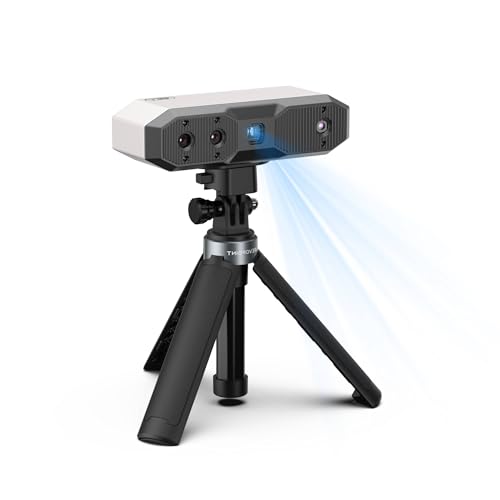
- Up to 0.02mm single-frame precision
- Blue light, RGB color, and six flash LEDs
- Compact 175g design with USB-C and Wi-Fi 6
Best For: Small, intricate, and color-rich miniature scans
Accessible Desktop Option
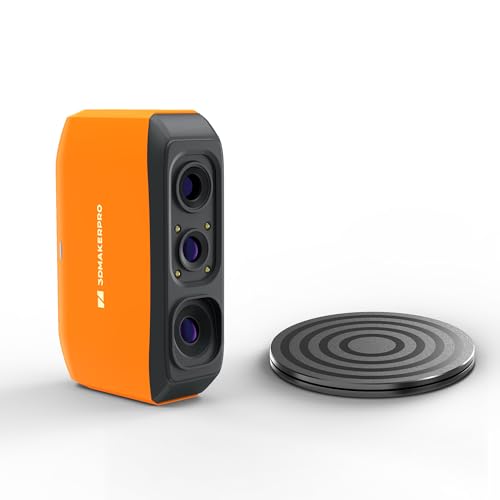
- 0.07mm stated accuracy with NIR light
- Markerless tracking and anti-shake operation
- Scans 40mm to 1200mm objects with JMStudio exports
Best For: DIY, STEM, and desktop miniature scanning
Precision Pick

- Up to 0.01 mm single-frame precision
- Scanning speeds up to 90 FPS
- No-spray scanning for dark and shiny surfaces
Best For: Precision-focused miniature makers and advanced workflows
Fast Detail Option

- Up to 0.02 mm laboratory accuracy
- Captures up to 660,000 points per second
- Supports full-color scanning and wireless accessories
Best For: Fast, versatile scanning across miniature and larger objects
Portable Choice

- Lightweight 190 g design with Wi-Fi 6
- Captures color textures with an RGB camera
- Includes tripod, mini turntable, and calibration board
Best For: Portable, color-capable miniature scanning
Best Wireless Option

- 0.1mm accuracy and 30FPS scanning
- WiFi 6 wireless mobile scanning
- Exports OBJ, STL, and PLY
Best For: Beginners wanting a flexible wireless scanning setup
Best Fine-Detail Pick

- Up to 0.02mm single-frame precision
- Blue light technology for detailed scans
- USB and WiFi 6 connectivity
Best For: Detail-focused miniature and small-object scanning
Best Value Handheld

- 0.1mm accuracy in high-accuracy mode
- Dual modes for small and large objects
- Full-color capture and portable power
Best For: Android users wanting versatile handheld scanning
Premium Precision Pick – Creality Pika
The Creality Pika is a versatile 3d scanner for miniatures when fine detail, portability, and flexible scanning modes matter. Its blue-laser mode is designed for intricate objects, while NIR structured light handles larger subjects and full-color capture.
Best For: Hobbyists and professionals scanning detailed miniatures, figurines, collectibles, and small mechanical parts for 3D printing or CAD work.
Pros:
- Up to 0.03mm accuracy and 0.1mm 3D resolution for detailed scans.
- Dual blue-laser and NIR structured-light modes cover miniature to life-size scanning.
- Lightweight wireless design with Wi-Fi 6, a touchscreen, and swappable batteries.
- Can scan dark and metallic surfaces without spray, according to the supplied specifications.
Cons:
- Best results require a compatible phone or computer; iPad support is still being optimized.
- Its broad feature set may be more than beginners need.
With high stated accuracy, fast capture, and marker-free operation in wired PC mode, the Pika is the most feature-rich option here. Confirm device compatibility before buying, especially if you plan to use an iPad.
Beginner-Friendly Workflow – 3DMakerpro Moose Lite Premium
The 3DMakerpro Moose Lite Premium is a practical 3d scanner for miniatures for users who value assisted tracking and a simpler scanning process. AI visual tracking, anti-shake features, and marker-free scanning are intended to reduce setup and handling difficulties.
Best For: Beginners who want guided scanning features and compatibility across Android, iOS, Windows, and macOS.
Pros:
- AI visual tracking can detect vulnerabilities and support automated model repair.
- Optical anti-shake technology helps compensate for shaky hands.
- Marker-free scanning avoids applying reference dots to the subject.
- JMStudio includes lifetime free OTA software upgrades.
Cons:
- The supplied notes list 0.05mm precision and 10FPS scanning, which may be less suited to fast-moving workflows.
- At 3.65 pounds, it is substantially heavier than the most portable scanners in this roundup.
The Moose Lite Premium emphasizes ease of use rather than headline speed. Its re-scanning function and software support are useful if a scan is interrupted, making it a reasonable option for learning and iterative miniature projects.
Fine-Detail Specialist – Revopoint MINI 2
The Revopoint MINI 2 is a focused 3d scanner for miniatures built around blue-light scanning and small-object detail. Its stated 0.02mm single-frame precision, color camera, and compact 175g body make it well suited to detailed models within its supported size range.
Best For: Makers scanning small figurines, miniatures, and other intricate objects for printing, modeling, or color reference.
Pros:
- Up to 0.02mm single-frame precision with scanning speeds up to 16FPS.
- RGB camera and six flash LEDs help capture color, texture, and marker details.
- IMU, tactile controls, USB-C, and Wi-Fi 6 support easier operation.
- Revo Scan exports to formats including STL, OBJ, PLY, 3MF, GLTF, and FBX.
Cons:
- Results can vary with object material and color; scanning spray may improve performance.
- Supported object sizes range from 10mm to 0.5m, limiting very large or extremely tiny subjects.
- Revo Design is paid separately, Windows-only, and compatible with x86_64 architecture.
The MINI 2 is the strongest detail-oriented choice in this list on stated precision. It is especially compelling for small objects, but buyers should account for possible spray use and verify that their computer and target objects fit the stated requirements.
Accessible Desktop Option – 3DMakerpro Fox
The 3DMakerpro Fox is an entry-level 3d scanner for miniatures aimed at accessible digitization of small to medium objects. Its NIR light, markerless tracking, and anti-shake system can simplify setup, while JMStudio handles scanning, editing, fusion, and export.
Best For: DIY users, STEM learners, and makers scanning desktop miniatures or prototypes from 40mm to 1200mm.
Pros:
- NIR light is described as safe for direct face and body scanning.
- Markerless tracking eliminates the need for target dots.
- Anti-shake technology helps compensate for minor hand tremors.
- JMStudio supports editing, fusion, and OBJ, STL, PLY, and ASC exports.
Cons:
- Its stated 0.07mm accuracy is lower than the higher-precision models in this roundup.
- The product has a learning curve and benefits from basic CAD or 3D-modeling knowledge.
- A capable PC with a dedicated GPU is strongly recommended for smooth software performance.
The Fox is a sensible starting point for users who want broad size coverage without marker application. Plan for time spent learning mesh refinement and slicing, and check that your computer meets the recommended performance level.
Precision Pick – Revopoint MetroY Ultra
The Revopoint MetroY Ultra is a strong choice when a 3d scanner for miniatures needs to capture fine geometry and support demanding workflows. Its blue laser system offers up to 0.01 mm single-frame precision, while multiple scanning modes accommodate detailed parts, deep holes, and larger objects.
Best For: Advanced miniature makers, reverse engineering, and users who prioritize precision, speed, and export flexibility.
Pros:
- Up to 0.01 mm single-frame precision and 0.015 + 0.04 mm x L (m) volumetric accuracy.
- Scans at up to 90 FPS with NVIDIA GPU support.
- Can scan dark, shiny, and metallic surfaces without scanning spray.
- Supports USB and Wi-Fi 6, with exports including STL, OBJ, 3MF, and FBX.
Cons:
- Requires a powerful computer for the listed Windows configuration.
- Its advanced feature set may be more than casual miniature projects require.
The MetroY Ultra stands out for detail-focused users who want fast acquisition, broad surface compatibility, and professional file-format support. Its 450 g weight and battery grip also make mobile scanning practical.
Fast Detail Option – Creality Raptor Pro
The Creality Raptor Pro is a versatile 3d scanner for miniatures and other objects, combining blue laser lines with high-speed capture. Its stated 0.02 mm laboratory accuracy and color-mapping support make it suitable for users who want detailed digital models with optional texture information.
Best For: Makers scanning miniatures and objects across a broad size range who value speed, wireless accessories, and color capture.
Pros:
- Offers up to 0.02 mm accuracy under laboratory conditions.
- Scans at up to 60 FPS and 660,000 points per second.
- Handles objects from 5 mm to 2,000 mm in size.
- Supports full-color 3D scanning and marker-based alignment.
Cons:
- The listed 0.02 mm accuracy is specified for laboratory conditions.
- Marker-based alignment requires using markers when stitching multiple scans.
- The package is listed at 12.17 pounds, making it less convenient to carry.
With its broad scanning range and fast point capture, the Raptor Pro is appealing for users who scan more than just small figures. The included Scan Bridge adds wireless-scanning convenience, while color mapping can help preserve visible miniature details.
Portable Choice – Revopoint INSPIRE 2
The Revopoint INSPIRE 2 is a lightweight 3d scanner for miniatures designed for flexible indoor and outdoor use. Its infrared structured-light and multi-line laser modes, RGB color camera, and adjustable optical zoom help capture geometry and surface appearance across different objects.
Best For: Portable miniature scanning, color-textured models, and users who want to work with a computer, phone, or tablet.
Pros:
- Weighs 190 g and supports Wi-Fi 6 for mobile scanning.
- Provides accuracy up to 0.05 mm and precision up to 0.03 mm.
- Scans reflective or dark surfaces without scanning spray using infrared laser lines.
- Includes a mini turntable, tripod, markers, calibration board, and outdoor filters.
Cons:
- Its 20,000-lux outdoor rating is more limited than the MetroY Ultra’s stated rating.
- Revo Design is paid separately and supports Windows only.
- Its 0.1 mm fused point distance is less fine than the listed point distance of some higher-precision options.
The INSPIRE 2 is a practical pick when portability and ease of use matter as much as raw precision. Built-in color capture and optical zoom add value for miniatures with visible textures or mixed-geometry surfaces.
Best Wireless Option – Creality CR-Scan Ferret Pro
For shoppers seeking a flexible 3d scanner for miniatures, the Creality CR-Scan Ferret Pro combines 0.1mm accuracy, 0.16mm resolution, full-color capture, and 30FPS scanning. Its WiFi 6 bridge supports wireless scanning with compatible mobile devices, while exported OBJ, STL, and PLY files fit common 3D-printing workflows.
Best For: Beginners and hobbyists who want wireless scanning across compatible phones, computers, and outdoor settings.
Pros:
- Up to 0.1mm accuracy with 30FPS scanning.
- WiFi 6 wireless transmission is designed for a smoother mobile workflow.
- Anti-shake tracking helps maintain scan stability during hand movement.
- Exports OBJ, STL, and PLY files for printing and design software.
Cons:
- Highly reflective, transparent, and extremely dark surfaces may require preparation or produce weaker results.
- Wireless mobile scanning requires compatible devices, including iPhone 11 or newer for iOS.
The Ferret Pro is a well-rounded choice when portability and device flexibility matter as much as scan detail. Verify your computer or phone meets the listed requirements before buying.
Best Fine-Detail Pick – Revopoint MINI 2
The Revopoint MINI 2 is aimed at shoppers who prioritize fine detail in a 3d scanner for miniatures. Its industrial-grade blue light system offers single-frame precision up to 0.02mm, while the RGB camera and flash LEDs help capture color and texture details.
Best For: Model makers and detail-focused users scanning small objects within the supported 10 × 10 × 10mm to 0.5 × 0.5 × 0.5m range.
Pros:
- Up to 0.02mm single-frame precision for intricate details.
- Blue light technology helps filter ambient-light interference.
- IMU tracking helps reduce faulty frames from shaky or fast movement.
- Supports USB and WiFi 6 connections with broad file export options.
Cons:
- Scanning spray may be recommended depending on the object’s material and color.
- Objects outside the stated scanning-volume range may produce suboptimal results.
- Revo Design is paid separately, Windows-only software.
With its stronger stated precision and miniature-friendly size range, the MINI 2 is the most detail-oriented option here. Plan for possible scanning spray and check software compatibility before purchase.
Best Value Handheld – Creality CR-Scan Ferret
The Creality CR-Scan Ferret offers a practical entry point for anyone comparing a 3d scanner for miniatures with broader scanning needs. It combines high-accuracy mode with wide-range scanning, 30FPS point-cloud capture, and full-color texture recording for flexible hobby use.
Best For: Hobbyists who want a portable handheld scanner for both smaller items and larger objects, primarily with Android or a computer.
Pros:
- High-accuracy mode reaches up to 0.1mm precision and 0.16mm resolution.
- Dual scanning modes support fine-detail and larger-object capture.
- RGB color camera records realistic textures.
- Can be powered by a 5V power bank or compatible Android device.
Cons:
- Mobile scanning is limited to Android devices; iOS support is listed for the Ferret Pro.
- Computer use requires the specified processor, operating-system, and RAM requirements.
- Firmware should be updated through Creality’s official website for the latest optimizations.
The standard Ferret is a versatile option when you want handheld portability and multiple scan modes without requiring the Pro model’s iOS wireless support. It is especially practical for Android users and PC-based workflows.
How We Picked the Best 3d Scanner for Miniatures
We evaluated these scanners against the needs of miniature makers, hobbyists, model designers, and 3D-printing users. Key considerations included advertised accuracy, scanning frame rate, tracking performance, color capture, portability, connection options, and compatibility with computers or mobile devices. We also considered whether each model is better suited to very small detailed parts, general-purpose objects, or larger subjects that need to be captured alongside fine features.
Accuracy specifications are useful for comparison, but they do not guarantee finished-print detail. Lighting, surface color, gloss, geometry, scanning distance, software processing, and printer capability all affect the final result.
Quick Comparison
- Highest advertised precision: Creality Raptor Pro, followed by Creality Pika.
- Small-object specialists: Revopoint MINI 2 models and 3DMakerpro Moose Lite.
- Fast scanning: Revopoint MetroY Ultra and Creality Raptor Pro.
- Portable wireless workflows: Creality CR-Scan Ferret Pro and Ferret.
- Entry-level flexibility: 3DMakerpro Fox and Revopoint INSPIRE 2.
Key Buying Factors for a 3d Scanner for Miniatures
Accuracy and Resolution
Look for a scanner that can resolve the smallest features you need to reproduce, such as facial details, armor seams, lettering, or mechanical edges. A lower advertised accuracy may still be adequate for larger figurines, while highly detailed masters benefit from a precision-focused scanner.
Tracking and Surface Performance
Miniatures often have repetitive shapes, thin parts, dark areas, or shiny accessories that can challenge tracking. Structured light, laser modes, color capture, markers, and software alignment tools can improve results. Expect to use scanning spray or removable markers when the subject lacks visual texture or reflects light.
Workflow and Compatibility
Check whether the scanner works with your operating system and preferred editing software. Mobile compatibility and wireless bridges are convenient for field work, while a wired desktop connection may offer a more predictable transfer and processing experience. Also confirm the export formats supported by the software you plan to use.
Scan Size and Speed
A scanner designed primarily for tiny parts may capture miniature details more effectively, but a versatile model can be better if you also scan helmets, props, busts, or full-size objects. Higher frame rates can reduce capture time, though stable tracking and clean alignment matter more than speed alone.
Who Should Buy Which 3d Scanner for Miniatures?
Choose a precision-focused model if you are digitizing small masters, jewelry-like parts, or miniatures where surface detail is the priority. Choose a versatile handheld scanner if you want one device for figures, props, repairs, and larger objects. Choose a wireless model if portability and phone or tablet workflows matter most. Choose an entry-level scanner if you are learning 3D scanning and want to keep the initial investment lower.
Before buying, measure your typical subjects and identify the smallest feature you must preserve. That single requirement, combined with your computer or mobile setup, is usually the fastest way to select the right scanner from this list.