
A quiet desktop can make long workdays, video calls, and focused home-office sessions much more comfortable. The best models combine restrained fan noise with enough processing power, memory, storage, and monitor support for your routine.
We’ve selected 10 quiet desktop computers ranging from compact mini PCs to business-oriented towers and small-form-factor systems, covering different budgets and workloads.
Best 10 Quiet Desktop Computers Picks for 2026
Best Performance
Dell Pro i5-14500 Business Desktop

- 14-core Intel i5-14500 processor
- 16GB DDR5 and 512GB PCIe SSD
- Ultra-quiet design with Windows 11 Pro
Best For: Business multitasking and demanding office work
Best Mini PC
GEEKOM A7 Ryzen 7 Quiet Mini Desktop

- 15W low-power Ryzen 7 7730U
- 36dB IceBlast 3.0 cooling
- 32GB RAM and expandable storage
Best For: Compact, efficient, low-noise workspaces
Best Budget Business PC

- Intel Core i3-13100 processor
- 16GB DDR5 with upgrade support
- Dual-monitor outputs and included accessories
Best For: Everyday office and home productivity
Best Refurbished Value

- Six-core Intel i5-8500 processor
- 1TB SSD and built-in wireless
- Renewed Windows 11 Pro tower
Best For: Budget home-office use and everyday multitasking
Best Budget Quiet Desktop

- Ultra-quiet compact tower
- Dual 4K monitor support
- Wi-Fi 6, Bluetooth, and SD reader
Best For: Budget-focused home and office productivity
Best Refurbished Quiet Desktop

- 16GB RAM and 512GB SSD
- Compact refurbished business PC
- Wi-Fi, Bluetooth, HDMI, and DisplayPort
Best For: Everyday office, education, and home computing
Best Performance Quiet Desktop

- 10-core Intel Core Ultra 5 processor
- DDR5 memory and PCIe SSD
- Dual 4K support with Wi-Fi 6
Best For: Modern professional multitasking and business use
Best Budget Business Pick

- 16GB RAM and 256GB SSD
- 4K dual-display support
- Compact renewed business desktop
Best For: Affordable office and home productivity
Best Ultra-Quiet Mini PC
- Ultra-quiet 1L design
- Core i5 performance up to 4.6GHz
- Wi-Fi 6 and 4K dual-monitor support
Best For: Quiet professional and student workspaces
Best Multitasking SFF Desktop

- Six-core Core i7 processor
- 32GB RAM and 512GB NVMe SSD
- Dual DisplayPort and built-in wireless
Best For: Heavy office multitasking and dual displays
Best Performance – Dell Pro i5-14500 Business Desktop
For shoppers seeking quiet desktop computers with strong business performance, this Dell Pro tower pairs a 14th Gen Intel Core i5-14500 with 16GB of DDR5 RAM and a 512GB PCIe SSD. Its ultra-quiet design, Windows 11 Pro, wireless connectivity, and included keyboard and mouse make it a practical ready-to-use workstation.
Best For: Business multitasking, office productivity, and users who want a quiet full-size desktop with upgrade potential.
Pros:
- 14 cores and 20 threads with speeds up to 5.0 GHz for demanding multitasking.
- Fast DDR5 memory and PCIe SSD storage, with support for up to 64GB RAM and 4TB storage.
- Wide port selection, Wi-Fi 6, Bluetooth, TPM security, and dual-display support.
- Includes Windows 11 Pro plus a wireless keyboard and mouse.
Cons:
- Integrated Intel UHD Graphics 770 is not intended for dedicated high-end gaming.
- The listed configuration provides 512GB of storage, which may be limited for very large media libraries.
This is the strongest all-around option in the group for buyers who prioritize quiet operation and modern processing power. Its upgrade headroom also makes it easier to keep useful longer than a basic office PC.
Best Mini PC – GEEKOM A7 Ryzen 7 Quiet Mini Desktop
The GEEKOM A7 is a compact choice among quiet desktop computers, using a low-power Ryzen 7 7730U and IceBlast 3.0 cooling rated at just 36dB. With 32GB of RAM, a 500GB PCIe Gen4 SSD, and a compact aluminum chassis, it suits efficient everyday computing and extended background workloads.
Best For: Space-conscious workspaces, always-on productivity, multitasking, and users who value low power consumption.
Pros:
- 15W TDP helps reduce power use, heat, and cooling noise.
- Eight-core, 16-thread Ryzen 7 processor with speeds up to 4.5 GHz.
- Generous 32GB RAM, expandable to 64GB, with support for up to 4TB SSD storage.
- Compact metal design, dual USB-C ports, dual HDMI, 2.5G LAN, and Wi-Fi 6E.
Cons:
- Integrated Radeon graphics are aimed at 4K playback, display work, photo editing, and casual gaming rather than demanding games.
- The included 500GB SSD offers less initial storage than some full-size desktop configurations.
Choose the A7 when desk space, efficiency, and low noise matter as much as performance. Its memory and storage expansion options add useful flexibility in a remarkably small system.
Best Budget Business PC – Dell QCT1250 Quiet Desktop
For straightforward office computing, this Dell QCT1250 offers quiet desktop computers shoppers can deploy with minimal setup. The tower includes an Intel Core i3-13100, 16GB DDR5 RAM, integrated graphics, Windows 11 Pro, wireless connectivity, and a keyboard and mouse.
Best For: Everyday office tasks, web browsing, email, video calls, and dual-monitor productivity.
Pros:
- Four-core, eight-thread Intel processor with speeds up to 4.5 GHz.
- 16GB DDR5 memory and PCIe SSD support provide responsive everyday performance.
- Supports up to 64GB RAM and 4TB PCIe storage according to the supplied specifications.
- Includes HDMI and DisplayPort outputs, Wi-Fi, Bluetooth, TPM security, and accessories.
Cons:
- The Core i3 is less suited to heavy creation workloads than the i5-based options.
- Integrated Intel UHD Graphics 730 is intended for general display tasks rather than demanding gaming.
This Dell is a sensible fit for offices and home users who need reliable daily performance without paying for a higher-tier processor. Its quiet design and upgrade ceiling make it more adaptable than a strictly entry-level system.
Best Refurbished Value – Dell OptiPlex 3060 i5 Desktop
This renewed Dell OptiPlex 3060 is a value-oriented option for shoppers comparing quiet desktop computers for home or office use. It combines a six-core Intel Core i5-8500 with 32GB DDR4 RAM, a 1TB SSD, built-in Wi-Fi and Bluetooth, and Windows 11 Pro.
Best For: Affordable home-office computing, multitasking, media streaming, and users who want ample memory and storage.
Pros:
- Six-core Intel Core i5-8500 supports multitasking and everyday productivity.
- Large 1TB SSD provides fast booting and generous application and file storage.
- Built-in Wi-Fi, Bluetooth, HDMI, DisplayPort, Ethernet, and multiple USB ports.
- Includes Windows 11 Professional and a full-size keyboard with numeric keypad.
Cons:
- As a renewed 2018-era system, it uses older DDR4 hardware and has a 90-day warranty.
- The supplied details contain conflicting memory information: the title lists 32GB, while the specifications list 8GB installed and maximum.
- Integrated Intel UHD 630 graphics are suited to general use and 4K output, not demanding modern gaming.
The OptiPlex 3060 can be an appealing low-cost choice when 1TB of SSD storage matters more than having the newest platform. Confirm the actual RAM configuration before purchase, especially if heavy multitasking is important.
Best Budget Quiet Desktop – Acer Aspire Business Desktop
The Acer Aspire is a practical choice for shoppers seeking quiet desktop computers for everyday business, school, and home tasks. Its compact tower includes a 256GB PCIe SSD, 8GB of RAM, Windows 11 Home, and support for dual 4K displays.
Best For: Budget-conscious users who need a compact office desktop with flexible connectivity and quiet operation.
Pros:
- Ultra-quiet design suits shared offices and home workspaces.
- Includes HDMI, VGA, USB, Ethernet, Wi-Fi 6, Bluetooth, and an SD card reader.
- Supports dual 4K monitors and includes a wired keyboard and mouse.
- RAM and storage can be configured up to 64GB and 4TB, respectively.
Cons:
- The included configuration has 8GB of RAM and 256GB of storage.
- Intel UHD integrated graphics are intended for general productivity rather than demanding graphics work.
Choose this Acer when quiet operation, essential business connectivity, and a compact design matter more than high-end processing performance. Its upgrade potential also provides room to extend the system’s useful life.
Best Refurbished Quiet Desktop – Dell OptiPlex 7050 SFF
The renewed Dell OptiPlex 7050 is a sensible option for buyers comparing quiet desktop computers at a lower cost. It combines an Intel Core i5-7500 processor with 16GB of DDR4 RAM, a 512GB SSD, Windows 11 Pro, and a compact small-form-factor chassis.
Best For: Everyday business, education, and home users who want strong memory and storage in a refurbished small-form-factor PC.
Pros:
- 16GB of RAM and a 512GB SSD provide a capable productivity setup.
- Includes built-in Wi-Fi, Bluetooth, DisplayPort, HDMI, USB-C, and numerous USB ports.
- Supports up to 4K output and includes a DVD-RW drive.
- Comes with Windows 11 Pro, a keyboard, and a mouse.
Cons:
- The older 2017-era platform uses Intel HD Graphics 630 integrated graphics.
- The listing notes TPM 1.2, so some Windows 11 security features and future updates may not be supported.
- As a renewed product, condition and configuration may require closer inspection before purchase.
This OptiPlex offers a well-equipped refurbished work PC, especially for office software, browsing, and schoolwork. The TPM limitation is the main consideration for buyers prioritizing long-term Windows 11 compatibility.
Best Performance Quiet Desktop – Dell ECT1250 Business Desktop
The Dell ECT1250 is the performance-focused pick among these quiet desktop computers. Its Intel Core Ultra 5 processor, 16GB of DDR5 memory, 512GB PCIe SSD, ultra-quiet design, and dual 4K monitor support make it well suited to modern business multitasking.
Best For: Professionals who want a newer, quiet business desktop with fast memory, broad connectivity, and dual-display support.
Pros:
- 10-core, 10-thread Intel Core Ultra 5 processor reaches up to 4.9GHz.
- DDR5 memory and a PCIe SSD support responsive everyday productivity.
- Includes Wi-Fi 6, Bluetooth, USB-C, HDMI, DisplayPort, Ethernet, and an SD card reader.
- Hardware TPM, a lock slot, and a padlock loop add business-oriented security features.
Cons:
- Integrated Intel UHD graphics are not intended for demanding gaming or professional graphics workloads.
- The listed configuration provides 16GB of RAM and 512GB of storage, while higher capacities are optional configurations.
- Port details should be checked carefully because the listing includes both HDMI input and output specifications.
For buyers who want a current productivity platform rather than a refurbished legacy system, the ECT1250 is the strongest overall fit. It combines quiet operation with modern DDR5 memory, extensive ports, and practical business security.
Best Budget Business Pick – Dell OptiPlex 3050 SFF
The renewed Dell OptiPlex 3050 SFF is a practical choice for quiet desktop computers in a home office or business setting. Its quad-core Intel Core i5 processor, 16GB of RAM, and 256GB SSD cover everyday productivity, browsing, and multitasking, while the compact case saves desk space.
Best For: Budget-conscious users who need a compact Windows 11 Pro desktop for office work, web use, and dual-monitor setups.
Pros:
- 16GB DDR4 RAM and a responsive 256GB SSD.
- Supports up to 4K resolution and dual displays through DisplayPort and HDMI.
- Compact small-form-factor design with eight USB ports.
- Includes a keyboard, mouse, and USB Wi-Fi adapter.
Cons:
- The older sixth-generation processor is less capable than newer systems.
- Storage capacity is modest for large media libraries or applications.
- As a renewed product, condition and packaging may vary; the listed warranty is at least 90 days.
This Dell is a sensible low-cost office computer with useful display connectivity and generous memory. Choose it when value and basic productivity matter more than newer-generation performance.
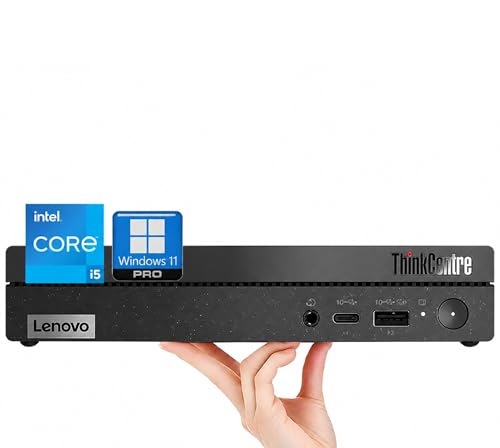
Best Ultra-Quiet Mini PC – Lenovo ThinkCentre 50q
The Lenovo ThinkCentre 50q stands out among quiet desktop computers with an ultra-quiet design and tiny 1L footprint. Its hybrid eight-core Intel Core i5-13420H processor, 16GB of RAM, and 512GB PCIe SSD provide a modern foundation for demanding office work, multitasking, and video conferencing.
Best For: Professionals, students, and home-office users who want a very compact, quiet Windows 11 Pro PC with modern connectivity.
Pros:
- Ultra-quiet design in a compact 1L chassis.
- Modern eight-core processor with speeds up to 4.6GHz.
- 512GB PCIe NVMe SSD and 16GB DDR4 RAM.
- Wi-Fi 6, 4K dual-monitor support, and included keyboard and mouse.
Cons:
- Integrated graphics are intended for general productivity rather than demanding graphics work.
- The compact design offers less expansion flexibility than a larger desktop tower.
- External speakers are required for audio output.
With its quiet operation, current processor platform, and minimal desk footprint, this Lenovo is the strongest fit for users prioritizing a peaceful workspace. It also adds practical business features and a one-year manufacturer warranty.
Best Multitasking SFF Desktop – Dell OptiPlex 7060
The renewed Dell OptiPlex 7060 is a capable option for quiet desktop computers in an office or home workspace. Its six-core Intel Core i7-8700 processor, 32GB DDR4 memory, and 512GB NVMe SSD are well suited to heavy multitasking, while the small-form-factor chassis supports a tidy setup.
Best For: Users who need strong office multitasking, fast storage, and dual-monitor connectivity in a renewed business desktop.
Pros:
- Six-core Core i7 processor with speeds up to 4.6GHz.
- 32GB DDR4 RAM for demanding multitasking.
- Fast 512GB M.2 NVMe SSD.
- Built-in Wi-Fi and Bluetooth, plus dual DisplayPort outputs and a wireless keyboard and mouse.
Cons:
- Integrated Intel UHD 630 graphics are not designed for demanding gaming or creative workloads.
- The product is renewed and includes a limited 90-day warranty.
- Some supplied specifications list 16GB RAM despite the product title stating 32GB, so the delivered configuration should be verified.
This OptiPlex offers the most memory and storage of the three listed systems, making it a strong productivity workstation. It is a good match for buyers who value multitasking capacity and business-class connectivity over a newer platform.
How We Picked These Quiet Desktop Computers
We focused on systems that emphasize quiet operation while still offering practical performance for office work, web browsing, streaming, video calls, light creative tasks, and multitasking. We compared processor generation, core count, memory, SSD capacity, chassis size, connectivity, operating system, monitor support, and upgrade potential.
Because manufacturers and sellers do not always publish standardized noise measurements, “quiet” should be treated as a design goal rather than a guaranteed decibel rating. Fan behavior can also change with room temperature, workload, dust, and power settings.
Quick Comparison
| Type | Best For | Typical Strength | Trade-Off |
|---|---|---|---|
| Mini PC | Small desks and media setups | Compact, efficient design | Fewer internal upgrade options |
| Business tower | Office productivity and expansion | Strong connectivity and serviceability | Larger footprint |
| Small-form-factor PC | Professional workspaces | Balanced size and performance | May require low-profile components |
| Refurbished business desktop | Value-focused buyers | Affordable RAM and SSD configurations | Older processors and shorter upgrade horizons |
Key Buying Factors for Quiet Desktop Computers
Noise and Cooling Design
Look for explicit ultra-quiet claims, efficient processors, sensible ventilation, and solid-state storage. Avoid blocking vents, and leave clearance around the chassis. A quiet computer under light use may become audible during sustained processing.
Processor and Memory
For documents, browsing, and video meetings, a modern midrange processor with 16GB of RAM is a sensible baseline. Choose a newer Core i5 or equivalent Ryzen system for heavier multitasking. Older refurbished models can still be useful, especially with 16GB or 32GB of memory, but offer less long-term headroom.
Storage and Connectivity
An SSD improves startup and application responsiveness while operating silently compared with a mechanical hard drive. Check whether the listed capacity meets your needs and whether storage can be expanded. Also verify Wi-Fi, Bluetooth, Ethernet, USB ports, DisplayPort or HDMI, and support for the number and resolution of monitors you plan to use.
Size, Upgrades, and Support
Mini PCs save the most space but generally provide fewer upgrade paths. Towers are easier to service and may accommodate additional drives or expansion cards. For business use, check the return policy, warranty, Windows edition, included accessories, and the seller’s refurbishment details.
Who Should Buy Which Quiet Desktop Computers?
Choose a mini PC if desk space, low power use, and simple everyday computing matter most. Select a newer business tower if you want stronger multitasking performance and easier future upgrades. A small-form-factor model is a practical middle ground for offices that need a tidy setup without sacrificing standard business connectivity.
Budget shoppers may find refurbished OptiPlex systems attractive when they need plenty of RAM and SSD storage at a lower price. Buyers keeping a computer for several years should prioritize newer processors, 16GB or more of memory, NVMe storage, and a clear upgrade or support path.