
Adding M.2 NVMe cache to a NAS can improve responsiveness for frequently accessed files, virtual machines, databases, and creative workflows. The right enclosure also needs enough drive bays, networking, memory, and software support for your workload.
We’ve selected 10 NAS solutions spanning traditional HDD systems, hybrid HDD/NVMe designs, and all-flash enclosures. Use the guide below to compare capacity, performance, expandability, and practical value before buying.
Best 10 Nas Enclosures with M2 Cache Picks for 2026
Simple Home Storage
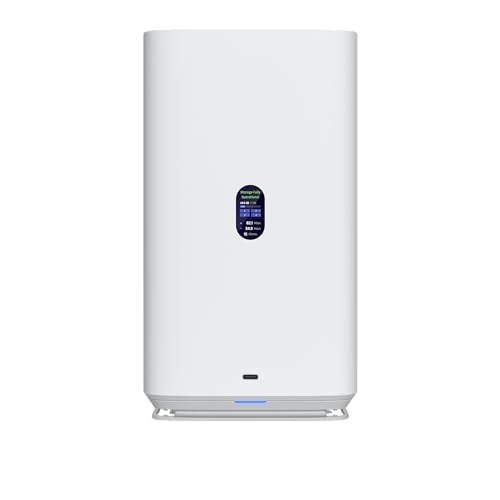
- Four SATA bays support 2.5/3.5-inch drives
- Dual M.2 NVMe slots for SSD caching
- 2.5GbE networking with USB-C connectivity
Best For: Home users and small offices wanting a simple cached NAS
High-Speed Team Storage

- Three M.2 slots support cache or storage pools
- Dual 5GbE ports target up to 1020MB/s
- 16GB DDR5 with Docker, VM, and media support
Best For: Creative teams and advanced home-lab users
Portable NVMe RAID

- Four M.2 2280 bays support up to 32TB
- USB4/Thunderbolt connectivity reaches 40Gbps
- Mac and Windows RAID modes with active cooling
Best For: Fast direct-attached NVMe RAID on Intel or Apple systems
Expandable Powerhouse

- Five HDD bays support up to 174TB
- Three M.2 slots plus 10GbE and 5GbE
- Ryzen 7 processor with up to 96GB DDR5
Best For: Power users needing capacity, speed, and expansion
Best Hybrid DAS for Flexible Expansion

- 4 SATA bays plus 4 M.2 NVMe slots
- Up to 152TB stated combined capacity
- 10Gbps USB-C connectivity
Best For: Flexible direct-attached storage expansion
Best Full NAS for Power Users

- Two PCIe 4.0 M.2 cache or storage slots
- 10GbE plus 2.5GbE networking
- Supports VMs, Docker, and multiple RAID modes
Best For: Demanding home labs, offices, and development workflows
Best Hot-and-Cold Data Enclosure

- Four SATA bays and four M.2 NVMe slots
- Up to 152TB stated total capacity
- Tool-free trays with temperature-controlled cooling
Best For: Manual hot-and-cold data organization
Best Overall

- Four SATA bays plus two M.2 SSD slots
- Dual 10GbE and expandable RAM up to 64GB
- Supports media, Docker, surveillance, and backups
Best For: Creators, enthusiasts, and small office teams
Best DIY Platform

- Four M.2 NVMe slots with two SATA bays
- 16GB LPDDR5 RAM and 10GbE networking
- Unraid starter license included
Best For: Home-lab builders and flexible media servers
Best All-Flash Option

- Four M.2 NVMe slots for all-flash storage
- Intel Core i5, 10GbE, and Wi-Fi 6
- Supports RAID 0, 1, 5, 6, and 10
Best For: Video editors and SSD-first creative workflows
Simple Home Storage – Ubiquiti UniFi 4-Bay NAS
Ubiquiti 4-Bay NAS with 2.5/3.5" HDD Slots & 2 M.2 NVMe SSD Cache Slots by Ubiquiti
Check Price On AmazonThe Ubiquiti UniFi NAS is a straightforward option among NAS enclosures with M2 cache, pairing four SATA HDD bays with two M.2 NVMe SSD cache slots. Its 2.5GbE networking and USB-C connectivity make it suitable for centralized storage and routine file transfers without an overly complex feature set.
Best For: Home users and small offices wanting a compact four-bay NAS with M.2 cache acceleration.
Pros:
- Four 2.5/3.5-inch HDD bays provide flexible drive support.
- Two M.2 NVMe slots are dedicated to SSD caching.
- 2.5GbE networking offers faster transfers than standard Gigabit Ethernet.
- USB-C adds a convenient wired connectivity option.
Cons:
- The supplied notes do not specify advanced RAID, snapshot, or virtualization features.
- Storage drives are not indicated as included.
This is a focused choice if you want the basic structure of a four-bay NAS with M.2 caching and 2.5GbE. Buyers seeking more expansion, application support, or faster networking may need a more feature-rich enclosure.
High-Speed Team Storage – TerraMaster F4-425 Plus
The TerraMaster F4-425 Plus stands out among NAS enclosures with M2 cache for its three M.2 slots, which can support SSD caching or independent storage pools. With an Intel N150 processor, 16GB DDR5 memory, dual 5GbE ports, and four HDD bays, it is designed for demanding home labs, creative workflows, and small teams.
Best For: Creative users, small businesses, and advanced home users needing fast networking, SSD flexibility, and application support.
Pros:
- Triple M.2 design supports cache or separate SSD storage pools.
- Dual 5GbE ports support link aggregation and SMB Multichannel.
- 16GB DDR5 memory and Intel N150 CPU suit multitasking and demanding workloads.
- Supports Docker, virtual machines, media servers, backups, snapshots, and TRAID.
Cons:
- It is diskless, so HDDs and SSDs must be purchased separately.
- Its broader feature set may be more than casual users need.
For buyers comparing NAS enclosures with M2 cache, this model offers one of the most flexible storage layouts in the group. The combination of three M.2 slots, dual 5GbE, and 16GB of memory makes it especially compelling for high-throughput shared storage.
Portable NVMe RAID – JEYI 4-Bay USB4 Enclosure
The JEYI 4-Bay NVMe enclosure takes a different approach to NAS enclosures with M2 cache: all four bays are for M.2 NVMe SSDs rather than SATA hard drives. USB4 and Thunderbolt connectivity can reach 40Gbps, while selectable RAID modes and active cooling target fast external storage workflows.
Best For: Intel or Apple users who need a fast, compact multi-SSD enclosure for external RAID storage.
Pros:
- Four M.2 2280 bays support up to 32TB total capacity based on the supplied limits.
- USB4 and Thunderbolt 3/4 connectivity supports up to 40Gbps.
- RAID 0, RAID 1, and JBOD are supported on Mac; Windows also adds RAID 5.
- Aluminum construction, thermal pads, and a turbo fan help manage heat.
Cons:
- It is an NVMe enclosure, not a conventional NAS with SATA HDD bays or a built-in NAS operating system.
- RAID configuration requires USB4 or Thunderbolt; standard USB use is limited to individual volumes.
- The supplied warranty is six months.
This is best viewed as a high-speed direct-attached RAID enclosure rather than a full network storage server. It makes sense for users prioritizing NVMe performance and portability, provided their host supports the required USB4 or Thunderbolt connection.
Expandable Powerhouse – MINISFORUM N5 Air NAS
The MINISFORUM N5 Air is a high-performance desktop option among NAS enclosures with M2 cache, combining five SATA HDD bays with three M.2 slots. Its Ryzen 7 255 processor, dual DDR5 memory slots, 10GbE and 5GbE networking, and MinisCloud OS make it suited to demanding storage, media, and virtualization-style workloads.
Best For: Power users, media creators, and small teams needing substantial capacity, fast networking, and broad expansion.
Pros:
- Five SATA bays support up to 174TB according to the supplied specifications.
- Three M.2 slots allow a mix of system, cache, and high-speed storage configurations.
- Ryzen 7 255, dual DDR5 slots, and up to 96GB RAM support demanding multitasking.
- Dual 10GbE/5GbE networking, PCIe expansion, OCuLink, and dual USB4 provide extensive connectivity.
Cons:
- The supplied notes do not fully specify the capacity or configuration limits of the M.2 slots.
- OCuLink does not support hot-swapping.
- Its performance and expansion options may be excessive for basic file storage.
Among these NAS enclosures with M2 cache, the N5 Air offers the broadest desktop-computing platform. It is a strong fit when you want large HDD capacity alongside NVMe expansion, fast network links, multiple displays, and room for future upgrades.
Best Hybrid DAS for Flexible Expansion – TerraMaster D8 Hybrid 2
For users comparing nas enclosures with m2 cache, the TerraMaster D8 Hybrid 2 offers a flexible direct-attached storage setup with four SATA drive bays and four M.2 2280 NVMe slots. Its independent-drive design lets you combine large HDD capacity with fast NVMe storage without built-in RAID.
Best For: Home users and professionals who want up to eight independently managed drives for backups, media, or workspace expansion.
Pros:
- Supports four SATA HDDs or SSDs and four M.2 NVMe SSDs.
- Offers up to 152TB of stated combined capacity.
- USB 3.2 Gen 2 Type-C supports up to 10Gbps transfer rates.
- Compatible with Windows, macOS, Linux, and NAS operating systems.
Cons:
- Drives are not included.
- No built-in RAID; third-party RAID software is required if needed.
- As a USB DAS, it is not a standalone NAS server.
The D8 Hybrid 2 is a strong choice when capacity and drive flexibility matter more than an integrated NAS operating system. Its power-management switch and included backup software add convenience for everyday storage and backup workflows.
Best Full NAS for Power Users – UGREEN NAS DXP4800 Pro
Among nas enclosures with m2 cache, the UGREEN NAS DXP4800 Pro stands out as a complete four-bay NAS with two PCIe 4.0 M.2 slots. It combines HDD storage, SSD caching or storage-pool support, virtualization features, and fast networking for demanding home or office environments.
Best For: IT professionals, developers, video editors, and power users running Docker containers, virtual machines, or large media libraries.
Pros:
- Intel Core i3-1315U processor, 8GB DDR5 RAM, and expandable memory up to 96GB.
- Dual M.2 PCIe 4.0 slots can serve as cache or storage.
- Includes 10GbE and 2.5GbE networking for high-speed transfers.
- Supports RAID 0, 1, 5, and 10, plus Docker and virtual machines.
Cons:
- Hard drives and M.2 SSDs are not included.
- Its advanced features may be more than casual users need.
- Maximum stated capacity depends on the installed drives.
This is the most capable option in the group for users who want an actual NAS platform rather than a USB enclosure. Its expandable RAM, high-speed networking, and M.2 support make it well suited to heavier multitasking and 24/7 workloads.
Best Hot-and-Cold Data Enclosure – TerraMaster D8 Hybrid
The TerraMaster D8 Hybrid is a practical option for shoppers seeking nas enclosures with m2 cache, although it functions as a USB direct-attached enclosure rather than a standalone NAS. Four SATA bays and four M.2 NVMe slots let you place frequently used data on SSDs and larger archives on HDDs.
Best For: Users who want to organize hot and cold data across separate HDD and NVMe storage in a single enclosure.
Pros:
- Combines four SATA drives with four M.2 2280 NVMe SSDs.
- Supports up to 152TB of stated total capacity.
- Tool-free trays and Push-Lock design simplify drive installation.
- Temperature-controlled fan and power-on recovery support unattended operation.
Cons:
- Diskless design requires separate HDDs and SSDs.
- No built-in RAID is specified.
- USB 3.2 Gen 2 bandwidth is shared through the enclosure connection.
The D8 Hybrid makes sense for straightforward storage expansion and manual hot-versus-cold data organization. It offers broad operating-system compatibility and useful drive-handling features, but users needing centralized NAS services should choose a full NAS appliance instead.
Best Overall – UGREEN NAS DXP4800 GT
For buyers comparing NAS enclosures with m2 cache, the UGREEN NAS DXP4800 GT offers a strong balance of capacity, networking, and creator-focused features. Its four SATA bays, two M.2 SSD slots, dual 10GbE ports, and expandable memory support make it suitable for demanding home labs, media libraries, backups, and office workloads.
Best For: Creators, tech enthusiasts, and small teams that need high-speed storage, media tools, and room to expand.
Pros:
- Ryzen Embedded R2514 processor, 8GB DDR4 RAM expandable to 64GB, and support for multitasking, Docker, and virtual machines.
- Four SATA bays plus two M.2 SSD slots, with up to 144TB stated total capacity when compatible drives are installed.
- Dual 10GbE networking, an SD card slot, multiple USB ports, 4K HDMI, and built-in surveillance features.
Cons:
- Drives are not included, so the total setup cost depends on separately purchased HDDs and SSDs.
- Advanced features such as link aggregation require compatible network equipment.
The DXP4800 GT is a versatile choice when you want more than basic file storage. Its combination of M.2 expansion, fast networking, local security, and creator-friendly input options makes it particularly compelling for mixed workloads.
Best DIY Platform – LincStation N2 6-Bay NAS
The LincStation N2 is an unusual option among NAS enclosures with m2 cache because it combines four M.2 NVMe slots with two 2.5-inch SATA bays in a compact, diskless chassis. Its included Unraid starter license and 10GbE port make it appealing to users who want to customize storage, media serving, containers, and private-cloud projects.
Best For: DIY NAS builders, Plex or Jellyfin users, and compact home-lab setups using mixed drive types.
Pros:
- Four M.2 NVMe slots and two dedicated SATA bays provide flexible high-speed and general-purpose storage options.
- Intel N100 processor with 16GB LPDDR5 memory supports media streaming, backups, and multitasking.
- Includes an Unraid starter license, plus 10GbE, USB-C 10G, HDMI 2.0, and a two-year warranty.
Cons:
- Only two SATA bays are provided, limiting conventional hard-drive expansion.
- The system is diskless, and buyers must select and install their own storage drives.
Choose the N2 if flexibility matters more than a traditional multi-drive enclosure. Its four NVMe positions are well suited to fast storage pools, while Unraid supports mixing drive sizes and expanding into applications such as Docker, game servers, and media hosting.
Best All-Flash Option – UGREEN NAS DXP480T Plus
For users specifically seeking NAS enclosures with m2 cache, the UGREEN NAS DXP480T Plus takes an all-flash approach with four M.2 NVMe slots. Its Intel Core i5 processor, 10GbE connection, Wi-Fi 6, and support for multiple RAID levels make it a strong fit for fast project storage and video-editing workflows.
Best For: Video editors and creators who prioritize fast SSD-based access over large hard-drive capacity.
Pros:
- Four M.2 NVMe slots create an all-flash storage platform with stated capacity up to 32TB.
- 12th-generation Intel Core i5 processing, 10GbE networking, Wi-Fi 6, and built-in 128GB SSD.
- Supports JBOD, Basic, RAID 0, 1, 5, 6, and 10 configurations, along with Docker and virtual machines.
Cons:
- It uses SSD-only storage, so maximum capacity is lower than many larger HDD-based NAS systems.
- NVMe drives are not included, and advertised capacity is based on RAID 0 with compatible drives.
- Actual transfer speeds depend on the network, processor, drives, router, and file sizes.
The DXP480T Plus is the most focused choice here for an all-flash workflow. It makes sense when low-latency access and fast editing matter more than economical bulk storage, especially for users with a 10GbE network.
How We Picked the Best Nas Enclosures with M2 Cache
We focused on systems that support NVMe SSDs as cache, storage, or both, while covering a range of configurations and budgets. The selection includes four-bay and larger enclosures, hybrid systems that combine hard drives with NVMe slots, and compact all-flash options.
We also considered processor capability, installed memory, upgrade potential, networking, RAID flexibility, cooling, and the intended audience. A NAS used for backups has different priorities from one running Plex, Docker containers, virtual machines, or high-resolution video projects.
Quick Comparison
- Best for balanced home storage: Ubiquiti’s four-bay NAS combines conventional drive capacity with two M.2 cache slots.
- Best for an accessible four-bay platform: The TERRAMASTER F4-425 Plus adds an Intel N150 processor and 16GB of DDR5 memory.
- Best for NVMe-focused setups: JEYI’s four-bay enclosure supports individual drives and RAID modes with active cooling.
- Best for high-end expansion: The MINISFORUM N5 Air offers a Ryzen 7 processor, expandable DDR5 memory, and 10GbE.
- Best for hybrid storage density: TERRAMASTER’s D8 Hybrid models combine four HDD bays with four NVMe positions.
- Best for professional and creator workloads: UGREEN’s DXP4800 Pro, DXP4800 GT, and DXP480T Plus target power users, teams, and video editors.
- Best for DIY flexibility: The LincStation N2 pairs two SATA bays with four M.2 slots, 10GbE, and 16GB of memory.
Key Buying Factors for NAS Enclosures with M.2 Cache
Cache Design and NVMe Support
Check whether the M.2 slots are intended for read cache, write cache, a separate storage pool, or multiple roles. Cache can accelerate repeated workloads, but it does not replace backups and may provide limited benefit for sequential media files or infrequently accessed data.
Drive Bays, RAID, and Expansion
Choose enough bays for your current capacity plus future growth. HDD bays generally offer the lowest cost per terabyte, while NVMe storage delivers lower latency and less noise. Confirm supported RAID levels, drive compatibility, hot-swap behavior, and whether mixing drive sizes wastes usable capacity.
Networking and Processing Power
Gigabit Ethernet is adequate for basic backups, but 2.5GbE or 10GbE is more appropriate for multiple users, large media libraries, editing, and fast SSD pools. A stronger CPU and more RAM matter when running containers, applications, encryption, indexing, or virtual machines.
Cooling, Noise, and Software
NVMe drives and high-capacity HDDs generate heat, so fan design and airflow are important for sustained workloads. Also verify the operating system’s backup tools, file-sharing protocols, app ecosystem, remote access, monitoring, and update policy before committing to a platform.
Who Should Buy Which Nas Enclosures with M2 Cache?
Home users and small offices should prioritize easy setup, dependable backups, and enough HDD capacity. A balanced four-bay enclosure with M.2 cache is usually the most practical choice.
Power users and developers should look for expandable memory, a capable processor, 10GbE, and flexible NVMe configurations. These features better support Docker, virtual machines, databases, and self-hosted services.
Creators and video editors benefit from 10GbE, high-speed SSD pools, strong cooling, and fast shared storage. Hybrid models suit teams needing both large HDD archives and responsive NVMe working space, while all-flash systems favor low latency and quiet operation.
Before buying, calculate usable RAID capacity rather than raw drive capacity, budget for compatible SSDs and backups, and confirm that the enclosure’s software supports the services you plan to run.