
The best desktop computers in 2026 cover a wide range of needs, from affordable everyday systems and space-saving all-in-ones to powerful gaming PCs and upgrade-friendly towers.
This roundup compares key specifications—including processor performance, memory, storage, graphics, display design, and connectivity—so you can choose a system that fits both your workload and budget.
Best 10 Desktop Computers Picks for 2026
Best Budget Desktop
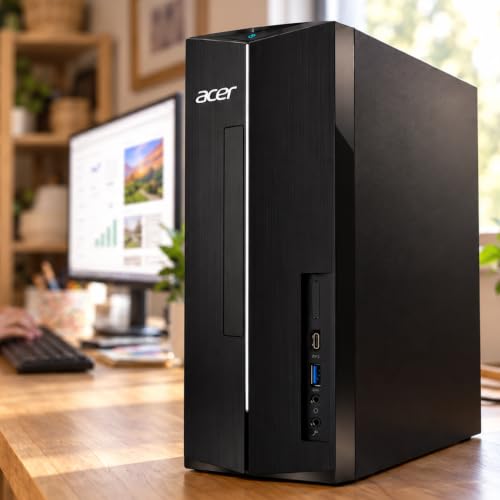
- 16GB RAM and a 256GB PCIe SSD
- Windows 11, keyboard, and mouse included
- Compact design with Wi-Fi 6E and six USB ports
Best For: Everyday home, student, and office tasks
Best All-in-One Desktop

- 23.8-inch FHD IPS display with 99% sRGB
- Built-in HDR webcam and Dolby Atmos speakers
- Keyboard, mouse, and one-year onsite service included
Best For: Home offices, study, calls, and streaming
Best Mini Gaming Desktop

- Core i7-13800H with dedicated RTX 4060 graphics
- 16GB DDR5 RAM and 1TB PCIe 4.0 SSD
- Compact design with Wi-Fi 6E and 4K output
Best For: Compact gaming and demanding creative workloads
Best Business Tower Desktop

- Intel Core Ultra 7 processor with built-in AI
- 32GB DDR5 RAM for demanding multitasking
- Supports multiple monitors and tool-less upgrades
Best For: Business productivity and multi-monitor work
Best Space-Saving Desktop
Lenovo IdeaCentre V100 All-in-One

- 23.8-inch Full HD IPS display
- 512GB SSD and Wi-Fi 6
- Compact design for everyday work
Best For: Students, home offices, and general productivity
Best Budget Gaming Desktop

- Dedicated Arc A380 graphics
- 16GB RAM and 1TB SSD
- RGB case with keyboard and mouse
Best For: Entry-level gaming and complete PC setups
Best Refurbished Office Desktop

- Six-core Core i5-8500 processor
- 1TB SSD with Windows 11 Pro
- Wi-Fi, Bluetooth, HDMI, and DisplayPort
Best For: Home offices, business work, and multitasking
Best All-in-One for Everyday Work

- 21.5-inch Full HD anti-glare display
- Intel N100 quad-core processor
- Includes keyboard, mouse, and Windows 11 Home
Best For: Students, home offices, and everyday productivity
Best for High-Performance Business Multitasking

- Core i7-12700K with 12 cores and 20 threads
- 32GB DDR5 RAM and 1TB PCIe SSD
- Supports two 4K monitors
Best For: Business multitasking, content creation, and data processing
Best Renewed Value for Office Use

- Core i7-9700 eight-core processor
- 32GB RAM with a 1TB NVMe SSD
- Dual DisplayPort support and Wi-Fi 6E
Best For: Office productivity and budget-conscious business setups
Best Budget Desktop – Acer Aspire Everyday Desktop
For shoppers seeking practical desktop computers for everyday use, the Acer Aspire combines 16GB of RAM with a 256GB PCIe SSD. Its compact chassis, included peripherals, and Windows 11 setup make it a straightforward choice for home, student, and basic business tasks.
Best For: Web browsing, homework, office work, entertainment, and space-conscious desks.
Pros:
- 16GB RAM supports everyday multitasking.
- PCIe SSD provides quick boot times and file access.
- Includes Windows 11 Home, keyboard, and mouse.
- Offers six USB ports, HDMI, DisplayPort, VGA, and Wi-Fi 6E.
Cons:
- Integrated Intel UHD Graphics are not intended for demanding gaming.
- 256GB of storage may feel limited for large media libraries.
- Seller warranty is listed as 30 days.
The Acer Aspire is a sensible desktop computer for routine productivity and home use. Its compact design and broad connectivity are useful, but shoppers needing substantial storage, advanced graphics, or longer warranty coverage may want to look higher in the range.
Best All-in-One Desktop – Dell 23.8-Inch FHD All-in-One
This Dell is one of the most convenient desktop computers for buyers who want a clean, ready-to-use workspace. The 23.8-inch FHD IPS display, built-in webcam, speakers, and wireless connectivity reduce cable clutter for work, study, video calls, and streaming.
Best For: Home offices, education, video calls, streaming, and users who prefer an all-in-one setup.
Pros:
- 23.8-inch FHD IPS display covers 99% sRGB.
- Integrated 5MP+IR HDR camera supports clearer video calls.
- Built-in Bluetooth speakers feature Dolby Atmos spatial sound.
- Includes a Dell keyboard and mouse plus one-year onsite service.
Cons:
- Non-touch display may not suit shoppers seeking touch input.
- Integrated graphics are designed for general use rather than demanding gaming.
- All-in-one designs generally offer less component flexibility than tower desktops.
Choose this Dell when simplicity and a tidy desk matter more than extensive upgrade options. Its display, camera, audio, and included peripherals make it particularly convenient for communication and everyday computing.
Best Mini Gaming Desktop – TOPGRO T1-Pro RTX 4060
Among compact desktop computers, the TOPGRO T1-Pro stands out for pairing an Intel Core i7-13800H processor with dedicated GeForce RTX 4060 graphics. It also provides 16GB of DDR5 RAM, a 1TB PCIe 4.0 SSD, and Windows 11 Pro in a space-saving mini-PC design.
Best For: Gaming, creative workloads, demanding multitasking, and users who want dedicated graphics in a compact format.
Pros:
- Dedicated RTX 4060 graphics include 8GB of GDDR6 memory.
- 1TB PCIe 4.0 SSD offers fast storage and generous capacity.
- DDR5 memory runs at 4800MHz and can expand up to 64GB.
- Supports Wi-Fi 6E, Bluetooth 5.3, 2.5G LAN, and 4K output.
Cons:
- Keyboard and mouse are not included.
- Mini-PC cooling and upgrade flexibility may be more constrained than a tower.
- Integrated graphics-card interface information may be less straightforward for upgrade planning.
The TOPGRO is the strongest performance-focused option here for buyers who value dedicated graphics without a full-size tower. Confirm your preferred peripherals and game requirements before purchasing, but the hardware provides a capable foundation for gaming and creative use.
Best Business Tower Desktop – Dell Tower Core Ultra 7
The Dell Tower is a strong choice for desktop computers aimed at productivity, business, and multimedia work. Its Intel Core Ultra 7 processor, 32GB of DDR5 RAM, expandable tower design, and multi-monitor support provide a useful combination for demanding office workflows.
Best For: Business productivity, multitasking, multimedia work, and multi-monitor office setups.
Pros:
- 32GB of DDR5 RAM is well suited to heavier multitasking.
- Intel Core Ultra processor includes built-in AI capabilities.
- Supports up to four FHD monitors or two 4K displays.
- Tool-less access and a removable side panel simplify upgrades.
Cons:
- Integrated Intel UHD Graphics are not aimed at high-end gaming.
- No display is included.
- The listed storage capacity is not clearly specified in the supplied details.
This Dell is a practical desktop computer for users who need abundant memory, strong office performance, and room to expand. Its integrated graphics make it better suited to productivity and multimedia than graphics-intensive gaming, while TPM security and onsite service add business-oriented value.
Best Space-Saving Desktop – Lenovo IdeaCentre V100 All-in-One
The Lenovo IdeaCentre V100 is a practical desktop computer for everyday home, school, and office work. Its 23.8-inch Full HD IPS display, compact all-in-one design, and included keyboard help keep a workspace organized without requiring a separate monitor.
Best For: Students, home offices, reception areas, and general browsing and productivity.
Pros:
- Space-saving all-in-one design with a 23.8-inch anti-glare IPS display
- 512GB PCIe SSD supports quick boot times and app launches
- Wi-Fi 6, Bluetooth 5.2, Gigabit Ethernet, and five USB ports
- Upgradeable DDR4 memory supports up to 32GB total
Cons:
- Intel N100 processor and integrated graphics are intended for everyday computing, not demanding gaming
- Includes only 8GB of RAM as configured
- No optical drive
This Lenovo is a sensible choice when desk space and simplicity matter more than high-end performance. The Full HD screen, webcam, speakers, and modern connectivity make it ready for routine productivity and video calls.
Best Budget Gaming Desktop – Odyssey Sahara V1 Gaming PC
The Odyssey Sahara V1 is a gaming-focused desktop computer with a dedicated Intel Arc A380 graphics card, 16GB of RAM, and a 1TB SSD. Its tempered-glass case, RGB lighting, and included gaming keyboard and mouse give it a ready-to-use gaming setup appearance.
Best For: Entry-level PC gaming, RGB-style setups, and users who want a complete tower bundle.
Pros:
- Dedicated Intel Arc A380 graphics with 6GB of GDDR6 memory
- 16GB of DDR4 RAM and a 1TB SSD provide useful capacity for gaming and applications
- Tempered-glass side panel and customizable RGB lighting
- Gaming keyboard and mouse are included
Cons:
- Graphics card brand may vary
- Uses an older 8th-generation Core i5-8500 platform
- 30-day limited warranty is shorter than many new-PC warranties
The Sahara V1 offers more gaming-oriented hardware than a basic office desktop, while keeping the setup straightforward with peripherals included. It is best suited to buyers who prioritize dedicated graphics and appearance over a newer processor platform.
Best Refurbished Office Desktop – Dell OptiPlex 3060 Tower
The renewed Dell OptiPlex 3060 is a capable desktop computer for office work, multitasking, media streaming, and everyday home use. Its six-core Intel Core i5 processor, 1TB SSD, built-in wireless connectivity, and Windows 11 Pro make it a flexible tower for an existing monitor setup.
Best For: Home offices, business tasks, multitasking, and buyers seeking a renewed tower with strong memory and storage.
Pros:
- Six-core Intel Core i5-8500 processor supports demanding multitasking
- 1TB SSD provides fast primary storage and boot performance
- Built-in Wi-Fi and Bluetooth simplify wireless connections
- Includes HDMI, DisplayPort, USB 3.0, USB 2.0, and Ethernet
Cons:
- Renewed system includes a 90-day warranty
- Integrated Intel UHD 630 graphics are not intended for modern high-end gaming
- Supplied specifications contain conflicting RAM information; verify the configured memory before purchase
This OptiPlex is a practical refurbished option for buyers who already have a monitor and want substantial storage, connectivity, and multitasking capability. Its business-oriented tower design also leaves room for a more traditional workstation setup.
Best All-in-One for Everyday Work – HP 21.5-inch FHD All-in-One
This HP all-in-one is a space-saving choice for shoppers comparing desktop computers for schoolwork, home tasks, and everyday office use. Its 21.5-inch Full HD anti-glare display, built-in webcam, included keyboard and mouse, and Windows 11 Home make it easy to set up as a complete workstation.
Best For: Students, home offices, and general productivity where a clean all-in-one design is useful.
Pros:
- 21.5-inch 1920 x 1080 anti-glare VA display
- Intel N100 quad-core processor with integrated Intel UHD Graphics
- Includes keyboard, mouse, webcam, Wi-Fi 6, and multiple USB ports
- Adjustable stand tilts from -6° to 21°
Cons:
- Integrated graphics are intended for everyday computing rather than demanding graphics work
- All-in-one design offers less component flexibility than a tower desktop
Choose this HP when simplicity and a tidy desk matter more than expandability. The listed 8GB RAM and 384GB storage configuration suits routine browsing, documents, video calls, and media, while the integrated docking hub adds convenient connectivity.
Best for High-Performance Business Multitasking – Dell Core i7 Tower
This Dell tower stands out among desktop computers for demanding office workloads, data processing, and content creation. Its Intel Core i7-12700K processor, 32GB of DDR5 memory, 1TB PCIe SSD, and Windows 11 Pro provide a strong foundation for intensive multitasking.
Best For: Business users, content creators, and professionals who need fast processing and dual-display support.
Pros:
- 12-core, 20-thread Intel Core i7-12700K processor reaching up to 5.0GHz
- 32GB DDR5 RAM and 1TB PCIe SSD for responsive multitasking and storage
- Supports two 4K monitors through HDMI and DisplayPort
- Includes Windows 11 Pro, Wi-Fi, Bluetooth, USB-C, keyboard, and mouse
Cons:
- Integrated Intel UHD Graphics 770 are not intended for dedicated GPU workloads
- Tower format takes more desk space than an all-in-one or small-form-factor PC
This Dell is the strongest performance-oriented option in the group for processor-heavy productivity. Its broad port selection and business-focused security features, including TPM and a lock slot, make it especially practical for a professional workstation.
Best Renewed Value for Office Use – Dell OptiPlex 7070 SFF
This renewed Dell OptiPlex is a practical value pick among desktop computers for home and business computing. It combines an eight-core Intel Core i7-9700 processor with 32GB of DDR4 RAM, a new 1TB NVMe SSD, Windows 11 Pro, and a small-form-factor chassis.
Best For: Office users and budget-conscious buyers who want generous memory, fast storage, and support for two displays.
Pros:
- Eight-core Core i7-9700 processor with speeds up to 4.7GHz
- 32GB DDR4 RAM and 1TB NVMe M.2 SSD
- Supports two displays through dual DisplayPort outputs
- Includes Wi-Fi 6E, wireless keyboard and mouse, and Windows 11 Pro
Cons:
- Renewed product includes a 90-day warranty
- Uses older DDR4 memory and a ninth-generation processor
- Integrated Intel UHD Graphics 630 are suited to productivity rather than demanding graphics tasks
The OptiPlex 7070 offers a balanced office setup with substantial RAM and quick NVMe storage at a potentially lower cost than newer systems. Its SFF design and available expansion capacity make it a sensible choice when business features and everyday responsiveness are priorities.
How We Picked These Desktop Computers
We selected systems across several practical categories rather than focusing on one type of buyer. The lineup includes all-in-one PCs for simplified setup, compact desktops for smaller workspaces, refurbished business-class machines for value, gaming systems with dedicated graphics, and full-size towers for demanding workloads.
Our comparison emphasizes the components that most affect daily use: processor generation and core count, RAM capacity, SSD storage, graphics hardware, display quality, operating system, wireless connectivity, and upgrade potential. We also considered whether each computer includes useful accessories such as a keyboard, mouse, docking hub, or built-in monitor.
Quick Comparison
| Best For | Recommended Type | What to Look For |
|---|---|---|
| Everyday home and office tasks | Budget tower or all-in-one | 16GB RAM and an SSD |
| Small workspaces | Mini PC or all-in-one | Compact design and dependable connectivity |
| Gaming | Dedicated-graphics desktop | Modern GPU, 16GB RAM, and fast cooling |
| Heavy multitasking | Performance tower | High-core-count CPU and 32GB RAM |
| Long-term flexibility | Standard desktop tower | Accessible upgrades and multiple display outputs |
Key Buying Factors for Desktop Computers
Processor and Memory
The processor determines how quickly a computer handles applications, while RAM affects multitasking. For browsing, office work, streaming, and schoolwork, 16GB is a sensible target. Choose 32GB for heavier spreadsheets, content creation, virtual machines, or demanding multitasking.
Storage
An SSD makes startup and application loading substantially faster than a traditional hard drive. A 256GB drive can work for basic use, but 512GB or 1TB offers more room for photos, games, applications, and local files.
Graphics and Displays
Integrated graphics are adequate for productivity, video playback, and casual games. Dedicated GPUs are preferable for modern gaming, 3D work, and GPU-accelerated creative applications. All-in-one systems simplify setup by combining the computer and monitor, but towers generally provide more upgrade freedom.
Ports, Networking, and Upgradeability
Check for enough USB ports, video outputs, Wi-Fi, Bluetooth, and the connections your accessories require. A tower with accessible RAM, storage, and graphics-card slots is usually easier to maintain and upgrade than a compact or all-in-one design.
Who Should Buy Which Desktop Computers?
For Home, School, and Office Use
Choose an affordable desktop or all-in-one with an SSD and at least 8GB to 16GB of RAM. These systems are well suited to documents, web applications, video calls, streaming, and general family use.
For Compact Workspaces
A mini PC or all-in-one is the better fit when desk space is limited. All-in-ones reduce cable clutter, while mini PCs let you pair the computer with a monitor you already own.
For Gaming and Creative Work
Prioritize a dedicated graphics card, a modern multi-core processor, 16GB or more of RAM, and fast NVMe storage. Also confirm that the case and power supply leave room for future upgrades.
For Power Users and Long-Term Value
A full-size tower with 32GB of RAM, a strong modern CPU, multiple display outputs, and standard upgradeable components is the most flexible choice for demanding work and future expansion.