
Enclosed resin printers can help contain odors, reduce dust exposure, and create a more controlled workspace for resin 3D printing. This roundup covers complete printers and compatible enclosures for desktop setups of different sizes.
We compare ventilation, UV protection, build-space compatibility, temperature control, and ease of setup so you can choose equipment that fits your printer, room, and printing habits.
Best 10 Enclosed Resin Printers Picks for 2026
YOOPAI Large Enclosure

- Holds a printer and curing machine
- Carbon filter with exhaust ventilation
- Large viewing window and enclosed design
Best For: Large resin-printing workspaces
ANYCUBIC Photon Mono 4

- 7-inch 10K monochrome LCD
- 17 μm XY pixel size
- Four-point leveling and power resume
Best For: Detailed desktop resin printing
Ventilated Resin Tent

- Adjustable-speed 12V ventilation
- Three-layer filter system
- UV-blocking window and fire-resistant fabric
Best For: Compact compatible resin printers
Creality HALOT-X1 Neo

- 9K LCD with 18 μm XY resolution
- Factory pre-leveled build platform
- USB, WiFi, and Creality Cloud transfers
Best For: Beginners and miniature creators
Best All-Around Fit
ELEGOO Desktop Resin Printer Enclosure

- Fan and duct help reduce resin odors
- Protects against dust, debris, and splashes
- Foldable frame with broad desktop compatibility
Best For: Everyday indoor desktop resin printing
Best Extra-Large Option
Creality Thermal Resin Printer Enclosure

- Large 1000 × 500 × 1000 mm interior
- Fan interface supports ventilation setup
- UV blocking, insulation, and dust protection
Best For: Large resin-printing stations with multiple devices
Best Filtration Setup
ELEGOO Resin Printer Enclosure with Ventilation

- Exhaust fan, hose, and filter support odor control
- Six-sided enclosure blocks dust and splashes
- Insulated chamber with high-transparency viewing window
Best For: Indoor printing with a focus on ventilation
Best Ventilated Pick
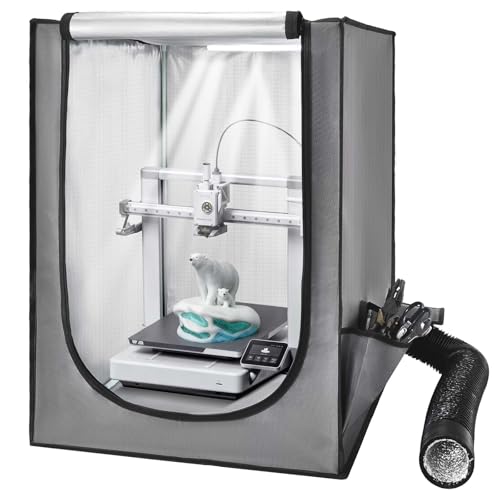
- Ventilation system helps expel smoke and dust
- Constant-temperature design supports consistent printing
- Window and LED make monitoring easier
Best For: Users wanting ventilation and visibility in a compact enclosure
Best Odor-Control Setup
Makacces Resin Printer Enclosure
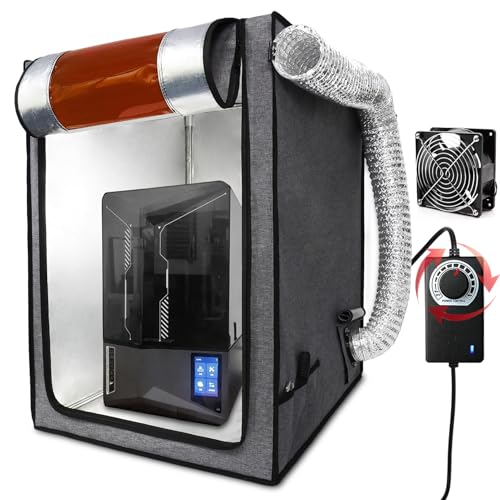
- Adjustable-speed 12V fan vents fumes and smoke
- Brown window helps block UV rays
- Stainless steel frame and fire-resistant fabric
Best For: Makers focused on adjustable airflow and odor extraction
Best Simple Pick
Creality Resin Printer Enclosure

- 1000 x 500 x 1000mm interior fits multiple devices
- Helps isolate dust, noise, and odors
- Flame-retardant fabric and metal frame add durability
Best For: Dedicated workspaces housing printers and post-processing equipment
YOOPAI Large Enclosure – Dual-Printer Odor Control
For makers comparing enclosed resin printers setups, the YOOPAI Large Resin 3D Printer Enclosure is a roomy tent designed to hold a resin printer and curing machine together. Its ventilation kit, carbon filter, viewing window, and enclosed structure address common workspace concerns such as odors, dust, and resin splashes.
Best For: Users who need a large enclosure for a resin printer and curing machine, provided both units fit within the 30 x 19.7 x 28.3-inch internal space.
Pros:
- Wide interior can accommodate two devices, such as a printer and curing machine.
- Built-in carbon filter, exhaust fans, and expandable pipes support odor and emission management.
- Large transparent front window enables monitoring without opening the cover.
- Six-sided enclosure helps reduce dust exposure and resin splashes.
Cons:
- Its large footprint requires careful workspace planning and measurement.
- Airflow slows when exhaust passes through the activated carbon filter.
- Printer and curing-machine dimensions should be checked before ordering.
The YOOPAI is a practical choice when capacity matters more than compactness. Its insulation may help maintain a steadier internal temperature, while the ventilation design gives users options for filtering or routing exhaust.
ANYCUBIC Photon Mono 4 – High-Detail Resin Printing
The ANYCUBIC Photon Mono 4 is a high-resolution resin printer for users who prioritize fine detail in a compact desktop format. Its 7-inch 10K monochrome LCD, uniform LighTurbo lighting, and 153.4 x 87 x 165 mm build volume make it a strong option to pair with enclosed resin printers workspaces.
Best For: Beginners and detail-focused makers who want a compact resin printer with straightforward leveling and a useful mid-size build area.
Pros:
- 10K resolution and 17 x 17 μm pixel size support highly detailed models.
- LighTurbo matrix lighting is designed to provide stable, uniform exposure and smoother surfaces.
- Four-point leveling is intended to reduce repeated leveling after the initial setup.
- Power-resume functionality can reduce wasted material after an outage.
Cons:
- The Anycubic app is not supported for this model.
- The build volume is limited compared with larger resin printers.
- Its 10 x 10 x 15-inch dimensions still need to be checked against an enclosure’s interior.
Photon Mono 4 suits buyers seeking detailed prints without moving to a larger machine. Pair it with an appropriately sized enclosure and remember that the advertised workflow does not include Anycubic app support.
Ventilated Resin Tent – Filtered Workspace Protection
This multifunctional enclosure is a ventilation-focused tent for smaller resin printers and wash machines. It combines a UV-blocking viewing window, adjustable fan speed, three-layer filtration, and fire-resistant fabric for users building enclosed resin printers workspaces.
Best For: Owners of compatible compact LCD resin printers who want adjustable airflow and filtered ventilation in a lightweight enclosure.
Pros:
- Adjustable 12V fan speed allows airflow to be tailored to the setup.
- Three-layer filtration is designed to capture dust and harmful gases.
- UV-blocking window permits progress monitoring while helping protect resin prints.
- Stainless-steel pipes and a larger view window improve the updated enclosure design.
Cons:
- The printer is not included.
- It is not water resistant.
- Replacing the steel fan bracket requires printing a plastic adapter from the specified Thingiverse file.
This tent offers useful ventilation controls at a relatively light 1.8 kg, but compatibility remains important. Measure the entire printer or wash-machine setup before buying, especially when using models outside the listed compatible series.
Creality HALOT-X1 Neo – Beginner-Friendly 9K Printer
The Creality HALOT-X1 Neo is a compact resin printer built around beginner-friendly setup and high-resolution output. Its pre-leveled platform, 9K LCD, WiFi and USB transfers, and broad slicer compatibility make it a convenient candidate for an enclosed resin printers station.
Best For: Beginners, miniature creators, tabletop gamers, and DIY users who want high-resolution printing with flexible file-transfer options.
Pros:
- 9K resolution and 18 μm XY pixel size support detailed miniatures and intricate models.
- Factory pre-leveling is designed to simplify initial setup.
- Files can be transferred through USB, 2.4GHz WiFi, or Creality Cloud.
- Works with HALOT BOX, CHITUBOX, and Lychee Slicer.
Cons:
- The 153.36 x 77.76 x 160 mm build volume is compact.
- Its 9.27 x 9.06 x 15.57-inch exterior dimensions must fit the selected enclosure.
- Some AI model-generation features may take up to 3.5 hours.
The HALOT-X1 Neo emphasizes easy onboarding without giving up fine resolution. Its compact footprint should work well in a suitably sized enclosure, while WiFi, USB, and cloud options give users flexibility when preparing prints.
Best All-Around Fit – ELEGOO Desktop Resin Printer Enclosure
If you need an enclosed resin printer setup for everyday indoor printing, this ELEGOO kit focuses on odor control, cleanliness, and broad desktop-printer compatibility. Its included exhaust fan and duct, viewing window, and foldable frame make it a practical option for a home workspace.
Best For: Desktop resin printer users who want odor reduction, dust protection, and easy storage.
Pros:
- Included exhaust fan and duct help manage resin odors.
- Enclosed design helps protect prints and equipment from dust, debris, and resin mess.
- Insulated enclosure can help maintain steadier printing temperatures in colder environments.
- Foldable metal-frame design and clear viewing window add convenience.
Cons:
- Its 49 × 60 × 72 cm interior should be checked against your printer dimensions.
- The enclosure weighs 5.85 pounds, so it is portable but not ultralight.
This is a balanced choice among enclosed resin printers for users who want ventilation support and a cleaner, more stable printing area without giving up portability. Confirm the interior size before ordering, particularly for larger machines.
Best Extra-Large Option – Creality Thermal Resin Printer Enclosure
Among enclosed resin printers, this Creality cover stands out for its 1000 × 500 × 1000 mm format and room for a printer, curing machine, or wash station. It also adds a fan interface, UV-blocking material, and thermal insulation for a more controlled workspace.
Best For: Users with larger resin-printing setups who need space for multiple pieces of equipment.
Pros:
- Extra-large interior accommodates most resin printers, curing machines, and wash stations.
- Fan interface supports exhaust-fan connection for ventilation.
- Thermal lining helps maintain temperature, while UV-blocking material helps prevent unwanted curing.
- Flame-retardant aluminum foil cloth, metal framing, and a clear viewing window add practical protection.
Cons:
- The larger enclosure requires more workspace than compact alternatives.
- An exhaust fan is connectable through the interface but is not specifically listed as included in the supplied notes.
- At 7.78 pounds, it is the heaviest option in this group.
This Creality model is a strong fit when enclosure capacity matters more than compact storage. Its large footprint and fan interface make it particularly useful for a fuller resin-printing station.
Best Filtration Setup – ELEGOO Resin Printer Enclosure with Ventilation
This ELEGOO enclosure is one of the more ventilation-focused enclosed resin printers accessories, pairing an exhaust fan with an extendable hose and ventilation filter. The six-sided enclosure also helps limit dust and splashes while its insulated interior supports steadier resin flow.
Best For: Indoor users prioritizing odor extraction, filtered ventilation, and unobstructed print monitoring.
Pros:
- Exhaust fan, extendable hose, and filter support odor removal and ventilation.
- Fully enclosed six-sided structure helps block dust and resin splashes.
- Large transparent window allows monitoring without opening the enclosure.
- Insulation and an orange window help maintain temperature and limit external-light interference.
Cons:
- Compatibility should be verified for larger printers because exact interior dimensions are not supplied in the notes.
- The ventilation components may require suitable placement for effective exhaust routing.
Choose this model if filtration and contained airflow are central to your buying decision. Its flame-retardant fabric and stainless-steel frame add durability, while the enclosed design supports a cleaner printing environment.
Best Ventilated Pick – VEVOR Resin Printer Enclosure
For shoppers comparing enclosed resin printers, the VEVOR enclosure combines a protective tent design with ventilation, temperature control, and process visibility. Its 21.65 x 25.59 x 29.53-inch size is intended for many small LCD resin printers, but measuring your printer first is important.
Best For: Users who want a ventilated, enclosed setup with an LED-lit viewing window.
Pros:
- Ventilation system helps expel smoke and dust after printing.
- Constant-temperature design may help reduce warping, cracking, clogging, and jamming.
- Flame-retardant materials, closed construction, transparent window, and included LED improve workspace protection and monitoring.
Cons:
- Compatibility depends on your printer fitting within the listed dimensions.
- The notes describe ventilation but do not specify adjustable fan speed.
The VEVOR is a practical choice when visibility and basic environmental control matter. Confirm the measurements before ordering, especially for larger resin machines.
Best Odor-Control Setup – Makacces Resin Printer Enclosure
Among enclosed resin printers, the Makacces enclosure stands out for its adjustable ventilation and odor-extraction features. Its stainless steel frame and 25 x 21.06 x 29.53-inch dimensions suit many LCD and FDM printers, provided your equipment fits.
Best For: Makers prioritizing adjustable fume ventilation, odor extraction, and UV protection.
Pros:
- 12V fan includes an adjustable speed controller for customized ventilation.
- Smoke and odor extraction helps create a cleaner workspace.
- Brown UV-light shelter helps protect resin from premature curing.
- Fire-resistant fabric, stainless steel frame, pre-installed fan, pipe, and storage bags support convenient setup.
Cons:
- Its listed dimensions may not accommodate larger printers or accessories.
- Ventilation components require space for the included pipe and fan system.
The Makacces offers a well-rounded enclosure package for users who want more control over airflow and resin exposure. Check the footprint of your printer before purchasing.
Best Simple Pick – Creality Resin Printer Enclosure
If you need more than a cover for a single machine, the Creality enclosure gives enclosed resin printers an extra-large 1000 x 500 x 1000mm interior. It can accommodate a UV curing machine and resin cleaning machine alongside a compatible printer, though all equipment should be measured before ordering.
Best For: Users needing room for a resin printer, curing machine, and cleaning machine in one enclosed workspace.
Pros:
- Extra-large interior provides space for multiple resin-printing devices.
- Enclosed design helps reduce noise and odors while protecting against dust.
- Flame-retardant aluminum foil cloth and robust metal frame provide a durable structure.
- Large transparent viewing window supports easy print monitoring.
Cons:
- Its approximately 39.37-inch cube footprint requires substantial workspace.
- The notes do not list an included fan or ventilation system.
- Equipment compatibility still depends on measuring each machine beforehand.
The Creality is the strongest fit for a dedicated, spacious resin-printing station rather than a compact desktop setup. Its large footprint is worthwhile only if you need the additional capacity.
How We Picked These Enclosed Resin Printers
We selected products across two practical categories: resin printers with enclosed or protective designs, and standalone enclosures that fit compatible desktop printers. Our comparison focuses on ventilation options, odor and dust management, UV-blocking materials, available space, temperature protection, setup requirements, and everyday usability.
Because an enclosure does not automatically make resin printing safe, we also considered whether each design can support a suitable exhaust path, filtration system, or external ventilation connection. Always follow the resin manufacturer’s handling instructions and use appropriate protective equipment.
Quick Comparison
| Best For | What to Look For |
|---|---|
| Compact desktop printing | A correctly sized tent with a fan or filter |
| Large-format equipment | Extra height, width, and a sturdy frame |
| Low-odor workspaces | Dedicated exhaust routing and replaceable filtration |
| High-detail models | A modern mono LCD, high resolution, and precise leveling |
| Variable room conditions | Thermal protection and a design that limits drafts |
Key Buying Factors for Enclosed Resin Printers
Printer and Enclosure Dimensions
Measure the printer’s full footprint, including the build plate’s movement, resin vat access, cables, and ventilation duct. Leave enough interior clearance to remove finished prints without dismantling the enclosure. Large models such as the Creality and VEVOR covers are better suited to oversized equipment, while smaller kits may be easier to place on a desk.
Ventilation and Filtration
Look for a fan interface, included fan, carbon filter, or duct connection. A filtered enclosure can reduce airborne odors, but it may not eliminate all emissions. If possible, route exhaust outdoors rather than relying only on recirculating filtration. Check replacement-filter availability and fan noise before buying.
UV Blocking and Visibility
Resin can cure when exposed to ultraviolet light. A UV-blocking cover helps protect uncured resin while letting you monitor a print through a viewing window. Confirm that the material is opaque or specifically described as UV resistant, and avoid leaving resin exposed after printing.
Temperature and Construction
Fabric tents with metal or stainless-steel frames are lightweight and flexible, while larger protective covers provide more room but require more floor space. Thermal protection can help in cooler rooms, although it is not the same as active heating. Inspect zippers, seams, cable ports, and frame stability.
Printer Features and Resolution
For an all-in-one machine, compare LCD resolution, XY resolution, build volume, leveling design, connectivity, and software support. Features such as Wi-Fi, USB transfer, pre-leveled platforms, and model-generation tools can simplify operation, but they should not outweigh reliable exposure control and a printer size that suits your projects.
Who Should Buy Which Enclosed Resin Printers?
Choose a complete printer such as the ANYCUBIC Photon Mono 4 or Creality HALOT-X1 Neo if you need a new, high-detail resin machine with modern controls. Choose an ELEGOO, YOOPAI, or multifunctional enclosure if you already own a compatible desktop printer and mainly need odor, dust, and UV management.
For larger printers or work areas, consider an extra-large Creality, VEVOR, or stainless-steel-frame enclosure. If your priority is the cleanest possible workspace, prioritize a model with a fan, filter, and duct connection, then verify that its dimensions and ventilation path match your room and printer.