
The best channel strip for voiceover can make narration sound more polished before it reaches your recording software. The right setup adds useful control over gain, dynamics, monitoring, and sometimes effects without making your workflow unnecessarily complicated.
This roundup includes dedicated channel strips, USB interfaces, podcast mixers, and portable recorders that suit different voiceover needs—from simple home narration to multi-mic interviews and mobile production.
Best 10 Channel Strip for Voiceover Picks for 2026
Tube Processing Pick
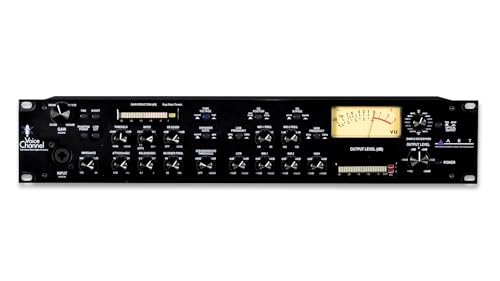
- Tube preamp adds warmth and definition
- Compressor, de-esser, expander, and gate
- USB plus extensive digital outputs
Best For: Voiceover rigs needing onboard processing and flexible digital connectivity
Streamlined DSP Pick

- 80 dB XLR microphone gain
- Onboard compressor, EQ, and voice effects
- Wave Link software with low-latency monitoring
Best For: Computer-based voiceover, podcasting, and streaming
Multitrack Production Pick

- Eight-channel mixer with six preamps
- Records to SD card and computer
- Four headphone outputs with three custom mixes
Best For: Multi-person podcasts and portable voiceover productions
Budget Interface Pick

- Two combo microphone, line, and instrument inputs
- Phantom power and zero-latency monitoring
- Compact USB interface with included software
Best For: Solo voiceover and entry-level home recording
Flexible Analog Pick

- Four mic/line inputs with phantom power
- Three-band EQ and 75 Hz low-cut filter
- 12 built-in reverb, chorus, and delay effects
Best For: Small voiceover studios needing hands-on mixing and multiple inputs
Podcasting and Remote Interview Pick

- Four XLR inputs with phantom power
- Four individually controlled headphone outputs
- Multitrack recording and automatic mix-minus
Best For: Multi-mic voiceover, podcast, and remote-interview recording
Budget Digital Feature Pick

- Two XLR inputs with independent 48V phantom power
- USB-C recording and USB flash-drive support
- Bluetooth playback, three-band EQ, and 99 DSP effects
Best For: Home voiceover and streaming setups wanting integrated digital features
Versatile Studio Mixer

- 48V phantom power for condenser microphones
- Three-band EQ on every channel
- 16 built-in DSP effects
Best For: Home studios and multi-input voiceover setups
Professional Portable Recorder

- Four low-noise Kashmir microphone preamps
- 32-bit float recording up to 192 kHz
- 8-in, 4-out USB audio interface
Best For: Portable and professional voiceover recording
Podcasting Control Center

- PAD and 80Hz high-pass filter
- 48V phantom power and three-band EQ
- USB recording, Bluetooth, and 99 DSP effects
Best For: Podcasting, streaming, and connected home studios
Tube Processing Pick – ART VoiceChannel
The ART VoiceChannel is a full-featured channel strip for voiceover when you want tube warmth, dynamics control, and flexible digital connectivity in one rack-style unit. Its compressor, expander, de-esser, and gate provide useful tools for shaping a spoken-word signal before it reaches your recording setup.
Best For: Voiceover setups that need analog-style tube character, detailed dynamics processing, and multiple digital output options.
Pros:
- Tube preamp design provides warmth and definition.
- Includes compressor, expander, de-esser, and gate.
- Supports ADAT, AES/EBU, S/PDIF, TOSLink, and USB connectivity.
- Supports sample rates up to 192 kHz.
Cons:
- Its 5.5 kg weight makes it less portable than compact USB interfaces.
- More features and connections than a simple one-mic voiceover setup may require.
The VoiceChannel is the most processing-focused option here. It suits users who want extensive routing and onboard control, provided they have room for a heavier, more equipment-oriented unit.
Streamlined DSP Pick – Elgato Wave XLR MK.2
The Elgato Wave XLR MK.2 is a practical channel strip for voiceover in a computer-based workflow. It combines up to 80 dB of XLR gain with onboard voice effects, touch controls, low-latency monitoring, and Wave Link software for routing and signal-chain management.
Best For: Streamers, podcasters, and voiceover creators who want a compact USB interface with integrated DSP and straightforward software control.
Pros:
- 80 dB of gain supports a wide range of XLR microphones.
- Built-in compressor, EQ, voice enhancer, and other effects.
- Touch mute and LED feedback make level control quick.
- Wave Link integrates routing, effects, and monitoring.
Cons:
- Wave Link requires Windows 11 or Apple Silicon macOS systems.
- USB connectivity is less expansive than a dedicated digital-output channel strip.
For creators who record directly into a modern computer setup, the Wave XLR MK.2 offers an accessible combination of gain, effects, monitoring, and control without requiring separate processors.
Multitrack Production Pick – Zoom LiveTrak L-8
The Zoom LiveTrak L-8 is a versatile channel strip for voiceover when your setup also includes multiple guests, performers, or podcast sources. It provides six preamps, three-band EQ and effects on every channel, multitrack recording to SD card, and simultaneous computer recording.
Best For: Multi-person podcasts, live voiceover sessions, and portable productions requiring several inputs and independent headphone mixes.
Pros:
- Six preamps and eight total channels accommodate larger setups.
- Records 12 tracks simultaneously at up to 24-bit/96 kHz.
- Four headphone outputs and three custom mixes support collaborative sessions.
- Can record to an SD card and computer at the same time.
Cons:
- Its mixer format is more equipment than a solo voiceover artist may need.
- The supplied notes list up to +54 dB of gain, which may be less than some high-gain interfaces.
- It is heavier and larger than compact two-channel interfaces.
The L-8 stands out for production scale rather than minimalist narration. Choose it when multiple microphones, headphone feeds, and standalone recording are central to your workflow.
Budget Interface Pick – M-AUDIO M-Track Duo
The M-AUDIO M-Track Duo is a straightforward channel strip for voiceover beginners who need a compact USB interface for Mac or PC. Its two combo inputs, phantom power, transparent preamps, and direct-monitoring switch cover common microphone and recording needs without adding complex routing.
Best For: Solo voiceover, podcasting, livestreaming, and home recording on a modest setup.
Pros:
- Two combo XLR, line, and instrument inputs offer flexible connections.
- Phantom power supports condenser microphones.
- USB/direct monitoring enables zero-latency monitoring.
- Includes MPC Beats and Ableton Live Lite software.
Cons:
- Maximum sample rate is 48 kHz.
- It does not provide the onboard compressor, de-esser, or EQ found on more advanced channel strips.
- Its 1/4-inch headphone output may be less convenient for setups built around other connector types.
The M-Track Duo is a sensible entry point for clean, uncomplicated voice recording. It is best suited to users who plan to handle most processing inside their recording or streaming software.
Flexible Analog Pick – Mackie Mix12FX
The Mackie Mix12FX is a practical channel strip for voiceover setups that need multiple microphone and line inputs, straightforward tone shaping, and built-in effects. Its four mic/line inputs include phantom power, a low-cut filter, and three-band EQ for basic voice cleanup.
Best For: Voiceover users who want an analog mixer with several inputs, onboard effects, and dedicated playback or recording connections.
Pros:
- Four mic/line inputs with phantom power for condenser microphones
- Three-band EQ and 75 Hz low-cut filter for practical voice shaping
- Includes 12 integrated reverbs, choruses, and delays
- Dedicated stereo RCA inputs and outputs support playback or recording
Cons:
- It is a corded analog mixer rather than a portable recorder
- Its effects-focused design may offer more features than a simple single-mic voiceover setup needs
The Mix12FX suits a small studio or multi-source recording station. Choose it when hands-on analog controls and flexible connectivity matter more than battery operation or direct multitrack recording.
Podcasting and Remote Interview Pick – Zoom PodTrak P4
The Zoom PodTrak P4 is a versatile channel strip for voiceover creators who also record podcasts, interviews, or multiple speakers. It provides four XLR microphone inputs with phantom power, individual headphone volume controls, multitrack recording, and USB interface operation.
Best For: Voiceover and podcast workflows involving several microphones, headphone monitoring, remote guests, or mobile recording.
Pros:
- Four high-quality microphone inputs with phantom power
- Four headphone outputs with individual volume control
- Supports multitrack recording for inputs and sound pads
- Includes automatic mix-minus for phone and remote interviews
Cons:
- Battery life is limited to up to 3.5 hours on two AA batteries
- Its feature set is oriented toward recording and interviews rather than traditional analog EQ control
The PodTrak P4 is the strongest fit for spoken-word creators who need routing and monitoring flexibility. Its battery operation and remote-interview tools also make it more adaptable than a conventional desktop mixer.
Budget Digital Feature Pick – Aveek 4-Channel Mixer
The Aveek 4-Channel Mixer is a compact channel strip for voiceover users who want Bluetooth playback, USB recording, and built-in processing in one affordable-style console. Its first two channels offer XLR/6.35 mm inputs, independent 48V phantom power, gain and three-band EQ controls, and headphone monitoring.
Best For: Home voiceover, podcast, and livestream setups that benefit from USB recording, Bluetooth playback, and basic onboard effects.
Pros:
- Two XLR/6.35 mm inputs with independent 48V phantom power
- USB-C PC recording and USB flash-drive playback or recording
- Bluetooth supports wireless music playback from compatible devices
- Three-band EQ plus 99 DSP reverb and delay effects
Cons:
- Bluetooth is intended for playback and cannot connect an output device
- Only two channels are specified with XLR microphone inputs
- It requires corded power rather than battery operation
The Aveek offers a broad feature list for a small voiceover or streaming desk. It is a sensible choice when built-in recording, wireless playback, and effects are priorities, provided its two XLR channels meet your microphone needs.
Versatile Studio Mixer – 6-Channel Stereo Audio Mixer
This 6-channel mixer is a practical channel strip for voiceover setups that need multiple microphone or line inputs, hands-on EQ, and onboard effects. It includes 48V phantom power for condenser microphones, four mono MIC/LINE inputs, stereo inputs, and XLR master outputs.
Best For: Home studios, voiceover workstations, karaoke, DJ events, and users who want physical controls with built-in effects.
Pros:
- 48V phantom power supports condenser microphones.
- Three-band EQ is available on all channels for tonal shaping.
- Sixteen DSP effects provide reverb and other mix enhancements.
- Stepped knobs and balanced inputs support precise, clean signal control.
Cons:
- It does not include USB connectivity.
- The 6-channel layout may be more mixer than a simple single-mic voiceover setup requires.
Choose this model if you want an affordable, tactile mixer with flexible analog connectivity and effects. Its lack of USB makes it better suited to setups using separate recording hardware or an external interface.
Professional Portable Recorder – Sound Devices MixPre-6 II
The MixPre-6 II combines recording, mixing, and interface functions in a compact unit, making it a strong channel strip for voiceover artists who work at home or on location. Its four ultra-low-noise Kashmir preamps, adjustable limiters, and 32-bit float recording support detailed capture with added flexibility.
Best For: Mobile voiceover recording, field work, home studios, and users who need a portable recorder with computer connectivity.
Pros:
- Four ultra-low-noise microphone preamps support high-quality capture.
- 32-bit float recording and sample rates up to 192 kHz offer flexible recording options.
- Built-in 6 x 2 mixer provides monitoring and mix control.
- Functions as an 8-in, 4-out USB audio interface.
Cons:
- Its feature set may be excessive for a basic stationary voiceover rig.
- The supplied notes do not specify integrated effects or EQ controls.
This is the most recording-focused option in the group. It makes sense when clean preamps, portable operation, and 32-bit float recording matter more than a large bank of onboard vocal effects.
Podcasting Control Center – 4-Channel Podcast Audio Mixer
This compact mixer works well as a channel strip for voiceover when you want vocal filtering, EQ, effects, and computer connectivity in one unit. It provides two XLR microphone inputs, 48V phantom power, a PAD switch, an 80Hz high-pass filter, USB recording, and Bluetooth streaming.
Best For: Podcasting, streaming, home voiceover recording, and creators who want built-in processing and USB connectivity.
Pros:
- 48V phantom power supports condenser microphones.
- PAD and 80Hz high-pass filter help manage loud sources and low-frequency rumble.
- Three-band EQ is available across the channels.
- USB recording, OTG support, Bluetooth 5.0, and 99 DSP effects add flexibility.
Cons:
- Only two of the inputs are XLR microphone inputs.
- Bluetooth range is specified at up to 15 feet.
- The compact four-channel design offers less expansion than the six-channel mixer.
For creators who want a straightforward voiceover and streaming hub, this mixer offers useful vocal cleanup tools and direct computer or mobile connectivity. It is especially appealing when high-pass filtering and onboard effects are priorities.
How We Picked the Best Channel Strip for Voiceover Options
We focused on the features that matter most for spoken-word recording: clean microphone preamps, dependable gain control, phantom power for condenser microphones, practical headphone monitoring, and a straightforward path into a computer or recorder. We also considered whether each unit supports one-person narration, multiple microphones, remote interviews, live production, or portable work.
Because “channel strip” can describe several types of gear, this list includes traditional processing hardware alongside USB interfaces, mixers, and field recorders. These alternatives may not offer the same dedicated compressor-and-EQ signal path, but they can provide a more convenient voiceover workflow for specific users.
Quick Comparison
- Traditional processing: The ART VoiceChannel is the closest fit for buyers seeking a dedicated microphone channel strip with onboard tone shaping and digital outputs.
- Simple computer recording: The Elgato Wave XLR and M-Audio M-Track Duo emphasize USB connectivity and uncomplicated monitoring.
- Podcasting and interviews: The Zoom PodTrak P4 and Zoom LiveTrak L-8 offer multiple inputs and features designed for conversational production.
- Portable professional recording: The Sound Devices MixPre-6 II is built for demanding field and multitrack workflows.
- Budget mixing: The Mackie, Aveek, six-channel mixer, and compact four-channel podcast mixer prioritize accessible controls and flexible routing.
Key Buying Factors for a Channel Strip for Voiceover
Microphone Input and Gain
Check the microphone type you use and how much gain it requires. Condenser microphones need 48V phantom power, while some low-output dynamic microphones benefit from substantial, quiet preamp gain. A unit with limited headroom can make narration noisy or force you to record too quietly.
Compression and EQ
A dedicated channel strip may include a compressor, equalizer, de-esser, or tube stage. These controls can smooth volume and shape tone while recording, but they require careful setup. If you prefer editing in software, a clean interface may be the better choice.
Monitoring and Connectivity
Look for zero- or low-latency headphone monitoring, a useful headphone output, and the connections your workflow requires. USB is convenient for direct computer recording; digital outputs can help integrate a traditional channel strip with a separate interface or recorder.
Inputs, Portability, and Workflow
One microphone input is enough for solo narration, but multiple XLR inputs are valuable for interviews, co-hosts, and backup microphones. Battery operation, onboard recording, and compact dimensions matter if you record outside a fixed studio.
Who Should Buy Which Channel Strip for Voiceover?
Choose the ART VoiceChannel if your priority is traditional channel-strip processing and you already have, or plan to add, suitable digital conversion. Choose the Elgato Wave XLR for a streamlined desktop setup with software-based control. The M-Audio M-Track Duo is a practical low-cost option for basic two-input recording.
For podcasts, guest conversations, and several headphones, the Zoom PodTrak P4 is the most purpose-built choice in this group. The LiveTrak L-8 suits users who need broader mixer functionality and recording flexibility. Choose the Sound Devices MixPre-6 II when portability, multichannel capture, and professional-grade field reliability matter most.
The Mackie Mix12FX and smaller budget mixers make sense for simple analog routing, live voice work, or users who do not need a full computer interface in the mixer itself. Before buying, confirm the product’s USB, recording, phantom-power, and headphone specifications so the selected unit matches your microphone and intended workflow.