
The best voice recorders for lectures make it easier to revisit explanations, capture important details, and build more complete study notes without typing continuously.
This roundup compares traditional digital recorders with newer AI note-taking devices, focusing on recording quality, storage, battery life, ease of use, and transcription features.
Best 10 Voice Recorders for Lectures Picks for 2026
Reliable Classic

- Up to 57 hours of battery life
- Built-in USB for PC transfers
- Simple MP3 recording
Best For: Students wanting a dependable, easy-to-use lecture recorder
AI Study Assistant

- Transcribes and summarizes recordings
- Ask questions across captured conversations
- Up to four days of battery life
Best For: Users who want AI-assisted lecture notes and review
High-Capacity Student Pick

- 64GB storage for extensive recordings
- Voice activation reduces silent segments
- WAV and MP3 playback support
Best For: Frequent lecture recording with flexible storage and controls
Ultra-Slim AI Recorder
Plaud Note Pro AI Voice Recorder
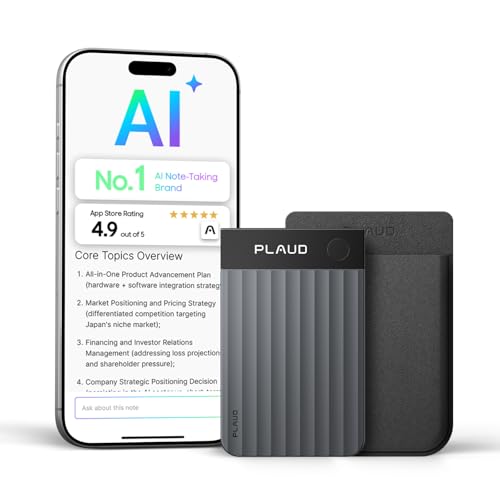
- Four microphones reach up to 16.4 feet
- AI transcripts, summaries, and next steps
- 30g design with 64GB storage
Best For: Users wanting portable lecture capture with AI note generation
High-Capacity Pick

- 128GB storage with up to 54 hours of continuous recording
- PCM, MP3, and WAV recording options
- Voice activation, password protection, and folder organization
Best For: Long lecture series and high-volume recording
Smart Note-Taking Pick
EVISTR AI Transcription Recorder

- Transcription in 113 languages with smart summaries
- 3072Kbps recording and noise reduction
- OTG phone transfer, password encryption, and HOLD switch
Best For: Turning lecture recordings into organized notes
Playback Control Pick

- Dual-mic PCM recording up to 1536Kbps
- 16 playback-speed levels plus A-B repeat
- Voice activation and three-digit password protection
Best For: Reviewing lecture recordings at adjustable speeds
Simple Lecture Pick
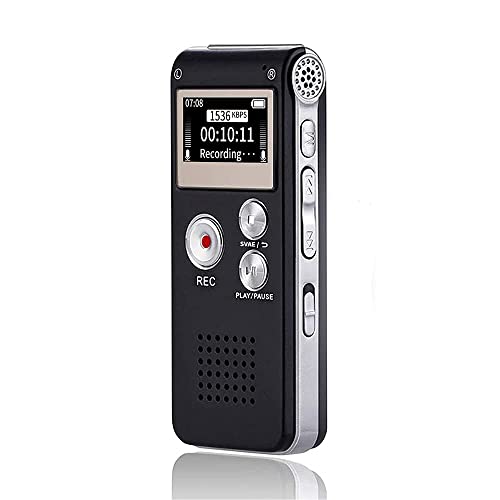
- One-button recording and A-B repeat
- Noise reduction with a built-in microphone
- More than 30 hours of continuous recording
Best For: Students who prioritize simple controls and lecture playback
Study-Focused Choice
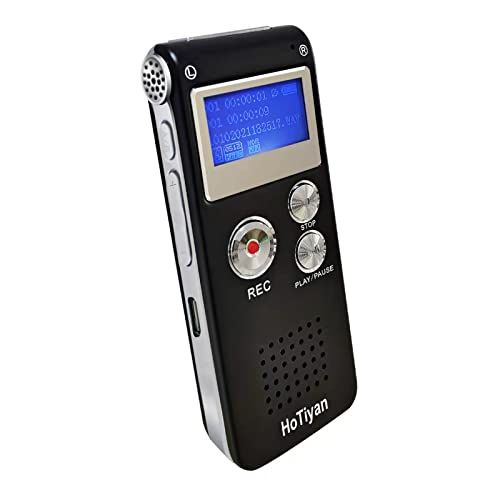
- Stereo recording with noise reduction
- A-B repeat and variable playback speed
- Time-stamped files and password protection
Best For: Students who need flexible playback and file organization
Best Simple Pick

- 128GB included TF card
- 1536kbps recording with stereo microphone
- 50-hour continuous recording and voice activation
Best For: Frequent users who need extensive storage and long recording sessions
Reliable Classic – Sony ICD-PX370
Sony ICD-PX370 Mono Digital Voice Recorder with Built-In USB Voice Recorder,black
Check Price On AmazonThe Sony ICD-PX370 is a straightforward choice for voice recorders for lectures when you want dependable MP3 recording, simple file transfers, and long battery life. Its built-in USB connection makes moving recordings to a computer convenient, while 4GB of storage is suited to regular classroom use.
Best For: Students and users who want a simple, familiar recorder for lectures and voice notes.
Pros:
- Up to 57 hours of battery life for extended recording.
- Built-in USB connection supports quick transfers to a PC.
- Records in MP3 format and includes a headphone jack.
Cons:
- 4GB of storage is less than several newer dedicated recorders.
- Uses two AA batteries rather than a built-in rechargeable battery.
- Mono recording may offer less spacious sound than stereo-focused models.
The ICD-PX370 favors ease of use over advanced features. It is a practical pick for lecture recording if you value long runtime and direct computer connectivity.
AI Study Assistant – Pocket AI Voice Recorder
The Pocket AI Voice Recorder takes voice recorders for lectures beyond basic audio capture by adding transcription, summaries, action items, and searchable insights. One-tap recording, smartphone compatibility, and up to four days of battery life make it suited to students who want help reviewing and organizing spoken material.
Best For: Students and professionals who want recorded lectures converted into summaries and organized notes.
Pros:
- Automatically transcribes recordings and creates summaries and action items.
- “Ask Pocket” can answer questions grounded in your recordings.
- 64GB storage and up to four days of battery life support frequent use.
- MagSafe compatibility enables convenient hands-free placement with compatible devices.
Cons:
- Advanced features may require an optional subscription.
- Designed around smartphone connectivity rather than fully standalone use.
- The supplied format is listed as RealAudio, which may be less universal than MP3.
This is more than a conventional recorder: its main advantage is reducing the work of turning lectures into usable notes. Consider it if AI organization matters as much as the recording itself.
High-Capacity Student Pick – EVISTR 64GB Recorder
The EVISTR L357 is a feature-rich option among voice recorders for lectures, combining 64GB of storage, voice activation, adjustable recording gain, and playback controls. Its noise-reduction microphone and stereo recording support are designed for capturing spoken audio, while USB-C simplifies file transfers to Windows and Mac computers.
Best For: Students, teachers, and frequent users who need generous storage and customizable lecture recording.
Pros:
- 64GB capacity can store up to 4,660 hours at 32Kbps.
- Voice activation can reduce silent sections during lectures.
- Adjustable seven-level gain and noise-reduction technology support distant audio capture.
- Supports WAV and MP3, playback controls, and USB-C transfers.
Cons:
- Its many settings may take longer to learn than a basic recorder.
- Voice activation may not suit lectures with very quiet or inconsistent speech.
- The supplied notes list conflicting battery figures, so real-world runtime may vary by usage.
The L357 is a strong fit when storage, control, and playback flexibility are priorities. It offers useful lecture-specific tools, although buyers seeking the simplest operation may prefer a more basic model.
Ultra-Slim AI Recorder – Plaud Note Pro AI Voice Recorder
The Plaud Note Pro is a premium, ultra-slim approach to voice recorders for lectures, using four microphones and AI-generated transcripts, highlights, and summaries. It can capture voices from up to 16.4 feet away, offers 64GB of storage, and includes a Starter Plan with 300 transcription minutes per month.
Best For: Users who want discreet hardware plus AI-generated lecture summaries and organized follow-up notes.
Pros:
- Four microphones capture voices from up to 5 meters away.
- AI can produce transcripts, highlights, tailored summaries, and next steps.
- Ultra-slim 30g design includes a small status display and magnetic accessories.
- 64GB storage and up to 30 hours in Enhance mode support extended use.
Cons:
- Additional transcription capacity requires upgrading beyond the included Starter Plan.
- No headphone jack is provided.
- Its AI-centered workflow may be more than needed for basic audio recording.
The Note Pro is best when the goal is to turn lectures into structured, usable notes rather than simply save audio. Its slim design and capable microphones are appealing, but ongoing transcription needs should be considered.
High-Capacity Pick – EVIDA 128GB Lecture Recorder
If you need voice recorders for lectures with substantial storage and flexible recording formats, the EVIDA 9296 is a practical option. It supports PCM, MP3, and WAV recording, offers voice activation, and can run for up to 54 hours of continuous recording.
Best For: Students, teachers, and professionals who want high storage capacity, voice activation, and password protection.
Pros:
- 128GB capacity can store up to 9,296 hours of recordings at supported settings.
- Records in MP3 or high-quality WAV/PCM formats, up to 1536Kbps.
- Voice activation, four-folder file management, password protection, and A-B repeat add useful convenience.
- Can also function as an MP3 player and USB flash drive.
Cons:
- The built-in microphone uses mono, noise-cancellation operation.
- It has no headphone jack listed in the specifications.
- High-quality recording settings will use storage more quickly than the maximum capacity estimate.
The EVIDA stands out for its storage and broad feature set. It is a good fit when you want to record long lecture series without frequently transferring files, provided you are comfortable using its built-in playback setup.
Smart Note-Taking Pick – EVISTR AI Transcription Recorder
For shoppers seeking voice recorders for lectures that can help organize notes afterward, the EVISTR L359 combines recording with app-based AI tools. It supports transcription in 113 languages, smart summaries, mind maps, speaker identification, and Ask AI insights through the AI DVR Link app.
Best For: Students and professionals who want to record lectures and convert spoken material into searchable, organized notes.
Pros:
- AI features can transcribe recordings in 113 languages and generate summaries.
- Records up to 3072Kbps HD audio with intelligent noise reduction.
- One-touch recording, a HOLD switch, and password encryption simplify everyday use and privacy.
- OTG connection supports direct wired transfer to compatible phones without Bluetooth.
Cons:
- Continuous recording time is listed as up to 33 hours, shorter than some high-capacity alternatives.
- AI transcription and summaries require the AI DVR Link app and a compatible connection.
- The product uses a built-in mono microphone.
The L359 is the most workflow-focused choice in this group. Its main advantage is not just capturing a lecture, but helping process it afterward; buyers should account for the app and OTG-based workflow when deciding whether its AI features match their needs.
Playback Control Pick – Aiworth E36 Lecture Recorder
The Aiworth E36 is among the more useful voice recorders for lectures when reviewing specific passages matters. It combines dual-mic PCM recording with voice activation, password protection, variable playback speed, and A-B repeat for easier study and review.
Best For: Students, writers, journalists, and professionals who frequently replay, slow down, or revisit recorded speech.
Pros:
- Dual-microphone PCM recording supports audio up to 1536Kbps.
- Variable playback offers 16 speed levels for faster review or clearer slow listening.
- A-B repeat helps isolate and replay important lecture sections.
- Front-facing controls, password protection, and voice activation support straightforward operation.
Cons:
- The supplied specifications list 72GB of storage, despite the product title referencing 136GB.
- Battery life is listed as up to 45 hours of continuous recording.
- The listed recording format is MP3, so buyers wanting WAV recording should consider another model.
The E36 is a strong review-oriented recorder, especially for users who need control over playback rather than AI transcription. Its storage figures should be checked carefully, but the speed adjustment and repeat functions are well suited to studying recorded lectures.
Simple Lecture Pick – Compact 16GB Voice Recorder
For shoppers comparing voice recorders for lectures, this compact Sunlan model focuses on straightforward controls, clear voice capture, and convenient playback. Its built-in noise reduction, voice activation, and 16GB storage make it practical for classes, meetings, and interviews.
Best For: Students who want simple one-button recording with built-in playback and repeat listening.
Pros:
- One-button recording with easy stop, playback, and A-B repeat controls
- DSP noise reduction and a sensitive built-in microphone help capture speech clearly
- 16GB storage and more than 30 hours of continuous recording
- Works as an MP3 player and removable USB storage device
Cons:
- Mono microphone operation may provide less spatial detail than stereo models
- Playback battery life is listed at 7 hours
- Uses a micro USB connection rather than USB-C
This is a sensible choice when ease of use matters more than advanced organization features. The small body, voice activation, and A-B repeat function are particularly useful for reviewing key lecture passages.
Study-Focused Choice – 8GB Voice-Activated Recorder
This HoTiyan recorder is designed for buyers seeking voice recorders for lectures with study-friendly playback tools. It combines stereo recording, voice activation, variable playback speed, A-B repeat, and file organization features in a small rechargeable device.
Best For: Students who want to replay important sections, adjust listening speed, and organize recordings.
Pros:
- Higher-sensitivity microphone, noise reduction, and stereo recording
- Voice activation can reduce silent sections and conserve storage
- A-B repeat and variable playback speed support focused studying
- Includes password protection, time-stamped filenames, and MP3 playback
Cons:
- 8GB capacity is smaller than the other listed options
- Continuous recording time is listed at 20 hours
- Transfers files through a Micro USB cable
With multiple recording-quality settings and substantial stated recording-time ranges, this model offers flexibility for different storage needs. Its learning-oriented playback functions give it an advantage for reviewing lecture material.
Best Simple Pick – 128GB HD Lecture Recorder
For frequent lecture recording, the arungo ZD70 stands out among voice recorders for lectures with 128GB of included storage, 1536kbps recording, and a stated 50-hour continuous recording time. It also adds voice activation, time-stamped files, and playback controls for easier review.
Best For: Heavy users recording many lectures, meetings, interviews, or long dictations.
Pros:
- 128GB TF card provides substantial space for recordings and music
- PCM noise cancellation and an omnidirectional stereo microphone are designed for clear audio
- Voice activation can save storage by starting when sound is detected
- Includes A-B repeat, speed control, password lock, and time-stamped filenames
Cons:
- The larger storage capacity may be unnecessary for occasional users
- Recording and battery-life claims are both listed at 50 hours, so actual results may vary by use
- Its listed dimensions are longer than the other two recorders
This is the strongest fit for users who record often and want to minimize file-management concerns. Its included memory card, stereo capture, and navigation features make it the most fully equipped option in this group.
How We Picked the Best Voice Recorders for Lectures
We focused on the features that matter most in classrooms, lecture halls, seminars, and study sessions. Each selected recorder offers a practical way to capture spoken audio, whether through a straightforward one-button recording system or a connected AI transcription workflow.
Our comparison considers microphone performance, voice activation, playback controls, storage capacity, battery convenience, portability, and the usefulness of transcription or summarization tools. We also accounted for different budgets and workflows, since some students want dependable audio files while others prefer searchable notes.
Quick Comparison
| Best For | Features to Prioritize | Typical Choice |
|---|---|---|
| Simple lecture recording | Easy controls, clear microphones, long battery life | Traditional digital recorder |
| Frequent long lectures | Large storage, voice activation, dependable battery | High-capacity recorder |
| Searchable study notes | Transcription, summaries, app or cloud support | AI voice recorder |
| Discreet everyday carry | Small size, rechargeable battery, quick start | Compact recorder |
Key Buying Factors for Voice Recorders for Lectures
Audio Quality and Microphone Pickup
Look for a recorder that can capture speech clearly from the distance you expect to use it. Noise reduction can help in busy rooms, but microphone placement still matters. For large lecture halls, test the device near the front or use an external microphone if supported.
Storage and Recording Format
More storage is useful for students who record multiple classes before transferring files. Check the advertised capacity alongside the expected recording format and quality, because higher-quality audio uses more space. WAV files generally preserve more detail, while compressed formats maximize storage.
Battery Life and Charging
A recorder should last through a full class schedule or charge quickly between sessions. USB-rechargeable models reduce the need for disposable batteries, while replaceable-battery designs may be convenient when outlets are unavailable.
Voice Activation and Controls
Voice activation can reduce silent sections and conserve storage, but it may miss very quiet speech. Physical buttons, a visible recording indicator, and simple playback controls are valuable when you need to start recording quickly and operate the device without navigating an app.
Transcription, Privacy, and Compatibility
AI models can turn recordings into searchable transcripts and summaries, saving substantial note-taking time. Check supported languages, subscription requirements, processing limits, export options, and whether audio is uploaded to the cloud. Always follow classroom rules and obtain permission before recording others.
Who Should Buy Which Voice Recorders for Lectures?
Choose a traditional digital recorder if you want reliable recording, straightforward file transfer, and no dependence on an app or subscription. These models are often the best value for occasional lectures.
Choose a high-capacity voice-activated model if you attend long classes, record frequently, or want to store many sessions before managing files. Prioritize battery performance and easy playback.
Choose an AI voice recorder if searchable transcripts, summaries, and faster review are more important than the lowest purchase price. Confirm that its transcription service suits your language and study workflow.
Choose a compact rechargeable model if portability is your main concern. A smaller device is easier to carry daily, but verify that its microphone performance and battery capacity meet your classroom needs.