
Choosing a resin 3D printer for a school means balancing detail quality with safe handling, manageable cleanup, reliable operation, and a budget that works for education. The right model can support STEM lessons, design projects, engineering prototypes, and detailed visual aids.
We compared ten resin printers across print resolution, build volume, automation, workflow accessories, and suitability for supervised classroom or lab use. Use the guide below to narrow the options by school needs rather than specifications alone.
Best 10 Resin Printers for Schools Picks for 2026
Top High-Resolution Pick

- 16K LCD with 14 x 19 μm XY resolution
- 150 mm/h printing and automatic resin heating
- AI camera, sensors, Wi-Fi, and auto-leveling
Best For: Detailed classroom models and higher-volume projects
Largest-Build Pick

- 298 x 164 x 300 mm build volume
- 7K detail with temperature-controlled resin management
- Self-checks monitor residue, material, and failed prints
Best For: Large models and classroom batch printing
Complete Workflow Pick

- Includes 16K Saturn 4 Ultra printer
- Adds a 7.5-liter Mercury Plus V3.0 station
- Supports printing, washing, and curing workflows
Best For: Classrooms building an all-in-one resin setup
Easy-Setup Pick

- 14K LCD supports crisp fine-detail prints
- Factory-calibrated auto-leveling reduces setup work
- AI checks, resin monitoring, and high-viscosity support
Best For: Classrooms needing guided operation and detailed output
Easy-Start Classroom Pick

- One-click automatic leveling
- 4K mono LCD for detailed prints
- Built-in alerts and overheat protection
Best For: Beginners and classrooms prioritizing simple setup
High-Detail Learning Lab Choice

- 7-inch 10K mono LCD
- Generous 153.4 × 87 × 165 mm build area
- Power-loss resume and adhesion-focused platform
Best For: Schools emphasizing detailed student models
Industrial Throughput Pick
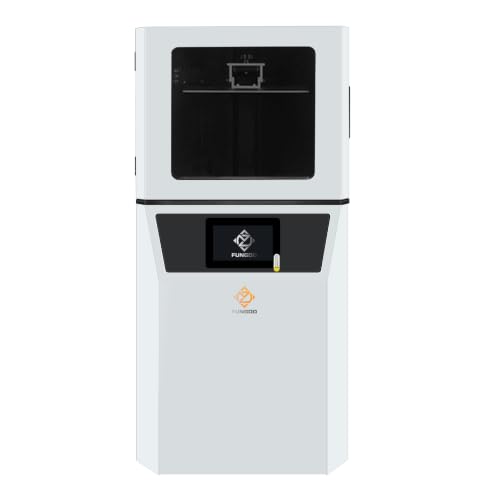
- Large 302 × 162 × 400 mm build volume
- Industrial Z-axis with 0.02 mm repeatability
- Wi-Fi, USB, Linux, and CHITUBOX support
Best For: University labs and high-volume technical programs
Best All-in-One Classroom Bundle

- 10K resolution with 17 × 17μm pixels
- Includes Wash & Cure 3.0
- 153.4 × 87 × 165mm build volume
Best For: Classrooms needing detailed prints and integrated post-processing
Best for High-Volume Production

- 33 × 18.5 × 30cm build plate
- 43μm XY resolution
- Built-in drip hanger for resin recovery
Best For: Advanced programs producing large batches of detailed models
Best Large-Format Option

- 18.3L build volume for large batches
- 14-inch 12K monochrome screen
- Auto-leveling and heated resin tank
Best For: Engineering labs printing oversized prototypes and dense batches
Top High-Resolution Pick – ELEGOO Saturn 4 Ultra 16K
For schools seeking resin printers for schools that combine fine detail with faster production, the ELEGOO Saturn 4 Ultra 16K offers a strong feature set. Its 16K screen, automatic resin heating, automatic leveling, and built-in monitoring are designed to simplify classroom operation.
Best For: Schools producing detailed models while prioritizing speed, monitoring, and easier setup.
Pros:
- 16K LCD provides 15120 x 6230 resolution and 14 x 19 μm XY resolution.
- Automatic tank heating helps maintain resin temperature when it falls below 25°C.
- AI camera, smart sensors, Wi-Fi transfer, automatic leveling, and power-on resume support easier supervision.
- Print speeds reach up to 150 mm/h with an 8.33 x 4.66 x 8.66-inch build area.
Cons:
- Its 35.4-pound weight and roughly 21.5-inch height require a dedicated workspace.
- The supplied features emphasize printer automation; washing and curing are not included.
For classrooms where detail and throughput matter, this is a capable choice. The monitoring features can help instructors oversee prints, while the heated tank and automatic setup features may reduce routine intervention.
Largest-Build Pick – ANYCUBIC Photon Mono M7 MAX
The ANYCUBIC Photon Mono M7 MAX is worth considering for schools that need resin printers for schools with substantial build capacity. Its large print volume supports bigger models and batch production, while resin management and self-check features address common operational tasks.
Best For: Schools making large models or multiple smaller parts in a single run.
Pros:
- 298 x 164 x 300 mm build volume accommodates large models and batch printing.
- 13.6-inch 7K screen and 46 x 46 μm XY pixel size support detailed textures.
- Temperature-controlled resin management and automatic material replenishment can improve workflow.
- Five intelligent inspections include residue detection, failed-print detection, and printer self-checking.
Cons:
- At 60.9 pounds, it is substantially heavier than the other listed printers.
- Its large 30.91 x 19.29 x 20.47-inch footprint needs considerable space.
- Its stated print speed is up to 60 mm/h, below the 150 mm/h claim of the ELEGOO Saturn 4 Ultra.
This model’s main advantage is scale. It can reduce the need to split large projects and may improve class efficiency through batch printing, though schools should plan carefully for its size and weight.
Complete Workflow Pick – ELEGOO Saturn 4 Ultra Bundle
ELEGOO Saturn 4 Ultra 16K Resin 3D Printer and ELEGOO Mercury Plus V3.0 Wash and Cure Station
Check Price On AmazonSchools comparing resin printers for schools should consider the full post-print workflow, not just the printer. This bundle pairs the ELEGOO Saturn 4 Ultra 16K with the Mercury Plus V3.0 wash and cure station, giving classrooms a printer and a compatible station for processing finished models.
Best For: Schools wanting a more complete print, wash, and cure setup in one package.
Pros:
- Includes the Saturn 4 Ultra 16K with 150 mm/h printing and an 8.33 x 4.66 x 8.66-inch print area.
- Smart tank heating at 30°C supports more consistent resin handling.
- Mercury Plus V3.0 provides a 7.5-liter wash and cure capacity.
- Wash and cure station is compatible with Mars, Saturn, Photon, Halot, MSLA, LCD, and DLP printers.
Cons:
- The bundle requires space for both the printer and the wash-and-cure station.
- The supplied notes do not specify the station’s wash or cure cycle times.
- Resin printing still requires classroom procedures for handling and post-processing materials.
The bundle is a practical choice when a school wants to avoid sourcing a separate wash-and-cure unit. Its combined equipment supports a more complete workflow, but the available workspace should accommodate both components.
Easy-Setup Pick – ANYCUBIC Photon P1 14K
The ANYCUBIC Photon P1 is a practical option for schools seeking resin printers for schools with less manual calibration. Factory-calibrated auto-leveling, pre-print checks, AI monitoring, and support for high-viscosity resins give it a classroom-friendly focus while its 14K screen targets fine detail.
Best For: Schools prioritizing guided setup, reliable monitoring, and detailed prints.
Pros:
- 14K mono LCD delivers 13,312 x 5,120 pixels and supports 16.8 x 24.8 μm pixel detail.
- Smart Leveling 3.0 is factory-calibrated and checks pressure across four corners.
- AI monitoring checks build plate installation and bottom-layer separation, while also monitoring resin level and residue.
- Handles resins with viscosity up to 8,000 cps and includes pre-configured Anycubic resin settings.
Cons:
- The supplied notes do not state a maximum print speed or build volume.
- Its 16.93 x 24.41 x 16.54-inch dimensions still require a dedicated workspace.
- Washing and curing equipment is not listed as included.
For schools where repeatable setup and early issue detection are more important than published speed, the Photon P1 is a compelling fit. Its factory-calibrated leveling and inspection features can make routine operation more approachable for student projects and supervised labs.
Easy-Start Classroom Pick – ELEGOO Mars 5
For schools seeking resin printers for schools with minimal setup, the ELEGOO Mars 5 emphasizes automated preparation, print checks, and safety monitoring. Its 4K mono LCD and COB light source are designed to reproduce fine details, while automatic leveling can help beginners get started faster.
Best For: Classrooms introducing students to resin printing and educators who value simplified setup.
Pros:
- One-click automatic leveling reduces calibration work.
- Smart residue detection, resin-shortage alerts, and leveling-failure alarms help limit waste.
- 4K mono LCD with COB lighting supports detailed prints.
- Self-checking and overheat protection add useful operational safeguards.
Cons:
- Its 4K resolution is lower than the 10K option offered by some competing models.
- The supplied specifications do not indicate an unusually large build volume.
The Mars 5 is a practical choice when ease of operation and protective features matter more than maximum resolution or industrial-scale throughput.
High-Detail Learning Lab Choice – ANYCUBIC Photon Mono 4
The ANYCUBIC Photon Mono 4 is a strong option among resin printers for schools when detailed models and a useful build area are priorities. Its 7-inch 10K mono LCD targets fine resolution, while the matrix light source is designed to provide consistent exposure and smoother surfaces.
Best For: School labs producing highly detailed models, prototypes, and classroom projects.
Pros:
- 10K resolution and 17-micron X/Y pixel size support fine detail.
- 6.04-by-3.42-by-6.49-inch build volume accommodates a range of projects.
- Laser-engraved platform is designed to improve adhesion while keeping removal manageable.
- Power-loss resume can reduce wasted material and printing time.
Cons:
- The four-point leveling process still requires an initial manual setup.
- Anycubic app service is not supported for this model.
Choose the Photon Mono 4 if print detail is central to instruction and the school can manage an initial leveling step without app-based control.
Industrial Throughput Pick – LCD 3D Printer F14
For schools needing resin printers for schools that can support larger, repeated workloads, the F14 takes an industrial-oriented approach. It combines a large 302-by-162-by-400 mm build volume with a reinforced Z-axis, 6K resolution, and Wi-Fi and USB connectivity for lab or enterprise environments.
Best For: University labs, technical programs, and schools requiring batch production or extended printing.
Pros:
- Extra-large build volume supports larger models and batch efficiency.
- Ball screw, linear guide, and dual-slider Z-axis design offers stated 0.02 mm repeatability.
- 6K LCD supports adjustable 0.01–0.15 mm layer thickness for fine-detail work.
- Wi-Fi and USB connectivity with Linux OS supports wireless task management and CHITUBOX compatibility.
Cons:
- At 68 pounds, it is substantially heavier and less portable than desktop-focused options.
- Its 14.2-by-16.9-by-25.6-inch footprint requires dedicated space.
- The supplied notes position it for professional use, which may exceed the needs of introductory classes.
The F14 makes the most sense where a school has adequate space, supervision, and demand for continuous or batch printing rather than occasional beginner projects.
Best All-in-One Classroom Bundle – Anycubic Photon Mono 4 Bundle
For schools seeking resin printers for schools that can support detailed projects without assembling a separate post-processing setup, the Anycubic Photon Mono 4 bundle is a practical option. Its 10K resolution, uniform light source, and included Wash & Cure 3.0 cover both printing and cleanup.
Best For: Classrooms and school makerspaces producing detailed models with an integrated wash-and-cure workflow.
Pros:
- 10K resolution with 17 × 17μm pixels for fine model detail.
- 153.4 × 87 × 165mm build volume supports everyday classroom projects.
- Included Wash & Cure 3.0 has a 4L cleaning bucket and 42% greater basket capacity than Wash & Cure 2.
- Gooseneck curing light strengthens curing in subtle model areas.
Cons:
- Its build volume is smaller than the large-format printers in this roundup.
- The bundle is designed for LCD printers sized 7.3 inches or less, which limits the included washer’s fit for larger machines.
The Mono 4 bundle stands out when a school values detailed output and a complete post-processing workflow. It is better suited to moderate-size projects than oversized prototypes or large batch production.
Best for High-Volume Production – Phrozen Sonic Mega 8K S
Among resin printers for schools, the Phrozen Sonic Mega 8K S is aimed at programs that need to produce many models in one run. Its 33 × 18.5 × 30cm build plate, 15-inch 8K screen, and workflow features favor large batches and detailed results.
Best For: Advanced school makerspaces, studios, or vocational programs handling high-volume model production.
Pros:
- Large build plate can reportedly produce 80 1/32-scale miniatures in under 1.5 hours.
- 43μm XY resolution captures fine textures, edges, and internal geometries.
- Lift-up lid reduces the clearance needed around the printer.
- Built-in metal drip hanger helps recover excess resin and reduce workspace mess.
Cons:
- At 57.3 pounds, it is a substantial machine to place and reposition.
- The large production capacity may be excessive for occasional classroom projects.
- The stated 10× speed advantage depends on using ACF film and TR300 High-Speed Resin.
This printer makes the most sense where throughput is a priority and there is adequate space for a 57.3-pound machine. Its large capacity and production-oriented features are more compelling for advanced programs than introductory classes.
Best Large-Format Option – Anycubic Photon P1 Max
For schools comparing resin printers for schools with oversized prototypes or batch-printing needs, the Anycubic Photon P1 Max offers substantial capacity. Its 18.3L build volume, heated resin tank, and automatic leveling are designed to simplify large-format production.
Best For: School engineering labs and makerspaces printing oversized prototypes or densely packed batches.
Pros:
- 285.5 × 214 × 300mm build volume accommodates large models and batch runs.
- 14-inch 12K monochrome screen provides 24.8 × 24.8μm pixels for smooth detail.
- 1900ml heated resin tank supports temperatures up to 35°C for more consistent resin flow.
- Auto-Leveling 3.0 checks and adjusts the build plate before printing.
Cons:
- Its 68.9-pound weight and roughly 20 × 21 × 30-inch dimensions require substantial space.
- The large resin tank and build volume may be more capacity than smaller classes need.
The P1 Max is a strong fit when project size and batch capacity matter more than a compact footprint. Auto-leveling can reduce setup guesswork, while the heated tank is useful in cooler workshop environments.
How We Picked These Resin Printers for Schools
We focused on specifications and features that matter in an educational setting: print detail, build volume, ease of setup, leveling and monitoring features, wash-and-cure workflow, replacement-part availability, and overall flexibility. Resolution matters for small models and intricate demonstrations, while a larger build area can help schools produce multiple student projects in one batch.
Because liquid resin requires careful handling, we also considered whether each printer can fit into a controlled workflow with ventilation, protective equipment, covered storage, and dedicated washing and curing. No resin printer should be treated as a plug-and-play classroom appliance without appropriate supervision.
Quick Comparison
| School Priority | Look For | Best-Fit Options |
|---|---|---|
| Fine detail | High-resolution mono LCD and precise motion control | ELEGOO Saturn 4 Ultra 16K, ANYCUBIC Photon P1 14K |
| Large batches | Large build volume and efficient exposure system | ANYCUBIC Photon M7 MAX, Photon P1 Max, Phrozen Sonic Mega 8K S |
| Simpler workflow | Auto-leveling or a bundled wash-and-cure station | ANYCUBIC Photon P1, Photon Mono 4 bundle, Saturn 4 Ultra bundle |
| Lower-cost entry | Compact printer with practical core features | ELEGOO Mars 5, ANYCUBIC Photon Mono 4 |
Key Buying Factors for Resin Printers for Schools
Safety and Supervision
Plan for ventilation, nitrile gloves, eye protection, spill control, resin-resistant tools, and a designated cleanup area. A lidded enclosure or restricted-access lab is preferable to an open classroom. Schools should also account for uncured resin, contaminated paper towels, and isopropyl alcohol disposal.
Resolution Versus Build Volume
Higher pixel resolution can improve fine features, but it does not automatically make every print better. Choose a compact high-resolution model for miniatures, dental-style demonstrations, or detailed parts; choose a larger machine when students need multiple models or oversized prototypes.
Workflow and Maintenance
Auto-leveling can reduce setup errors, while a dedicated wash-and-cure station makes post-processing more consistent. Check whether the printer supports commonly available resins, replacement vats, screens, films, and other consumables before committing to a fleet.
Capacity and Classroom Logistics
Compare expected print queues, not just maximum build volume. A school makerspace may benefit from several smaller printers for parallel assignments, whereas an engineering lab may prefer one large production-oriented unit. Noise, footprint, network access, and staff training also affect day-to-day usability.
Who Should Buy Which Resin Printers for Schools?
Choose a compact model such as the ELEGOO Mars 5 or ANYCUBIC Photon Mono 4 for introductory labs with limited space and moderate print demand. The Photon Mono 4 bundle is a practical choice when a school wants a more complete post-processing setup from the start.
For advanced STEM programs that prioritize detailed parts and dependable automation, consider the ELEGOO Saturn 4 Ultra, especially when paired with its wash-and-cure station, or the ANYCUBIC Photon P1 14K. Schools producing many parts should look toward the Photon M7 MAX, Photon P1 Max, or Phrozen Sonic Mega 8K S, provided the lab has sufficient space, ventilation, and operating procedures.
The industrial-grade F14 is best reserved for schools or enterprises with a dedicated technical workspace and staff who can manage higher-capacity equipment. Whichever model you select, budget for resin, cleaning supplies, replacement components, safety equipment, and training—not only the printer itself.