
Mini PCs deliver real desktop power in a compact footprint, making them a smart choice for tight desks, living room setups, and everyday productivity.
Below, we focus on the best options across performance, value, and expandability so you can choose a mini PC that fits your workload and budget.
Best 10 Mini PC Picks for 2026
Gaming Mini PC
GMKtec M7 Ultra Ryzen 7 PRO 6850U 32GB DDR5

- Ryzen 7 PRO 6850U with Radeon 680M graphics
- Dual USB4, HDMI 2.1, and OCuLink support
- 32GB DDR5 RAM, 512GB SSD, dual 2.5GbE
Best For: Gaming and heavy multitasking in a compact desktop
Renewed Budget Mini PC
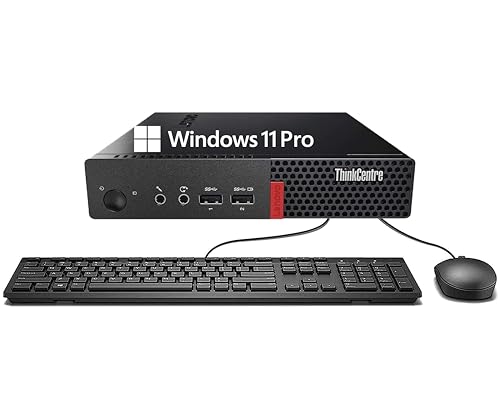
- 6th Gen Core i3-6100T for basic tasks
- 8GB DDR4 RAM and 256GB SSD
- Windows 11 Pro with Wi-Fi and Bluetooth
Best For: Affordable everyday productivity and browsing
Business-Ready Mini PC

- Ryzen 7 7730U with efficient 15W design
- Upgradable RAM, SSD, and extra storage options
- Supports up to four displays with 8K over Type-C
Best For: Business workstations and multitasking setups
Fast-Wired Productivity Mini PC

- Core i3-10110U for responsive everyday work
- 16GB RAM and 512GB SSD included
- 2.5GbE plus dual 4K HDMI outputs
Best For: Office work, dual monitors, and wired networking
High-Performance AI Mini PC

- Ryzen 7 Pro 8845HS and Radeon 780M graphics
- DDR5 RAM with PCIe 4.0 SSD storage
- USB4, dual 2.5GbE, and support for four displays
Best For: Gaming, creative work, and demanding multitasking
Refurbished Business Pick

- 6-core i5-8500T for steady multitasking
- 16GB RAM with 256GB NVMe SSD
- Dual monitor output in a compact chassis
Best For: Business and home office users who want a small, dependable Windows 11 Pro PC
Performance Gaming Choice
GMKtec M5 Ultra Ryzen 7 Mini PC

- Ryzen 7 7730U with 32GB RAM and 512GB SSD
- Triple-display support with 4K@60Hz output
- WiFi 6E plus 2.5G dual LAN connectivity
Best For: Power users who want a compact PC for productivity, media, and light gaming
Dual-LAN Budget Option
BOSGAME E5 Ryzen 5300U Mini PC

- Ryzen 5300U with 16GB RAM and 512GB SSD
- Triple display support with USB-C, HDMI, and DP
- Dual 2.5G LAN for networking and home lab use
Best For: Office users and home-lab builders who want strong networking in a compact PC
Gaming Mini PC – GMKtec M7 Ultra Ryzen 7 PRO 6850U 32GB DDR5
This mini pc is built for buyers who want more than basic office speed. The GMKtec M7 Ultra pairs a Ryzen 7 PRO 6850U with Radeon 680M graphics, so it can handle heavier multitasking, creative work, and even AAA gaming better than most compact desktops. It also adds OCuLink, dual 2.5GbE, and four-display support for a more flexible setup.
Best For: Gamers, power users, and creators who want strong integrated graphics and expansion options in a compact desktop.
Pros:
- Ryzen 7 PRO 6850U and Radeon 680M graphics deliver strong performance for a mini pc class system.
- Dual USB4, HDMI 2.1, and OCuLink give you broad display and eGPU connectivity.
- 32GB DDR5 RAM and 512GB PCIe SSD provide a solid starting point with upgrade room.
- Dual 2.5GbE LAN, Wi-Fi 6E, and Bluetooth 5.2 support fast, flexible networking.
Cons:
- Storage starts at 512GB, so larger game libraries may need expansion.
- Performance depends on the selected power mode and cooling profile.
- It is still an integrated-graphics system, so top-tier discrete GPU gaming is not built in.
Overall, the M7 Ultra stands out as a high-spec mini pc for users who want gaming-friendly hardware, modern ports, and serious expandability in a small chassis.
Balanced Triple-Display Mini PC – KAMRUI Pinova P2 Ryzen 7330U
If you want a practical mini pc for home or office use, the KAMRUI Pinova P2 focuses on efficiency and everyday speed. Its Ryzen 7330U processor is tuned for low power use, while the integrated Radeon graphics and triple 4K display support make it useful for multitasking, streaming, and presentation setups. The compact body and VESA mount also help it disappear behind a monitor.
Best For: Home users, remote workers, and small-office setups that need quiet performance and triple-monitor support.
Pros:
- Ryzen 7330U offers efficient 4-core/8-thread performance for everyday workloads.
- Triple 4K@60Hz output supports flexible multi-monitor productivity.
- 16GB LPDDR4X RAM and 256GB SSD give you a ready-to-use starting configuration.
- Compact size, VESA mount, and quiet cooling suit desk-saving setups.
Cons:
- Storage starts at 256GB, which may feel tight for larger files.
- It is a 4-core chip, so demanding content creation is not its main strength.
- Memory is LPDDR4X, which is less upgrade-friendly than standard DIMM setups.
As a mini pc for work and light media use, the P2 leans into efficiency, quiet operation, and display flexibility rather than raw power.
Renewed Budget Mini PC – Lenovo ThinkCentre M710q Tiny
This renewed mini pc is aimed at buyers who need a simple and affordable desktop for everyday tasks. The Lenovo ThinkCentre M710q Tiny uses a 6th Gen Core i3-6100T, 8GB of RAM, and a 256GB SSD, which is enough for office work, browsing, and basic multimedia use. Windows 11 Pro and the included keyboard and mouse make it easy to get started.
Best For: Budget-minded buyers who want a compact Windows 11 Pro desktop for basic productivity.
Pros:
- Compact ThinkCentre design keeps the desktop footprint small.
- 8GB DDR4 RAM and 256GB SSD cover light multitasking and quick boot times.
- Windows 11 Pro adds security and business-friendly features.
- Includes Wi-Fi, Bluetooth, DisplayPort, keyboard, and mouse for easy setup.
Cons:
- 6th Gen Core i3 hardware is older and best suited to basic workloads.
- Renewed status and 90-day warranty may matter to cautious buyers.
- Integrated graphics and 1080p-class output limit more demanding use cases.
For shoppers who mainly want a dependable mini pc for essentials, the M710q Tiny offers a straightforward, low-friction path into compact computing.
Business-Ready Mini PC – GEEKOM A5 Ryzen 7 7730U
The GEEKOM A5 is a business-focused mini pc built around efficient performance and strong expandability. With a Ryzen 7 7730U, 16GB of RAM, and a 512GB NVMe SSD, it is set up for office workloads, multitasking, and AI-assisted workflows without needing a full tower. Its four-screen support and flexible storage options make it especially attractive for workstations and long-running deployments.
Best For: Offices, professionals, and business users who want a reliable mini pc with upgrade room and multi-display support.
Pros:
- Ryzen 7 7730U delivers efficient 15W performance for office and multitasking use.
- Upgradable RAM and storage options add long-term flexibility.
- Supports up to four displays, with 8K output available through Type-C.
- 3-year warranty and business-oriented support stand out in this category.
Cons:
- Integrated Radeon Vega 8 graphics are aimed at productivity, not high-end gaming.
- AI hosting claims are best viewed as workflow-oriented rather than workstation-class local compute.
- Many expansion features are optional scale-up paths, not part of the base 16GB/512GB setup.
Overall, the A5 is a strong mini pc choice when reliability, warranty coverage, and expandability matter more than flashy performance claims.
Budget-Friendly Office Mini PC – C4 SE Ryzen 5 3500U
If you want a mini pc for everyday work without giving up desk space, the C4 SE is built around practical productivity. Its Ryzen 5 3500U, 8GB RAM, and 256GB SSD make it a straightforward fit for office apps, online learning, web browsing, and video meetings, while triple-display support helps you keep more on screen at once.
Best For: Home office users, students, and small workspaces that need reliable everyday performance.
Pros:
- Ryzen 5 3500U 4-core/8-thread CPU handles multitasking and daily productivity smoothly.
- Triple display support via HDMI, DisplayPort, and USB-C can improve workflow.
- Upgradeable design with dual SODIMM slots and an extra M.2 SSD expansion slot.
- Dual Gigabit LAN, WiFi 5, and Bluetooth 5.0 offer flexible connectivity options.
Cons:
- 8GB RAM and 256GB SSD may feel limiting for heavier workloads out of the box.
- WiFi 5 is older than the newer WiFi 6 standard found on some competitors.
Overall, the C4 SE is a sensible mini pc for buyers who value compact size, upgrade potential, and wired network flexibility more than raw performance. It is best viewed as a dependable work-and-study machine that can grow with your needs.
Fast-Wired Productivity Mini PC – GMKtec G3 PRO Core i3
The GMKtec G3 PRO is a mini pc aimed at office users who want responsive performance and strong connectivity in a compact chassis. With a Core i3-10110U, 16GB dual-channel RAM, and a 512GB SSD, it is set up for everyday multitasking, quick boot times, and smooth handling of browser-heavy work, while dual HDMI outputs make dual 4K displays easy to manage.
Best For: Office setups, business users, and home users who want fast wired networking and dual-monitor support.
Pros:
- Core i3-10110U offers strong single-core performance for office apps and browsing.
- 16GB dual-channel RAM and 512GB SSD provide a capable out-of-box setup.
- Dual HDMI ports support two 4K@60Hz displays for multitasking.
- 2.5GbE, WiFi 6, and Bluetooth 5.2 give it versatile modern connectivity.
Cons:
- Integrated graphics are better suited to productivity than demanding creative work or gaming.
- The processor is positioned for light productivity rather than high-end performance.
In practical terms, this mini pc stands out for users who care about stable networking, easy dual-monitor setups, and a ready-to-use configuration. It is a strong fit for office desks, server-like tasks, and business environments where reliability matters.
High-Performance AI Mini PC – Glorlin Ryzen 7 Pro 8845HS
If you need a mini pc that goes beyond basic office use, the Glorlin AI Mini PC brings desktop-class power in a compact form. Its Ryzen 7 Pro 8845HS, Radeon 780M graphics, DDR5 memory, and PCIe 4.0 SSD are designed for gaming, content creation, virtual machines, and demanding multitasking, while the included AI engine adds hardware support for modern AI-assisted workflows.
Best For: Power users, creators, and gamers who want high performance in a small desktop.
Pros:
- Ryzen 7 Pro 8845HS and Radeon 780M deliver strong performance for demanding workloads.
- DDR5 RAM and PCIe 4.0 SSD help keep multitasking and loading times fast.
- Two USB4 ports, HDMI 2.1, DisplayPort 1.4, and dual 2.5GbE make it highly connected.
- Integrated AMD Ryzen AI hardware supports AI-enhanced tasks and video-call features.
Cons:
- This is a premium-spec mini pc, so it may be more than casual users need.
- One memory stick is included, even though the system supports dual-channel operation.
For buyers who want small size without sacrificing serious performance, this model is the most capable option in the group. It is especially compelling if you want a mini pc for gaming, creative work, or advanced productivity with room to scale.
Refurbished Business Pick – HP EliteDesk 800 G4 Mini Tiny
If you want a mini pc for everyday office work, the HP EliteDesk 800 G4 Mini Tiny focuses on core productivity rather than flashy extras. Its 6-core Intel i5-8500T, 16GB of DDR4 RAM, and NVMe SSD should help it feel responsive for multitasking, while the compact chassis is easy to tuck under a desk or behind a monitor.
Best For: Business users, home offices, and anyone who wants a small Windows 11 Pro desktop for general-purpose tasks.
Pros:
- Hexa-core Intel Core i5-8500T is built for reliable multitasking.
- 16GB DDR4 RAM and NVMe SSD support fast startup and everyday responsiveness.
- Dual monitor support with HDMI and DisplayPort adds flexibility for work setups.
- Compact mini chassis saves desk space and fits neatly in tight areas.
Cons:
- Renewed unit may show minor cosmetic wear.
- Storage is modest at 256GB, so heavy file libraries may need expansion.
- Integrated graphics are best suited to basic visual tasks, not demanding gaming.
Overall, this HP mini pc is a practical choice if you care most about dependable office performance, space-saving design, and dual-display support. It is a straightforward renewed business desktop for users who want function over frills.
Performance Gaming Choice – GMKtec M5 Ultra Ryzen 7 Mini PC
The GMKtec M5 Ultra is a mini pc aimed at users who want more speed and more display flexibility than a basic office box. With a Ryzen 7 7730U, 32GB of DDR4 memory, and a 512GB PCIe SSD, it is positioned for productivity, light gaming, and content work such as 4K video playback and editing.
Best For: Power users, multitaskers, light gamers, and anyone who wants a compact desktop with triple-display support and fast networking.
Pros:
- Ryzen 7 7730U and 32GB dual-channel RAM offer strong everyday performance.
- Supports triple displays, including 4K@60Hz output.
- 2.5G dual NIC LAN, WiFi 6E, and Bluetooth 5.2 improve connectivity options.
- Expandable storage and memory allow room to grow beyond the base setup.
Cons:
- Integrated graphics are useful for light gaming and editing, not high-end GPU workloads.
- Performance and boost behavior can depend on BIOS mode settings.
- Expansion drives are not included, so upgrades add extra cost.
This is a strong mini pc pick if you want a compact machine that can handle work, media, and some gaming without sacrificing ports or network speed. It stands out most when you value versatility and display support over raw dedicated graphics power.
Dual-LAN Budget Option – BOSGAME E5 Ryzen 5300U Mini PC
The BOSGAME E5 is a mini pc built around a Ryzen 5300U, making it a practical fit for office work, home use, and multi-monitor setups. It includes 16GB of DDR4 memory, a 512GB NVMe SSD, and support for triple displays, which gives it a useful balance of size and everyday capability.
Best For: Office workers, programmers, home users, and network-focused setups like a soft router, NAS, or home lab.
Pros:
- Ryzen 5300U handles general business and multitasking workloads smoothly.
- Triple-display support via HDMI, DisplayPort, and USB-C is useful for productivity.
- Dual 2.5G LAN makes it appealing for networking projects and server-style use.
- Includes a VESA mount and supports memory and storage upgrades.
Cons:
- Base RAM is 16GB, which may be limiting for heavier workloads without upgrading.
- Integrated Radeon graphics are geared more toward 4K playback than demanding gaming.
- Two HDMI ports are not listed; display output depends on the provided port mix.
For buyers who want a capable mini pc with strong networking and three-screen support, the BOSGAME E5 is easy to justify. It is especially attractive if your priority is office productivity, home-lab flexibility, or a compact always-on machine.
How We Picked the Best Mini PC
We prioritized performance per dollar, cooling headroom, memory and storage capacity, port selection, wireless connectivity, and overall suitability for common use cases. For a Mini PC, balance matters: a strong processor helps, but usable RAM, fast SSD storage, and the right display outputs often matter just as much.
Quick Comparison
Broadly speaking, the 10 picks break into a few groups: premium performance models for heavier multitasking and light gaming, value-focused machines for browsing and office work, and refurbished or business-class systems for buyers who want reliability and strong peripheral support at a lower price. If you need more graphical power, look for newer Ryzen 7-class chips and Radeon 780M graphics. For basic productivity, lower-cost Intel and Ryzen 5 systems can be plenty.
Key Buying Factors for a Mini PC
Processor and Graphics
Choose the CPU based on your workload. Web browsing, email, and document work do fine on entry-level processors, while content creation, virtual meetings, and heavier multitasking benefit from Ryzen 7 or higher-tier chips. If you want smoother casual gaming or accelerated graphics, integrated Radeon graphics are typically the better fit.
Memory and Storage
16GB of RAM is the practical baseline for most buyers, and 32GB is worth considering if you keep many tabs open or run heavier applications. For storage, 512GB gives you comfortable room for Windows, apps, and files, while 1TB is a better long-term choice if you store media locally.
Ports, Networking, and Displays
A good Mini PC should match your setup with the right mix of USB, HDMI, DisplayPort, Ethernet, and wireless options. Dual-monitor support is especially useful for office work. If your use case involves file transfers, server-like tasks, or stable streaming, faster wired networking and extra LAN ports can be valuable.
Upgradability and Thermals
Check whether the RAM and SSD are upgradeable, since that can extend the machine’s useful life. Also consider cooling design and chassis size: compact systems can be very capable, but sustained workloads may depend on better thermal management.
Who Should Buy Which Mini PC?
Buy a higher-performance Mini PC if you want one compact system for work, media, and some gaming. Choose a value or business-class model if your priorities are reliability, low power use, and everyday productivity. If you need maximum longevity, start with at least 16GB RAM and a 512GB SSD, then pick the fastest CPU and strongest graphics your budget allows.