
If you want a compact desktop that still handles fast peripherals, dual 4K displays, and single-cable docking, a mini PC with Thunderbolt is hard to beat.
This roundup focuses on models that balance speed, expandability, and everyday practicality for home offices, creators, and power users.
Best 10 Mini PC with Thunderbolt Picks for 2026
Thunderbolt-Ready Productivity Pick
C7 Mini PC with Dual Thunderbolt 4

- Dual Thunderbolt 4 ports for expansion and fast peripherals
- Intel Core 3 100U with 16GB RAM and 512GB SSD
- 2.5Gb Ethernet, Wi-Fi 6, and dual HDMI
Best For: Compact productivity setups and multi-monitor users
High-Power Creator Choice
Beelink GTi13 Core i9 Thunderbolt Mini PC

- Core i9 13900HK with 14C/20T for demanding work
- Thunderbolt 4 with 100W PD, 40Gbps data, and video
- 32GB DDR5, 1TB SSD, and dual 2.5G LAN
Best For: Creators and power users needing workstation-level speed
Value Thunderbolt Compact
C7 Mini PC with Dual 4K Expandability
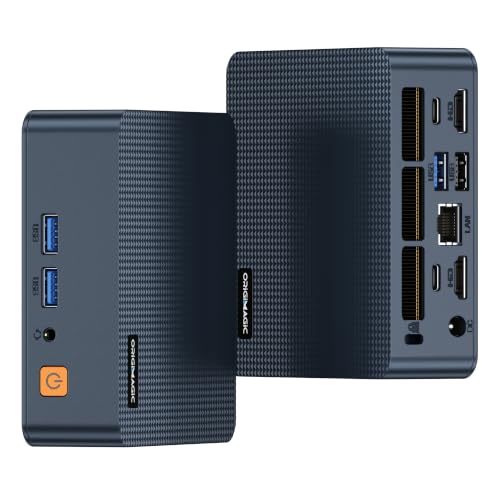
- Dual Thunderbolt 4 ports for docks and expansion
- Core 3 100U, 16GB DDR4, and 512GB SSD included
- Wi-Fi 6, 2.5Gb Ethernet, and dual HDMI
Best For: Everyday users wanting affordable Thunderbolt flexibility
Premium Barebones Upgrade Pick
ASUS NUC 15 Pro with Thunderbolt 4

- Thunderbolt 4 and HDMI 2.1 for up to four 4K displays
- Core Ultra 5 225H with Wi-Fi 7 and Bluetooth 5.4
- Barebones chassis with tool-less access and dual storage
Best For: Custom business builds and multi-display users
Thunderbolt Productivity Pick

- Dual Thunderbolt 4 ports with 40Gbps transfer
- Up to four 4K displays or dual 8K displays
- 2.5G LAN, Wi‑Fi 6, and expandable storage
Best For: Multi-monitor office users and compact workstation setups
Premium NUC Option

- Thunderbolt 4 plus HDMI 2.1 for four 4K displays
- Intel Core 7 240H with DDR5 and Gen4 SSD
- Wi‑Fi 7, Bluetooth 5.4, and tool-less upgrades
Best For: Premium small-form-factor buyers who want modern connectivity
Value Performance Pick

- USB4 supports Thunderbolt 4-style connectivity
- Core i7-12700H with 32GB RAM and 512GB SSD
- Dual 2.5GbE LAN and triple-display support
Best For: Value-focused users who want USB4 expansion and strong networking
Powerful Quad-Display Pick
MINIX NGC 512 for Business and Home Office

- Intel Core i5-12600H performance
- Thunderbolt 4 with quad-display support
- Dual LAN plus Wi-Fi 6 connectivity
Best For: Compact business and home office multitasking
Quiet Office Multitasker

- Thunderbolt 4 with HDMI and DP
- 16GB RAM and 512GB SSD included
- Wi-Fi 6 plus dual RJ45 ports
Best For: Mainstream office setups with 3-monitor support
Business-Ready Compact Pick
ASUS NUC 13 Pro with Dual Thunderbolt

- Core i5-13420H up to 4.6GHz
- Two Thunderbolt ports plus dual HDMI
- Expandable RAM and SSD storage
Best For: Professional workstations and multi-display desks
Thunderbolt-Ready Productivity Pick – C7 Mini PC with Dual Thunderbolt 4
If you want a mini pc with thunderbolt for a compact office or flexible workstation, the C7 is built around dual Thunderbolt 4 ports and a balanced Intel Core 3 100U processor. It pairs everyday responsiveness with expansion-friendly connectivity, including support for external GPU enclosures, multi-display use, and fast peripherals.
Best For: Home offices, business users, and compact setups that need Thunderbolt 4 expansion without moving to a full tower.
Pros:
- Dual Thunderbolt 4 ports with support for high-speed peripherals and eGPU-style expansion
- Intel Core 3 100U hybrid CPU with 6 cores and 8 threads for mixed workloads
- 16GB DDR4 memory and 512GB NVMe SSD included, with upgrade paths for both RAM and storage
- 2.5Gb Ethernet, Wi-Fi 6, and dual HDMI for practical everyday connectivity
Cons:
- Integrated graphics mean heavy gaming and creative work will rely on external expansion
- Memory starts at 16GB, so power users may want to upgrade sooner
- Best suited to productivity and flexible setups rather than raw desktop-class performance
This C7 makes sense if you value Thunderbolt 4 flexibility in a very small footprint. It is a strong fit for multi-monitor work, quiet long-hour operation, and users who want a compact machine with upgrade room.
High-Power Creator Choice – Beelink GTi13 Core i9 Thunderbolt Mini PC
The Beelink GTi13 is a mini pc with thunderbolt aimed at users who need a lot more muscle than a basic office box. With an Intel Core i9 13900HK, 32GB DDR5, and Thunderbolt 4 support, it is positioned for demanding workloads like video editing, rendering, programming, and multi-device productivity.
Best For: Creators, power users, and small-workstation buyers who want strong CPU performance plus Thunderbolt 4 and expansion options.
Pros:
- Intel Core i9 13900HK with 14 cores and 20 threads for heavy multitasking
- Thunderbolt 4 supports 100W PD charging, 40Gbps data, and video output
- 32GB DDR5 and 1TB SSD included, with substantial upgrade ceilings
- 2x 2.5G LAN, Wi-Fi 6, and a wide port mix for fast networking and peripherals
Cons:
- Higher-performance hardware may be more than casual users need
- Large feature set can make it less straightforward than a basic mini PC
- Uses a 65W TDP design, so thermal behavior matters in sustained workloads
For buyers who want Thunderbolt 4 alongside serious processing power, the GTi13 stands out. It is especially compelling if you plan to run creative apps, multiple storage devices, or a docked workstation setup.
Value Thunderbolt Compact – C7 Mini PC with Dual 4K Expandability
If you want a mini pc with thunderbolt for everyday work and light expansion, this C7 keeps the focus on practical performance. It uses the Intel Core 3 100U hybrid processor, includes 16GB DDR4 and a 512GB SSD, and adds dual Thunderbolt 4 ports for flexible display and accessory connectivity.
Best For: Buyers who want a compact Thunderbolt 4 mini PC for office work, streaming, and light workstation expansion.
Pros:
- Dual Thunderbolt 4 ports with support for external GPU enclosures and advanced expansion
- Intel Core 3 100U hybrid CPU balances performance and efficiency for daily tasks
- 16GB DDR4 memory and 512GB NVMe SSD included out of the box
- Wi-Fi 6, Bluetooth 5.2, 2.5Gb Ethernet, and dual HDMI for broad connectivity
Cons:
- Integrated graphics limit native gaming and creative performance
- Best upgrades are still centered on memory and storage, not internal graphics
- More of a productivity-first machine than a performance-first one
This is a sensible pick if you want Thunderbolt 4 without paying for a high-end processor you may not use. It offers strong everyday usability and upgrade flexibility in a very compact chassis.
Premium Barebones Upgrade Pick – ASUS NUC 15 Pro with Thunderbolt 4
The ASUS NUC 15 Pro is a premium mini pc with thunderbolt for buyers who want a modern barebones platform and strong connectivity. Built around the Intel Core Ultra 5 225H, it supports up to 96GB DDR5, dual storage, Wi-Fi 7, and Thunderbolt 4 for flexible desktop setups.
Best For: Buyers who want a premium, upgrade-friendly mini PC platform for business use, multi-display work, and long-term flexibility.
Pros:
- Thunderbolt 4 and HDMI 2.1 support up to four 4K displays
- Intel Core Ultra 5 225H with integrated Intel Arc graphics for modern everyday performance
- Barebones design with tool-less chassis access for quick upgrades
- Wi-Fi 7, Bluetooth 5.4, and 24/7 reliability testing for a polished feature set
Cons:
- Sold barebones, so you must add RAM and storage before use
- Higher-end platform may be more than basic browsing or office users need
- Premium features can push it above value-focused mini PC options
For users who want the newest connectivity and a clean upgrade path, the NUC 15 Pro is one of the strongest Thunderbolt-focused options here. It is best viewed as a compact foundation you can tailor to your workload.
Thunderbolt Productivity Pick – Mini PC C7 100U
If you want a mini pc with thunderbolt that feels closer to a desktop workstation, the Mini PC C7 100U is built around that idea. Its dual Thunderbolt 4 ports, quad-display support, and 2.5G networking make it a strong fit for desk setups where speed, expansion, and clean cable management matter.
Best For: Users who want a compact office or workstation PC with dual Thunderbolt 4 ports and multi-monitor flexibility.
Pros:
- Two Thunderbolt 4 ports support 8K@60Hz output and 40Gbps transfer speeds.
- Can drive up to four 4K displays or dual 8K displays with the HDMI ports.
- Includes 16GB dual-channel DDR4, a 512GB NVMe SSD, and an extra M.2 expansion slot.
- Has 2.5G Ethernet plus Wi-Fi 6 for faster wired and wireless networking.
Cons:
- Ships with Windows 11 Pro, which may not suit users who want a no-OS system.
- Uses DDR4 instead of newer DDR5 memory.
Overall, this model stands out if Thunderbolt connectivity is a top priority and you want it paired with serious display output and practical upgrade options. It is especially appealing for multi-screen productivity without adding a dock.
Premium NUC Option – ASUS NUC 15 Pro Slim
The ASUS NUC 15 Pro Slim is a mini pc with thunderbolt aimed at buyers who want a polished, modern platform with strong connectivity. With Intel Core 7 240H, Thunderbolt 4, Wi-Fi 7, and tool-less access for upgrades, it is a compact choice for demanding everyday or business use.
Best For: Buyers who want a premium small-form-factor system with Thunderbolt 4, Wi‑Fi 7, and easy upgrade access.
Pros:
- Thunderbolt 4 and HDMI 2.1 can support up to four 4K displays.
- Comes with 16GB DDR5 RAM and a 512GB PCIe Gen4x4 NVMe SSD installed.
- Includes Wi-Fi 7 and Bluetooth 5.4 for modern wireless connectivity.
- Tool-less chassis access makes upgrades and maintenance easier.
Cons:
- Does not include a pre-installed operating system.
- Higher-end positioning may be more than casual users need.
For buyers comparing compact PCs on connectivity and finish, this NUC is the most premium-feeling option here. It balances Thunderbolt 4, display flexibility, and business-oriented reliability in a very small footprint.
Value Performance Pick – BOSGAME P2 Plus
The BOSGAME P2 Plus is a mini pc with thunderbolt support through USB4, giving it a useful mix of performance and expansion for the price. With an Intel Core i7-12700H, dual 2.5GbE ports, and triple-display support, it is geared toward users who want a capable compact machine for work, networking, or light creative tasks.
Best For: Buyers who want a strong value mini PC with USB4/Thunderbolt 4 support and dual 2.5GbE networking.
Pros:
- USB4 supports Thunderbolt 4 functionality for faster expansion and display output.
- Core i7-12700H processor provides solid all-around performance.
- Dual 2.5GbE LAN is useful for stable wired networking and router-type uses.
- Supports triple 4K 60Hz displays via HDMI, DisplayPort, and USB4.
Cons:
- Uses DDR4 memory rather than DDR5.
- Thunderbolt support is via USB4, not native Thunderbolt 4 ports.
This is a practical pick if you want the Thunderbolt-style flexibility of USB4 without moving to a higher-priced premium box. It offers a strong mix of ports, network speed, and display support for everyday power users.
Powerful Quad-Display Pick – MINIX NGC 512 for Business and Home Office
If you want a mini pc with thunderbolt for serious multitasking, the MINIX NGC N512 is built to handle it. Its Intel Core i5-12600H, 16GB DDR5 memory, and 512GB PCIe 4.0 SSD give it the kind of speed that fits office work, remote collaboration, and heavier everyday use. The Thunderbolt 4 port also adds high-end display flexibility, including support for up to 8K output.
Best For: Users who want a compact Windows 11 Pro mini PC with Thunderbolt 4, strong multitasking performance, and quad-display support.
Pros:
- Intel Core i5-12600H with 12 cores and 16 threads for fast multitasking
- Thunderbolt 4 plus HDMI and USB-C for triple or four-screen setups
- Dual LAN, Wi-Fi 6, and Bluetooth 5.2 for flexible connectivity
- Upgradeable memory and storage options for future growth
Cons:
- Uses a compact design, so expansion still stays more limited than a full desktop
- Included 16GB RAM and 512GB SSD may be enough for many users, but power users may want upgrades
This MINIX model stands out if display output and performance both matter. It is a practical fit for professionals who need a compact workstation without giving up Thunderbolt 4 or multi-monitor capability.
Quiet Office Multitasker – MSI Cubi 5 with Thunderbolt 4
The MSI Cubi 5 is a mini pc with thunderbolt aimed at straightforward work setups that still need modern connectivity. It pairs an Intel Core i3-1215U, 16GB RAM, and a 512GB SSD with Thunderbolt 4, HDMI, and DisplayPort, making it easy to drive a clean multi-monitor desk. Windows 11 Pro adds a business-friendly layer for productivity and remote work.
Best For: Office users who want a compact, quiet mini PC with Thunderbolt 4 and reliable 3-monitor support.
Pros:
- Thunderbolt 4, HDMI, and DisplayPort for versatile monitor connections
- 16GB RAM and 512GB SSD for smooth everyday multitasking
- Dual RJ45 ports and Wi-Fi 6 for flexible networking
- Windows 11 Pro with productivity and security features
Cons:
- Core i3-1215U is best suited for mainstream productivity, not heavier workloads
- RAM maximum is listed at 32GB, which is lower than some competing mini PCs
Overall, this MSI model is a sensible choice for users who want simple setup, quiet operation, and Thunderbolt 4 without paying for more performance than they need.
Business-Ready Compact Pick – ASUS NUC 13 Pro with Dual Thunderbolt
If you need a mini pc with thunderbolt for a polished workstation, the ASUS NUC 13 Pro brings a strong balance of speed, expandability, and quiet operation. Its Intel Core i5-13420H processor, 16GB RAM, and 512GB PCIe SSD are a solid foundation for business tasks, while two Thunderbolt ports and dual HDMI 2.1 outputs make multi-display setups easy.
Best For: Professionals who want a compact, Windows 11 Pro mini PC with dual Thunderbolt ports and flexible display options.
Pros:
- Intel Core i5-13420H with boost speeds up to 4.6GHz
- 2x Thunderbolt ports and 2x HDMI 2.1 for multi-monitor use
- Expandable memory and SSD storage for future upgrades
- Wi-Fi 6E and Bluetooth 5.3 for current-generation wireless support
Cons:
- Ships with 16GB RAM, which is fine for many users but may not suit all heavy workloads
- The tall mini PC form factor is still compact, but larger than some ultra-small models
This ASUS NUC is a strong fit for offices, conference rooms, and anyone who values Thunderbolt flexibility alongside straightforward Windows 11 Pro performance.
How We Picked the Best Mini PC with Thunderbolt
We focused on systems that offer a useful Thunderbolt or Thunderbolt-compatible connection, along with the hardware most buyers actually need: responsive CPUs, enough memory for multitasking, NVMe storage, and modern wireless support. We also looked for compact designs that make sense on a desk, behind a monitor, or in a travel setup.
Quick Comparison: What Stands Out
The strongest Mini PC with Thunderbolt options in this group lean toward either higher-end performance for heavy workloads or balanced everyday speed for office and creator use. Barebones models give you more control over RAM and storage, while fully configured systems are better if you want a simpler plug-and-play purchase. If you need multiple external displays, make sure the video output mix and Thunderbolt implementation fit your monitor setup.
Key Buying Factors for a Mini PC with Thunderbolt
Port Type and Real-World Use
Not every USB-C port delivers the same experience. Look for explicit Thunderbolt 4 support or a clearly stated Thunderbolt-compatible implementation if you plan to use high-speed storage, docks, or multiple peripherals through one cable.
CPU Class and Performance Headroom
For office work and media consumption, efficient midrange chips are usually enough. For development, creative apps, or heavier multitasking, step up to higher-core options that can sustain performance under load.
Memory and Storage Upgrades
At least 16GB of RAM is the sensible baseline for most buyers, while 32GB or more is better for demanding multitasking. NVMe SSD storage is important for fast boots and app launches, and dual-drive support can be a big plus if you keep large files locally.
Display and Docking Needs
If you use several monitors, check both the number of supported displays and the resolution limits. A Mini PC with Thunderbolt is especially attractive when you want a clean desk setup with one cable for display, data, and accessories.
Who Should Buy Which Mini PC with Thunderbolt?
Choose a higher-performance model if you edit media, run virtual machines, or want more future-proof headroom. Pick a balanced midrange system if your day is mostly productivity, meetings, and light creative work. If you value customization, a barebones unit may be the best fit because you can choose your own RAM and SSD. If you want the simplest setup, a fully configured Mini PC with Thunderbolt-ready connectivity is the easiest path.
Overall, the best choice depends on whether you care most about raw speed, upgrade flexibility, or clean docking convenience. Match the port support, memory, and display output to your actual workflow, and you will end up with a compact PC that feels far less limited than its size suggests.