
If you want desktop performance in a tiny footprint, a mini PC with NPU is one of the most practical upgrades you can make. These systems combine efficient processors with on-device AI acceleration for smoother productivity, video calls, and select creative tasks.
In this roundup, we focus on models that balance speed, connectivity, memory, and thermals so you can choose the right compact PC for work, home, or light gaming.
Best 10 Mini PC with Npu Picks for 2026
AI Business Multitasker
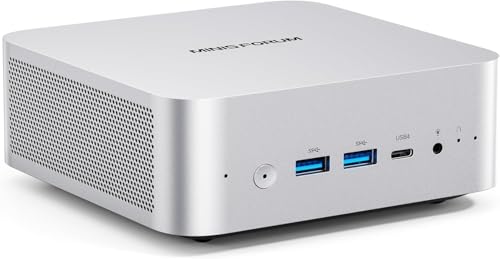
- Ryzen 7 255 with Radeon 780M graphics
- Dual USB4 and OCuLink eGPU support
- Wi‑Fi 7, 2.5G LAN, and 4-screen output
Best For: Business users and power multitaskers
Compact AI Office Box
Bmax Core Ultra 5 115U 16GB/512GB

- Core Ultra 5 115U with AI Boost NPU
- 16GB LPDDR5 and 512GB SSD
- Triple 8K output with 2.5G LAN and Wi‑Fi 6
Best For: Students and office users wanting easy local AI
AI Productivity Workstation

- Core Ultra 9 285H with 99 TOPS AI performance
- 32GB DDR5 and 1TB Gen 4 SSD
- Quad-display support with WiFi 7 and USB4
Best For: IT professionals, creators, and power users
Balanced AI Gaming Pick

- Ryzen 7 Pro 8845HS with Radeon 780M graphics
- Dedicated Ryzen AI NPU with up to 38 TOPS total
- Dual USB4 and dual 2.5GbE LAN ports
Best For: Users who want a compact all-rounder for work and light gaming
Efficient AI Expandable Mini PC

- Core Ultra 5 125U with Intel AI Boost
- 32GB DDR5 and three M.2 storage slots
- Oculink plus four-screen display support
Best For: Users who want a low-power mini PC with upgrade headroom
AI Powerhouse for Creators
GEEKOM GT13 MAX Intel Ultra 9 185H

- Intel Core Ultra 9 185H with Intel AI Boost NPU
- Supports local AI tasks like OCR, transcription, and Q&A
- Up to four displays plus Wi-Fi 7 and dual 2.5G LAN
Best For: Creators and professionals who want local AI features with strong connectivity
Business AI Desktop

- Intel Core Ultra 7 258V with 47 TOPS NPU
- Windows 11 Pro and fingerprint login for business use
- Up to 3 displays at 4K with Thunderbolt 4
Best For: Office teams and professionals who need AI features in a compact desktop
Budget-Friendly AI Workhorse
Glorlin Ryzen 7 8845HS Mini PC

- Ryzen 7 8845HS with AI NPU up to 38 TOPS
- Radeon 780M graphics for 4K playback and light gaming
- Quad 4K display support with USB4 and dual 2.5G LAN
Best For: Users who want affordable AI support and flexible multi-display connectivity
AI Value Performer – GMKtec K15 Core Ultra 5 125U 32GB/1TB
If you want a mini pc with npu for everyday work, light editing, and multi-display setups, the GMKtec K15 brings a strong mix of Intel Core Ultra efficiency, fast storage, and flexible expansion. Its AI Boost NPU is built to accelerate local AI tasks, while the Arc 140T graphics and triple M.2 design make it a practical pick for users who want headroom without moving to a full tower.
Best For: Users who want a balanced mini PC for office work, creative tasks, gaming-light workloads, and future expansion.
Pros:
- Intel Core Ultra 5 125U with 12 cores, 16 threads, and up to 4.3 GHz turbo
- Intel AI Boost NPU rated up to 13 TOPS for AI acceleration
- 32GB DDR5 memory plus 1TB PCIe 4.0 SSD and three M.2 2280 slots
- Oculink, 2.5GbE, Wi‑Fi 6, Bluetooth 5.2, and quad-display 8K support
Cons:
- Built-in NPU performance is modest compared with newer higher-TOPS AI systems
- Gaming capability is centered on integrated Arc graphics, not a discrete GPU
- RGB-heavy cooling design may be more than some office users need
The K15 stands out as a flexible mini pc with npu for buyers who value storage expansion, wired networking, and broad display support. It looks especially appealing if you want an AI-ready daily driver with upgrade paths built in.
AI Business Multitasker – MINISFORUM AI X1-255 Ryzen 7
The MINISFORUM AI X1-255 is a strong mini pc with npu-adjacent AI positioning for users who want fast business performance, modern connectivity, and eGPU flexibility. With a Ryzen 7 255, Radeon 780M graphics, dual USB4, and OCuLink support, it is built for demanding multitasking, media work, and low-latency setups.
Best For: Professionals and power users who want a compact desktop for business, productivity, and versatile expansion.
Pros:
- AMD Ryzen 7 255 with 8 cores, 16 threads, and up to 4.9 GHz boost
- 32GB DDR5 and dual PCIe 4.0 M.2 slots for fast storage expansion
- OCuLink plus dual USB4 for eGPU and high-speed peripherals
- Wi‑Fi 7, 2.5G LAN, built-in mic, and dual speakers for modern connectivity
Cons:
- The notes do not specify a dedicated Intel/AMD NPU value the way some AI-focused mini PCs do
- Full-load noise can reach 45dB, so it is not the quietest option under stress
- Storage expansion tops out at 4TB per slot, which may matter for large media libraries
This model is a compelling choice if you want speed, ports, and upgrade flexibility in a compact machine. It is best approached as a productivity-first mini PC that can scale into heavier workflows through external graphics and fast I/O.
Compact AI Office Box – Bmax Core Ultra 5 115U 16GB/512GB
If you are shopping for a mini pc with npu for office productivity and light creative work, the Bmax B11 Pro is tuned for efficient local AI use without overcomplicating the setup. Its Intel AI Boost NPU, low-power LPDDR5 memory, and triple 8K display output make it a practical everyday system for users who value convenience and privacy.
Best For: Office users, students, and anyone who wants simple local AI features in a compact Windows 11 Pro desktop.
Pros:
- Intel Core Ultra 5 115U with built-in AI Boost NPU for local acceleration
- 16GB LPDDR5 memory and 512GB SSD for efficient everyday use
- Triple 8K display support via HDMI 2.1, DP 2.1, and Type-C
- 2.5G LAN, Wi‑Fi 6, and Windows 11 Pro preinstalled
Cons:
- 16GB onboard memory is not user-replaceable in the same way as standard SO-DIMM designs
- Storage starts at 512GB, which may be tight for larger media or project files
- Integrated graphics are aimed at productivity and light creative work rather than gaming-heavy use
The Bmax B11 Pro is a sensible choice for buyers who want local AI tools, compact size, and straightforward setup. It is less about raw performance and more about delivering an efficient, quiet desktop experience for daily tasks.
Silent Premium Daily Driver – GEEKOM AX8 Max Ryzen 7 8745HS
The GEEKOM AX8 Max is a premium mini pc for users who want strong everyday performance and quiet operation, but it is not positioned around an onboard NPU. Instead, it focuses on a Ryzen 7 8745HS, Radeon 780M graphics, dual USB4, and a highly expandable design that suits work, content creation, and light gaming.
Best For: Buyers who want a silent, high-quality mini PC for productivity, creative work, and external GPU expansion.
Pros:
- Ryzen 7 8745HS with 8 cores/16 threads and Radeon 780M graphics
- Dual USB4 ports plus USB4 eGPU support for more demanding setups
- 16GB DDR5, 1TB Gen 4 SSD, and expansion up to 128GB RAM and 8TB SSD
- Quiet IceBlast 2.0 cooling and premium aluminum frame
Cons:
- No built-in NPU is highlighted in the supplied notes
- Memory starts at 16GB, so heavy users may want to upgrade sooner
- Performance Mode and external GPU options add value, but also add cost and complexity
This is a strong fit if you care more about a refined, quiet mini PC than about built-in AI hardware. It delivers a lot of flexibility for future upgrades, especially if you plan to use external graphics or large storage needs later.
AI Productivity Workstation – GEEKOM IT15
If you want a mini pc with npu that can handle AI-assisted creation, demanding multitasking, and serious office work, the GEEKOM IT15 is built around Intel Core Ultra 9 285H performance. Its 99 TOPS total AI capability combines NPU, Arc GPU, and CPU acceleration, so it can keep local AI workloads moving without overworking the system. The result is a compact desktop that fits creators, developers, and power users who want responsive performance and privacy-friendly local processing.
Best For: IT professionals, video creators, and design users who want a high-end AI mini PC for productive daily work.
Pros:
- Intel Core Ultra 9 285H with 99 TOPS total AI performance for AI-assisted workflows.
- 32GB DDR5 RAM and 1TB Gen 4 SSD for fast multitasking and storage.
- Supports up to four displays, including dual 8K and dual 4K setups.
- WiFi 7, 2.5Gbps Ethernet, and USB4 make it well connected for modern workstations.
Cons:
- High-end specs may be more than casual users need.
- Best value is tied to workloads that actually use AI or heavy multitasking.
The IT15 is positioned as a true productivity-focused AI mini PC rather than a basic desktop replacement. If your work benefits from fast local processing, multiple monitors, and dependable 24/7 operation, it stands out as a strong premium option.
Balanced AI Gaming Pick – Glorlin Ryzen 7 Pro 8845HS
For buyers comparing a mini pc with npu that can also handle gaming and content work, the Glorlin AI Mini PC offers a practical balance of speed and versatility. It uses the AMD Ryzen 7 Pro 8845HS with Radeon 780M graphics plus a dedicated Ryzen AI NPU, giving it up to 16 TOPS of AI performance and a total system AI capability of up to 38 TOPS. That makes it a solid fit for smarter video calls, photo and video tools, and everyday workflows that benefit from AI acceleration.
Best For: Users who want a compact all-rounder for office work, light gaming, and AI-accelerated creative tasks.
Pros:
- Ryzen 7 Pro 8845HS plus Radeon 780M graphics for strong everyday performance.
- Dedicated Ryzen AI NPU with up to 38 TOPS total AI capability.
- 16GB DDR5 RAM and 1TB PCIe 4.0 SSD for smooth multitasking and quick storage.
- Two USB4 ports and dual 2.5GbE LAN add flexibility for fast peripherals and networking.
Cons:
- Ships with 16GB RAM, which may feel modest for heavier creator workloads.
- WiFi 6 and Bluetooth 5.3 are solid, but not the newest wireless standards.
This model is a good middle ground if you want AI features without jumping to a premium workstation class. It is especially appealing if you need a compact machine for work, light gaming, and general-purpose performance in one box.
Efficient AI Expandable Mini PC – GMKtec K15
If you want a mini pc with npu that emphasizes efficiency, expandability, and practical multitasking, the GMKtec K15 is a smart pick. Its Intel Core Ultra 5 125U is paired with Intel AI Boost and a low 15W TDP, so it is designed to deliver capable performance without wasting much energy. The 32GB DDR5 memory, 512GB PCIe 4.0 SSD, and multiple expansion options make it especially appealing for users who need a compact system that can grow with them.
Best For: Buyers who want a low-power AI mini PC with strong display support and expansion options.
Pros:
- Intel Core Ultra 5 125U with Intel AI Boost and a low 15W power profile.
- 32GB DDR5 RAM, 512GB SSD, and three M.2 slots for major storage expansion.
- Supports four-screen output with HDMI 2.1, DisplayPort 1.4, and USB-C.
- Oculink port adds higher-bandwidth external GPU expansion potential.
Cons:
- 512GB included storage is smaller than some competing mini PCs.
- Best suited to efficiency and expansion, not the highest raw performance tier.
The K15 stands out if you care about power efficiency, multi-monitor flexibility, and future upgrades. It is a practical option for home office, light creative work, and users who may want to add more storage or an eGPU later.
AI Powerhouse for Creators – GEEKOM GT13 MAX Intel Ultra 9 185H
If you want a mini pc with npu that can handle local AI tools, creative work, and everyday productivity, the GEEKOM GT13 MAX is built to do a lot in a small footprint. Its Intel Core Ultra 9 185H pairs with Intel AI Boost NPU support for on-device tasks like document Q&A, OCR, transcription, meeting summaries, and coding assistance, while still leaving room for cloud AI when you need deeper work.
Best For: Creators, office users, and AI-curious buyers who want local AI features plus strong graphics and expandability.
Pros:
- Intel Core Ultra 9 185H with Intel Arc graphics and up to 11 TOPS NPU support
- Supports local AI tasks like RAG search, OCR, subtitles, transcription, and private document Q&A
- Dual USB4, dual HDMI 2.0, and Mini DP 1.4 support up to four displays
- 16GB DDR5 RAM and 1TB SSD, with expansion up to 96GB RAM and 6TB storage
Cons:
- AI NPU throughput is lower than some newer Copilot+ class systems
- Base memory may be limiting for heavier multitasking without upgrades
- Best suited to lightweight local AI rather than large, demanding models
This is a strong all-around pick if you want a compact system that mixes AI features, graphics capability, and broad connectivity. The GT13 MAX is especially appealing when you want local processing for privacy and convenience without giving up general-purpose performance.
Business AI Desktop – MSI Cubi NUC AI+ Ultra 7 258V
The MSI Cubi NUC AI+ is a mini pc with npu aimed squarely at business users who want AI assistance, strong multitasking, and a tidy desk setup. With an Intel Core Ultra 7 258V, a 47 TOPS NPU, and Copilot+ PC positioning, it is designed for efficient workflows, voice-enabled interaction, and everyday office productivity.
Best For: Business users who want a compact AI desktop with pro-level Windows features and multi-display support.
Pros:
- Intel Core Ultra 7 258V with 115 TOPS overall AI performance and 47 TOPS NPU peak
- Windows 11 Pro adds management tools like Group Policy and Kiosk mode
- Supports up to 3 displays at 4K via HDMI and Thunderbolt 4
- Fingerprint reader, built-in D-Mic, speaker, Wi-Fi 6E, and dual LAN for office use
Cons:
- Listed memory and SSD specs conflict across the provided details
- Integrated graphics are aimed more at business tasks than gaming
- Designed primarily for productivity, not high-end creative workloads
If your priority is a small business PC with practical AI features and enterprise-friendly software, this model makes a lot of sense. It focuses on office efficiency, display flexibility, and secure access rather than raw consumer flair.
Budget-Friendly AI Workhorse – Glorlin Ryzen 7 8845HS Mini PC
The Glorlin mini pc with npu is a practical choice if you want a compact machine for work, light gaming, and everyday multitasking. Its Ryzen 7 8845HS includes an AI NPU rated up to 38 TOPS, so it can handle modern automation and data-processing tasks while the Radeon 780M covers everyday graphics and 4K playback.
Best For: Home and office users who want a versatile mini PC with AI support, quad-display output, and upgrade room.
Pros:
- Ryzen 7 8845HS with built-in AI NPU up to 38 TOPS
- Radeon 780M integrated graphics for 4K video and light gaming
- Supports up to four 4K displays through HDMI, DisplayPort, and USB-C
- 16GB DDR5 RAM, 1TB SSD, dual 2.5G LAN, and USB4 connectivity
Cons:
- AI-intensive tasks may benefit from more memory than the base 16GB
- Integrated graphics are best for light gaming rather than demanding titles
- One-year warranty is shorter than some competing mini PCs
This is a balanced option for buyers who want AI capability without jumping to a premium workstation price point. It offers a strong mix of everyday performance, display support, and upgrade flexibility for mixed-use setups.
How We Picked the Best Mini PC with Npu
We prioritized real-world usefulness over raw spec sheets. That means looking at CPU class, NPU capability, integrated graphics, memory and storage capacity, port selection, and whether the system is better suited to office work, AI-assisted productivity, or more demanding creator workloads.
We also favored balanced configurations that are ready to use out of the box, since many buyers want a Mini PC with Npu that can handle multitasking without immediate upgrades.
Quick Comparison
For most buyers, the best choice depends on how you plan to use it. Intel Core Ultra systems tend to emphasize strong AI features and broad business compatibility, while Ryzen 7 and Ryzen 9-based options often offer excellent all-around performance and integrated graphics. Business-focused models may include extras like fingerprint login, while performance models may add USB4, dual display support, or Oculink for expansion.
Key Buying Factors for a Mini PC with Npu
NPU Performance and Software Support
Look beyond the advertised TOPS number and consider the software you actually use. A higher NPU rating can help with AI-enhanced apps, but benefits depend on support in your operating system, conferencing tools, office apps, and creative software.
CPU, GPU, and Memory Balance
The best Mini PC with Npu is usually the one with a balanced platform. For heavy multitasking, 32GB of RAM is the safer choice. If you plan to use integrated graphics for light gaming, media editing, or multiple 4K displays, pay attention to GPU class and memory speed as well.
Ports, Displays, and Expansion
Check for USB4, HDMI, DisplayPort, and dual or quad-display support if you use several monitors. Expansion options such as Oculink or extra M.2 slots can matter if you want more storage or external graphics flexibility later.
Thermals and Noise
Compact systems can vary a lot in cooling quality. If the PC will sit on a desk or in a quiet office, look for models marketed as silent or well-cooled, especially if you expect sustained workloads.
Who Should Buy Which Mini PC with Npu?
Choose a business-oriented Mini PC with Npu if you want secure sign-in, reliable office performance, and a small footprint for a desk or conference room. Pick a Ryzen-based model if you want a strong mix of graphics performance and everyday speed for mixed-use homes or creator workflows. Choose a higher-end Intel Ultra system if your priority is AI features, premium responsiveness, and broader headroom for demanding multitasking.
If you mainly need a compact PC for browsing, meetings, documents, and streaming, midrange NPU systems are usually the best value. If you want more future-proofing, step up to 32GB RAM, a 1TB SSD, and better display/expansion connectivity.