
Upgrading or duplicating drives is easier with a hard drive enclosure that can clone disks without a computer. These docks and enclosures support combinations of SATA HDDs, SATA SSDs, and M.2 NVMe or SATA drives, depending on the model.
We selected 10 options for different needs, from straightforward dual-bay SATA cloners to versatile USB-C docks with NVMe support, RAID modes, and extra connectivity.
Best 10 Hard Drive Enclosure with Offline Cloning Picks for 2026
Most Versatile
ICY BOX Triple-Bay NVMe/SATA Cloner

- One-touch offline cloning
- Supports NVMe and SATA drives
- Three bays with USB 3.2 Gen 2
Best For: Mixed-drive workflows and frequent storage migrations
Best Value
SABRENT USB 3.0 Dual-Bay Cloner

- Dual-bay SATA docking station
- Offline cloning up to 60Mbps
- Supports drives up to 10TB
Best For: Simple, affordable SATA cloning and drive access
Best NVMe Adapter

- Adapts M.2 NVMe to SATA form factors
- USB-C connectivity up to 10Gbps
- Works with PC, Mac, and Android
Best For: Repurposing an NVMe SSD in SATA-oriented systems
Best SATA Specialist

- Offline SATA cloning up to 60MBps
- Fits 2.5- and 3.5-inch SATA drives
- Tool-free hot-swappable dual bays
Best For: Straightforward SATA drive cloning and file transfers
Best for NVMe RAID flexibility

- Offline Clone, RAID 0/1, and JBOD modes
- 20Gbps USB 3.2 transfer capability
- Tool-free aluminum dual-SSD design
Best For: NVMe users needing cloning and multiple storage modes
Best for SATA drive cloning

- Clones 2.5- and 3.5-inch SATA drives offline
- Supports up to 48TB across two bays
- Adds three USB 3.0 hub ports
Best For: SATA backups, upgrades, and IT data handling
Best for USB-C SATA access
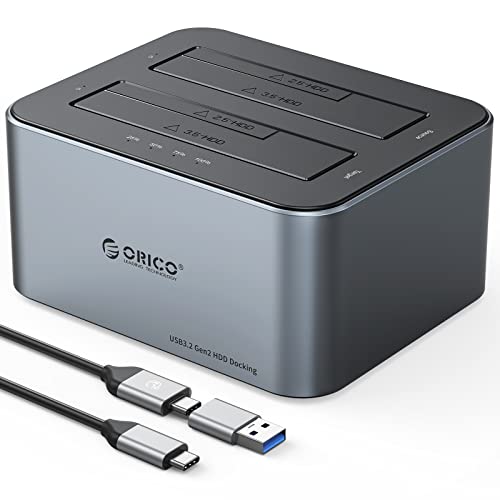
- Offline cloning for two SATA drives
- USB-C with up to 6Gbps and UASP
- Works with 2.5- and 3.5-inch HDDs
Best For: USB-C-equipped PCs needing SATA cloning
M.2-to-SATA Cloner
M.2 SATA Offline Clone Enclosure

- Clones M.2 SATA to 2.5- or 3.5-inch SATA drives
- USB-C supports up to 5Gbps transfers
- Single-drive adapter for SATA upgrades
Best For: M.2 SATA SSD owners moving data to a traditional SATA drive
Classic Dual-Bay Dock

- Clones between two SATA drives without a computer
- Supports 2.5- and 3.5-inch drives up to 16TB each
- UASP, hot-swapping, and broad OS support
Best For: Computer-free SATA backups and drive duplication
High-Capacity Dual Dock

- Supports up to two 20TB SATA drives
- Dedicated button starts computer-free cloning
- UASP and USB 3.0 support up to 5Gbps
Best For: Large-capacity SATA backups and drive duplication
Most Versatile – ICY BOX Triple-Bay NVMe/SATA Cloner
If you need a hard drive enclosure with offline cloning that can handle more than standard SATA drives, the ICY BOX Triple-Bay Cloner is a flexible choice. It supports M.2 PCIe NVMe, 2.5-inch SATA, and 3.5-inch SATA drives, with three independent tool-free bays and USB 3.2 Gen 2 connectivity.
Best For: Users managing mixed NVMe and SATA drives, multiple storage devices, or frequent cloning tasks.
Pros:
- One-touch offline cloning without software or a computer setup.
- Supports NVMe-to-NVMe and SATA-to-NVMe cloning, plus 2.5- and 3.5-inch SATA drives.
- Three bays allow multiple drives to be connected simultaneously.
- Includes USB-C and USB-A connectivity with transfer speeds up to 10Gbps.
Cons:
- The plastic enclosure may feel less rugged than metal alternatives.
- Its broader feature set may be more than needed for SATA-only users.
The ICY BOX stands out for its drive-format flexibility and three-bay layout. It is the strongest fit here for mixed storage environments, especially when NVMe support and high-speed computer access matter.
Best Value – SABRENT USB 3.0 Dual-Bay Cloner
For a straightforward hard drive enclosure with offline cloning, the SABRENT EC-HD2B provides two bays for standard 2.5- and 3.5-inch SATA hard drives or SSDs. It is plug and play, supports drives up to 10TB, and can clone offline at up to 60Mbps.
Best For: Budget-conscious users who need a simple dual-bay SATA dock and offline duplicator.
Pros:
- Supports both 2.5- and 3.5-inch SATA hard drives and SSDs.
- Offline cloning requires no computer or drivers.
- Supports up to 10TB drives and USB 3.0 transfer speeds up to 5Gbps.
- Includes a power supply, USB 3.0 cable, and user manual.
Cons:
- It does not support M.2 or NVMe drives.
- Offline cloning is limited to up to 60Mbps.
- Only two drives can be docked at once.
The EC-HD2B is a practical SATA-only option with useful capacity support and simple operation. Choose it when you want basic cloning and drive access without paying for NVMe compatibility.
Best NVMe Adapter – Rosewill NVMe-to-SATA Cloner
The Rosewill RS-NS-CL takes a different approach to a hard drive enclosure with offline cloning by adapting an M.2 NVMe SSD for use with 2.5- or 3.5-inch SATA-oriented systems. Its USB-C connection supports advertised transfer speeds up to 10Gbps.
Best For: Tech enthusiasts who want to repurpose an M.2 NVMe SSD with traditional SATA-compatible equipment.
Pros:
- Converts an M.2 NVMe SSD for use in 2.5- and 3.5-inch SATA applications.
- USB-C connectivity supports speeds up to 10Gbps.
- Compatible with PC, Mac, and Android platforms according to the supplied details.
- Designed as a standalone cloning and adapter tool.
Cons:
- Its supplied specifications provide less detail about supported drive capacities and cloning limits.
- It is focused on NVMe-to-SATA conversion rather than broad multi-format docking.
- The enclosure is plastic.
The Rosewill is best understood as a specialized NVMe conversion tool rather than a universal dock. It makes the most sense when your main goal is connecting or cloning an M.2 NVMe drive through a SATA-style setup.
Best SATA Specialist – SABRENT USB-C Dual-Bay Cloner
If your drives are exclusively SATA, the SABRENT EC-CH2B is a focused hard drive enclosure with offline cloning. Its two tool-free bays accept bare 2.5- and 3.5-inch SATA drives, while USB-C connects both drives to a Windows or Mac computer for file transfers.
Best For: Users who need reliable one-to-one cloning for standard SATA HDDs and SSDs.
Pros:
- Clones one SATA drive to another without a computer at up to 60MBps.
- Supports both 2.5- and 3.5-inch SATA HDDs and SSDs.
- Both bays appear as separate drives when connected over USB.
- Tool-free, hot-swappable design includes an access LED for each bay.
Cons:
- Does not support M.2, NVMe, IDE/PATA, or 4-pin Molex drives.
- The target drive must be the same size as or larger than the source.
- USB 3.0 transfer speeds top out at 5Gbps, and the included cable is USB-C on the dock end.
The EC-CH2B is a clear choice for SATA-only users who value simple offline duplication and simultaneous two-drive access. Its limitations are easy to define, making it less suitable for mixed-format storage collections.
Best for NVMe RAID flexibility – Dual-Bay M.2 NVMe Enclosure
If you need a hard drive enclosure with offline cloning for M.2 2280 NVMe SSDs, this dual-bay NEWQ enclosure combines direct disk duplication with RAID 0, RAID 1, and JBOD modes. Its 20Gbps USB 3.2 connectivity and tool-free installation suit fast backups, drive upgrades, and portable storage setups.
Best For: NVMe users who want offline cloning plus flexible RAID configurations.
Pros:
- Supports Clone, RAID 0, RAID 1, and JBOD modes.
- 20Gbps transfer rate helps with large files and data-intensive work.
- Tool-free access makes SSD changes convenient.
- Aluminum construction supports heat dissipation and portability.
Cons:
- Compatible with M.2 2280 NVMe SSDs rather than 2.5- or 3.5-inch SATA drives.
- Dual high-capacity SSD setups may require the auxiliary USB-C input for stable operation.
This is a specialized choice for PCIe NVMe storage rather than a general-purpose SATA dock. Choose it when RAID options, high-speed transfers, and convenient offline cloning matter more than broad drive-format compatibility.
Best for SATA drive cloning – MAIWO Dual-Bay SATA Cloner
This MAIWO docking station is a practical hard drive enclosure with offline cloning for 2.5- and 3.5-inch SATA HDDs and SSDs. It can duplicate a source drive to a target without a computer, while its USB 3.0 hub adds connectivity for flash drives and other peripherals.
Best For: Home users, technicians, and IT workflows involving large SATA drives and standalone duplication.
Pros:
- Supports 2.5- and 3.5-inch SATA HDDs and SSDs.
- Offline cloning requires no computer or drivers.
- Each bay supports drives up to 24TB, with 48TB total stated capacity.
- Includes three USB 3.0 Type-A hub ports, including one with 2.4A charging.
Cons:
- USB 3.0 transfer speeds are limited to up to 5Gbps.
- The ABS plastic enclosure is less premium than an aluminum design.
- Offline cloning requires a separate target drive.
With broad SATA compatibility, clear clone-progress indicators, and an independent 12V power supply, this dock is well suited to straightforward drive duplication and bulk storage tasks. It is a stronger fit for SATA media than for NVMe SSDs.
Best for USB-C SATA access – ORICO Dual-Bay Clone Dock
The ORICO 6626C3-C is a hard drive enclosure with offline cloning designed for two 2.5- or 3.5-inch SATA drives. Its aluminum-and-plastic construction, USB-C connection, and UASP support make it a convenient option for cloning and accessing SATA storage from a compatible computer.
Best For: Users who want a dual-bay SATA dock with USB-C connectivity and accelerated transfers.
Pros:
- Supports offline cloning between compatible SATA drives.
- Accepts both 2.5- and 3.5-inch HDDs.
- USB 3.2 Type-C interface supports up to 6Gbps.
- UASP support is designed to accelerate transmission, with S.M.A.R.T. and TRIM support listed.
Cons:
- It is intended for SATA drives, not M.2 NVMe SSDs.
- The supplied notes do not specify included power-adapter details.
- Its stated compatibility is centered on Windows and PC use.
This ORICO dock offers a balanced feature set for SATA cloning and everyday drive access, especially if your computer has USB-C. Consider the MAIWO instead if you specifically need integrated USB-A hub ports or more detailed power-supply information.
M.2-to-SATA Cloner – M.2 SATA Offline Clone Enclosure
If you need a hard drive enclosure with offline cloning for moving data from an M.2 SATA drive to a larger traditional SATA disk, the MAIWO M.2-to-SATA Cloner is a specialized option. It supports one-way cloning from an M.2 SATA drive to a 2.5- or 3.5-inch SATA HDD or SSD, while USB-C connectivity supports transfers up to 5Gbps.
Best For: Users adapting an M.2 SATA SSD to traditional SATA hardware or cloning it to a 2.5- or 3.5-inch SATA drive.
Pros:
- Supports monodirectional cloning from M.2 SATA to 2.5- or 3.5-inch SATA drives.
- USB-C connectivity supports transfer speeds up to 5Gbps.
- Works with desktop, laptop, PC, and tablet setups and includes a USB-C cable.
- Compact ABS enclosure with a 12-month warranty.
Cons:
- Cloning is limited to the M.2 SATA-to-SATA direction.
- It supports one drive at a time rather than two installed drives.
- It is not designed for NVMe M.2 drives.
This MAIWO model is a focused adapter rather than a general dual-bay dock. Choose it when your source is an M.2 SATA SSD and your target is a conventional SATA drive; for routine external storage, its 5Gbps USB-C connection adds useful flexibility.
Classic Dual-Bay Dock – USB 3.0 SATA Offline Cloner
The WAVLINK dual-bay dock is a practical hard drive enclosure with offline cloning for copying between two 2.5- or 3.5-inch SATA HDDs or SSDs without a computer. It supports USB 3.0, UASP, hot-swapping, and drives up to 16TB per bay, making it useful for backups and drive maintenance.
Best For: Users who need a two-bay SATA dock with standalone cloning and broad Windows, Mac, and Linux compatibility.
Pros:
- Supports 2.5- and 3.5-inch SATA-I/II/III HDDs and SSDs.
- Offline cloning works from a source disk to a target disk without a computer.
- Dual bays support up to 16TB per drive, according to the listing.
- UASP supports transfers up to 6Gbps, with hot-swapping and no dock drivers required.
Cons:
- The target drive must have capacity equal to or greater than the source.
- Offline cloning is limited to 60Mbps according to the supplied specifications.
- It is not compatible with M1/M2-based Macs.
This dock stands out for straightforward, computer-free disk duplication and support for both common SATA drive sizes. Its capacity requirement and Apple silicon limitation are important checks before buying, but it remains a versatile choice for Windows, older Mac, and Linux systems.
High-Capacity Dual Dock – SATA Offline Clone Station
For a hard drive enclosure with offline cloning that emphasizes capacity and easy operation, this WAVLINK dual-bay docking station supports two 2.5- or 3.5-inch SATA drives, with up to 20TB per bay. Its dedicated Clone button starts computer-free duplication, while USB 3.0 and UASP support fast connected transfers.
Best For: Users backing up or duplicating large-capacity SATA drives and wanting a stable two-bay dock with protective bezels.
Pros:
- Supports two 2.5- or 3.5-inch SATA I/II/III HDDs or SSDs.
- Supports up to 2x20TB and starts offline cloning with a dedicated button.
- UASP and USB 3.0 support transfer rates up to 5Gbps.
- Tool-free, hot-swappable design includes bezels, power adapter, and USB adapters.
Cons:
- The target disk must be equal to or larger than the source disk.
- It is intended for SATA drives, not NVMe storage.
- Offline cloning requires a manual button press of about five seconds to start.
This model is the strongest fit for large SATA collections because its listed capacity reaches 20TB per bay. The fixed bezels add drive stability, and the included adapters broaden connection options, while the SATA-only design keeps it focused on conventional HDD and SSD workflows.
How We Picked the Best Hard Drive Enclosure with Offline Cloning
We focused on practical features that matter when duplicating or accessing drives: offline cloning, drive compatibility, connection speed, bay layout, capacity support, power delivery, and ease of use. Models were also compared by whether they accept 2.5-inch and 3.5-inch SATA drives, M.2 SATA or NVMe SSDs, or a combination of formats.
Offline cloning means a source drive can be copied to a target drive without installing cloning software or connecting the dock to a computer. However, the target drive generally must be equal to or larger than the source, and cloning normally erases existing data on the target.
Quick Comparison
- Best for mixed drive formats: Choose a dock that supports both M.2 and 2.5-/3.5-inch SATA drives.
- Best for simple SATA cloning: A dual-bay SATA dock is usually the easiest and most affordable option.
- Best for faster computer transfers: Look for USB-C 10Gbps or 20Gbps connectivity and UASP support.
- Best for flexible storage setups: RAID-capable enclosures can provide mirrored or striped configurations, but they require more setup.
- Best for occasional upgrades: A basic offline cloner with clearly labeled source and target bays may be all you need.
Key Buying Factors for a Hard Drive Enclosure with Offline Cloning
Drive Compatibility
Check the interface before buying. SATA docks accept standard 2.5-inch and 3.5-inch HDDs or SSDs, while M.2 models may support NVMe, SATA, or only one of those protocols. M.2 key type and physical length also matter.
Cloning Controls
Look for dedicated source-to-target indicators and a clearly marked clone button. Confirm that the product supports the drive capacities you plan to use. Offline cloning is generally a one-way duplication process, not a file-sync feature.
Speed and Connectivity
USB 3.0 is adequate for many SATA drives, while USB-C 10Gbps or faster can reduce transfer bottlenecks with high-speed SSDs. A faster port does not make a hard drive exceed its own performance limits.
Power and Cooling
3.5-inch hard drives usually require an external power adapter. For long cloning jobs, a stable power supply and open design can help manage heat and reduce interruptions.
Who Should Buy Which Hard Drive Enclosure with Offline Cloning?
Choose a dual-bay SATA model if you mainly clone traditional 2.5-inch or 3.5-inch drives and want simple operation. Pick an M.2-compatible enclosure if your upgrades involve modern NVMe or SATA SSDs. A USB-C model is a better fit for newer laptops and desktops, while USB 3.0 remains practical for broad compatibility.
For home backups and occasional migration, prioritize clear controls and reliable drive support over extra ports. Power users who need RAID, higher bandwidth, or multiple storage standards should verify every compatibility detail before purchasing. Whichever model you choose, back up important files separately and double-check the source and target bays before starting an offline clone.