
The best external SSD with hardware encryption protects sensitive files without relying entirely on your computer’s operating system or software. These drives combine fast solid-state storage with dedicated security features such as AES encryption, PIN entry, fingerprints, or encrypted key management.
Our 2026 roundup includes compact portable SSDs, rugged field-ready models, touchscreen drives, and higher-capacity desktop options. Compare security standards, connection speeds, capacity, durability, and ease of access to find the right fit for work, travel, backups, or confidential data.
Best 10 External SSD with Hardware Encryption Picks for 2026
Best for Managed PIN Security
Kingston IronKey Vault Privacy 80
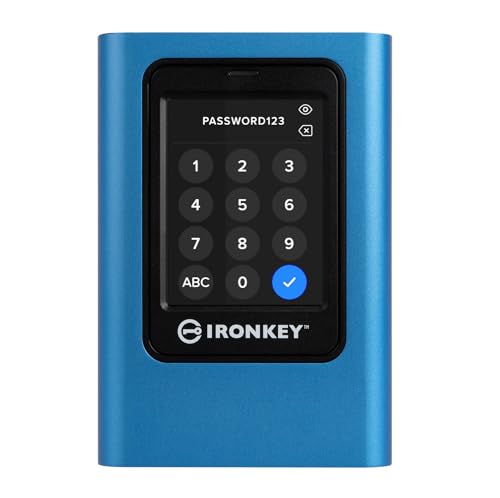
- FIPS 197 and XTS-AES 256-bit encryption
- Touchscreen PIN and passphrase access
- Read-only modes for added protection
Best For: Sensitive business and personal data
Best for Fast PIN-Protected Transfers

- Hardware-based encryption and USB 3.2
- Up to 1,000 MB/s listed transfer speed
- Admin/user modes with brute-force defense
Best For: Business and financial workflows
Best for Phone-Friendly Fingerprint Access

- Fingerprint or password app-based unlocking
- 1TB capacity and lightweight portable design
- USB-C support for phones, tablets, and computers
Best For: Mobile backups and everyday file transfers
Best for Rugged High-Capacity Security
G-Technology ArmorLock 2TB NVMe SSD

- 2TB capacity with up to 1,000 MB/s speeds
- 256-bit AES-XTS hardware encryption
- IP67-rated rugged protection and phone unlocking
Best For: Large files and demanding mobile workflows
Reliable Everyday Security
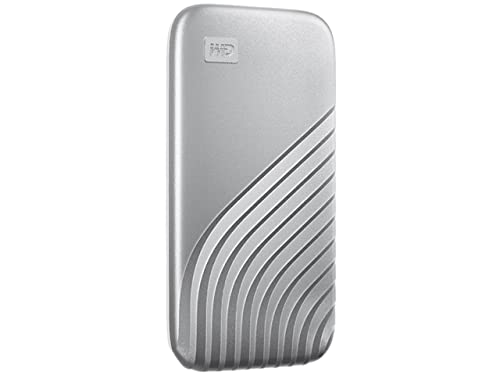
- 256-bit AES hardware encryption and password protection
- Up to 1,050MB/s read and 1,000MB/s write speeds
- 6.5-foot drop resistance with USB-C and USB-A support
Best For: Secure everyday storage, backups, and business files
Smart High-Speed Protection
OSCOO MD600 1TB Touchscreen SSD

- Touchscreen monitors speed, temperature, and capacity
- Hardware encryption with password protection
- Up to 2,000MB/s read and 1,800MB/s write speeds
Best For: Creators and mobile users needing fast, monitored storage
Best for Comfort
SanDisk Extreme Portable SSD 2TB

- 2TB capacity with 256-bit AES hardware encryption
- IP65 water and dust resistance plus three-meter drop protection
- Up to 1,050MB/s read and 1,000MB/s write speeds
Best For: Travel, gaming, media storage, and rugged backups
Best DIY Security Pick
VCOM Fingerprint Encryption SSD Enclosure

- 256-bit AES hardware encryption with fingerprint access
- Supports M.2 NVMe and SATA SSDs
- USB 3.2 Gen 2 speeds up to 10Gbps
Best For: Users building a customizable biometric-secured external SSD
Best Rugged Phone-Unlock Option

- Phone-based unlock with no password required
- Up to 1000MB/s read and write speeds
- Portable design with a five-year limited warranty
Best For: Mobile professionals and creators needing convenient encrypted storage
Best for Regulated Workloads
BUSlink CipherShield 2TB Encrypted SSD

- Real-time 256-bit AES hardware encryption
- FIPS 140-2 Level 2 validated
- USB 3.0 and eSATA connectivity with 2TB capacity
Best For: Organizations handling regulated or highly sensitive data
Best for Managed PIN Security – Kingston IronKey Vault Privacy 80
The Kingston IronKey Vault Privacy 80 is a strong choice when you need an external SSD with hardware encryption and hands-on access control. Its FIPS 197 certification, XTS-AES 256-bit encryption, and integrated touchscreen support PIN- or passphrase-based unlocking.
Best For: Business users and professionals who want configurable password rules, multi-user access, and write protection.
Pros:
- FIPS 197 certified with XTS-AES 256-bit hardware encryption
- Touchscreen supports administrator and user PIN or passphrase modes
- Dual read-only modes help protect against unwanted changes or malware
- Includes USB-C-to-C and USB-C-to-A cables plus a travel case
Cons:
- Listed read and transfer speeds are 250 MB/s
- Its 960GB capacity is less than the 1TB-class options in this roundup
- The drive is comparatively heavy at 285g
This model prioritizes deliberate, device-level access control over top-end transfer speeds. It is a practical fit for sensitive business or personal files where certification, PIN management, and write protection matter most.
Best for Fast PIN-Protected Transfers – Apricorn Aegis NVX 500GB
The Apricorn Aegis NVX combines an external SSD with hardware encryption and a USB 3.2 connection rated for up to 1,000 MB/s transfers. Separate administrator and user modes, configurable PINs, and brute-force defense make it suited to controlled data access.
Best For: Business and financial users who need fast encrypted storage with administrative controls and automatic locking.
Pros:
- Hardware-based encryption with separate administrator and user PIN modes
- Listed read and data-transfer speeds reach 1,000 MB/s
- Includes recovery PIN support and programmable brute-force defense
- Provision Lock supports unattended automatic locking
Cons:
- Capacity is limited to 500GB
- The supplied information does not specify an encryption standard or certification
- Only the drive unit is listed among the included accessories
With a focus on speed and administrative management, the Aegis NVX is appealing for workflows that regularly move protected files. Its smaller capacity may be the main limitation for large media libraries or full-system backups.
Best for Phone-Friendly Fingerprint Access – NEWQ 1TB Touch Portable SSD
The NEWQ Touch Portable SSD offers an accessible approach to an external SSD with hardware encryption, using fingerprint or password unlocking through its app. USB-C compatibility with phones, tablets, computers, and other devices makes it particularly convenient for mobile backups and file transfers.
Best For: Users who want 1TB of portable storage with app-based fingerprint security and direct USB-C device support.
Pros:
- Fingerprint and password unlocking for protected access
- 1TB capacity in a compact 1.92-ounce enclosure
- Works with USB-C phones, tablets, Macs, PCs, and listed gaming consoles
- App supports encrypted transfers, organization, and backups without cloud registration
Cons:
- Listed transfer speed is up to 400 MB/s
- Security depends on the accompanying app and device setup
- Warranty is listed as one year
This is the most mobile-oriented option in the group, especially for users moving photos and files directly from a phone. It offers convenient biometric access, though buyers seeking a stated certification or enterprise-grade security specification may prefer the dedicated security drives above.
Best for Rugged High-Capacity Security – G-Technology ArmorLock 2TB NVMe SSD
The G-Technology ArmorLock is a high-capacity external SSD with hardware encryption for users who also need fast performance and physical durability. Its ArmorLock system unlocks through a phone, while 256-bit AES-XTS encryption, multi-user management, and a rugged IP67-rated design add practical protection.
Best For: Professionals handling large files in demanding field, studio, business, or multimedia environments.
Pros:
- 2TB capacity with listed read and write speeds up to 1,000 MB/s
- 256-bit AES-XTS hardware encryption
- Phone-based unlocking with multi-user and multi-drive management
- IP67 dust and water resistance plus stated drop and crush resistance
Cons:
- Phone-based unlocking may be less convenient than a built-in keypad or fingerprint reader
- The supplied details identify Mac and PC support but do not list mobile operating-system compatibility
- Its rugged security features may be more than casual users need
The ArmorLock stands out when capacity, speed, and physical resilience are equally important. It is especially compelling for photographers, video professionals, and teams who need to share access across multiple users and drives.
Reliable Everyday Security – WD My Passport SSD 1TB
The WD My Passport SSD is a practical external ssd with hardware encryption for users who want fast portable storage and password-protected files. Its NVMe performance reaches up to 1,050MB/s read and 1,000MB/s write, while the compact metal case and drop resistance suit everyday travel.
Best For: Personal, business, and backup use when password protection, broad USB compatibility, and a five-year warranty matter.
Pros:
- 256-bit AES hardware encryption with password protection.
- Fast NVMe performance of up to 1,050MB/s read and 1,000MB/s write.
- Shock- and vibration-resistant design with drop resistance up to 6.5 feet.
- Includes USB-C and USB-C-to-A connectivity for newer and older systems.
Cons:
- Its advertised speeds depend on the host device and usage conditions.
- At 1TB, it offers less capacity than some larger portable SSDs.
This is a balanced choice for buyers seeking a recognizable brand, strong everyday durability, and hardware-based file protection without sacrificing portable performance.
Smart High-Speed Protection – OSCOO MD600 1TB Touchscreen SSD
The OSCOO MD600 is an external ssd with hardware encryption that adds a touchscreen for checking transfer speed, temperature, and available capacity. With USB 3.2 Gen 2×2 performance up to 2,000MB/s read and 1,800MB/s write, it is designed for fast file transfers and mobile creative workflows.
Best For: Creators, mobile professionals, and users who want real-time drive information, password protection, and broad USB-C device compatibility.
Pros:
- Built-in hardware encryption and password protection help secure private files.
- Touchscreen provides real-time transfer speed, temperature, and capacity monitoring.
- Up to 2,000MB/s read and 1,800MB/s write performance over USB 3.2 Gen 2×2.
- Magnetic design and support for compatible Apple ProRes recording suit mobile workflows.
Cons:
- Reaching the top advertised speeds requires a compatible USB 3.2 Gen 2×2 host.
- The supplied capacity is 1TB, which may be limiting for large video libraries.
The MD600 stands out for its touchscreen controls and unusually high claimed transfer speeds, making it appealing when visibility and fast USB-C workflows are priorities.
Best for Comfort – SanDisk Extreme Portable SSD 2TB
The SanDisk Extreme Portable SSD combines 2TB of capacity with an external ssd with hardware encryption, making it suitable for storing private files, media, and game data on the move. It delivers up to 1,050MB/s read and 1,000MB/s write speeds, plus IP65 water and dust resistance and up to three-meter drop protection.
Best For: Travelers, photographers, gamers, and professionals who need more capacity and a rugged portable drive with password-protected hardware encryption.
Pros:
- 256-bit AES hardware encryption with password protection.
- 2TB capacity provides room for large files, projects, and backups.
- IP65 water and dust resistance with up to three-meter drop protection.
- Carabiner loop makes it easy to secure to a belt loop or backpack.
Cons:
- Advertised transfer speeds may vary with the host device and other conditions.
- Its USB 3.2 Gen 2 interface does not offer the 2,000MB/s class speeds of newer Gen 2×2 drives.
Choose this model when capacity and physical protection are more important than chasing the highest interface speeds. Its rugged build and hardware encryption make it a strong travel-oriented option.
Best DIY Security Pick – VCOM Fingerprint Encryption SSD Enclosure
For shoppers building an external SSD with hardware encryption, the VCOM enclosure combines 256-bit AES hardware protection with fingerprint access and a physical security button. Its USB 3.2 Gen 2 interface supports transfers up to 10Gbps, and it accepts both M.2 NVMe and SATA SSDs.
Best For: Users who want a customizable, biometric-secured enclosure for compatible M.2 SSDs.
Pros:
- Supports 256-bit AES hardware encryption, fingerprint registration, and one-touch locking.
- Works with M.2 NVMe and SATA SSDs in 2242, 2260, and 2280 sizes.
- Offers up to 10Gbps transfer speeds and a real-time LCD status display.
- Compatible with Windows, macOS, Linux, and Android.
Cons:
- Requires a separately installed compatible M.2 SSD rather than including built-in storage.
- Security features may be more involved than a standard plug-and-play external SSD.
The VCOM is a flexible choice when you want to choose your own SSD capacity and add biometric access. Its dual-protocol support and aluminum construction also suit mobile work and professional use.
Best Rugged Phone-Unlock Option – SanDisk G-DRIVE ArmorLock SSD
The SanDisk Professional G-DRIVE ArmorLock is a convenient external SSD with hardware encryption for users who want secure access without typing a password. Its phone-based unlock system, USB-C connection, and rated speeds up to 1000MB/s make it suitable for portable business and multimedia workflows.
Best For: Creative professionals and mobile users who want encrypted storage with phone-based access.
Pros:
- ArmorLock security technology enables phone-based unlocking without a password.
- Auto Unlock can provide quick access from a pre-authorized device.
- Delivers up to 1000MB/s read and write speeds.
- Supports multi-user and multi-drive management and includes USB-C and USB-A cables.
Cons:
- Its 1TB capacity may be limiting for large media libraries.
- Phone-based access may be less convenient if the authorized device is unavailable.
Choose the G-DRIVE ArmorLock if streamlined secure access matters as much as transfer speed. The rugged design and five-year limited warranty add reassurance for frequent portable use.
Best for Regulated Workloads – BUSlink CipherShield 2TB Encrypted SSD
The BUSlink CipherShield is a strong fit for organizations seeking an external SSD with hardware encryption and formal security credentials. It uses real-time 256-bit AES encryption, a removable CipherKey, and FIPS 140-2 Level 2 validation, with USB 3.0 and eSATA connectivity for current and legacy systems.
Best For: Government, healthcare, education, and enterprise users handling regulated or sensitive data.
Pros:
- Provides real-time 256-bit AES hardware encryption without storing passwords on the host system.
- FIPS 140-2 Level 2 validated and designed for HIPAA, HITECH, and FERPA requirements.
- Automatically locks and encrypts when the CipherKey is removed or power is lost.
- Includes both USB 3.0 and eSATA interfaces and offers 2TB of capacity.
Cons:
- USB 3.0 transfer rates are up to 5Gbps, slower than newer USB 3.2 Gen 2 options.
- The desktop-oriented design weighs 1.2 pounds and includes a power adapter.
- Requires the physical CipherKey for access.
The CipherShield prioritizes controlled access and compliance over maximum portability. Its automatic locking, removable key, and regulatory positioning make it especially appropriate for high-risk or shared environments.
How We Picked the Best External SSD with Hardware Encryption
We focused on the security features that matter most in real-world use: hardware-based AES encryption, independent authentication, standards or certifications where listed, and practical protection against unauthorized access. We also considered USB connectivity, advertised transfer speeds, capacity options, portability, ruggedness, and whether the drive requires software, a touchscreen, a PIN, a fingerprint, or a separate management app.
Because product specifications can vary by capacity and revision, verify the manufacturer’s current details before buying. Advertised speeds are maximum interface or sequential figures; actual performance depends on the host device, cable, file sizes, and workload.
Quick Comparison
| Best For | What to Prioritize |
|---|---|
| Highly confidential files | 256-bit AES hardware encryption, independent authentication, and recognized security certifications |
| Frequent travel | Rugged construction, compact size, water and dust resistance, and a protective cable or case |
| Fast creative workflows | NVMe storage, USB 3.2 Gen 2 or faster connectivity, and sustained-write performance |
| Simple everyday protection | Easy password setup, reliable compatibility, and enough capacity for your active files |
| Large stationary backups | Higher capacity, desktop power requirements, and a secure physical placement |
Key Buying Factors for an External SSD with Hardware Encryption
Encryption and Authentication
Look for dedicated hardware encryption rather than a product that only advertises password-protected software. AES-256 is a strong baseline. PIN pads, touchscreens, and fingerprint readers can authenticate directly on the drive, while app-managed systems may offer easier administration but depend on a phone or computer.
Speed and Compatibility
Match the drive to your ports. USB 3.2 Gen 2 can support up to 10Gbps, but older USB ports will reduce performance. Check whether the package includes USB-C and USB-A cables or adapters, and confirm compatibility with Windows, macOS, Linux, phones, cameras, or other devices you plan to use.
Capacity and Durability
Choose enough space for current files plus growth. A 1TB model suits documents, photo libraries, and moderate media work; 2TB is more flexible for video, game libraries, and backups. If the drive will travel, prioritize shock resistance and a rated water or dust seal, while remembering that ruggedness does not replace safe eject practices or backups.
Who Should Buy Which External SSD with Hardware Encryption?
Choose a certified, independently authenticated model if you handle regulated, client, medical, financial, or corporate data. A touchscreen or PIN-based drive is convenient when you need access across multiple computers without installing software. Fingerprint-focused models suit users who value quick biometric unlocking, provided the reader and enrollment process meet their needs.
For photographers, editors, and other mobile creators, prioritize a rugged NVMe SSD with USB-C and strong sustained performance. A mainstream password-protected portable SSD can be the better value for ordinary personal files, while a desktop encrypted SSD makes more sense when capacity and fixed-location backup matter more than portability. Whichever model you choose, maintain a second backup: encryption protects access, but it cannot recover files lost through damage, deletion, or hardware failure.