
The best desktop computers for multitasking make it easier to run browsers, office apps, video calls, creative tools, and background processes without constant slowdowns. The right choice depends on more than processor speed alone.
We compared these 10 desktops across memory, storage, processor capability, connectivity, expandability, and overall suitability for demanding home and office workloads.
Best 10 Desktop Computers for Multitasking Picks for 2026
High-Performance Tower

- 32GB DDR5 memory for demanding multitasking
- Supports up to four FHD or two 4K displays
- Tool-less access, TPM security, and onsite service
Best For: Business, education, and multi-monitor productivity
Versatile AMD Desktop

- Ryzen 7 8700G processor with 32GB DDR5 RAM
- 1TB PCIe Gen4 NVMe SSD
- Radeon 780M graphics and included keyboard and mouse
Best For: Productivity, multimedia, and light gaming
Space-Saving Workstation
Dell Core Ultra 5 Slim Desktop

- Compact 3.74-inch-wide design
- Supports up to four FHD or two 4K monitors
- Tool-less access and TPM security
Best For: Small offices and everyday multi-monitor productivity
Compact AI Mini PC

- Intel Core Ultra 5 with CPU, NPU, and GPU AI support
- Quad 4K display output and dual 2.5G LAN
- 3-year coverage and near-silent 38dB cooling claim
Best For: Compact business, education, and commercial deployments
Reliable Office Workhorse
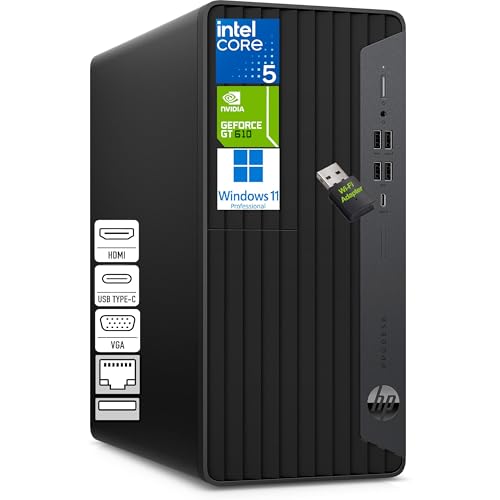
- 6-core Intel Core i5 performance
- 16GB RAM with 256GB NVMe SSD
- HDMI, VGA, and DVI-I outputs
Best For: Home offices and small-business multitasking
Modern Multi-Display Pick
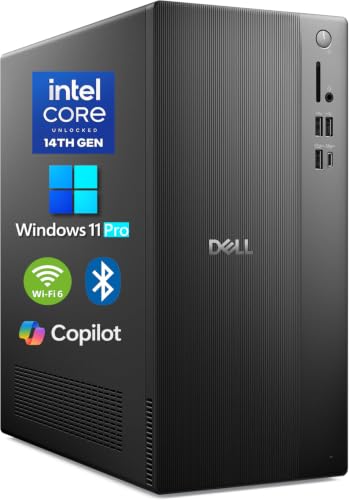
- 14th Gen Core i3 processor
- 16GB DDR5 and 1TB PCIe SSD
- Supports up to four FHD monitors
Best For: Multi-monitor business and developer work
High-Memory Renewed Value

- 8-core Core i7-9700 processor
- 32GB RAM and 1TB NVMe SSD
- Wi-Fi 6E and dual DisplayPort
Best For: Memory-heavy office multitasking on a budget
Best Business Tower

- 14-core Intel Core Ultra 5 processor with AI Boost NPU
- 16GB DDR5 RAM and 512GB PCIe SSD
- Three DisplayPort outputs for multi-monitor work
Best For: Business, home-office, and everyday multitasking
Best Value Refurbished PC

- Six-core Intel Core i5-8500 processor
- Listed with 32GB DDR4 RAM and 1TB SSD
- Built-in Wi-Fi, Bluetooth, HDMI, and DisplayPort
Best For: Affordable home and office multitasking
Best Simple Pick

- 12-core, 20-thread Intel Core i7-12700K processor
- 32GB DDR5 RAM and 1TB PCIe SSD
- Dual 4K display support with Wi-Fi and Bluetooth
Best For: Demanding business, content, and data-processing workflows
High-Performance Tower – Dell Core Ultra 7 Desktop
For demanding office workflows, creative projects, and heavy multitasking, this Dell tower combines an Intel Core Ultra 7-265 processor with 32GB of DDR5 memory and SSD storage. Its support for up to four FHD monitors or two 4K displays makes it a strong choice among desktop computers for multitasking.
Best For: Business users, educators, and home-office users who need abundant memory, multi-monitor support, and room for convenient internal upgrades.
Pros:
- 32GB DDR5 RAM supports numerous applications and browser tabs.
- Supports up to four FHD monitors or two 4K displays.
- Tool-less access and a removable side panel simplify upgrades.
- Includes TPM security, a lock slot, and one year of onsite service.
Cons:
- Integrated Intel UHD Graphics are not positioned as a dedicated gaming solution.
- The tower is larger and heavier than a slim or mini PC.
This Dell is a well-rounded multitasking desktop for users who value memory capacity, multiple displays, and business-oriented security. Its integrated graphics make it better suited to productivity and multimedia than graphics-intensive gaming.
Versatile AMD Desktop – HP OmniDesk Ryzen 7 PC
The HP OmniDesk pairs an eight-core AMD Ryzen 7 8700G processor with 32GB of DDR5 memory and a 1TB PCIe Gen4 NVMe SSD. Its Radeon 780M graphics and broad port selection give multitaskers a flexible desktop for productivity, multimedia, and light gaming.
Best For: Users who want a ready-to-use tower with plenty of memory, fast storage, integrated Radeon graphics, and included keyboard and mouse.
Pros:
- 32GB DDR5-5200 memory supports demanding multitasking.
- 1TB PCIe Gen4 NVMe SSD provides fast and generous storage.
- Radeon 780M graphics support multimedia and light gaming use.
- Includes a keyboard and mouse, plus Wi-Fi 6 and Bluetooth 5.4 connectivity.
Cons:
- Only one HDMI port is listed.
- Its integrated graphics may not suit users seeking a dedicated high-end gaming GPU.
With strong memory, a large NVMe drive, and capable integrated Radeon graphics, the OmniDesk is a practical all-purpose option. It is especially appealing if you want a complete desktop setup without separately purchasing basic input devices.
Space-Saving Workstation – Dell Core Ultra 5 Slim Desktop
This Dell Slim Desktop is designed for efficient everyday multitasking in a compact 3.74-inch-wide chassis. The Intel Core Ultra 5-225 processor, 512GB SSD, Wi-Fi, and support for up to four FHD monitors or two 4K displays make it a practical fit for small offices and home workspaces.
Best For: Office and education users who need a compact desktop for everyday productivity, multiple displays, and straightforward connectivity.
Pros:
- Slim design suits space-constrained desks.
- Supports up to four FHD monitors or two 4K displays.
- Tool-less access makes internal upgrades easier.
- Includes TPM security, Wi-Fi, Bluetooth, keyboard, and mouse.
Cons:
- Integrated Intel UHD Graphics are intended for general productivity rather than demanding graphics work.
- Its 512GB SSD offers less listed capacity than the HP and GEEKOM options.
- Only one expansion slot is listed.
The Slim Desktop prioritizes a small footprint without giving up useful multi-monitor flexibility. It is a sensible choice for routine multitasking, especially when desk space and business security matter more than dedicated graphics performance.
Compact AI Mini PC – GEEKOM IT12 MAX
The GEEKOM IT12 MAX takes a different approach to desktop computers for multitasking, using a compact Intel Core Ultra 5 125U mini PC with 16GB of LPDDR5 memory and a 500GB PCIe 4.0 NVMe SSD. Its NPU, quad-display support, dual 2.5G LAN, and commercial-focused cooling make it suitable for both desk work and specialized deployments.
Best For: Businesses, schools, and professionals needing a compact, low-noise system for productivity, displays, networking, or commercial installations.
Pros:
- CPU, NPU, and GPU work together for supported AI-assisted tasks.
- Dual USB4 and dual HDMI 2.0 support quad 4K output.
- Dual 2.5G LAN enables network isolation and advanced networking setups.
- Includes a 3-year warranty, local repair support, and a near-silent 38dB operating claim.
Cons:
- 16GB RAM and 500GB storage are lower than the memory and storage listed for some tower alternatives.
- Linux and Ubuntu support are listed, rather than a preinstalled Windows operating system.
- Its compact design is more specialized than a conventional upgrade-friendly tower.
The IT12 MAX is compelling when size, connectivity, efficiency, and deployment flexibility are priorities. Its commercial I/O and networking features go beyond typical home-office needs, while the upgradeable SSD helps extend its usefulness.
Reliable Office Workhorse – HP ProDesk 600 G6
For shoppers comparing desktop computers for multitasking, the HP ProDesk 600 G6 offers a practical mix of responsive performance, useful connectivity, and a compact microtower design. Its Intel Core i5 processor, 16GB of RAM, and NVMe SSD are suited to everyday office workflows.
Best For: Home offices, small businesses, spreadsheets, web browsing, accounting software, and professionals who want a multi-monitor setup.
Pros:
- Intel Core i5-10400F processor with 6 cores and 12 threads.
- 16GB DDR4 RAM and a 256GB NVMe SSD support multiple apps and browser tabs.
- HDMI, VGA, and DVI-I outputs support an expanded multi-display workspace.
- Includes Windows 11 Pro, wired keyboard and mouse, and a Wi-Fi adapter.
Cons:
- The 256GB SSD provides less storage than some competing options.
- The included graphics card has 1GB of DDR3 memory, limiting graphics-focused use.
This HP is a sensible choice when reliable office multitasking and flexible monitor support matter more than large storage capacity or demanding graphics performance.
Modern Multi-Display Pick – Dell 2026 Tower
The Dell 2026 tower is one of the more forward-looking desktop computers for multitasking, pairing 16GB of DDR5 memory with a spacious 1TB PCIe SSD. Its newer platform and broad display support make it well suited to organized productivity setups.
Best For: Business users, developers, analysts, and anyone who needs several monitors for documents, dashboards, coding, or daily productivity.
Pros:
- 14th Gen Intel Core i3-14100 processor with up to 4.7GHz turbo speed.
- 16GB DDR5 RAM and a 1TB PCIe SSD provide responsive multitasking and ample storage.
- Supports up to four FHD monitors or dual 4K displays through DisplayPort and HDMI.
- Includes Windows 11 Pro, Wi-Fi 6, Bluetooth, and USB-C connectivity.
Cons:
- Uses integrated Intel UHD 730 graphics rather than a dedicated graphics card.
- The four-core processor may be less suitable for heavily threaded workloads than higher-core alternatives.
Choose this Dell if you want a current-generation office tower with fast memory, generous SSD storage, and especially strong multi-monitor flexibility in a compact chassis.
High-Memory Renewed Value – Dell OptiPlex 7070
For buyers seeking desktop computers for multitasking on a value-oriented business platform, the renewed Dell OptiPlex 7070 stands out with 32GB of RAM and a 1TB NVMe SSD. Its eight-core Intel Core i7 processor is designed for demanding everyday office workloads.
Best For: Business users, home offices, file-heavy workflows, and buyers who want substantial memory and storage in a small-form-factor desktop.
Pros:
- Eight-core Intel Core i7-9700 processor reaches up to 4.7GHz.
- 32GB DDR4 RAM supports extensive multitasking.
- New 1TB M.2 NVMe SSD provides fast boot and application loading.
- Includes Wi-Fi 6E, wireless keyboard and mouse, and two DisplayPort outputs.
Cons:
- As a renewed system, it carries a shorter 90-day warranty.
- Integrated Intel UHD 630 graphics are aimed at productivity rather than graphics-intensive work.
- Display connectivity is limited to two DisplayPort outputs.
This OptiPlex is a strong practical option when abundant RAM, fast storage, and an eight-core processor are more important than having the newest platform or dedicated graphics.
Best Business Tower – Dell Pro Tower Plus
For shoppers comparing desktop computers for multitasking, the Dell Pro Tower Plus offers a current business-focused platform with an Intel Core Ultra 5 processor, 16GB of DDR5 memory, and a 512GB PCIe SSD. Windows 11 Pro, three DisplayPort outputs, and a broad selection of ports make it a practical choice for office workflows and multi-display setups.
Best For: Small businesses, remote workers, students, and home-office users handling productivity applications, web browsing, video calls, and light content creation.
Pros:
- 14-core Intel Core Ultra 5 235 processor with integrated AI Boost NPU.
- 16GB DDR5 RAM and a fast 512GB PCIe SSD support responsive everyday multitasking.
- Three DisplayPort 1.4a outputs support dual- or triple-monitor configurations.
- Windows 11 Pro, Gigabit Ethernet, USB-C, and a built-in DVD drive add business versatility.
Cons:
- Integrated Intel graphics are intended for business and everyday workloads rather than demanding graphics applications.
- The 512GB SSD may require expansion for large media libraries or extensive project files.
This Dell is a well-rounded business tower for users who value modern connectivity, Windows 11 Pro features, and multi-monitor productivity. Its compact expandable design also leaves room for future upgrades.
Best Value Refurbished PC – Dell OptiPlex 3060
The renewed Dell OptiPlex 3060 is a value-oriented option among desktop computers for multitasking. Its Intel Core i5-8500, 32GB of listed DDR4 memory, and 1TB SSD provide a useful combination for multi-tab browsing, office work, streaming, and general multimedia use, while built-in Wi-Fi and Bluetooth simplify setup.
Best For: Budget-conscious home and office users who need generous memory, fast SSD storage, wireless connectivity, and support for everyday productivity.
Pros:
- Six-core Intel Core i5-8500 processor supports everyday multitasking and media streaming.
- Product listing highlights 32GB DDR4 RAM and a spacious 1TB SSD.
- Built-in Wi-Fi and Bluetooth reduce the need for additional adapters.
- HDMI and DisplayPort outputs support displays up to 4K resolution.
Cons:
- It is a renewed system based on an older 8th-generation platform.
- Integrated Intel UHD 630 graphics are better suited to general use than demanding graphics workloads.
- The supplied warranty is listed as 90 days.
The OptiPlex 3060 makes the most sense when capacity and affordability matter more than having the newest platform. Its SSD, ample listed memory, and wireless features create a capable foundation for routine multitasking.
Best Simple Pick – Dell Core i7 Desktop
For demanding desktop computers for multitasking, this Dell tower pairs an Intel Core i7-12700K with 32GB of DDR5 memory and a 1TB PCIe SSD. Its 12 cores, 20 threads, dual-4K display support, wireless connectivity, and included keyboard and mouse make it a strong fit for advanced business and productivity setups.
Best For: Professionals managing demanding business applications, content creation, data processing, large file workflows, and multiple displays.
Pros:
- Intel Core i7-12700K provides 12 cores, 20 threads, and speeds up to 5.0GHz.
- 32GB DDR5 RAM and a 1TB PCIe SSD support intensive multitasking and fast application loading.
- HDMI and DisplayPort outputs support dual 4K monitors.
- Includes Wi-Fi, Bluetooth, USB-C, TPM security, Windows 11 Pro, keyboard, and mouse.
Cons:
- Integrated Intel UHD 770 graphics may not suit users seeking dedicated gaming or professional graphics performance.
- The listed maximum memory is 32GB, limiting memory expansion according to the supplied specifications.
This tower is the performance-focused choice in the group. It offers substantial processing headroom and fast DDR5 storage for users whose work involves many applications, large files, or demanding productivity sessions.
How We Picked the Best Desktop Computers for Multitasking
We focused on the hardware that most affects everyday multitasking: processor cores and threads, installed RAM, SSD capacity and speed, graphics capability, wireless connectivity, and upgrade potential. Systems with 16GB of memory can handle typical office use, while 32GB models offer more breathing room for large spreadsheets, many browser tabs, development tools, virtual machines, and creative applications.
We also considered form factor and practical features, including tower expandability, compact mini-PC designs, dual-monitor support, modern Wi-Fi and Bluetooth, operating-system compatibility, and the convenience of preinstalled Windows 11. Older business desktops can still provide strong value when their memory and SSD configurations are competitive, but buyers should verify condition, warranty coverage, and upgrade limitations.
Quick Comparison
| What to Compare | Best Starting Point | Why It Matters |
|---|---|---|
| Heavy multitasking | 32GB RAM and a modern Core Ultra or Ryzen 7 processor | Handles demanding applications and large workloads more comfortably |
| Everyday office work | 16GB RAM, a current midrange processor, and a 512GB SSD | Balances responsiveness, capacity, and cost |
| Storage needs | 1TB NVMe SSD | Provides faster loading and more room for files and applications |
| Expansion | Mid-tower or business tower | Offers more room for memory, storage, and add-in cards |
| Small workspace | Mini PC or slim desktop | Saves desk space but may provide fewer upgrade options |
Key Buying Factors for Desktop Computers for Multitasking
Processor and Memory
Look for a recent processor with multiple performance cores, especially if you regularly switch between demanding applications. RAM is equally important: 16GB is a sensible baseline, while 32GB is preferable for intensive multitasking and longer-term use.
SSD Capacity and Speed
An NVMe SSD makes Windows, applications, and files load quickly. A 512GB drive works for basic productivity, but a 1TB SSD is a better fit if you store photos, projects, games, or large work files locally.
Ports, Displays, and Connectivity
Check the exact port selection before buying. If you use two monitors, confirm that the system supports the desired resolutions through its HDMI, DisplayPort, or other video outputs. Wi-Fi 6 or newer and current Bluetooth standards are useful for modern accessories and reliable wireless networking.
Upgradeability and Size
Tower desktops generally offer the easiest access to additional RAM, storage, and expansion cards. Slim and mini PCs are convenient in small offices, but their compact designs can limit upgrades. Confirm whether memory is replaceable and whether spare drive bays or slots are available.
Who Should Buy Which Desktop Computers for Multitasking?
Choose a 32GB tower with a modern Core Ultra 7, Ryzen 7, or comparable processor if you work with large spreadsheets, many simultaneous applications, programming tools, photo editing, or demanding professional software. A 16GB modern desktop is usually enough for email, documents, research, video meetings, and routine business use.
A slim desktop or mini PC is the better fit for compact desks, reception areas, and light home-office setups where quiet operation and a small footprint matter most. Buyers seeking maximum value may consider refurbished or older OptiPlex-style systems, provided the SSD, memory, Windows support, connectivity, and seller warranty meet their needs. For future flexibility, prioritize a tower with accessible components and at least one available path to expand storage or memory.