
If you’re looking to boost your productivity, a corner desk for dual monitors might be the solution you need. These desks combine style and functionality, making it easier to create an efficient workspace. With options that include power outlets, storage, and cable management, you can find the perfect fit for your needs. Curious about the best choices available? Let’s explore some top contenders that can transform your work environment.
Korfile 59 inch L Shaped Computer Desk with Power Outlets

If you’re juggling multiple tasks or projects and need a dedicated space for dual monitors, the Korfile 59 inch L Shaped Computer Desk with Power Outlets is an excellent choice. With its modern matte finish and versatile design, you can configure it to fit your space perfectly. The desk features three power outlets and two USB ports, ensuring your devices stay charged while you work. Plus, the two movable monitor stands help reduce neck strain. Weighing only 45 pounds yet supporting up to 180 pounds, it’s both sturdy and functional, making it ideal for gaming, working, or writing in any room.
Best For: The Korfile 59 inch L Shaped Computer Desk is best for individuals who need a functional workspace for multitasking with dual monitors, whether for gaming, working, or writing.
Pros:
- Versatile Design: Can be configured as an L-shape or long format to fit various spaces.
- Ample Storage: Includes four breathable fabric drawers for efficient organization.
- Integrated Charging Station: Features multiple power outlets and USB ports for easy device charging.
Cons:
- Assembly Required: May require time and effort to assemble, especially for one person.
- Weight Limit: While sturdy, the maximum weight capacity may not accommodate heavier equipment.
- Limited Color Options: Available only in black, which may not suit all decor styles.
PRAISUN 63 Inch L Shaped Desk with Power Outlets and USB-C Port

The PRAISUN 63 Inch L Shaped Desk is an excellent choice for remote workers and gamers alike, thanks to its built-in power strip featuring four AC outlets and a USB-C port. With a spacious design, it offers an 18.9-inch deep main desk and a side table, perfect for dual monitors. Adjustable monitor stands let you customize your setup for ideal viewing. The desk includes two large fabric drawers and a file drawer for organized storage. Crafted from durable materials, it guarantees stability and longevity. Assembly is straightforward with numbered parts and a full tool kit included, making setup a breeze.
Best For: Remote workers, freelancers, and gamers seeking a spacious and organized workspace with convenient power options.
Pros:
- Built-in power strip with multiple outlets and USB ports for easy device connectivity.
- Spacious L-shape design allows for dual monitor setups and ample workspace.
- Durable construction with eco-friendly materials ensures stability and longevity.
Cons:
- Requires assembly, which may be time-consuming for some users.
- Heavy weight of 63 pounds may make it difficult to move once assembled.
- Limited color options, as it only comes in rustic brown.
Furologee 66” L Shaped Desk with Power Outlet

For those seeking an efficient and versatile workspace, the Furologee 66” L Shaped Desk with Power Outlet stands out as an ideal choice for dual monitor setups. Its reversible design lets you customize your workspace, whether you need a work desk, study table, or gaming station. With three power outlets and two USB ports, charging your devices is a breeze. The movable monitor stands elevate your screens to eye level, promoting better posture. Plus, the upgraded file drawer and adjustable shelves offer ample storage for files and equipment. Made from durable materials, this desk combines style, functionality, and convenience seamlessly.
Best For: Individuals seeking a versatile and efficient workspace for work, study, or gaming with dual monitor setups.
Pros:
- Customizable design: Reversible configuration allows for personalized workspace arrangement.
- Convenient power options: Three power outlets and two USB ports make charging devices easy.
- Ergonomic support: Movable monitor stands promote better posture by raising screens to eye level.
Cons:
- Assembly required: May take time and effort to set up, as it comes with detailed instructions and hardware.
- Weight limit: The load capacity of 180 pounds may not accommodate heavier equipment.
- Material durability: Made from particleboard, which may be less durable compared to solid wood options.
SEDETA Corner Computer Desk, L Shaped Gaming Desk with Storage and LED Lights

Looking for a versatile workspace that accommodates dual monitors? The SEDETA Corner Computer Desk is perfect for you. Its L-shaped design measures 66.1″L x 47.2″W and can transform into a 94.5″ straight-row desk, ideal for multiple setups. With 7 open shelves and 3 fabric drawers, you’ve got ample storage for files and decor. Plus, a built-in power strip with USB ports keeps your devices charged. The RGB LED light strip adds a modern touch, offering a variety of colors and modes. Made from sustainable materials, this desk combines style with durability, ensuring a stable and efficient workspace.
Best For: Those seeking a multifunctional workspace that supports dual monitors and provides ample storage solutions.
Pros:
- Spacious Design: The L-shaped configuration offers plenty of room for multiple monitors and work materials.
- Ample Storage: Features 7 open shelves and 3 fabric drawers for efficient organization of files and personal items.
- Modern Aesthetics: The RGB LED light strip adds a contemporary flair while providing customizable lighting options.
Cons:
- Assembly Required: Initial setup may take some time and effort due to the assembly of various components.
- Size Limitations: May not fit well in smaller rooms or tight spaces due to its large footprint.
- Weight Capacity: The desk’s stability may be compromised if overloaded with heavy equipment.
AODK 66″ L Shaped Computer Desk with File Cabinet & LED Lights

Crafted for gamers and multitaskers alike, the AODK 66″ L Shaped Computer Desk offers an exceptional workspace that easily accommodates dual monitors. With a vintage design and reversible layout, it fits perfectly in any corner. You’ll appreciate the built-in power outlet with 3 AC outlets and 2 USB ports for convenient charging. The upgraded LED lighting sets the mood, while the file cabinet and four fabric drawers keep your workspace organized. Its sturdy metal frame supports up to 220 pounds, ensuring durability. Assembly may require two people, but the clear manual makes it straightforward. Enjoy a clean, efficient workspace with this desk!
Best For: Gamers and multitaskers seeking a spacious and organized workspace with modern features.
Pros:
- Versatile Design: Reversible layout fits both left and right corners, adapting to different room configurations.
- Convenient Charging: Built-in power outlet with multiple AC and USB ports allows for easy device charging.
- Ample Storage: Includes a file cabinet and additional fabric drawers for effective organization of documents and supplies.
Cons:
- Assembly Required: Setup may require two people, which could be inconvenient for some buyers.
- Tools Not Included: Assembly tools are not provided, necessitating the use of personal tools.
- Weight Capacity Limitation: While sturdy, the 220-pound weight capacity may not be sufficient for heavier equipment setups.
Huuger 63 Inch L Shaped Desk with Power Outlets and USB-C Port

The Huuger 63 Inch L Shaped Desk stands out with its built-in power outlets and USB-C port, making it an ideal choice for tech-savvy individuals who rely on multiple devices. With a modern rustic brown finish, this desk combines style with functionality. Its reversible L-shape design fits perfectly in corners or offers ample legroom for dual workstations. The durable, scratch-resistant surface supports up to 220 lbs, and the reinforced steel frame guarantees stability. Assembly is straightforward with included instructions and tools, allowing you to set it up quickly. Enjoy a clutter-free workspace with easy access to power for all your gadgets.
Best For: Tech-savvy individuals and remote workers who need a functional and stylish workspace with multiple charging options.
Pros:
- Built-in power outlets and USB ports provide convenient charging for multiple devices.
- Reversible L-shape design allows for versatile placement and ample legroom.
- Durable, scratch-resistant surface and reinforced steel frame ensure long-lasting stability and support.
Cons:
- Assembly required, which may be time-consuming for some users.
- Weight of 49 lbs could make it challenging to move without assistance.
- Limited color options, as it only comes in a rustic brown finish.
EnHomee L Shaped Desk with Hutch and Drawers

If you’re seeking a spacious and versatile work area, the EnHomee L Shaped Desk with Hutch and Drawers stands out as an ideal choice for dual monitor setups. With its 104-inch design, you’ll have plenty of room for your monitors, laptops, and printers. The desk features three fabric drawers and open shelves, keeping your workspace organized. Plus, its dynamic RGB lighting adds a stylish touch while the adjustable monitor stand promotes healthy posture. Constructed from sturdy materials, assembly is straightforward, making it perfect for any home office or gaming room. Enjoy a clutter-free, efficient workspace with this functional desk.
Best For: Those seeking a spacious and organized workspace for dual monitor setups in home offices or gaming rooms.
Pros:
- Ample space with a 104-inch design for dual monitors and additional devices.
- Multiple storage options including fabric drawers and open shelves to keep workspace organized.
- Dynamic RGB lighting and adjustable monitor stand enhance both style and ergonomic comfort.
Cons:
- The large size may not be suitable for smaller rooms or apartments.
- Assembly may require time and effort due to the multiple components.
- Limited color options could restrict personalization for some users.
Coleshome 66″ L Shaped Gaming Desk
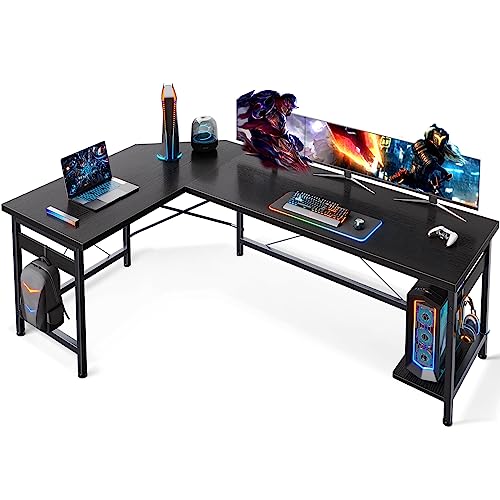
For gamers and home office enthusiasts seeking a spacious setup, the Coleshome 66″ L Shaped Gaming Desk stands out as an ideal choice. Its L-shaped design fits perfectly in corners, maximizing your workspace while providing a large surface area for gaming or writing. With a sturdy steel frame and adjustable legs, it guarantees stability on any floor. The desk supports up to 220 lbs and features a CPU stand along with an iron hook for your headphones. Assembly is straightforward, and maintenance is simple—just wipe it down with a cloth. Enjoy efficiency and style with this versatile desk!
Best For: Gamers and home office users looking for a spacious, stable, and stylish desk setup.
Pros:
- Large Surface Area: Provides ample space for gaming equipment, writing materials, and other office essentials.
- Sturdy Construction: Features a strong steel frame and adjustable legs for enhanced stability on uneven floors.
- Convenient Features: Includes a CPU stand and an iron hook for easy storage of computer towers and headphones.
Cons:
- Assembly Required: Initial setup may take time and requires following detailed instructions.
- Weight Limit: While it can hold up to 220 lbs, heavier equipment may require careful consideration of weight distribution.
- Material Sensitivity: The MDF desktop, although waterproof and anti-scratch, may be prone to damage if not properly maintained.
SEDETA L Shaped Desk with Wood File Drawer & Power Outlet
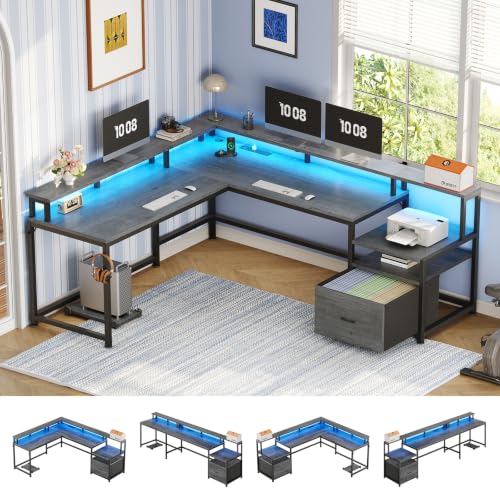
Looking for a versatile workspace that accommodates dual monitors? The SEDETA L Shaped Desk is your solution, offering a convertible design that adapts to your needs, whether it’s a 67-inch corner setup or a 98.4-inch two-person space. With ample storage, including a wood file drawer and two-tier shelves, it keeps your workspace organized. The ergonomic monitor shelf reduces strain, while the built-in charging station with multiple outlets powers your devices. Plus, the RGB LED lighting adds a dynamic touch for both work and play. Easy to assemble, this desk maximizes efficiency in any limited space.
Best For: Individuals or small teams looking for a versatile, space-efficient desk that accommodates multiple devices and promotes an organized workspace.
Pros:
- Ample storage with a file drawer and two-tier shelves for efficient organization.
- Ergonomic design with a monitor shelf that reduces strain on the back and neck.
- Dynamic RGB LED lighting with music sync function enhances the workspace ambiance.
Cons:
- May be too large for very small rooms despite its corner design.
- Assembly required, which might be time-consuming for some users.
- Limited color options for the desk itself, focusing more on the lighting features.
VENNQD Corner Desk with Drawers for Small Spaces

The VENNQD Corner Desk with Drawers is an ideal choice for those seeking a compact yet functional workspace, especially if you need to accommodate dual monitors in small areas. Its 90-degree triangle shape fits snugly in corners, maximizing your available space. With two AC outlets and USB ports, charging devices is a breeze. The full-size monitor stand promotes ergonomic posture, reducing neck strain. Four fabric drawers and two shelves provide ample storage for all your essentials. Built from durable materials, it’s easy to clean and maintain. Plus, the vibrant RGB LED lights enhance your workspace atmosphere, making it a stylish addition.
Best For: Individuals looking for a compact and functional desk solution for small spaces, particularly those needing to accommodate dual monitors.
Pros:
- Space-saving design with a 90-degree triangle shape, perfect for corners.
- Integrated charging options with 2 AC outlets and 2 USB ports for convenience.
- Stylish RGB LED lights that enhance the workspace atmosphere with customizable color and brightness settings.
Cons:
- Assembly required, which may be challenging for some users.
- Limited size may not be suitable for those needing a larger workspace.
- Fabric drawers may not be as durable as traditional wooden storage options.
Factors to Consider When Choosing a Corner Desk for Two Monitors
When you’re choosing a corner desk for two monitors, consider the size and dimensions to guarantee a perfect fit in your space. Monitor support features and cable management solutions are also essential for a tidy and functional setup. Don’t forget to check the storage options and the material’s durability to confirm stability and longevity.
Size and Dimensions
Choosing the right size and dimensions for your corner desk is essential for optimizing your dual monitor setup. Aim for a desk that’s at least 60 inches wide to comfortably fit both monitors. You’ll also want a minimum depth of 24 inches, giving you enough space for your monitors, keyboard, and other essentials. Adjustable height options are a bonus, as they help you position your monitors at eye level for better ergonomics. Consider an L-shaped configuration, which maximizes space efficiency while allowing two monitors to sit side by side. Finally, check the desk’s weight capacity to verify it can support the combined weight of your monitors and any additional equipment you plan to use.
Monitor Support Features
Finding a corner desk that effectively supports dual monitors can greatly enhance your workspace. Look for desks with adjustable monitor stands, allowing you to elevate your screens to eye level and reduce neck strain. A designated monitor shelf can also provide additional height and organization, keeping your setup tidy. Verify the desk has enough surface area—ideally 60-66 inches in width—to fit both monitors comfortably without crowding. Opt for ergonomic designs that promote healthy posture by allowing proper spacing and positioning. Finally, while not the focus right now, consider desks with built-in power outlets to keep your workspace efficient. With these features, you’ll create a productive environment tailored to your needs.
Cable Management Solutions
An organized workspace enhances productivity, so effective cable management is just as important as monitor support features. Look for corner desks with built-in cable trays or channels to hide and organize your wires, keeping your desk surface clutter-free. Desks with integrated power outlets and USB ports can also help reduce visible cords while providing easy access to charging points. Adjustable monitor stands contribute to cable management by allowing you to route cables behind or under the monitors, keeping them out of sight. Additionally, using cable clips or ties secures loose cables along the desk edges, preventing tangling. Finally, consider desks with designated storage solutions to store excess cables and power strips, creating a cleaner workstation.
Storage Options Available
When selecting a corner desk for two monitors, it’s essential to prioritize storage options that enhance both organization and accessibility. Look for desks that offer ample storage solutions, like multiple fabric drawers, shelves, and cabinets to keep your office supplies tidy. Dedicated file drawers designed for letter, legal, and A4 files can greatly improve your paperwork management. Open shelves are great for displaying books or decorative items while adding functionality. Consider desks with CPU stands or shelves to elevate your computer tower, protecting it from dust and moisture. Ergonomic designs with integrated monitor stands can reduce neck strain, while smart storage solutions contribute to a clean, efficient workspace that helps you stay focused and productive.
Material Durability and Stability
Choosing the right materials is essential for ensuring your corner desk can handle the demands of dual monitors. Prioritize high-quality particle board and steel frames, which provide durability and can support weights up to 220 pounds. Look for surfaces that are both waterproof and scratch-resistant, especially if you’re in a high-traffic area or tackling intensive tasks. Stability is key; desks with adjustable feet or reinforced crossbars maintain balance on uneven floors, enhancing your overall experience. Additionally, consider designs with a strong monitor stand to elevate screens to eye level, reducing strain on your neck and back. Finally, check durability ratings and customer reviews to gauge the desk’s longevity and stability during regular use.
Ergonomic Design Considerations
Finding the right corner desk for dual monitors means prioritizing ergonomic design to guarantee comfort during long hours of work. Look for a monitor shelf that raises your screens to eye level, reducing neck and back strain. Desks with adjustable height options let you switch between sitting and standing, promoting better posture and circulation. A spacious desktop surface is essential to fit two monitors while leaving room for other essentials, keeping clutter at bay. Features like adjustable feet assure stability on uneven floors, enhancing your overall comfort. Finally, a design that supports easy cable management prevents tangling, creating an organized workspace that fosters efficiency. By focusing on these ergonomic elements, you’ll enjoy a more comfortable and productive work environment.
Power Outlet Accessibility
An ergonomic design sets the stage for a productive workspace, but power outlet accessibility can make all the difference in your corner desk setup for dual monitors. Look for desks with built-in power outlets to make charging devices easier and minimize cord clutter. Desks with multiple AC outlets and USB ports enhance convenience, allowing you to charge several devices at once during work or gaming sessions. Pay attention to outlet placement; those located at the front or sides offer better access compared to those at the back. Also, consider desks with USB-C ports for modern devices. Finally, assess the desk’s weight capacity to guarantee it can support your dual monitors and other equipment without sacrificing stability.
Aesthetic and Style Choices
While selecting a corner desk for your dual monitors, it’s essential to take into account how the aesthetic will impact your workspace. A modern design with a matte finish can create a sleek look that fits well in contemporary offices. Consider desks with customizable configurations, like reversible designs, to maximize your available space and adapt to different room styles. Integrated storage solutions, such as fabric drawers or shelves, help keep your workspace organized while enhancing its visual appeal. Additionally, opting for ergonomic features, like adjustable monitor stands, promotes comfort and contributes to a polished setup. Finally, versatile color options, like black or rustic brown, can seamlessly blend with various interior design themes, ensuring your desk complements your overall aesthetic.