
Choosing an audio interface with low latency can make the difference between a smooth session and a frustrating one. If you record vocals, play virtual instruments, stream, or podcast, the right interface should keep monitoring responsive and the workflow simple.
In this roundup, we focus on models that balance driver performance, sound quality, and practical I/O so you can find the best fit for your home studio or mobile setup.
Best 10 Audio Interface with Low Latency Picks for 2026
Low-Latency All-Rounder
MOTU M4 4x4 USB-C Audio Interface

- Low-latency monitoring for recording and podcasting
- 4x4 USB-C layout with MIDI I/O and loopback
- LCD screen plus hardware monitoring for easy workflow
Best For: Home studios and podcasters needing a compact fast-monitoring interface
Compact Desktop Pick
Audient iD4 MKII USB-C Interface

- High-speed USB-C interface with monitor mix and panning
- Class A console mic preamp for home recording
- All-metal desktop housing with dual headphone outputs
Best For: Solo musicians and small setups that value premium build and simple monitoring
Best Sound Quality Value
MOTU M2 2x2 USB-C Audio Interface

- ESS Sabre32 Ultra DAC for strong analog sound
- 120 dB dynamic range and -129 dBu EIN spec
- Compact 2x2 design with Ableton Live Lite included
Best For: Users who want compact two-channel recording with strong audio specs
High-I/O Studio Hub
Focusrite Scarlett 16i16 4th Gen

- 16-in/16-out design with ADAT, S/PDIF, and MIDI I/O
- 24-bit/192kHz converters with 122 dB dynamic range
- Auto Gain and Clip Safe simplify recording sessions
Best For: Producers needing expanded I/O and workflow tools for larger sessions
Portable Podcast & Music Starter
M-AUDIO M-Track Duo USB Audio Interface

- USB/Direct switch enables zero latency monitoring
- Two combo inputs support mics, guitar, and line signals
- Includes Crystal Preamps and MPC Beats software
Best For: Beginners who want a compact interface for podcasting, streaming, and simple recording
Reliable Solo Recording Pick
Focusrite Scarlett Solo 3rd Gen USB-C Audio Interface

- 24-bit/192kHz conversion for detailed recording
- High-performance mic preamp with switchable Air mode
- Low-noise outputs support clean playback
Best For: Solo singers, guitarists, and podcasters who want a simple, polished interface
DSP Monitoring Powerhouse
Yamaha URX22C 2-in/2-out USB-C Audio/MIDI Interface

- Latency-free DSP monitoring with onboard effects
- 32-bit/192kHz support and USB 3.0 connectivity
- Two combo inputs plus MIDI I/O
Best For: Home studios and performers who want real-time monitoring with onboard processing
Portable Low-Latency Starter
USB C Audio Interface for Recording Music, Streaming, Podcasting

- Independent audio chip helps reduce recording latency
- Three monitoring modes for recording, mixing, or USB playback
- Portable 300g design with 48V phantom power
Best For: Portable creators who want simple monitoring and broad device support
Feature-Rich Fender Pick
4x2 USB-C Audio Interface with Low-Latency Drivers
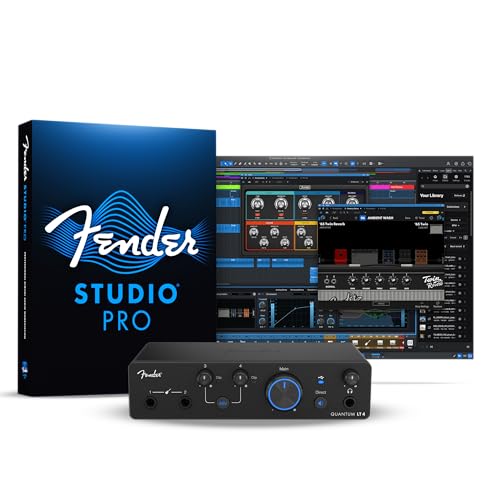
- Custom low-latency drivers for responsive tracking
- Dual MAX-HD mic preamps and dual instrument inputs
- Loopback, balanced outputs, and a strong headphone amp
Best For: Guitarists, vocalists, and streamers who want flexible routing
Zero-Delay Monitoring Pick
2-In/4-Out USB Audio Interface with Monitoring Modes

- Zero-latency monitoring with four listening modes
- 24-bit/192kHz capture for detailed recording
- Two combo inputs with 48V phantom power and PAD switches
Best For: Solo creators and small studios that want real-time monitoring
Low-Latency All-Rounder – MOTU M4 4×4 USB-C Audio Interface
If you want an audio interface with low latency for recording, mixing, and podcasting, the MOTU M4 is built around practical speed and easy monitoring. Its 4×4 USB-C layout, hardware monitoring, MIDI I/O, and loopback make it a flexible desktop hub for Mac, PC, or iOS setups.
Best For: Home studios, podcasters, and musicians who want fast monitoring plus a simple 4×4 workflow.
Pros:
- Low-latency monitoring is highlighted in the product details.
- 4-in/4-out USB-C connectivity with MIDI I/O for versatile routing.
- Hardware monitoring, loopback, and an LCD screen support practical daily use.
- Includes 6+GB of free content and compatibility with Mac, PC, and iOS.
Cons:
- Only two microphone preamps, so larger tracking sessions will need expansion.
- Not designed for heavy multi-input recording compared with larger interfaces.
Overall, the M4 balances low-latency performance with straightforward features that suit small studios and content creators. It is a strong fit if you want speed, clean monitoring, and a compact footprint without overcomplicating the setup.
Compact Desktop Pick – Audient iD4 MKII USB-C Interface
The Audient iD4 MKII is a compact audio interface with low latency-friendly USB-C connectivity and a clean desktop design for home recording. Its Class A console mic preamp, monitor mix and panning function, and dual headphone outputs make it a practical option for solo creators working on Mac, PC, or iOS.
Best For: Singer-songwriters and small home studios that want a premium-feeling two-channel interface.
Pros:
- High-speed USB-C connection simplifies power and cable handling.
- Class A microphone preamp draws from Audient’s high-end console design.
- Monitor mix and monitor panning functions support efficient tracking.
- All-metal housing adds durability for desktop or portable use.
Cons:
- Only 2 channels, so it is not suited to larger multi-source sessions.
- Maximum sample rate is 96 kHz, which is lower than some rivals.
The iD4 MKII keeps things focused on quality and simplicity rather than channel count. If you need a low-latency interface for direct recording and monitoring with a sturdy build, it is an easy one to place on a shortlist.
Best Sound Quality Value – MOTU M2 2×2 USB-C Audio Interface
For buyers looking for an audio interface with low latency and strong conversion quality, the MOTU M2 focuses on clean playback and recording in a compact 2×2 design. The ESS Sabre32 Ultra DAC, measured dynamic range, and low-noise mic input specs make it a smart choice for straightforward Windows-based home studios.
Best For: Creators who want compact size and high-quality sound in a basic two-channel interface.
Pros:
- ESS Sabre32 Ultra DAC technology is used for strong analog sound.
- Measured 120 dB dynamic range on outputs supports detailed monitoring.
- Measured -129 dBu EIN on mic inputs points to very quiet recording performance.
- Includes Ableton Live Lite and MOTU Performer Lite support.
Cons:
- 2×2 channel count is limited for larger recording setups.
- Windows compatibility is listed in the supplied details, so platform flexibility is narrower here.
The M2 is a focused interface that emphasizes sound quality and low-noise performance over extra I/O. If you want a small, no-frills unit for monitoring and recording with dependable audio specs, it is a compelling option.
High-I/O Studio Hub – Focusrite Scarlett 16i16 4th Gen
If you need an audio interface with low latency potential and a much larger input/output layout, the Scarlett 16i16 4th Gen is aimed at full-featured production rigs. With 16 inputs and 16 outputs, 4th Gen preamps, ADAT, S/PDIF, MIDI I/O, and workflow tools like Auto Gain and Clip Safe, it is built for more ambitious sessions.
Best For: Producers and musicians who need expanded connectivity for multi-source recording.
Pros:
- 16 inputs and 16 outputs provide broad routing and expansion options.
- 24-bit/192kHz converters with 122 dB dynamic range support detailed recordings.
- Auto Gain and Clip Safe help speed up setup and prevent clipping.
- Includes ADAT, S/PDIF, MIDI I/O, and two Hi-Z inputs for flexible workflows.
Cons:
- Larger and heavier than compact desktop interfaces.
- May be more interface than needed for simple solo recording.
The Scarlett 16i16 brings serious connectivity and useful safety tools to a modern studio setup. It stands out when you want a larger interface that can handle more sources without giving up a clean, current-generation feature set.
Portable Podcast & Music Starter – M-AUDIO M-Track Duo USB Audio Interface
If you want an audio interface with low latency for podcasting, streaming, or simple music recording, the M-AUDIO M-Track Duo keeps the setup straightforward. It offers two combo XLR/line/instrument inputs, 48kHz audio resolution, and a USB/Direct monitoring switch for zero latency monitoring.
Best For: Beginners and creators who need a compact interface for vocals, guitar, and live streaming.
Pros:
- USB/Direct monitoring switch supports zero latency monitoring.
- Two combo XLR/Line/Instrument inputs handle vocals, guitar, and line sources.
- Crystal Preamps are designed for clean microphone capture.
- Includes MPC Beats software for recording and production.
Cons:
- Maximum sample rate is 48kHz, which is lower than some competing interfaces.
- Only two channels, so it is not built for larger multi-input setups.
Overall, this is a practical entry-level pick if low-latency monitoring and simple connectivity matter more than advanced studio features. It covers the essentials well for solo recording and lightweight content creation.
Reliable Solo Recording Pick – Focusrite Scarlett Solo 3rd Gen USB-C Audio Interface
The Focusrite Scarlett Solo 3rd Gen is a strong audio interface with low latency for solo artists and podcasters who want clean capture and easy monitoring. It pairs a high-performance mic preamp with a Hi-Z instrument input, 24-bit/192kHz conversion, and low-noise balanced outputs for clear playback.
Best For: Solo singers, guitarists, and podcasters who want polished recording quality in a simple 2-channel interface.
Pros:
- 24-bit/192kHz conversion supports high-quality recording and mixing.
- High-performance mic preamp and switchable Air mode add clarity.
- Hi-Z instrument input is suited to guitar or bass.
- Low-noise balanced outputs help deliver clean monitoring playback.
Cons:
- Only one XLR mic preamp and one instrument input, so input flexibility is limited.
- No dedicated zero-latency monitoring claim in the supplied notes.
For a simple home-recording setup, this interface focuses on sound quality and dependable everyday use. It is a sensible choice if you want compact hardware and pro-grade conversion without extra complexity.
DSP Monitoring Powerhouse – Yamaha URX22C 2-in/2-out USB-C Audio/MIDI Interface
If you need an audio interface with low latency and built-in processing, the Yamaha URX22C stands out with latency-free DSP-powered monitoring. It combines 32-bit/192kHz support, two combo inputs with D-PRE mic preamps, and MIDI I/O in a rugged metal design.
Best For: Home studios and performers who want real-time monitoring effects and flexible USB-C connectivity.
Pros:
- Latency-free DSP-powered monitoring with REV-X reverb, Channel Strip, and Guitar Amp Classics.
- 32-bit/192kHz support and USB 3.0 connectivity provide modern recording specs.
- Two combo inputs include Class-A D-PRE preamps with phantom power and Hi-Z support.
- Includes MIDI I/O plus Steinberg software and dspMixFx app.
Cons:
- Two-in/two-out design may be limiting for larger recording sessions.
- Its DSP-focused feature set may be more than casual users need.
This is the most feature-rich option in the group for low-latency monitoring and onboard effects. It makes sense if you want an interface that can handle recording, monitoring, and practical workflow tools in one box.
Portable Low-Latency Starter – USB C Audio Interface for Recording Music, Streaming, Podcasting
If you want an audio interface with low latency for everyday recording, streaming, or podcasting, this Synido 2×2 model focuses on simple setup and flexible monitoring. It uses an independent audio chip to help reduce recording latency and supports 24-bit/48kHz capture for clear, practical results.
Best For: Creators who want a portable USB-C interface with easy monitoring options and broad device compatibility.
Pros:
- Independent audio chip is designed to reduce recording latency.
- Three monitoring modes: Stereo, Mix, and USB.
- XLR/6.35mm input support with LED level indicators.
- Includes 48V phantom power and plug-and-play portability.
Cons:
- Maximum sample rate is limited to 48kHz.
- Best DAW performance may require a third-party ASIO driver.
Overall, this is a straightforward option if you value low-latency monitoring, compact size, and easy switching between recording and playback workflows. It is especially appealing for mobile creators who want a lightweight interface without a complicated control layout.
Feature-Rich Fender Pick – 4×2 USB-C Audio Interface with Low-Latency Drivers
This audio interface with low latency is built for musicians and streamers who want responsive monitoring plus room to grow. The Fender Quantum LT 4 combines dual MAX-HD mic preamps, dual instrument inputs, custom low-latency drivers, and loopback routing for a flexible home-studio workflow.
Best For: Guitarists, vocalists, and content creators who want a feature-rich interface with strong monitoring tools.
Pros:
- Custom low-latency drivers for responsive recording.
- Two MAX-HD mic preamps with up to 75 dB of gain.
- Dual instrument inputs and balanced TRS outputs.
- Loopback audio and a powerful headphone amp for streaming and podcasting.
Cons:
- More advanced than a basic entry-level interface.
- Best value depends on using the Fender software ecosystem and routing features.
For buyers who need more than a simple 2-in/2-out box, the Quantum LT 4 offers a strong blend of low-latency performance, flexible I/O, and creator-friendly tools. It stands out most when you want both music production and streaming features in one unit.
Zero-Delay Monitoring Pick – 2-In/4-Out USB Audio Interface with Monitoring Modes
If you need an audio interface with low latency for recording, livestreaming, or podcasting, the BlueAVS AR013 is built around real-time monitoring and high-resolution capture. It supports 24-bit/192kHz recording, two combo inputs, and multiple monitoring modes to help you hear yourself without distracting delay.
Best For: Home studios and creators who want zero-latency monitoring with flexible input and output options.
Pros:
- Zero-latency monitoring with OFF, MONO, Crossfeed, and STEREO modes.
- 24-bit/192kHz recording with support for multiple sample rates.
- Two XLR/TRS combo inputs with independent 48V phantom power.
- Balanced TRS outputs and plug-and-play USB-C compatibility.
Cons:
- Only 2 input channels, so it is not ideal for larger sessions.
- Some users may prefer a simpler layout if they do not need multiple monitoring modes.
This model makes sense if your priority is clean, real-time monitoring rather than a large channel count. Its combination of zero-delay monitoring, high sample-rate support, and portable USB-C design makes it a solid pick for solo creators and small setups.
How We Picked the Best Audio Interface with Low Latency
We focused on interfaces that are a strong match for real-world recording and content creation: dependable drivers, useful input/output layouts, solid preamps, and monitoring features that help reduce perceived delay. We also favored models with USB-C connectivity, clear software support, and enough flexibility for musicians, podcasters, and streamers.
Quick Comparison
For simple solo recording, compact 2×2 models are usually the easiest and most affordable choice. If you need more inputs, MIDI, or better monitoring control, step up to a 4×4 or larger unit. For band sessions, multi-in/multi-out interfaces offer more room to grow, while creator-focused models may prioritize loopback, DSP, or streamlined controls.
Key Buying Factors for an Audio Interface with Low Latency
Driver Quality and Platform Support
Low hardware delay matters, but driver stability matters just as much. Look for interfaces with a strong reputation on your operating system, especially if you use DAWs, amp sims, or soft synths under load.
Monitoring Features
Direct monitoring, mix control, and cue options can make tracking feel immediate. Some interfaces also include DSP or software routing, which can improve the experience for an Audio Interface with Low Latency during vocal takes or streaming.
Input and Output Count
Choose the smallest I/O setup that still meets your needs. One mic input may be enough for solo podcasting, while dual combo inputs or extra line outputs are better for stereo recording, instruments, and monitor setups.
Preamp and Conversion Quality
Cleaner preamps and capable converters help preserve detail, especially with dynamic microphones and quiet sources. If you plan to record frequently, this is worth prioritizing over flashy extras.
Extra Features
MIDI, loopback, bundled software, and phantom power can be important depending on your workflow. Don’t overpay for features you won’t use, but avoid buying too small if you expect your setup to expand.
Who Should Buy Which Audio Interface with Low Latency?
Solo creators and mobile musicians should usually start with a compact 2-in/2-out interface. Podcasters and streamers may prefer models with easy monitoring and routing. Producers who use multiple mics or outboard gear should look at higher-channel units, while beginners should favor simple control layouts and straightforward software.
The best choice is the one that matches your current workflow while leaving enough headroom for future projects. If low monitoring delay is a top priority, focus on interface quality, driver support, and monitoring options before chasing the highest sample-rate spec on the box.