
A practical gaming gift can make everyday play more comfortable, organized, or enjoyable. The right pick depends on how the recipient plays, what gear they already own, and how much room they have for an upgrade.
These 18 ideas cover desk setups, PC gaming, handhelds, multiplayer, and streaming, with compatibility details to check before choosing.
Practical Christmas Gift Ideas for Gamers
1. ErGear Height Adjustable Electric Gaming Desk
A Flexible Foundation for a Gaming Setup
ErGear Height Adjustable Electric Gaming Desk

- 48-by-24-inch black desk with electric height adjustment from 28.35 to 46.46 inches.
- Four memory presets let users save preferred desk heights.
- Steel frame and engineered-wood top; listed weight capacity is 176 pounds.
Best For: A gamer creating or upgrading a dedicated desk setup.
2. EPOMAKER x Aula F75 Wireless Mechanical Keyboard
A Compact Keyboard for Gaming and Typing
EPOMAKER x Aula F75 Wireless Mechanical Keyboard

- 75% layout with Bluetooth, 2.4GHz wireless, and USB-C connectivity.
- Hot-swappable sockets allow switch replacement; includes a multimedia control knob.
- Five-layer internal padding and RGB lighting are listed features.
Best For: A PC gamer who wants a compact keyboard with customization options.
3. Univivi 36-Inch Under-Desk Cable Tray
A Tidy-Up for the Gaming Desk
Univivi 36-Inch Under-Desk Cable Tray

- 36-inch under-desk tray made with 600D Oxford fabric and bottom support.
- Can be installed with clamps or screws; check desk clearance and dimensions first.
- Built-in ties help secure items, and the tray can unfold for access.
Best For: A gamer who wants to organize power adapters and cables beneath a desk.
4. LYMAX Dimmable Monitor Light Bar
Focused Light for Late Sessions
LYMAX Dimmable Monitor Light Bar

- USB-C powered light bar with touch controls and a wireless remote.
- Adjustable color temperature ranges from 2900K to 6000K, with four color modes.
- Gravity-damper bracket fits screens listed as 0.2 to 1.8 inches thick.
Best For: A gamer who wants task lighting while keeping desk space clear.
5. Benicci Blue-Light-Blocking Computer Glasses
A Wearable Screen-Time Accessory
Benicci Blue-Light-Blocking Computer Glasses

- Black rectangular frames with blue-light-blocking lenses, according to the listing.
- Includes a protective case, cleaning cloth, testing kit, and small carry bag.
- Listed as a one-size adult style for men and women.
Best For: A gamer who wears glasses and wants a pair for computer use.
6. JSAUX Dual-Layer ROG Xbox Ally Carrying Case
Handheld Gear, Packed Together
JSAUX Dual-Layer ROG Xbox Ally Carrying Case

- Listed as compatible with ROG Xbox Ally (2025), Ally X (2025), and Ally X20 (2026).
- Two compartments provide space for the handheld and accessories such as a charger or cables.
- Soft lining, joystick-protecting raised areas, and SD and microSD slots are included.
Best For: Someone who travels with one of the listed ROG Xbox Ally handhelds.
7. EPOMAKER Click Lite Wireless Gaming Mouse
A Lightweight Mouse with Three Connection Options
EPOMAKER Click Lite Wireless Gaming Mouse

- Connects by 2.4GHz wireless, Bluetooth, or USB-C cable; has five programmable buttons.
- Adjustable sensitivity is listed from 800 to 12,000 DPI.
- Rechargeable 500mAh battery and 59-gram weight are listed specifications.
Best For: A right-handed PC gamer who wants a lightweight wireless mouse.
8. Extended Gaming Mouse Pad with Stitched Edges
More Room for Mouse and Keyboard
Extended Gaming Mouse Pad with Stitched Edges
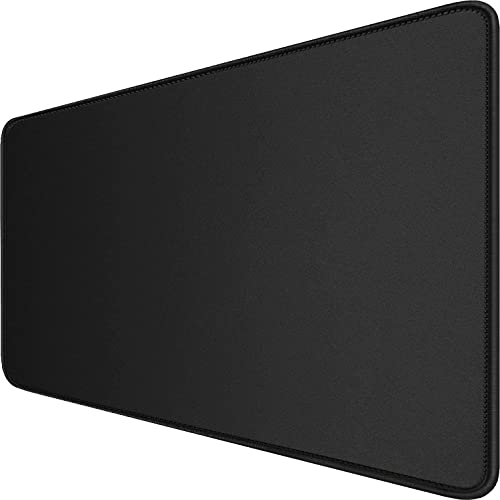
- 31.5-by-15.7-inch surface can fit a mouse and keyboard together.
- Natural-rubber base is described as anti-slip, with stitched edges.
- Waterproof coating and a smooth tracking surface are listed features.
Best For: A PC gamer who wants a broad, unified surface for desk peripherals.
9. Klipsch ProMedia Lumina 2.1 Gaming Speakers
Desktop Sound with a Subwoofer
Klipsch ProMedia Lumina 2.1 Gaming Speakers

- 2.1 computer speaker system includes a low-profile subwoofer and RGB lighting effects.
- Connects through USB-C, AUX, or Bluetooth 5.3, according to the listing.
- The Klipsch Control app offers EQ and lighting controls, including night mode.
Best For: A gamer who prefers desktop speakers for games, music, or movies.
10. FIFINE K688 Microphone and BM88 Boom Arm
A Voice Setup for Chat and Streaming
FIFINE K688 Microphone and BM88 Boom Arm

- Dynamic microphone offers USB and XLR outputs; XLR cable is not included.
- Metal boom arm extends up to 29 inches and includes cable management.
- USB connection provides a tap-to-mute button, gain control, and headphone monitoring.
Best For: A gamer who chats, records, or streams from a PC.
11. NexiGo N660P 1080p 60fps Webcam
A Camera with a Built-In Privacy Cover
NexiGo N660P 1080p 60fps Webcam
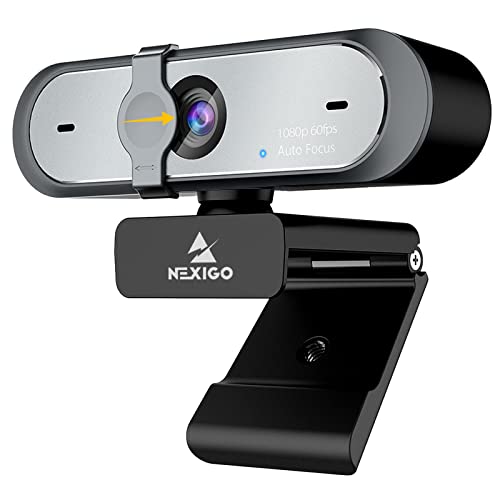
- Captures 1080p video at up to 60 frames per second, with autofocus.
- Includes dual microphones and a sliding privacy cover.
- USB plug-and-play design with a 6.5-foot cord; listed for Windows, Mac, Linux, and more.
Best For: A gamer who joins video calls or wants a camera for streams.
12. InnoView 15.6-Inch Portable Monitor
A Second Screen That Can Travel
InnoView 15.6-Inch Portable Monitor

- 15.6-inch IPS display with 1920-by-1080 resolution and a 60Hz refresh rate.
- Has two full-function USB-C ports and one HDMI port; USB-C video requires supported device output.
- Protective cover doubles as an adjustable stand; built-in speakers are listed.
Best For: A gamer who travels with a laptop or wants a portable second display.
13. SANSUI 27-Inch 1440p Gaming Monitor
A Larger, High-Refresh Desk Display
SANSUI 27-Inch 1440p Gaming Monitor
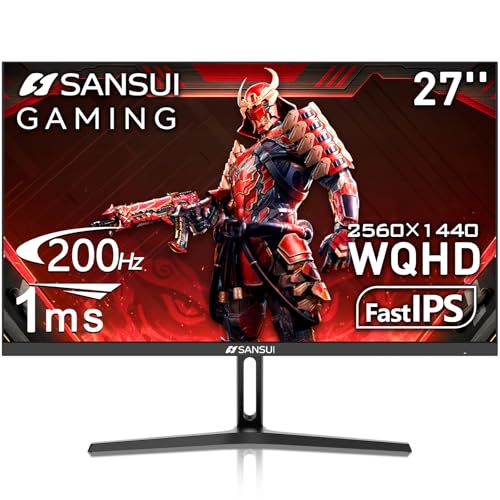
- 27-inch Fast IPS display with 2560-by-1440 resolution and a listed refresh rate of up to 200Hz.
- Includes two HDMI 2.0 and two DisplayPort 1.2 ports; one DP cable is included.
- VESA mounting support, tilt adjustment, and game-assistant settings are listed.
Best For: A desk gamer checking for a QHD display with high refresh capability.
14. Samsung T9 Portable SSD, 2TB
Extra Portable Storage for Games and Clips
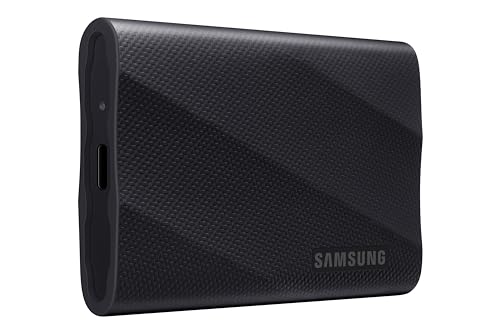
- Portable solid-state drive with 2TB capacity and USB 3.2 Gen 2x2 connectivity.
- Listed read and write speeds are up to 2,000 MB/s.
- Compatibility includes gaming consoles, Mac, PC, tablets, and iPhone 15/16.
Best For: A gamer who needs portable space for files, installs, or recordings.
15. GL.iNet Flint 2 Wi-Fi 6 Gaming Router
A Network Upgrade for Connected Play
GL.iNet Flint 2 Wi-Fi 6 Gaming Router

- Wi-Fi 6 router with a listed data rate of up to 6 Gbps.
- Has two 2.5G ports and four 1G Ethernet ports.
- Supports OpenVPN and WireGuard; the listing advises updating firmware during setup.
Best For: An online gamer upgrading a home network with wired devices.
16. Turtle Beach Stealth 500 Wireless Gaming Headset
Wireless Chat for Multiplayer Sessions
Turtle Beach Stealth 500 Wireless Gaming Headset

- Wireless connectivity includes low-latency 2.4GHz and Bluetooth 5.2.
- Features memory-foam cushions, an adjustable audio EQ, and a flip-to-mute microphone.
- Battery life is listed at up to 40 hours, with quick charge.
Best For: A multiplayer gamer who wants wireless audio and a chat microphone.
17. AutoFull C3 Pro Ergonomic Gaming Chair
Adjustable Seating for Long Sessions
AutoFull C3 Pro Ergonomic Gaming Chair

- Lumbar support adjusts forward and backward across 10 positions.
- 3D armrests and a 2D headrest offer multiple adjustment directions.
- Reclines up to 160 degrees and includes a 25-degree rocking feature.
Best For: A gamer who spends long sessions at a desk and needs adjustable seating.
18. Elgato 4K X HDMI 2.1 Capture Card
A Capture Upgrade for Console Creators
Elgato 4K X HDMI 2.1 Capture Card

- External capture card with HDMI 2.1 in and out and USB 3.2 Gen 2 connectivity.
- Supports VRR passthrough; listing describes capture up to 1080p at 240 frames per second.
- Works with platforms and software including PS5, Xbox Series X, Switch, PC, Mac, and OBS.
Best For: A console or PC gamer who records or streams gameplay.
How to Choose Practical Christmas Gift Ideas for Gamers
Practical Christmas gift ideas for gamers work best when they fit the recipient’s actual setup, play habits, and available space. Start by identifying what they use most: a desktop PC, laptop, console, or handheld. Then look for an upgrade that solves a real everyday problem, such as limited storage, a crowded desk, uncomfortable seating, or a need to capture gameplay.
Start with the setup
For a desk-based player, consider how the pieces will work together. A height-adjustable desk, chair, light bar, cable tray, and extended mouse pad affect the physical workspace. Measure before choosing a large item. Check desk width and depth, monitor thickness for a light bar, available clearance beneath the desk for a cable tray, and the chair’s dimensions against the room. A generous surface or adjustable feature is useful only if it fits the space and the recipient will use it.
Peripherals can be easier to fit into an existing setup, but still check connection needs. The keyboard offers wireless and wired modes, while the mouse lists Bluetooth, 2.4GHz, and USB-C options. Ask whether the gamer prefers a compact keyboard layout, a particular hand orientation, or a wired connection. A large mouse pad is a low-complexity desk addition, though its dimensions should still be compared with the available surface.
Check compatibility before buying
Compatibility matters most for screens, networking, storage, and capture gear. The portable monitor’s USB-C video connection requires a device that supports the stated video output mode; otherwise, HDMI and a separate power cable may be needed. Check the laptop or console’s available ports and output capabilities. For the 27-inch monitor, compare the source device’s supported resolution and refresh rate with the display’s connections. Its listing says there are no built-in speakers, so account for the recipient’s existing audio setup.
For a handheld case, match the exact console family and model named in the listing. A case made for one handheld may not fit another, even when the devices look similar. For a router, consider the home’s internet plan, existing modem, room layout, and whether the gamer can connect their main console or PC by Ethernet. A new router can only work within the limits of the internet service and home network.
The capture card is a more specialized choice. Check the gaming system’s video connections, the computer’s operating system and USB port, and the creator’s recording or streaming software. Its listed minimum system requirements are useful to compare with the computer being used. Storage also deserves a compatibility check: confirm that the target device supports an external drive and the relevant connection before choosing the portable SSD.
Match the gift to the person and budget
For a modest desk refresh, consider a mouse pad, cable tray, monitor light, or glasses. A mouse, keyboard, webcam, and headset offer more focused upgrades without changing the room’s furniture. A portable monitor or SSD can serve gamers who move between locations. Larger purchases such as a desk, chair, display, speaker system, or router benefit from knowing the recipient’s preferences first. If you can, ask about screen size, seating preferences, desk measurements, and equipment they already own.
Personalization does not require adding decorative extras. Choose a color that fits the setup when the listing provides options, or prioritize features the gamer will appreciate: adjustable positions, multiple connection methods, a privacy cover, programmable buttons, or dedicated accessory storage. For audio products, consider whether they usually use headphones or prefer speakers. For streamers, a webcam, microphone, or capture card only helps if it suits their existing workflow.
Plan timing and setup
Leave time to verify model names, ports, measurements, and any needed cables. The microphone listing explicitly says an XLR cable is not included, and the portable monitor may require a separate power cable for some HDMI setups. A gift that needs configuration, firmware updates, or software installation may be easier to enjoy if there is time to set it up together. For a last-minute decision, favor an item with straightforward fit and use, such as a mouse pad, glasses, or a cable organizer, after checking desk space and recipient preference. For expensive or compatibility-sensitive equipment, confirm the details before ordering and allow time for the recipient to connect and configure it.