
A good desktop soundbar can improve music, calls, videos, and games without taking up the space of traditional speakers. The models in this roundup focus on compact designs, simple connections, and practical controls for PC workstations.
We’ve included USB-powered, Bluetooth, AUX, RGB, and monitor-mount options so you can match your setup, listening habits, and available desk space.
Best 10 Soundbars for Desktop Setups Picks for 2026
Versatile Stereo Pick
Nylavee SK100 Computer Soundbar

- Bluetooth 5.0 and 3.5mm AUX connectivity
- USB-powered with side knob control
- Four speaker units with bass diaphragms
Best For: Flexible desktop, office, and gaming audio
Gaming RGB Pick

- Compact beneath-monitor design
- USB-C power and audio delivery
- Chroma RGB with 14 lighting zones
Best For: Compact gaming desks and RGB setups
Atmospheric Desk Pick
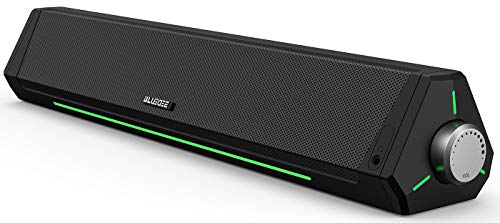
- Bluetooth, AUX, and USB-powered operation
- Slim profile for beneath-monitor placement
- Light strips and braided Y-cable
Best For: Organized workspaces with ambient lighting
Clutter-Free Monitor Pick

- Clips onto monitors up to 1 inch thick
- Single USB cable for power and audio
- Built-in volume, mute, and playback controls
Best For: Minimal desks and monitor-mounted audio
Compact USB Pick

- Compact bar fits beneath a monitor
- USB power, AUX audio, and USB-C adapter
- Touch lighting with top volume knob
Best For: Space-conscious desktop users who prefer wired plug-and-play audio
Wireless Desktop Pick
SOULION R50 Bluetooth Computer Speakers

- Bluetooth, AUX, and USB modes
- Four customizable dynamic lighting modes
- Slanted under-monitor design with volume knob
Best For: Multi-device desktops that need both Bluetooth and wired playback
RGB Gaming Pick
Redragon GS560 Desktop Soundbar
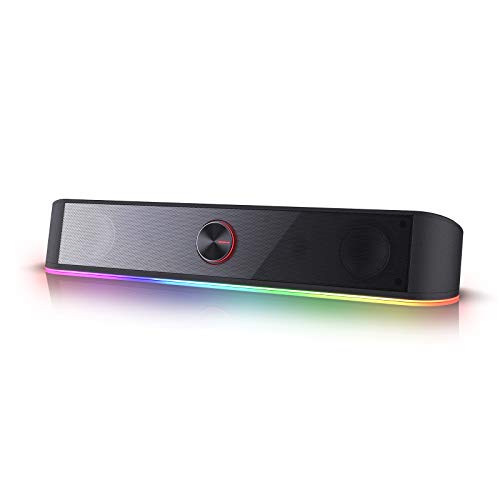
- 2.0-channel sound with rich bass claim
- Four RGB lighting modes with music sync
- USB-powered with 3.5mm audio connection
Best For: Gaming and office desks where RGB effects and simple controls matter
Best Budget USB Pick
LENRUE E-1103 Desktop Soundbar

- Compact stereo soundbar fits beneath monitors
- Single USB connection with USB-C adapter
- Touch-controlled colorful lighting
Best For: Simple, space-saving desktop audio
Best Bluetooth Flexibility
ICOREBEI USB-C Desktop Soundbar
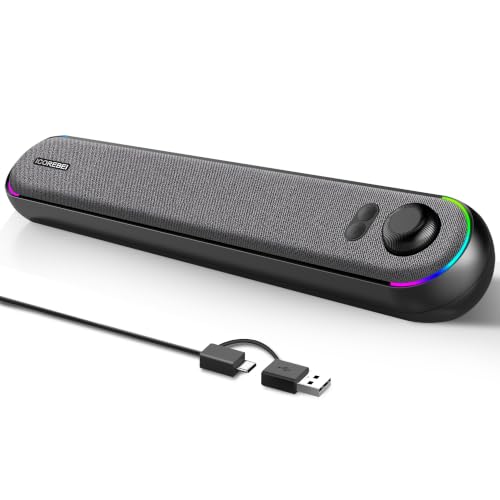
- USB-C audio and power in one connection
- Bluetooth 5.3 for compatible devices
- Three RGB lighting modes and angled profile
Best For: Mixed wired and wireless desktop listening
Best Wired Stereo Value
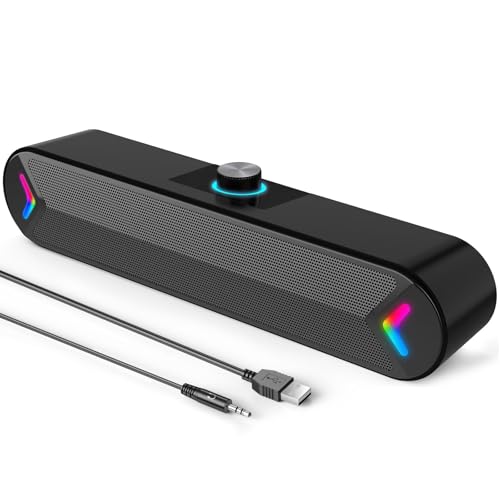
- 10-watt 2x5-watt stereo output
- USB power with 3.5mm AUX audio
- Top-mounted volume knob and colorful lighting
Best For: Straightforward wired computer audio
Versatile Stereo Pick – Nylavee SK100 Computer Soundbar
The Nylavee SK100 is a flexible option for soundbars for desktop setups, combining Bluetooth 5.0 and 3.5mm AUX connectivity with USB power. Its stereo design, bass diaphragms, and side control knob suit everyday office listening, gaming, and media playback.
Best For: Desktop users who want wired and wireless connectivity in a compact, bass-forward soundbar.
Pros:
- Supports Bluetooth 5.0 and 3.5mm AUX connections.
- Uses four speaker units and two bass diaphragms for fuller stereo sound.
- USB-powered design and one-knob operation simplify setup and control.
- Compatible with desktops, laptops, smartphones, tablets, and gaming consoles.
Cons:
- Requires a separate USB power source because it has no built-in battery.
- Not waterproof or water resistant.
- Its 16-inch width may be less suitable for very narrow desks.
With dual connection options and straightforward controls, the SK100 is a practical all-around choice when you want desktop audio that can also serve mobile devices or consoles.
Gaming RGB Pick – Razer Leviathan V2 X
The Razer Leviathan V2 X is designed for gaming-focused soundbars for desktop setups, fitting beneath a monitor while adding USB-C audio and power. Its full-range drivers, passive radiators, Bluetooth 5.0, and customizable Chroma RGB make it a feature-rich choice for compact gaming desks.
Best For: PC gamers who want a compact soundbar with low-latency Bluetooth and customizable RGB lighting.
Pros:
- Compact form factor fits beneath a monitor for a cleaner desktop.
- USB-C provides both power and audio through one cable.
- Two full-range drivers and two passive radiators support dynamic stereo sound.
- Chroma RGB offers 14 lighting zones with customizable effects.
Cons:
- Designed specifically for computers rather than broad multi-room use.
- Not waterproof or water resistant.
- RGB and sound customization rely on Razer software and app controls.
The Leviathan V2 X stands out when desk space, gaming aesthetics, and software-based customization matter as much as simple plug-and-play audio.
Atmospheric Desk Pick – Bluedee Computer Soundbar
The Bluedee computer soundbar brings practical connectivity and ambient lighting to soundbars for desktop setups. It uses USB power, Bluetooth 5.0, and a 3.5mm audio connection, while its slim profile and braided Y-cable help keep a workspace organized.
Best For: Office and home users who want compact stereo audio with accent lighting and flexible connections.
Pros:
- Offers Bluetooth 5.0 and 3.5mm wired connectivity.
- Slim 16.4-inch profile fits neatly beneath many monitors.
- USB-powered plug-and-play setup requires no additional drivers or software.
- Built-in light strips add visual ambiance to a desktop.
Cons:
- USB power is required for operation.
- Not waterproof or water resistant.
- Its Bluetooth range is listed at 10 meters, which may limit distant placement.
The Bluedee is a balanced choice for a tidy workspace, especially if you value easy setup, multiple input options, and subtle desk lighting without a separate subwoofer.
Clutter-Free Monitor Pick – Cyber Acoustics CA-2890
The Cyber Acoustics CA-2890 takes a space-saving approach to soundbars for desktop setups, clipping directly to the bottom of compatible monitors. Its single USB connection, built-in controls, and included USB-A to USB-C adapter make it a convenient choice for computers and newer laptops.
Best For: Users who want a monitor-mounted speaker bar with simple USB plug-and-play operation.
Pros:
- Clip-on design fits most monitors up to 1 inch thick.
- Uses one USB cable for power and audio.
- Includes a USB-A to USB-C adapter for newer laptops.
- Provides volume, mute, and play/pause controls directly on the speaker.
Cons:
- Wired USB connectivity does not provide Bluetooth.
- Monitor clip compatibility depends on screen thickness and design.
- Its compact driver setup may be less expansive than larger soundbars.
For a clean, minimal desk, the CA-2890 is particularly appealing because it mounts to the monitor and avoids adding another object to the desktop surface.
Compact USB Pick – LENRUE G11 Computer Speakers
For shoppers comparing soundbars for desktop setups, the LENRUE G11 is a compact wired option designed to sit beneath a monitor. It uses USB power and a 3.5mm AUX connection, with a top-mounted volume knob and touch-controlled lighting.
Best For: Desktop users who want a simple, space-saving speaker bar with USB-C adapter support and colorful touch lights.
Pros:
- Compact 14.57-inch-wide design fits beneath many monitors.
- USB-powered stereo sound with 3.5mm AUX connectivity and included USB-C adapter.
- Touch-controlled angular game lights and an accessible volume knob.
- Plug-and-play setup requires no driver installation.
Cons:
- No Bluetooth, headphone port, or microphone.
- Not compatible with TVs or headphones according to the supplied notes.
- Its 5-watt maximum output is intended for personal desktop listening rather than filling a room.
The G11 makes the most sense when desk space and straightforward wired setup matter more than wireless flexibility. Its integrated cable design can also help reduce clutter around a computer workstation.
Wireless Desktop Pick – SOULION R50 Bluetooth Computer Speakers
The SOULION R50 adds Bluetooth convenience to the soundbars for desktop setups category while retaining USB power and 3.5mm AUX input. Its slightly tilted bar is designed for under-monitor placement and includes adjustable lighting plus a volume knob.
Best For: Users who switch between computers, phones, tablets, and other compatible devices and want both Bluetooth and wired modes.
Pros:
- Supports Bluetooth, USB power, and 3.5mm AUX audio.
- Four lighting modes include gradient, breathing, rhythm, and fixed-color options.
- 30-degree slanted design aims sound toward the listener beneath a monitor.
- Volume knob provides stepless adjustment, and the rated Bluetooth range is up to 10 meters.
Cons:
- Bluetooth requires a separate USB connection for power.
- Wireless stability depends on staying within the stated 10-meter range.
- The single-channel soundbar design may not provide the separation of a two-speaker setup.
Choose the R50 if flexible device connectivity is a priority. It is particularly practical for a desk shared by a computer and mobile devices, with lighting controls that can be turned off when desired.
RGB Gaming Pick – Redragon GS560 Desktop Soundbar
The Redragon GS560 is a 2.0-channel choice for soundbars for desktop setups, pairing a compact under-monitor form with RGB lighting effects. It is USB powered, connects through a 3.5mm audio cable, and includes a front volume knob with power control.
Best For: Gamers and desktop users who want synchronized RGB effects, simple wired connectivity, and convenient front-panel volume control.
Pros:
- Four backlit modes include dynamic and static illumination.
- Music-synced lightshow projection adds a gaming-focused visual effect.
- Approximately 16 inches wide for placement beneath a monitor or other device.
- USB power and 3.5mm audio support PCs, laptops, phones, smartphones, and televisions.
Cons:
- It is wired rather than Bluetooth-enabled.
- Its 4-watt maximum output is suited to personal desktop use.
- The supplied information does not indicate a headphone output or microphone.
The GS560 is a strong fit for a gaming desk where lighting is part of the setup. Its straightforward USB-and-3.5mm arrangement keeps installation simple, while the physical knob makes everyday volume changes easy.
Best Budget USB Pick – LENRUE E-1103 Desktop Soundbar
For shoppers comparing soundbars for desktop setups, the LENRUE E-1103 is a compact USB-powered option with stereo sound, touch-controlled lighting, and a slim profile designed to fit beneath a monitor or laptop.
Best For: Budget-conscious desktop users who want simple plug-and-play stereo audio in a space-saving design.
Pros:
- Single USB connection provides power and audio, with a USB-C adapter included.
- Stereo sound with balanced bass for gaming, movies, music, and everyday listening.
- Touch-sensitive controls manage the colorful breathing lights.
- No drivers or software are required.
Cons:
- Not compatible with Xbox gaming systems or projectors.
- Monitor connections require a USB port that supports both power delivery and audio output.
- USB-powered operation requires a connected compatible device.
The E-1103 makes the most sense when desk space and setup simplicity matter more than extensive connectivity or high output power. Its 5-watt stereo design is well suited to close-range computer listening.
Best Bluetooth Flexibility – ICOREBEI USB-C Desktop Soundbar
The ICOREBEI soundbar combines USB-C digital audio and power with Bluetooth 5.3, making it a flexible choice among soundbars for desktop setups. Its angled profile, hi-fi stereo drivers, and three RGB modes suit modern workspaces.
Best For: Users who want wired computer audio plus Bluetooth playback from compatible phones, tablets, laptops, or other devices.
Pros:
- Dual full-range drivers and a bass radiator provide balanced near-field stereo sound.
- USB-C-to-USB-A cable carries digital audio and power through one connection.
- Bluetooth 5.3 supports wireless audio up to 10 meters in open conditions.
- Three RGB lighting modes can be switched or turned off.
Cons:
- It has no built-in battery and must remain connected to USB power.
- Bluetooth playback still requires USB power.
- Bluetooth range can vary with obstacles and surroundings.
This model is a strong fit for desks shared between computers and mobile devices. Choose it if Bluetooth convenience and a contemporary design are more important than a fully wireless, battery-powered speaker.
Best Wired Stereo Value – LENRUE A39PRO 10W Soundbar
The LENRUE A39PRO is a practical wired choice for soundbars for desktop setups, pairing 10-watt stereo output with USB power and a 3.5mm AUX audio connection. A top-mounted volume knob makes quick adjustments easy.
Best For: Desktop and laptop users who prefer dependable wired audio with straightforward controls and colorful accent lighting.
Pros:
- Upgraded 2×5-watt stereo design delivers clear audio for movies, music, videos, and games.
- Works with devices offering a standard 3.5mm headphone jack, while USB supplies power.
- Top-mounted volume knob provides convenient adjustments.
- Plug-and-play setup requires no drivers and includes a 47-inch cable.
Cons:
- It requires separate USB power and 3.5mm AUX audio connections.
- Devices without a standard headphone jack may need an adapter.
- Lighting is controlled by a rear switch rather than the volume knob.
The A39PRO is a sensible pick for users who value higher listed output and familiar analog connectivity. Its separate power and audio cables are less streamlined than a single-cable USB setup, but the physical volume knob is convenient at a desk.
How We Picked the Best Soundbars for Desktop Setups
We selected these soundbars by comparing the features that matter most at a computer desk: connection options, power requirements, footprint, control placement, stereo presentation, lighting, and compatibility with common PCs and monitors. We also considered whether each model suits focused office use, casual media, gaming, or a mixed setup.
Because compact desktop speakers vary widely, we prioritized practical usability over headline specifications. A soundbar that fits beneath a monitor and connects with one cable may be a better choice than a larger, louder model if your desk is crowded.
Quick Comparison
USB-powered models are generally the simplest choice for everyday desktop use because they draw power from the computer and avoid an extra wall adapter. Bluetooth models offer more flexibility for phones and tablets, while AUX connections can provide a dependable wired signal with compatible equipment. RGB and touch controls add visual appeal and convenience, but they should not outweigh sound quality or connectivity.
For the smallest workstations, look at compact bars and clip-on designs such as the Cyber Acoustics option. For gaming-focused setups, the Razer Leviathan V2 X and RGB-equipped Redragon model emphasize a more immersive presentation and desktop style. Models from Nylavee, Bluedee, LENRUE, and SOULION cover a range of affordable, space-conscious configurations.
Key Buying Factors for Soundbars for Desktop Setups
Connections and Power
Check whether the soundbar uses USB-A, USB-C, AUX, Bluetooth, or a combination. USB may carry power only, so confirm whether audio travels over USB or still requires a 3.5mm cable. If you frequently switch between a computer and phone, Bluetooth can be especially useful.
Size and Placement
Measure the space beneath your monitor before buying. A bar that is too tall may block the display, while a wide model may not fit between monitor stands. Clip-on or narrow designs can help preserve keyboard and mouse space.
Sound and Volume
Compact soundbars typically prioritize convenience over deep bass. Look for stereo drivers, a suitable power rating, and user controls that are easy to reach. For music and games, a wider stereo spread can be more valuable than maximum volume.
Controls and Extras
Touch controls, physical volume knobs, headphone outputs, lighting, and audio-light synchronization can improve usability or appearance. Treat RGB as an optional feature rather than a substitute for clear sound.
Who Should Buy Which Soundbars for Desktop Setups?
Choose a USB-powered LENRUE, SOULION, or similar compact model if you want affordable, uncomplicated audio for office work, streaming, and calls. Pick a Bluetooth-and-AUX model if you need to connect several devices. A clip-on Cyber Acoustics bar is practical for very limited desk space, while the Razer or Redragon options are better suited to gaming desks where design, lighting, and a fuller presentation matter. If your monitor already has limited clearance, measure carefully and favor a low-profile soundbar before prioritizing extra features.