
Capturing a clear lecture recording is easier when your device matches the room, speaker, and workflow. The best podcast recorders for lectures can provide dependable audio, simple controls, long battery life, and convenient file transfer.
This roundup covers compact dictation recorders, handheld audio devices, and podcast-focused models with multiple inputs. Use the buying guide below to narrow the options by recording quality, portability, storage, and transcription needs.
Best 10 Podcast Recorders for Lectures Picks for 2026
Best for Multi-Person Recording

- Four XLR inputs with phantom power
- Four headphone outputs with separate volume controls
- Phone, USB, and multitrack recording support
Best For: Lecture panels, interviews, and group recordings
Best for AI Lecture Notes

- Transcribes in 113 languages via its app
- Creates summaries, mind maps, and speaker identification
- 128GB storage with up to 33 hours of recording
Best For: Students and professionals organizing lecture recordings
Best for Enhanced Group Audio

- Four XLR inputs and four headphone outputs
- AI noise reduction, tone enhancement, and compression
- Direct phone connection for video audio
Best For: Multi-speaker lectures and podcast-style sessions
Best Budget Lecture Recorder

- 1536kbps stereo recording with noise reduction
- Voice activation helps reduce silent sections
- 64GB storage with Type-C file transfer
Best For: Simple classroom, meeting, and interview recording
Best Overall

- X/Y stereo microphones for clear lecture and interview audio
- 32-bit float recording helps prevent clipped takes
- USB-C microphone mode and up to 10-hour battery life
Best For: Portable lecture recording and general content creation
Best for Everyday Use
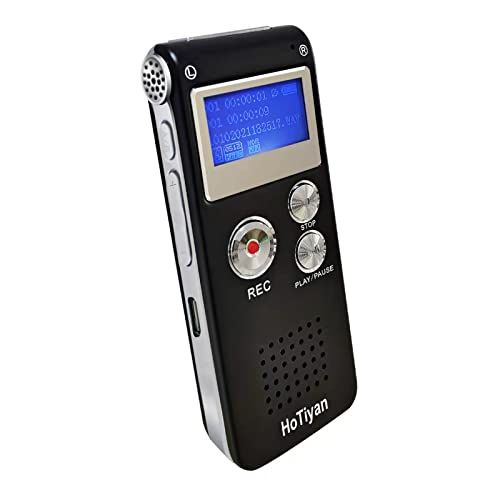
- Voice activation helps reduce silent sections
- Up to 128 hours of stated recording at 192 kbps
- A-B repeat and variable playback speed for review
Best For: Affordable classroom recording and lecture review
Best for Podcast Expansion

- Two XLR/TRS inputs for external microphones and gear
- Four-track recording for more involved projects
- USB-C recording or streaming with SD-card backup
Best For: Lecture recording that may expand into podcasts and interviews
High-Capacity Pick

- 128GB storage with up to 9,296 hours listed
- 1536kbps WAV and MP3 recording options
- Voice activation, folders, playback, and password protection
Best For: Long lectures, meetings, and organized recording archives
Two-Person Podcast Pick

- Two USB mic inputs and two headphone outputs
- AI noise reduction and built-in voice processing
- Streams while saving individual tracks to SD card
Best For: Two-person lecture interviews, panels, and podcast-style recordings
Simple Budget Pick
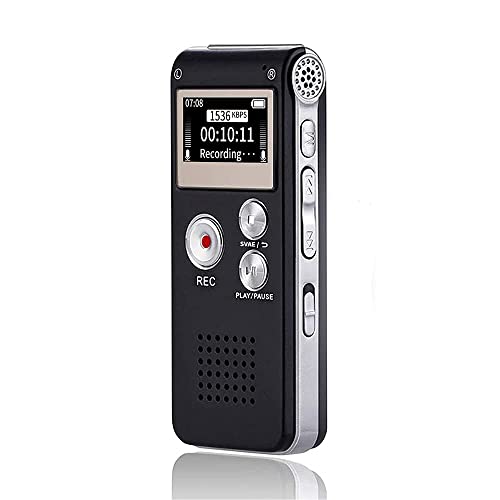
- Simple Record, Stop, and Play controls
- Noise reduction and voice-activated recording
- Up to 30 hours of continuous recording
Best For: Students seeking uncomplicated lecture and meeting recording
Best for Multi-Person Recording – Zoom PodTrak P4
For shoppers comparing podcast recorders for lectures, the Zoom PodTrak P4 is a strong choice when recording involves several microphones or participants. Its four XLR inputs, separate headphone controls, multitrack recording, and battery operation make it more versatile than a basic voice recorder.
Best For: Lecture panels, group discussions, interviews, and users who need multiple microphones and headphones.
Pros:
- Four XLR microphone inputs with phantom power support.
- Four headphone outputs with individual volume controls.
- Supports phone interviews, remote interviews, and USB audio interface mode.
- Includes programmable sound pads and multitrack recording.
Cons:
- Runs for up to 3.5 hours on two AA batteries.
- More equipment-focused than a pocket-sized lecture recorder.
The P4 makes the most sense when flexibility and multi-person recording matter more than the smallest possible setup. It is particularly useful for structured lectures, guest sessions, or recordings that may also become podcast content.
Best for AI Lecture Notes – EVISTR L359 AI Voice Recorder
If you want podcast recorders for lectures that also help organize what was said, the EVISTR L359 adds AI transcription and summaries to its core recording functions. It records in HD, offers noise reduction and voice activation, and connects to a phone through the included OTG accessories.
Best For: Students and professionals who want recordings, transcriptions, summaries, and searchable lecture notes in one workflow.
Pros:
- Supports transcription in 113 languages through the AI DVR Link app.
- Can create summaries, mind maps, speaker identification, and Ask AI insights.
- 128GB storage and up to 33 hours of continuous recording.
- One-touch recording, password encryption, and a physical HOLD switch.
Cons:
- AI processing requires the AI DVR Link app and phone connection.
- Wired OTG transfer may be less convenient than a wireless workflow.
The L359 is a practical pick for lecture capture when the goal is to turn audio into organized study material. Its large storage and lightweight design also suit frequent classroom, meeting, and interview use.
Best for Enhanced Group Audio – Zoom PodTrak P4next
Among podcast recorders for lectures, the Zoom PodTrak P4next is designed for multi-person sessions where cleaner, more balanced audio is important. It combines four XLR inputs and four headphone outputs with AI noise reduction, tone enhancement, and compression.
Best For: Lecture recordings with multiple speakers, podcast-style discussions, and users who want built-in audio assistance.
Pros:
- Four XLR inputs support up to four people with multitrack recording.
- AI noise reduction, tone enhancement, and compression help simplify mixing.
- Provides up to +70dB of gain for demanding microphones.
- Connects to a phone for direct audio capture into video.
Cons:
- Requires suitable microphones for its XLR inputs.
- Two AA batteries are required for portable operation.
The P4next is best suited to organized group recording rather than simple solo note capture. Its processing tools and phone connection make it a capable option when lectures include panels, interviews, or video production.
Best Budget Lecture Recorder – EVISTR L357 64GB
For straightforward podcast recorders for lectures, the EVISTR L357 focuses on clear capture, simple controls, and long recording capacity. Its adjustable gain, PCM noise reduction, voice activation, and Type-C file transfer make it suitable for classroom recording without a larger audio setup.
Best For: Students and users who want a compact recorder for lectures, meetings, interviews, and playback.
Pros:
- Records up to 1536kbps stereo audio with dynamic and PCM noise reduction.
- Voice activation can reduce silent sections during lectures.
- 64GB storage supports up to 4,660 hours at 32Kbps.
- Offers WAV and MP3 recording, variable-speed playback, and Type-C transfer.
Cons:
- Built-in microphone design is less flexible than an XLR recorder.
- The supplied notes do not specify the full digital recording-time figure.
The L357 is a sensible choice when ease of use and extended storage are priorities. Its two-button recording approach and voice-activation mode keep the setup simple for regular classroom use.
Best Overall – Zoom H1 Essential
If you want a flexible option among podcast recorders for lectures, the Zoom H1 Essential combines clear stereo capture with a compact design. Its X/Y microphones are suited to lectures, interviews, meetings, and podcasting, while 32-bit float recording is designed to help avoid clipped audio.
Best For: Students, podcasters, and creators who want one portable recorder for lectures, voiceovers, interviews, and general content.
Pros:
- X/Y stereo microphones capture natural-sounding voices and room audio.
- 32-bit float recording provides clip-free audio for changing sound levels.
- USB-C microphone mode supports calls, livestreams, and computer or mobile recording.
- Runs for up to 10 hours on two AAA batteries.
Cons:
- Uses replaceable AAA batteries rather than a built-in rechargeable battery.
- Its stereo microphone setup is less suited to multi-microphone or instrument-input projects.
The H1 Essential is a strong everyday choice when lecture recording is only part of the plan. It offers straightforward portable recording plus USB functionality for users who also create podcasts or online content.
Best for Everyday Use – HoTiyan 8GB Voice Recorder
This compact HoTiyan recorder is a practical pick for shoppers focused specifically on lectures, meetings, and interviews. It includes voice activation, built-in storage, simple three-button controls, and playback features that make it easy to revisit important sections.
Best For: Students and note-takers who want an inexpensive recorder with long recording capacity and repeat-playback tools.
Pros:
- Voice activation can reduce quiet sections and conserve storage.
- 8GB capacity supports up to 128 hours of stated recording time at 192 kbps.
- A-B repeat and variable playback speed are useful for reviewing lectures.
- Records in MP3 or WAV and transfers files by Micro USB.
Cons:
- Built-in microphone and USB 2.0 interface offer fewer expansion options than pro-oriented recorders.
- Its rechargeable battery is rated for up to 20 hours of continuous recording, so extended sessions may require recharging.
For straightforward classroom use, this model emphasizes capacity and playback convenience over advanced connectivity. It is a sensible fit if you mainly need to record and review lectures rather than build a multi-input podcast setup.
Best for Podcast Expansion – Zoom H4 Essential
The Zoom H4 Essential is a more expandable choice among podcast recorders for lectures, especially when you may later add microphones or other audio gear. It combines built-in stereo microphones with two XLR/TRS inputs, four-track recording, USB-C connectivity, and SD-card backup recording.
Best For: Podcasters, interviewers, and creators who need lecture recording plus support for external microphones, instruments, mixers, or soundboards.
Pros:
- Built-in stereo microphones record lectures, interviews, and field audio.
- Two XLR/TRS inputs accommodate external microphones, instruments, mixers, or soundboards.
- Four-track recording supports larger or more involved projects.
- USB-C supports recording or streaming to a phone, tablet, or computer while audio can also be saved to an SD card.
Cons:
- Its broader feature set may be more than needed for basic one-person lecture recording.
- Uses two AA batteries and has a stated 10-hour digital recording time.
The H4 Essential makes the most sense when lecture recording is part of a wider audio workflow. Its external inputs and backup-to-SD capability provide room to grow from simple voice capture into interviews, podcasts, and more complex productions.
High-Capacity Pick – EVIDA 128GB Lecture Recorder
For shoppers comparing podcast recorders for lectures, the EVIDA 9296 is a feature-rich choice with high-capacity storage, voice activation, and multiple recording formats. Its noise-canceling microphone can record in WAV at up to 1536kbps, while the playback, password protection, and folder organization features add convenience for students, teachers, and professionals.
Best For: Users who want extensive storage and flexible recording options for lectures, meetings, interviews, and conversations.
Pros:
- 128GB capacity stores up to 9,296 hours of recordings according to the supplied product information.
- Supports MP3 recording at 128kbps or 192kbps and WAV recording at 1536kbps.
- Voice activation, four-folder file management, password protection, bookmarks, and A-B repeat add useful control.
- Up to 54 hours of continuous recording and USB file transfers to a computer.
Cons:
- The built-in microphone operates in mono rather than stereo.
- It has no headphone jack listed in the supplied specifications.
- The many settings may be more than needed for simple one-button recording.
The EVIDA stands out when storage and advanced organization matter most. It is a practical lecture recorder for people who want to retain long recordings and manage files directly on the device.
Two-Person Podcast Pick – Zoom PodTrak P2
Although designed for podcast production, the Zoom PodTrak P2 can suit lecture interviews, panel discussions, and two-person educational recordings. It accepts two USB microphones, provides two headphone outputs, and combines AI noise reduction with tone shaping, compression, and de-essing for a more polished result.
Best For: Users recording two-person conversations, interviews, or lecture content with USB microphones and optional remote guests.
Pros:
- Two USB microphone inputs and two headphone outputs simplify two-person recording.
- Mix-Minus helps prevent echo and feedback when adding a phone or computer guest.
- AI noise reduction, tone shaping, compression, and de-essing reduce the need for post-production.
- Can stream while saving individual tracks to an SD card.
Cons:
- It is a podcast recorder rather than a small standalone dictation device.
- Battery operation is listed at up to four hours using four AA batteries.
- It requires USB microphones instead of using a built-in microphone for lecture capture.
The PodTrak P2 is the strongest fit here for structured, multi-person recordings rather than simply placing a recorder in a classroom. Its routing and processing features are especially useful for interviews and live podcast-style discussions.
Simple Budget Pick – Sunlan 16GB Voice Recorder
For straightforward lecture recording, this compact Sunlan dictaphone keeps the controls simple: press Record, Stop, and Play to manage a session. It combines noise reduction, voice activation, playback through its built-in speaker, and USB file transfer in a small rechargeable device.
Best For: Students and casual users who want an easy-to-operate recorder for lectures, meetings, interviews, and short study sessions.
Pros:
- One-button recording and simple playback make it easy to use.
- Noise reduction and a sensitive microphone are designed to capture spoken words clearly.
- Voice activation can reduce silent sections and conserve recording time.
- Offers up to 30 hours of continuous recording and USB-rechargeable operation.
Cons:
- Its 16GB storage is considerably less than the EVIDA recorder’s capacity.
- Playback time is listed at seven hours.
- The built-in microphone operates in mono.
The Sunlan is a sensible choice when ease of use matters more than extensive storage or advanced podcast controls. Its voice activation and simple physical controls make it convenient for routine lecture recording.
How We Picked the Best Podcast Recorders for Lectures
We compared these recorders by the features that matter most for classroom, conference, and interview use: microphone performance, ease of operation, storage, battery convenience, file transfer, portability, and recording flexibility. We also considered whether each model suits a single speaker or a more demanding setup with external microphones, headphones, or remote participants.
Voice-activated recording, playback controls, password protection, and transcription tools can be useful for students and professionals, but they should complement—not replace—clear microphone placement and responsible recording practices. Always confirm that recording is permitted before capturing a lecture.
Quick Comparison
- Best for podcast-style setups: Zoom PodTrak P4 and P4next, with multiple inputs and headphone monitoring.
- Best for two USB microphones: Zoom PodTrak P2, a compact option for simple podcast or interview arrangements.
- Best for portable general recording: Zoom H1 Essential, with a straightforward handheld design.
- Best for advanced handheld recording: Zoom H4 Essential, which is better suited to creators who need more input flexibility.
- Best for notes and transcription: EVISTR and EVIDA digital recorders that emphasize large storage, playback, or AI-assisted summaries.
- Best for basic lecture capture: Compact 8GB and 16GB voice recorders with simple controls and USB charging.
Key Buying Factors for Podcast Recorders for Lectures
Microphone and Room Coverage
A built-in microphone is convenient for one person near the recorder, while a multi-input model is preferable when several speakers or external microphones are involved. In a large classroom, placement near the lecturer generally matters more than storage capacity.
Storage, Battery, and File Transfer
Choose enough storage for your recording schedule, especially if you record uncompressed or high-quality files. USB charging and direct computer transfer make regular use easier. Voice activation may reduce silent sections, but test it first so quiet speech is not missed.
Controls and Monitoring
Large buttons, a visible display, pause and playback functions, and a headphone output can make lecture recording less stressful. Monitoring is particularly valuable when using external microphones or recording in a noisy environment.
Transcription and Noise Reduction
AI transcription and summarization can speed up note-taking, but results vary with accents, distance, room echo, and overlapping speech. Noise reduction can improve intelligibility, though it cannot fully repair poor microphone placement or severe background noise.
Who Should Buy Which Podcast Recorders for Lectures?
Students who want a small, uncomplicated device should prioritize a compact voice recorder with playback, dependable storage, and USB charging. Buyers who regularly record interviews, panel discussions, or podcast episodes should choose a PodTrak model with the number of inputs and headphone outputs they need.
Musicians, filmmakers, and content creators will generally benefit more from a handheld Zoom recorder with stronger input flexibility and better control over recording levels. If searchable notes are the priority, an AI-enabled recorder may be worth considering—but verify its transcription workflow, supported languages, and privacy practices before relying on it for important lectures.