
Recording a lecture clearly depends on more than storage capacity. The best choice balances microphone performance, battery life, portability, controls, and how easily you can review or transcribe sessions later.
This roundup compares 10 recorders ranging from flexible multitrack models such as the Zoom H6 and TASCAM units to straightforward voice recorders designed for students and meetings. Use the guide below to match features with your campus, classroom, or research workflow.
Best 10 Multitrack Recorders for Lectures Picks for 2026
Best Multitrack Flexibility

- Four XLR/TRS inputs with individual controls
- Up to 24-bit/96kHz WAV recording
- SD storage and multichannel USB interface
Best For: Expandable lecture, panel, and multi-source recording
Best Smart Note-Taking Recorder
Innioasis PR1 AI Voice Recorder
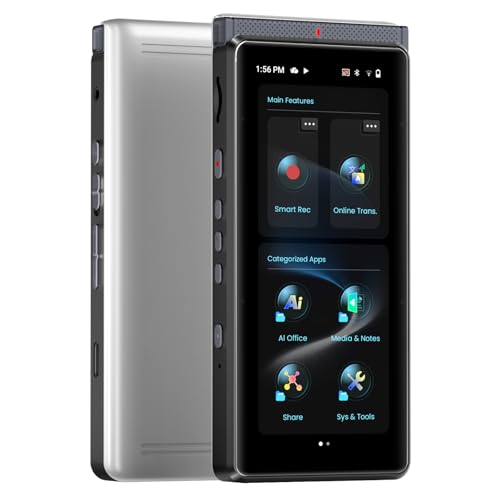
- Offline transcription without a monthly fee
- Beamforming microphone array for lecture capture
- Creates summaries, mind maps, and translations
Best For: Students and professionals who want searchable lecture notes
Best Dedicated Multitrack Studio Recorder
TASCAM DP-008EX 8-Track Pocketstudio

- Eight-track digital recording in a portable body
- Built-in stereo microphones and WAV support
- Includes 2GB SD card and battery operation
Best For: Track-based recording projects and multi-source audio work
Best Simple Lecture Recorder
EVISTR L357 64GB Digital Voice Recorder

- 64GB storage for extended recording capacity
- Voice activation helps reduce silent sections
- Up to 32 hours of continuous recording
Best For: Students seeking simple, long-running classroom recording
Studio-Style Lecture Capture

- Eight simultaneous playback tracks with 64 V-Tracks
- Built-in stereo microphone and battery operation
- Effects, pitch correction, and drum machine included
Best For: Portable lecture recording with multitrack production features
Flexible Room Recording

- Four-track recording with built-in adjustable microphones
- XLR/1/4-inch inputs with phantom power
- Up to 15 hours of listed battery life
Best For: Lectures requiring room microphones or external audio inputs
Long-Storage Lecture Recorder

- 128GB storage with voice activation
- Up to 54 hours of continuous recording
- Password protection and USB file transfer
Best For: Extended lecture and meeting voice recording
Compact Lecture Companion

- Stereo recording with noise reduction
- Voice activation and A-B repeat
- Up to 20 hours of recording
Best For: Students seeking simple lecture recording and playback
High-Capacity Pick

- 1536kbps PCM recording
- Pre-installed 128GB storage
- Voice activation and one-button control
Best For: Frequent recording of lectures and meetings
Playback-Focused Choice

- Dual-mic 1536kbps PCM recording
- 136GB stated memory capacity
- 16 playback speeds and A-B repeat
Best For: Long sessions and detailed lecture review
Best Multitrack Flexibility – Zoom H6
For shoppers comparing multitrack recorders for lectures, the Zoom H6 is a versatile choice when you need more than a simple voice memo. It records to SD cards, supports up to four XLR/TRS inputs, and includes stereo microphone capsules for capturing lectures, panels, or other multi-source sessions.
Best For: Users who need expandable inputs, high-resolution recording, or a recorder that can also serve as a USB audio interface.
Pros:
- Four XLR/TRS inputs with individual gain knobs, pads, and phantom power
- Records WAV or MP3 audio at up to 24-bit/96kHz
- Supports SD cards up to 128GB and multichannel USB operation
- Includes X/Y and M/S microphone capsules, batteries, case, and windscreen
Cons:
- More complex than a basic single-purpose lecture recorder
- Requires four AA batteries for portable operation
The H6 is a strong fit when lecture recording is only one part of your workflow. Its interchangeable microphones and multiple inputs offer room to grow, while the included accessories make it usable out of the box.
Best Smart Note-Taking Recorder – Innioasis PR1 AI Voice Recorder
The Innioasis PR1 takes a software-driven approach to multitrack recorders for lectures, combining recording with on-device transcription and summaries. Its beamforming microphone array, large touchscreen, and offline AI processing are designed for turning longer recordings into searchable, organized notes.
Best For: Students and professionals who want lecture recordings converted into transcripts, summaries, mind maps, or translated notes on the device.
Pros:
- Offline transcription with support for more than 70 languages and no transcription subscription
- Four array microphones plus a high-SNR microphone with beamforming and noise-filtering modes
- 64GB storage, 17-hour AI recording, and up to 58 hours of Hi-Fi audio recording
- Supports summaries, translation, file backup, and document apps through its Android-based interface
Cons:
- Some translation features require online access
- Its smart features and touchscreen interface may be more than needed for simple recording
The PR1 is less focused on traditional musical multitracking and more focused on capturing spoken content and processing it afterward. For lecture users who value transcripts and summaries as much as the original audio, it offers a distinctive all-in-one workflow.
Best Dedicated Multitrack Studio Recorder – TASCAM DP-008EX 8-Track Pocketstudio
The TASCAM DP-008EX is a compact 8-track digital Pocketstudio for buyers who interpret multitrack recorders for lectures as equipment for recording several sources or building an edited audio project. Its built-in microphones, WAV recording, and battery operation provide a self-contained setup.
Best For: Users who want an 8-track recorder for structured projects, songwriting, or combining recorded sources rather than simply making voice memos.
Pros:
- Provides eight tracks in a compact digital recorder
- Built-in stereo microphones simplify portable recording
- Records WAV files and includes a 2GB SD card
- Runs on four AA batteries and includes a USB cable
Cons:
- Only 6.5 hours of listed digital recording time
- Its 2GB included storage is modest compared with higher-capacity recorders
- Designed more for multitrack projects than automated lecture transcription
The DP-008EX makes the most sense when you need hands-on track-based recording and editing. For straightforward classroom capture, a simpler voice recorder may be easier, but this TASCAM offers substantially more project-oriented control.
Best Simple Lecture Recorder – EVISTR L357 64GB Digital Voice Recorder
For buyers who want an uncomplicated option among multitrack recorders for lectures, the EVISTR L357 emphasizes long battery life, voice activation, and easy file transfer. Its built-in microphone, adjustable gain, and compact metal body are suited to classroom, meeting, and interview recording.
Best For: Students and everyday users who need a small recorder with voice activation, ample storage, and simple playback controls.
Pros:
- 64GB storage can hold up to 4,660 hours at the listed 32Kbps setting
- Voice activation can reduce silent sections during lectures
- Offers seven recording-gain levels and PCM noise reduction
- Provides up to 32 hours of continuous recording and USB-C file transfer
Cons:
- Uses a built-in microphone rather than multiple input connections
- Does not provide multitrack recording or on-device transcription
The L357 is a practical choice when portability and ease of use matter more than studio-style multitrack features. Its voice-activated mode and generous storage are particularly useful for recording long classes without filling the memory with silence.
Studio-Style Lecture Capture – Boss BR-600
The Boss BR-600 is a compact multitrack recorder for lectures when you also want extensive overdubbing and track-management capabilities. It offers eight simultaneous playback tracks, a built-in stereo microphone, battery power, and CompactFlash storage, making it suitable for portable recording and later production work.
Best For: Users who want a portable lecture recorder with multitrack playback, built-in effects, and a drum machine.
Pros:
- Supports eight simultaneous playback tracks and 64 V-Tracks.
- Built-in stereo microphone and battery power support recording away from a desk.
- Includes vocal effects, pitch correction, a guitar processor, and a velocity-sensitive drum machine.
- Includes a 128MB CompactFlash card.
Cons:
- Its listed digital recording time is 2 hours and 16 minutes.
- Requires four 9V batteries.
- CompactFlash media may be less convenient than the SD cards used by newer portable recorders.
The BR-600 is more production-oriented than a basic lecture recorder. Choose it when multitrack flexibility and onboard effects matter more than maximum recording capacity or the simplest voice-only workflow.
Flexible Room Recording – Tascam DR-40
The Tascam DR-40 is a practical multitrack recorder for lectures, especially when you need to capture both the room and an external microphone. Its adjustable built-in condenser microphones, four-track recording, long listed battery life, and XLR/1/4-inch inputs provide flexibility for classrooms, meetings, and presentations.
Best For: Students, instructors, and field recordists who need adjustable microphones or external mic and line inputs.
Pros:
- Records up to four tracks using built-in microphones and external inputs.
- Adjustable microphones support XY and AB positioning for different room setups.
- XLR/1/4-inch combo inputs include phantom power and recording up to 96kHz/24-bit.
- Offers a listed battery life of up to 15 hours and includes a 2GB card.
Cons:
- Uses two AA batteries, which must be replaced or recharged separately.
- Its broad multitrack feature set may be more than needed for simple single-speaker recordings.
- The included storage is 2GB, although SD and SDHC cards up to 32GB are supported.
The DR-40 is the most adaptable option here for recording different lecture environments. Its external-input support is particularly useful when a built-in microphone alone cannot provide the desired placement or coverage.
Long-Storage Lecture Recorder – EVIDA 128GB Voice Recorder
The EVIDA digital voice recorder is designed specifically for lectures, meetings, and conversations rather than multitrack production. It combines a noise-cancelling built-in microphone, voice activation, 128GB storage, password protection, and up to 54 hours of continuous recording, making it convenient for extended voice capture.
Best For: Students and professionals who prioritize long storage, voice-activated recording, and straightforward playback.
Pros:
- 128GB storage is listed for up to 9,296 hours of recording.
- Voice activation offers six sensitivity levels to reduce silent sections.
- Records in MP3 or WAV settings, including a listed 1536kbps PCM option.
- Includes password protection, bookmarks, A-B repeat, four-folder organization, and USB transfer.
Cons:
- Uses a mono built-in microphone rather than a stereo or multitrack microphone setup.
- No headphone jack is listed in the specifications.
- The listed continuous recording time is 54 hours, not the full storage capacity.
For lecture capture, the EVIDA emphasizes capacity and convenience over multitrack control. Its voice activation and large internal storage are useful for recurring classes, while the mono design is better suited to speech than detailed room or music recording.
Compact Lecture Companion – 8GB Voice Recorder
For shoppers comparing multitrack recorders for lectures, this compact HoTiyan recorder focuses on straightforward stereo capture, voice activation, and easy playback. Its 8GB storage, rechargeable battery, and simple three-button controls make it practical for everyday classes, meetings, and interviews.
Best For: Students and casual users who want an affordable, easy-to-operate recorder with repeat playback and MP3 support.
Pros:
- Stereo microphone, noise reduction, and recording up to 192 kbps.
- Voice activation can reduce quiet sections and conserve storage.
- A-B repeat, variable playback speed, password protection, and time-stamped filenames.
- Supports MP3/WAV recording and includes Micro USB file transfer.
Cons:
- 8GB capacity is substantially smaller than the other options in this roundup.
- Rated continuous recording time is up to 20 hours, with up to 8 hours of playback using earphones.
- The basic three-button design may offer less control than larger recorders.
This is a sensible pick when simple operation matters more than maximum storage or extended battery life. Voice activation and A-B repeat are particularly useful for reviewing lecture material.
High-Capacity Pick – 128GB PCM Voice Recorder
Among multitrack recorders for lectures, this arungo model stands out for its pre-installed 128GB TF card and high-resolution 1536kbps PCM recording. Voice activation, one-button operation, and time-stamped files make it suited to users who record frequently and need room for many sessions.
Best For: Frequent lecture, meeting, and interview recording where large storage and convenient file organization are priorities.
Pros:
- 1536kbps PCM recording with an omnidirectional stereo microphone and noise cancellation.
- Pre-installed 128GB TF card provides substantial storage for recordings and music.
- Voice activation can save storage compared with continuous recording.
- Includes A-B repeat, speed control, password lock, Type-C charging, and computer transfer.
Cons:
- Continuous recording battery life is rated at 50 hours, so it still requires recharging for extended use.
- Its feature set may be more than needed for occasional note-taking.
- The supplied details do not specify multichannel or separate-track recording.
The combination of high-quality PCM capture and generous storage makes this a strong option for recording-heavy schedules. Its one-button workflow also keeps setup simple before a lecture begins.
Playback-Focused Choice – Aiworth E36 Voice Recorder
This Aiworth E36 is a practical choice among multitrack recorders for lectures when clear speech review and long recording time are important. It combines dual-microphone 1536kbps PCM recording with 136GB of stated memory, voice activation, password protection, and detailed playback controls.
Best For: Students, writers, and professionals who need long recording sessions and flexible tools for reviewing spoken content.
Pros:
- Dual sensitive microphones and professional recording circuitry support 1536kbps PCM capture.
- 136GB configuration and voice activation are designed for substantial recording storage.
- Up to 45 hours of continuous recording from the rechargeable 800mAh battery.
- Sixteen playback-speed levels, A-B repeat, password protection, and front-facing controls.
Cons:
- Supplied details list MP3 as the recording format rather than WAV.
- Memory figures vary between the listing details and product description, so storage specifications merit verification.
- The supplied information does not indicate multichannel or separate-track recording.
The E36 is best viewed as a high-capacity speech recorder with unusually strong playback flexibility. Its speed adjustment and repeat functions can make lecture review more efficient, while the password feature adds privacy.
How We Picked the Best Multitrack Recorders for Lectures
We evaluated these models by looking at the features that matter during real lecture recording: microphone quality, input flexibility, recording formats, storage, battery operation, portability, and playback controls. We also considered whether each device supports multitrack work, simple voice memos, voice activation, or AI-assisted transcription. Because classrooms vary widely, the list includes both advanced portable recorders and simpler dictation devices rather than treating one design as ideal for everyone.
Quick Comparison
| Best For | Look For | Recommended Type |
|---|---|---|
| Multiple speakers or panels | Several inputs and separate tracks | Zoom H6 or TASCAM multitrack recorder |
| Lecture recording with summaries | AI transcription, translation, and large storage | Innioasis PR1 |
| Simple student use | Voice activation, playback, and compact design | EVISTR, EVIDA, or similar voice recorder |
| Music and advanced editing | Track-based recording and overdubbing | Boss BR-600 or TASCAM DP-008EX |
Key Buying Factors for Multitrack Recorders for Lectures
Microphones and Input Options
Built-in stereo microphones are convenient for a single speaker, but adjustable microphone positioning and external inputs can improve results in large rooms. XLR/TRS inputs are useful when you need a better microphone, a feed from a sound system, or separate sources. A true multitrack recorder is more flexible than a basic dictation device, but it may require more setup.
Storage, Battery Life, and File Handling
High-capacity internal storage or an SD card reduces the need to transfer files during a busy semester. Check the supported file format, transfer method, and expected battery life. Voice-activated recording can conserve space, while uncompressed WAV files offer better editing quality but consume considerably more storage than compressed formats.
Transcription and Ease of Review
AI transcription and translation can speed up note-taking, but accuracy depends on room noise, accents, speaker distance, and the service or device being used. Playback speed controls, bookmarks, a headphone output, and clear physical buttons may be more valuable than advanced software when you need to find a specific passage quickly.
Portability and Classroom Etiquette
A compact, battery-powered recorder is easier to place discreetly on a desk. Before recording, follow your school’s policies and obtain any required permission from the lecturer or participants. Noise reduction can help, but microphone placement still has the greatest effect on clarity.
Who Should Buy Which Multitrack Recorders for Lectures?
Choose the Zoom H6 or a comparable TASCAM multitrack model if you record panels, classrooms, interviews, or multiple microphones and want room to expand. The Boss BR-600 and TASCAM DP-008EX are better suited to musicians and users who specifically want track-based editing, overdubbing, or songwriting features.
For students who mainly need searchable notes, summaries, or translation, the Innioasis PR1 is the most specialized option. For straightforward lectures, meetings, and interviews, the EVISTR, EVIDA, aiworth, and other basic voice recorders can be easier to operate and less expensive. Prioritize recording quality and reliable playback over headline storage numbers if you review sessions frequently.