
Choosing the right laser engraver for jewelry means balancing metal compatibility, marking detail, speed, safety, and the type of work you plan to produce. The machines in this roundup range from portable infrared tools to powerful dual-laser systems built for small-business production.
Use the comparison and buying advice below to narrow the field by material, workflow, workspace, and budget before choosing a jewelry engraver.
Best 10 Laser Engraver for Jewelry Picks for 2026
Best for Mobile Customization

- Dual fiber and diode lasers for metal and non-metal work
- Up to 10,000 mm/s speed with 0.0027 mm precision
- Portable 6.02 kg design for on-location personalization
Best For: Mobile sellers and mixed-material craft businesses
Best Compact Metal Marker

- 1064nm infrared laser for fine metal surface marking
- Standalone touchscreen and AlgoOS workflow
- Compact desktop design for small studios
Best For: Jewelry personalization and small metal gifts
Best for High-Volume Shops

- 20W fiber and diode lasers cover metals and craft materials
- 10,000 mm/s speed with a 220 x 220 mm work area
- Camera-assisted batch workflow with optional Auto Conveyor
Best For: Retail counters and production-focused customization businesses
Best for Countertop Personalization

- Touchscreen workflow with text, sketches, and 300+ designs
- 0.04 x 0.05 mm spot for detailed metal lettering
- Approximately 3 kg and easy to move between selling spaces
Best For: Gift shops and jewelry counters offering on-demand messages
Best Dual-Laser Pick

- 5W IR plus 15W diode lasers
- 50MP camera for precise alignment
- Up to 6000mm/s engraving speed
Best For: Jewelry makers and small-batch personalization businesses
Best Jewelry-Focused Compact Pick
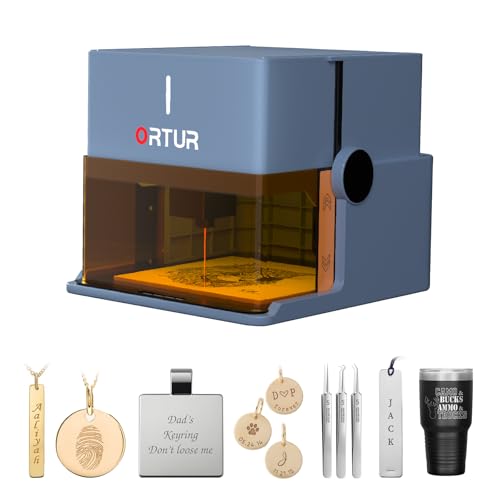
- 1064nm IR laser for jewelry metals
- Foldable, installation-free design
- Class 1 safety protections
Best For: Beginners engraving gold, silver, platinum, and copper jewelry
Best Touchscreen Beginner Pick

- Built-in touchscreen needs no computer
- Adjustable power and speed controls
- Class 1 enclosure with smart protection
Best For: Beginners and DIYers making jewelry, gifts, and small products
Best Smart Enclosed Pick
TOOCAA NOVA 20W Laser Engraver

- 5MP AI camera for precise visual positioning
- Autofocus and material recognition simplify setup
- Enclosed Class 1 design with 360° rotary support
Best For: Jewelry, gifts, tumblers, and small-business customization
Best Beginner Desktop Pick

- 3.5-inch touchscreen enables PC-free engraving
- Compact, assembled design for quick setup
- Class 1 safety cover with broad connectivity
Best For: Beginners and hobbyists making small custom craft projects
Best Portable Precision Pick
LaserPecker LP2 Handheld Engraver

- 1 kg handheld design for mobile engraving
- 0.05 mm spot and up to 2K detail
- Fast galvo engraving with optional cylindrical support
Best For: Portable engraving on coated metal, wood, leather, and small projects
Best for Mobile Customization – LaserPecker LP5
If you need a versatile laser engraver for jewelry that can also handle wood, leather, and other craft materials, the LaserPecker LP5 is designed for speed and portability. Its 20W fiber and diode laser setup supports metal marking, selected metal cutting, and detailed 3D grayscale work in a compact 6.02 kg format.
Best For: Mobile sellers, mall kiosks, craft-fair vendors, and creators who need to personalize jewelry and mixed-material products during customer wait times.
Pros:
- Dual fiber and diode lasers cover jewelry metals plus wood, leather, acrylic, and other non-metals.
- Up to 10,000 mm/s speed and claimed 0.0027 mm precision support fast, detailed customization.
- Portable 6.02 kg design is easier to transport to markets, fairs, or retail counters.
- 3D grayscale engraving and a Material Test Array support dimensional designs and more efficient testing.
Cons:
- Its listed 0.5 mm metal-cutting capability is limited to thin materials such as brass or titanium.
- It is heavier than a small desktop metal-marking machine at 23.2 pounds.
The LP5 stands out when one machine needs to move between jewelry personalization and broader craft production. Choose it over a metal-only marker if cutting and non-metal work are equally important.
Best Compact Metal Marker – AlgoLaser Pixi 1064nm
The AlgoLaser Pixi is a focused laser engraver for jewelry for surface marking on suitable metals. Its 1064nm infrared laser is intended for names, logos, patterns, and other fine personalization on jewelry, tags, coated metal, and selected dark plastics rather than cutting or deep engraving.
Best For: Beginners, home studios, gift businesses, and small personalization shops that primarily mark jewelry and compact metal products.
Pros:
- 1064nm infrared laser is designed for cleaner, finer surface marks on suitable metals.
- 3.5-inch touchscreen and AlgoOS allow previewing and starting projects without constant PC use.
- Compact desktop format fits small workspaces and weighs approximately 7.24 pounds.
- Includes a 1-year warranty and customer support.
Cons:
- Designed for surface marking, not wood cutting, deep engraving, or large-scale cutting.
- Reflective metals may require slower speeds or marking spray for darker, more consistent results.
- Proper eye protection and ventilation are required, especially when marking reflective metals.
Choose the Pixi when precise, compact metal personalization matters more than material versatility. It is a practical fit for jewelry names, logos, and small custom-gift orders, but not for production cutting.
Best for High-Volume Shops – xTool F1 Ultra
The xTool F1 Ultra is a high-capacity laser engraver for jewelry built around 20W fiber and diode lasers. It can engrave metals such as gold, silver, copper, stainless steel, brass, and titanium, while the diode laser expands its use to wood, acrylic, leather, glass, rubber, and fabric.
Best For: Retail customization counters, established small businesses, and production users who need fast metal personalization with room for batch workflows.
Pros:
- 20W fiber and diode lasers support jewelry metals alongside a broad range of non-metal materials.
- Speeds up to 10,000 mm/s and a 220 x 220 mm working area suit demanding workflows.
- 16MP camera supports shape recognition and batch engraving when paired with the optional Auto Conveyor.
- Enclosed design includes smoke extraction, a fire safety alarm, and an emergency stop button.
Cons:
- The Auto Conveyor needed for expanded batch automation is sold separately.
- At 43.8 pounds, it is substantially less portable than compact desktop markers.
- It is a Class 4 laser system, so the enclosed safety features and operating procedures are important.
The F1 Ultra is the strongest choice here for businesses prioritizing throughput, working area, and material range. Its size, weight, and separate conveyor cost make it better suited to a dedicated workspace than casual jewelry marking.
Best for Countertop Personalization – AlgoLaser Pixi
The AlgoLaser Pixi is a compact laser engraver for jewelry focused on convenient metal personalization. Its 1064nm infrared laser and 3.5-inch touchscreen let you prepare names, dates, motifs, and built-in designs directly on the machine without creating a computer file first.
Best For: Gift shops, jewelry counters, market tables, and makers who want customers to choose simple designs and messages at the point of sale.
Pros:
- Standalone AlgoOS workflow supports text, sketches, previews, and 300-plus built-in designs.
- Fine 0.04 x 0.05 mm laser spot supports detailed lettering and artwork on suitable metal pieces.
- Compact approximately 3 kg design is easy to move between a counter and market table.
- Compatible with LightBurn and LaserGRBL for more detailed computer-designed artwork.
Cons:
- Its infrared laser is intended for suitable metal personalization rather than broad material cutting.
- The small format is best suited to tags, nameplates, jewelry, and other compact keepsakes.
This Pixi is a convenient option when personalization happens in front of the customer. Its touchscreen-first design keeps simple orders moving, while software compatibility provides a path to more detailed designs when needed.
Best Dual-Laser Pick – xTool F2
If you need a fast, flexible laser engraver for jewelry and other small products, the xTool F2 combines a 5W infrared laser with a 15W diode laser. Its built-in camera, enclosed design, and material presets make it well suited to precise personalization and small-batch work.
Best For: Jewelry makers, on-site personalization businesses, and users who want metal marking plus broader material capability.
Pros:
- 5W IR laser supports deep, dark, vivid color marking on metal.
- Built-in 50MP camera offers up to 0.1 mm alignment accuracy for small pieces.
- Speeds up to 6000mm/s and support for batch processing with the optional Slide Extension.
- Fully enclosed, leak-proof design with built-in fan and optional purifier.
Cons:
- Accessories such as the RA3, Slide Extension, and purifier are optional.
- Its advanced dual-laser feature set may be more than casual users need.
The xTool F2 is a strong choice when accurate placement, metal color marking, and production speed matter. It arrives assembled and weighs 4.6 kg, making it practical for workshops, stores, fairs, and pop-up events.
Best Jewelry-Focused Compact Pick – Ortur R1
The Ortur R1 is a compact laser engraver for jewelry built around a 1064nm infrared module. It is specifically designed for engraving metals such as gold, silver, platinum, and copper, while its foldable, no-installation design keeps setup simple.
Best For: Beginners and jewelry makers who want straightforward engraving on rings, bracelets, necklaces, and other metal pieces.
Pros:
- 1064nm infrared laser is designed for precise engraving on jewelry metals.
- Foldable design unfolds ready for use without installation.
- App supports quick text engraving, hand-drawn designs, templates, and QR-code projects.
- Class 1 safety features include tilt detection, auto shutdown, exposure limits, and lid-stop protection.
Cons:
- The supplied notes do not specify engraving speed or laser spot accuracy.
- Its primary laser module is more specialized than a dual-laser system for cutting and broader production tasks.
For jewelry-focused metal personalization, the R1 keeps the workflow approachable while offering dedicated infrared capability. Its 7.72-pound body and gift-box-style packaging also make it a convenient option for home, office, classroom, or gifting use.
Best Touchscreen Beginner Pick – AlgoLaser Pixi 10W
The AlgoLaser Pixi 10W makes a laser engraver for jewelry easier to operate without a computer. Its 3.5-inch touchscreen handles drawing, text, uploads, presets, and templates, while adjustable power and speed help users refine detail on metal and other materials.
Best For: Beginners, DIYers, educators, and small workshops that want offline touchscreen control for jewelry and gift projects.
Pros:
- Offline 3.5-inch touchscreen works without a computer and includes 160+ templates.
- Adjustable power from 50–100% and speed from 100–300 mm/s.
- Supports engraving on metal, wood, leather, glass, acrylic, and more than 300 materials.
- Fully enclosed Class 1 design includes an auto-pause lid, password lock, and alerts.
Cons:
- Its listed speed range is substantially lower than the xTool F2’s advertised maximum.
- External ventilation is recommended for wood, leather, and coated materials.
The Pixi is a practical entry point for users who value an uncomplicated workflow over maximum production speed. Touchscreen operation, phone and computer connectivity, and broad material support make it versatile for personalized jewelry and small gift items.
Best Smart Enclosed Pick – TOOCAA NOVA 20W Laser Engraver
If you want a capable laser engraver for jewelry and personalized gifts, the TOOCAA NOVA 20W emphasizes accurate placement and an easy workflow. Its 5MP AI camera, autofocus, material recognition, and enclosed Class 1 design make it practical for detailed projects, including jewelry, coated metal, rings, and cylindrical items.
Best For: Makers and small businesses seeking an enclosed, feature-rich engraver for jewelry, gifts, tumblers, and other custom products.
Pros:
- 5MP camera enables live previews, one-click calibration, and visual design placement.
- AI autofocus and material recognition reduce manual setup and trial-and-error.
- 360° rotary kit supports rings, tumblers, bottles, and other cylindrical projects.
- Fully enclosed Class 1 design includes lid-open stop, flame detection, tilt protection, and child lock.
Cons:
- At 33.3 pounds, it is less portable than the smaller handheld options.
- The 20W system and extensive features may be more than casual users need.
The NOVA is the strongest all-around choice here for users who value camera-assisted accuracy, enclosed operation, and rotary jewelry work. Its combination of automation and material support should appeal to both beginners and active makers.
Best Beginner Desktop Pick – AlgoLaser Pixi 3W
The AlgoLaser Pixi 3W is a compact option for shoppers who want a straightforward laser engraver for jewelry-related craft work and personalized designs. Its touchscreen and AlgoOS allow PC-free drawing, text entry, or file uploads, while support for glass, acrylic, wood, and leather broadens its use beyond jewelry projects.
Best For: Beginners, hobbyists, and small creators who want a compact desktop engraver with direct touchscreen controls.
Pros:
- 3.5-inch touchscreen and AlgoOS allow engraving without a computer.
- No assembly is required, and designs can be transferred by USB-C, WiFi, or SD card.
- Class 1 laser and auto-stop safety cover pause operation when opened.
- Works with LightBurn, LaserGRBL, mobile devices, and optional rotary accessories.
Cons:
- The 3W model is positioned for craft materials and may be less suitable for demanding metal work.
- Safe operation still requires ventilation, protective goggles, and supervision.
Pixi stands out for its accessible controls and small footprint. It is a sensible entry point for light craft engraving and jewelry-adjacent personalization, especially when portability and simple setup matter more than higher laser power.
Best Portable Precision Pick – LaserPecker LP2 Handheld Engraver
For makers who need a portable laser engraver for jewelry and coated-metal personalization, the LaserPecker LP2 focuses on speed, precision, and flexible positioning. Its 1 kg handheld design, fixed-focus cover, and 0.05 mm micro-spot are suited to detailed work on supported materials, though pure or highly reflective metals require surface treatment.
Best For: Mobile creators and detail-focused users engraving wood, leather, coated metal, and selected small jewelry projects.
Pros:
- Lightweight 1 kg body and built-in handle make it easy to transport.
- 0.05 mm spot size and up to 2K resolution support fine detail.
- Galvo technology reaches engraving speeds up to 36,000 mm/min.
- App control, a removable baseplate, and optional roller expand project flexibility.
Cons:
- Pure or highly reflective metals need surface treatment before engraving.
- The Basic Set may require additional accessories for cylindrical or oversized projects.
- Its handheld, non-enclosed format may be less convenient for a permanent workshop setup.
The LP2 is the most travel-friendly choice in this group and offers impressive stated precision for small designs. It makes the most sense for users who prioritize mobility and fast, detailed engraving on compatible surfaces.
How We Picked the Best Laser Engraver for Jewelry
We compared these machines by their laser technology, stated power, material compatibility, precision, work speed, portability, enclosure design, controls, and practical jewelry features. Fiber and infrared lasers are especially relevant for marking metals, while diode lasers can add versatility for wood, leather, coated surfaces, and certain nonmetal projects.
We also considered workflow features such as cameras, touchscreen controls, app support, automatic positioning, rotary compatibility, grayscale or color marking, and 3D engraving capabilities. Product specifications can vary by configuration, so confirm the included module, accessories, safety classification, and regional requirements before ordering.
Quick Comparison
| Best For | Look For | Recommended Type |
|---|---|---|
| Detailed metal personalization | 1064nm infrared or fiber laser, fine spot size, rotary support | Infrared or fiber machine |
| Mixed jewelry and craft materials | Dual lasers, broad material support, camera positioning | Fiber-and-diode system |
| Small workspaces | Compact footprint, portable design, simple software | Portable infrared or diode engraver |
| Business production | Higher power, fast scanning, repeatable positioning, enclosure | 20W-class dual or fiber-capable machine |
| Safer home or studio use | Class 1 enclosure, interlocks, filtration, clear operating controls | Fully enclosed engraver |
Key Buying Factors for a Laser Engraver for Jewelry
Laser Type and Metal Compatibility
For stainless steel, titanium, brass, and other jewelry metals, 1064nm infrared or fiber technology is generally more suitable than a basic blue-diode laser. Check whether the machine can engrave bare metal or requires marking spray, and verify support for precious metals before committing to a production workflow.
Detail, Power, and Speed
Fine jewelry work benefits from a small spot size, accurate motion system, and consistent focus. More power can improve throughput, but it does not automatically produce finer results. Look for adjustable settings, repeatability, and test grids so you can tune depth, contrast, and heat exposure for each alloy.
Work Area and Positioning
Measure typical rings, pendants, tags, and flat plates against the stated work area. A built-in camera or automatic positioning can save time when aligning irregular pieces. For rings and bracelets, confirm rotary compatibility rather than assuming it is included.
Safety and Ventilation
Laser engraving can create fumes, particles, and bright reflected light. An enclosed Class 1 design is a strong choice for shared studios or homes, but it still needs the manufacturer’s recommended ventilation and operating precautions. Follow eye protection, fire-safety, and material restrictions carefully.
Software and Workflow
Touchscreens and mobile apps are convenient for quick jobs, while desktop software may offer better control over vector files, photographs, grayscale, and repeat batches. Camera alignment, job preview, and saved parameter libraries are particularly useful for personalized orders.
Who Should Buy Which Laser Engraver for Jewelry?
Choose a fiber or infrared model if your main goal is crisp lettering, logos, serial numbers, or designs on metal jewelry. Choose a dual-laser machine if you want one system for jewelry plus wood, leather, acrylic, or other craft materials. Choose a portable model for occasional engraving, markets, gifts, or limited workspace. Choose an enclosed machine when safety, repeatable alignment, and a cleaner studio workflow matter most. For frequent commercial orders, prioritize speed, rotary support, cooling, software reliability, and an appropriately sized work area over headline wattage alone.