
The right condenser microphone can make spoken audio sound clearer, fuller, and more polished without requiring a complicated studio. For podcasting, the best choice depends on your recording space, connection type, monitoring needs, and whether you record alone or with multiple guests.
We’ve gathered 10 notable USB and XLR options for different budgets and workflows, including plug-and-play microphones for beginners, studio-focused models, and multi-microphone bundles for podcast teams.
Best 10 Condenser Microphone for Podcasting Picks for 2026
Flexible USB Pick

- Four selectable pickup patterns
- Onboard gain, mute, and monitoring controls
- Plug-and-play USB setup with stand
Best For: Podcasters and streamers wanting versatile computer recording
Quiet Studio Upgrade
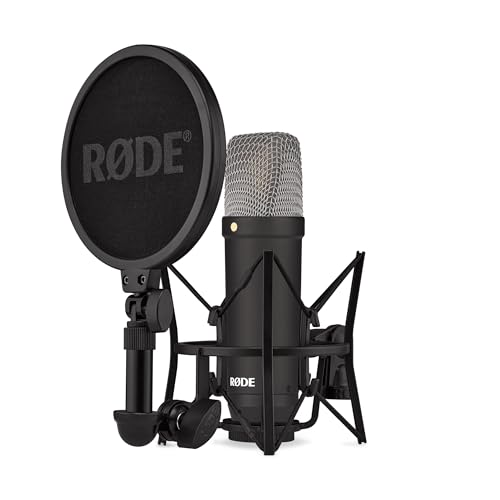
- Large-diaphragm studio condenser design
- Very low 4.5 dBA self-noise specification
- Includes shock mount, pop filter, and XLR cable
Best For: Vocal-focused podcasters with an audio interface
Mobile-Friendly USB Choice
ZealSound K66 Podcast Microphone

- USB plug-and-play across computers and mobile devices
- Selectable noise reduction mode
- Built-in zero-latency monitoring and control knobs
Best For: Creators recording across desktop and mobile platforms
Budget XLR Studio Pick

- Cardioid large-diaphragm condenser design
- Requires +48V phantom power
- Includes shock mount and carrying case
Best For: Entry-level XLR podcast and home-studio setups
Best USB Starter Kit

- Plug-and-play USB setup
- Includes arm, shock mount, and pop filter
- 192kHz/24-bit, 16mm condenser capsule
Best For: New podcasters and desktop content creators
Best Adjustable Arm Bundle
FIFINE T669 USB Podcast Microphone

- Direct plug-and-play USB output
- Cardioid capsule for front-facing speech
- 30-inch boom arm and double pop filter included
Best For: Home studios and adjustable desk setups
Best Multi-Person Setup
Movo PodPak4T XLR Podcast Bundle

- Four cardioid condenser microphones
- Includes stands, filters, mounts, and XLR cables
- Requires +48V phantom power
Best For: Four-person podcasts with an XLR interface or mixer
Premium USB Pick

- Warm cardioid voice capture
- Onboard gain, mix, and volume controls
- Includes stand and headphone jack
Best For: Premium desktop podcasting and streaming
Budget Desk Favorite

- Plug-and-play USB recording
- Cardioid pickup for focused voice capture
- Metal body with tripod stand
Best For: Affordable podcasting, meetings, and streaming
Simple Mute-Ready Option

- Large 14mm diaphragm with low-noise pickup
- One-tap mute function
- Adjustable 360-degree stand
Best For: Casual PC or Mac podcasting and streaming
Flexible USB Pick – Blue Yeti USB Microphone
The Blue Yeti is a versatile condenser microphone for podcasting when you want straightforward USB setup and flexible recording options. Its four pickup patterns, onboard controls, headphone monitoring, and included stand make it practical for solo creators, interviews, streaming, and other computer-based recording.
Best For: Podcasters and streamers who want plug-and-play USB recording with multiple pickup patterns.
Pros:
- Four pickup patterns—cardioid, omni, bidirectional, and stereo—support different recording setups.
- Onboard gain, headphone volume, pattern selection, and mute controls simplify adjustments.
- Includes an adjustable desktop stand and supports direct connection to a mic stand or boom arm.
- Blue VO!CE software adds broadcast-style effects and audio samples.
Cons:
- USB connectivity is less suited to users building an XLR-based studio system.
- The 3.5-pound microphone may be more substantial than needed for highly portable setups.
Choose the Blue Yeti if convenience and recording flexibility matter more than a traditional studio interface. It is an adaptable all-in-one option for computer-based podcasting.
Quiet Studio Upgrade – RØDE NT1 Signature
The RØDE NT1 Signature is a studio-style condenser microphone for podcasting designed for users who already have, or plan to add, an audio interface. Its large-diaphragm voicing, tight cardioid pattern, and very low self-noise focus attention on the voice, while the included shock mount, pop filter, and XLR cable provide a useful recording foundation.
Best For: Vocal-focused podcasters and streamers seeking an XLR setup with quiet operation.
Pros:
- Large-diaphragm condenser design uses the established NT1 studio voicing.
- Very low stated self-noise helps keep recordings clean and unobtrusive.
- Tight cardioid pickup focuses on the speaker and rejects sound from the room.
- Includes an SM6 shock mount with pop filter, a 6-meter XLR cable, and dust cover.
Cons:
- Requires an audio interface because it uses an XLR connection.
- Unlike a USB microphone, it is not a direct plug-and-play computer solution by itself.
The NT1 Signature makes the most sense as the centerpiece of a more traditional vocal recording chain. Its included accessories reduce the number of extra purchases needed to start recording through an interface.
Mobile-Friendly USB Choice – ZealSound K66 Podcast Microphone
The ZealSound K66 is a practical condenser microphone for podcasting when you need USB convenience across computers and mobile devices. It combines a cardioid capsule with selectable noise reduction, built-in headphone monitoring, dedicated adjustment knobs, and included USB-C and Lightning adapters.
Best For: Multi-device creators recording podcasts, streams, voice-overs, or meetings from desktops and mobile hardware.
Pros:
- Plug-and-play compatibility is listed for Windows, Mac, PS4, PS5, tablets, iPhone, iPad, and USB-C devices.
- Cardioid pickup focuses on the voice, while Noise Reduction Mode targets sounds such as keyboard clicks and fan noise.
- Built-in zero-latency headphone monitoring helps detect distortion and background noise while recording.
- Separate controls adjust microphone volume, monitoring volume, and echo.
Cons:
- The supplied notes do not indicate an XLR connection for traditional interface-based setups.
- Noise reduction is a selectable mode, so users may prefer the default mode for a more natural tone in quiet spaces.
The K66 stands out for flexible device support and hands-on controls. It is a convenient choice for creators who move between a computer, tablet, and phone rather than maintaining one fixed studio setup.
Budget XLR Studio Pick – MXL 990 Condenser Microphone
The MXL 990 is a large-diaphragm condenser microphone for podcasting that uses an XLR connection and requires +48V phantom power. Its cardioid pattern helps emphasize the speaker over room sound, while the included shock mount, stand adapter, and carrying case make it a capable starting point for an interface-based home studio.
Best For: Podcasters and vocalists building an affordable XLR recording setup with an audio interface or powered preamp.
Pros:
- Cardioid pickup rejects sound from the sides and back to help reduce room noise.
- FET preamp and mid-diaphragm design are intended for detailed digital and analog recordings.
- 20 Hz–20 kHz frequency response supports a broad range of male and female vocal recordings.
- Includes a custom shock mount, mic stand adapter, and carrying case.
Cons:
- Requires +48V phantom power from a compatible audio interface or mic preamp.
- XLR connectivity means it is not a direct USB computer microphone.
The MXL 990 is a sensible fit for buyers who want to enter XLR recording without giving up useful included accessories. Pair it with a phantom-powered interface and a suitable stand or boom setup for podcasting.
Best USB Starter Kit – MAONO A04 Podcast Microphone
If you want a straightforward condenser microphone for podcasting, the MAONO A04 is a practical USB option with plug-and-play setup. Its 16mm capsule, cardioid pattern, and included boom-arm accessories make it suitable for voice-focused recording at a desk.
Best For: First-time podcasters, streamers, voiceover creators, and online meetings using a computer or compatible mobile device.
Pros:
- USB setup requires no additional driver software or external sound card.
- Includes a scissor arm, shock mount, pop filter, and foam windscreen.
- Supports high-resolution 192kHz/24-bit sampling and has a 16mm condenser capsule.
- Works with most laptops, PCs, Macs, PS4, PS5, and mobile phones.
Cons:
- Not compatible with Xbox.
- The included desk clamp is designed for desktops less than 2.1 inches thick.
- It is not compatible with Maono Link software.
The A04 is a convenient all-in-one choice when you want to begin recording without assembling a separate audio chain. Its USB connectivity and included accessories simplify setup, while the cardioid condenser design keeps the focus on the speaker in front of the mic.
Best Adjustable Arm Bundle – FIFINE T669 USB Podcast Microphone
The FIFINE T669 is a useful condenser microphone for podcasting when you want a USB connection and flexible positioning in one package. Its cardioid capsule, double pop filter, and adjustable boom arm are designed for voice recording, streaming, and calls.
Best For: Home-studio podcasters, voiceover creators, streamers, and PC users who need an adjustable desk-mounted setup.
Pros:
- Plug-and-play USB connection works with PCs and laptops without extra drivers.
- Cardioid pickup is designed to capture front-facing audio while reducing ambient sound.
- Includes a sturdy boom arm with a 30-inch reach and multiple adjustment points.
- Comes with a double pop filter, shock mount, and 8.2-foot detachable cable.
Cons:
- Not compatible with Xbox.
- The USB setup is intended for computer-based recording rather than an XLR audio interface.
The T669 stands out for its included positioning hardware. The arm and pop-filter system can help keep the microphone consistently placed and reduce plosive sounds, making it a sensible choice for a fixed podcast or voiceover desk.
Best Multi-Person Setup – Movo PodPak4T XLR Podcast Bundle
For a group show, the Movo PodPak4T is a complete condenser microphone for podcasting bundle built around four participants. It includes four cardioid microphones, tabletop stands, shock mounts, pop filters, windscreens, and XLR cables, but it requires an audio interface or mixer with +48V phantom power.
Best For: Four-person podcasts, interviews, collaborative video production, and creators who already use XLR recording equipment.
Pros:
- Provides four microphones for co-hosts or guests in one package.
- Includes adjustable tabletop stands, shock mounts, pop filters, windscreens, and XLR cables.
- Cardioid condenser microphones are designed for clear vocals and background-noise rejection.
- 20Hz–20kHz frequency response supports full-range voice recording.
Cons:
- Requires +48V phantom power.
- Needs a compatible audio interface or mixer rather than connecting directly by USB.
- The supplied notes list a lower 20dB signal-to-noise ratio than the USB models here.
The PodPak4T is best viewed as a scalable group-recording solution rather than a solo USB mic. If your setup can provide phantom power and multiple XLR inputs, the four included stations can simplify outfitting a complete podcast table.
Premium USB Pick – Sennheiser Profile
The Sennheiser Profile is a polished condenser microphone for podcasting when you want plug-and-play USB setup without giving up hands-on control. Its cardioid capsule, table stand, built-in headphone jack, and onboard gain, mix, and volume controls make it practical for solo recording and streaming.
Best For: Podcasters and streamers seeking warm voice reproduction, premium construction, and convenient desk-based controls.
Pros:
- USB-C plug-and-play connection for PC and Mac.
- Cardioid condenser capsule delivers a natural, warm vocal sound.
- Onboard mute, gain, mix, and volume controls simplify live adjustments.
- Includes a compact table stand and built-in headphone jack.
Cons:
- Its table-focused design may be less suitable for users who specifically want a boom-arm setup.
- It is heavier and more premium-built than basic desktop USB microphones.
Choose the Profile if straightforward operation and tactile controls matter as much as vocal quality. The metal housing and included stand create a durable, tidy desk setup for podcasting or streaming.
Budget Desk Favorite – FIFINE K669B USB Mic
The FIFINE K669B is a practical condenser microphone for podcasting, meetings, voice-overs, and streaming. It connects directly by USB, includes a desktop tripod, and uses a cardioid pattern to focus on the main speaker while helping reduce background sound.
Best For: First-time podcasters, gamers, and remote workers who want an affordable USB microphone with simple volume control.
Pros:
- Plug-and-play USB setup with a 5.9-foot cable.
- Cardioid pickup produces clear, smooth voice output.
- Built-in volume knob allows quick level adjustments or muting.
- Durable metal construction and included tripod stand suit desk recording.
Cons:
- It is not compatible with Xbox or phones.
- Applications with automatic volume adjustment may cause recording levels to change unless that feature is disabled.
- It lacks the onboard mix and headphone-monitoring controls found on more advanced models.
The K669B keeps the setup uncomplicated and covers common podcasting, conferencing, and streaming needs. It is a sensible choice when clear USB audio and a compact desk footprint matter more than premium extras.
Simple Mute-Ready Option – Amazon Basics USB Mic
The Amazon Basics model is an easy-to-use condenser microphone for podcasting, streaming, recording, and online calls. Its large 14mm diaphragm, cardioid pickup, adjustable 360-degree stand, and one-tap mute function provide useful features for a straightforward PC or Mac setup.
Best For: Casual podcasters and streamers who want a compact plug-and-play microphone with quick mute control.
Pros:
- Plug-and-play USB connection requires no additional drivers.
- Cardioid pickup helps isolate background noise for cleaner speech.
- One-tap mute function is convenient during live sessions and calls.
- 360-degree adjustable stand and detachable design support flexible placement.
Cons:
- The enclosure uses plastic or plastic alloy rather than a metal body.
- Supplied details identify PC and laptop compatibility, so broader device support should not be assumed.
- Onboard controls are limited compared with microphones offering gain, mix, or headphone controls.
This microphone suits buyers who value easy setup and a quick mute button over extensive manual controls. Its adjustable stand and standard 5/8-inch mounting compatibility also make it convenient for changing desk or stand positions.
How We Picked the Best Condenser Microphone for Podcasting
We focused on microphones suited to spoken-word recording, considering connection type, pickup pattern, monitoring controls, included accessories, setup requirements, and likely use cases. USB models were evaluated for convenience and computer compatibility, while XLR microphones were considered for users who want an audio interface, mixer, or more flexible studio setup.
We also looked for practical features such as headphone monitoring, mute and gain controls, shock mounts, pop filters, adjustable stands, and bundled accessories. Sound quality matters, but a microphone is only useful if it fits your room, recording habits, and technical comfort level.
Quick Comparison
| Best For | Recommended Type | What to Look For |
|---|---|---|
| First-time podcasters | USB condenser | Plug-and-play setup, mute control, and headphone monitoring |
| Home studios | XLR condenser | Audio-interface compatibility and a quiet recording environment |
| Solo streaming and podcasting | USB cardioid mic | Front-facing pickup and easy desk positioning |
| Multiple hosts | Multi-mic XLR bundle | Several microphones, stands, cables, and mixer or interface support |
Key Buying Factors for a Condenser Microphone for Podcasting
USB Versus XLR
USB microphones connect directly to a computer and are usually the simplest option for solo creators. XLR microphones require an audio interface or mixer, but they offer more upgrade flexibility and can work better in a multi-person recording setup.
Pickup Pattern and Room Noise
A cardioid pattern generally favors sound from in front of the capsule while reducing pickup from the rear. It can help focus on one speaker, but it does not eliminate keyboard noise, fans, or room reflections. Condenser microphones are sensitive, so use a quiet space and position the mic close to your mouth without speaking directly into the strongest airflow.
Monitoring and Controls
Headphone monitoring helps you catch clipping, background noise, and positioning problems while recording. Gain controls, mute buttons, and built-in headphone volume controls are convenient, particularly for live streaming or solo podcasting.
Accessories and Placement
A stable stand, pop filter, and shock mount can improve consistency and reduce handling noise. Check whether the package includes these items before comparing prices. Keep the microphone at a comfortable speaking distance and use a pop filter when plosive sounds are noticeable.
Who Should Buy Which Condenser Microphone for Podcasting?
Choose a USB model if you want the fastest setup for a computer, video calls, streaming, or a solo podcast. These microphones are practical for beginners and creators who do not need an external mixer.
Choose an XLR model if you already own an interface or expect to build a more advanced studio. XLR is also the better direction when you need multiple microphones, separate gain control, or future equipment upgrades.
Choose a bundled multi-microphone kit for roundtable shows, interviews, or small podcast teams. Confirm that your interface or mixer has enough inputs and that the included stands fit your recording space.
Prioritize monitoring and controls if you record live, stream regularly, or need to adjust levels without opening software. Whatever you choose, good mic technique and a controlled room will often improve results as much as moving to a more expensive microphone.