
If you need a vinyl cutting machine for small business use, the best choice depends on your workflow, budget, and the kinds of jobs you sell most often. Some cutters are better for labels and decals, while others are built for wider signs and higher-volume production.
This roundup focuses on practical options that balance cutting accuracy, software support, and day-to-day ease of use so you can choose a machine that fits your shop, not just your wishlist.
Best 10 Vinyl Cutting Machine for Small Business Picks for 2026
Quiet Precision Print-and-Cut

- 4-point registration improves print alignment
- Quiet cutting up to 400mm/s
- Cuts, sketches, and embosses multiple materials
Best For: Quiet, detail-focused small businesses making stickers and HTV
Large-Format Shop Plotter
VEVOR 34 Inch Bluetooth Cutter

- 34-inch feed for larger signage jobs
- Bluetooth, USB, and COM connectivity
- Includes stand, software, and vinyl rolls
Best For: Windows-based small businesses needing larger-format output
All-in-One Maker Bundle

- Cuts 300+ materials including vinyl and wood
- Print-then-cut works with most inkjet printers
- Bundle includes starter tools and materials
Best For: Easy-to-use small businesses making personalized craft products
Value-Size Production Plotter

- 28-inch area for decals and labels
- Windows-compatible with COM and USB
- Includes SignMaster and extra vinyl rolls
Best For: Mid-size Windows shops making decals and heat-transfer projects
Compact Starter Pick
Cricut Joy Xtra with Rainbow Vinyl Bundle

- Starter bundle includes machine, vinyl, tools, and guides
- Smart Vinyl loads without a mat for quicker setup
- Good for labels, decals, signs, and small personalized projects
Best For: Beginners and small shops making small vinyl items
Feature-Rich Midrange Choice
VEVOR 12-In Vinyl Cutter with Built-In Resources

- Includes software and 20,000+ built-in design resources
- Cuts, writes/draws, and scores in one machine
- Connects by USB, Bluetooth, or USB drive on multiple devices
Best For: Small businesses making varied craft products
Large-Format Workhorse
VEVOR 34-In Manual Vinyl Plotter

- Wide 34.3-inch feed supports larger projects
- Adjustable pressure and speed for more control
- Useful for signs, labels, heat transfer, and decoration
Best For: Wide-format sign and decal production
Heavy-Duty 28-Inch Pick
VEVOR 28-inch Cutting Machine for Vinyl

- 28.3-inch feed width for larger jobs
- LCD controls speed and force adjustments
- SignMaster software and safety stop included
Best For: small businesses needing a wider-format cutter for signs and transfers
Smart Auto-Detect Choice
VEVOR Automatic Edge Detection Vinyl Cutter

- Automatic edge detection improves pattern accuracy
- Cuts 100+ materials for varied product lines
- Includes software plus starter materials
Best For: small shops making stickers, cards, and apparel across many materials
Compact Multi-Device Pick
VEVOR 12 in Button-Controlled Vinyl Cutter
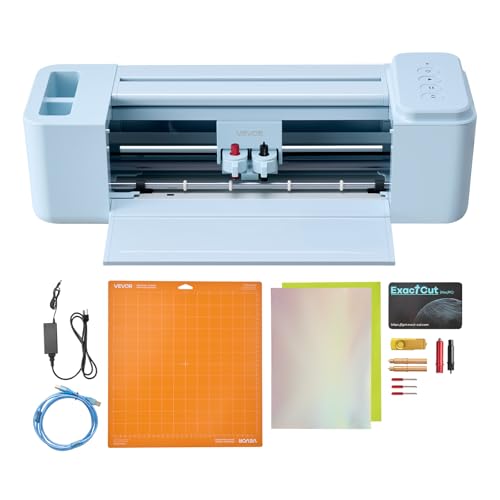
- No recurring software payments mentioned
- Cut, write, and score in one machine
- Works with Mac, Windows, Android, and iOS
Best For: solo makers and small businesses doing everyday custom projects
Quiet Precision Print-and-Cut – Silhouette Cameo 5 Alpha
If you want a vinyl cutting machine for small business use that can handle detailed print-and-cut work without taking over your workspace, the Silhouette Cameo 5 Alpha is a strong fit. It combines a 4-point registration system, faster sketching, and Intelligent Path Technology to help produce cleaner results with less material stress.
Best For: Small businesses making stickers, heat transfers, and other detailed custom pieces in a quiet home or shared-space setup.
Pros:
- 4-point registration helps improve alignment for printed images, stickers, and heat transfers.
- Fast Sketch Mode speeds up drawing and sketching without losing detail.
- Intelligent Path Technology helps create smoother, cleaner cuts with less waste.
- Quiet operation and speeds up to 400mm/s suit home or shared workspaces.
Cons:
- Cutting width and included accessories are more limited than larger shop-style plotters.
- Designed around a 12 in. x 24 in. active surface area, so it is not ideal for oversized jobs.
Overall, this model is best if your business values accuracy, low noise, and versatility across vinyl, fabric, and other craft materials. It is a polished option for smaller production runs where clean detail matters more than sheer size.
Large-Format Shop Plotter – VEVOR 34 Inch Bluetooth Cutter
For a vinyl cutting machine for small business work that needs bigger output and more of a shop-style setup, this 34-inch VEVOR plotter is built around capacity and control. It offers Bluetooth Android app control, USB/COM connectivity, and a large cutting area for signage, decals, and heat transfer projects.
Best For: Small businesses that need a larger-format cutter for signage, decoration, and high-volume DIY-style production.
Pros:
- 34-inch paper feed and 30.7-inch cutter width support larger jobs.
- Bluetooth, USB, and COM options add flexible connectivity.
- Steel shaft and 0.0004 in / 0.01 mm blade accuracy are built for precision.
- Includes a floor stand and multiple accessories, plus five vinyl rolls.
Cons:
- Windows-compatible only, so Mac users will need to look elsewhere.
- Manual operation and larger footprint make it less desk-friendly than compact cutters.
This is the most production-oriented option in the group, especially if your business needs bigger cuts and a more traditional plotter setup. It makes the most sense when workspace size and Windows compatibility are not a problem.
All-in-One Maker Bundle – Cricut Maker 4 Seashell
If you want a vinyl cutting machine for small business projects that also handles drawing, scoring, and print-then-cut work, the Cricut Maker 4 is a flexible all-rounder. The bundle includes useful starter materials and bonus digital content, making it easier to begin producing custom goods right away.
Best For: Small businesses that want an easy-to-learn, multi-material machine for personalized products and print-then-cut items.
Pros:
- Works with 300+ materials, including vinyl, leather, wood, and cardstock.
- Supports print-then-cut with most inkjet printers for full-color sticker projects.
- Design Space is beginner-friendly and includes a large image and font library.
- Bundle adds starter materials, a light grip mat, tools, and 30 bonus images.
Cons:
- Some advanced content and features depend on optional Cricut Access.
- Plastic construction and app-based workflow may not suit every production style.
This is a strong choice if you want broad material support and an easier software experience than a traditional plotter. It is especially attractive for businesses focused on personalized craft products rather than large-format signage.
Value-Size Production Plotter – VEVOR 28 Inch Cutter Bundle
As a vinyl cutting machine for small business use, this upgraded 28-inch VEVOR bundle aims to balance workspace size, connectivity, and production-ready extras. It supports COM and USB connections, includes SignMaster software, and handles common materials like heat transfer vinyl, cardstock, and paint masks.
Best For: Small businesses that want a mid-size Windows cutter for decals, labels, and heat-transfer projects.
Pros:
- 28-inch cutting area offers more room than compact craft machines.
- Adjustable pressure, speed, and 0.0004 in / 0.01 mm blade accuracy support detailed work.
- Includes extra vinyl rolls, tools, and SignMaster software.
- Compatible with Windows XP through Windows 11 and COM/USB connections.
Cons:
- Not compatible with Mac systems.
- Manual operation is less automated than modern desktop cutting machines.
This model is a practical middle ground if you want a larger cutter without jumping to the bigger 34-inch class. It is best suited to straightforward business cutting tasks where Windows support and bundled accessories are more important than app-driven convenience.
Compact Starter Pick – Cricut Joy Xtra with Rainbow Vinyl Bundle
If you want a vinyl cutting machine for small business tasks that also feels approachable for everyday use, the Cricut Joy Xtra bundle is a practical entry point. It includes the machine, Smart Vinyl, transfer tape, tools, and design guides, so you can start making labels, decals, signs, and personalized projects with minimal setup.
Best For: Beginners, teachers, and small business owners who need a simple machine for labels, decals, and personalized vinyl projects.
Pros:
- Includes a complete starter bundle with machine, vinyl, tools, and design guides
- Smart Vinyl loads without a cutting mat for faster setup and longer continuous cuts
- Designed for labels, decals, signs, storage bins, notebooks, and gifts
- Beginner-friendly setup and included tools help with cutting, weeding, transfer, and application
Cons:
- Best suited to smaller projects rather than large-format production
- Focused on smart vinyl crafting, which may be limiting for some workflows
- Not positioned as a heavy-duty commercial cutter
This bundle makes sense if you want a straightforward, low-friction way to begin vinyl personalization for home-based selling or small batches. It is more about convenience and ease of use than raw production size.
Feature-Rich Midrange Choice – VEVOR 12-In Vinyl Cutter with Built-In Resources
This vinyl cutting machine for small business use is aimed at creators who want more flexibility without paying for recurring software. The VEVOR 12-inch cutter includes design software, built-in resources, and support for cutting, writing, and scoring, making it useful for decals, cards, stickers, and other handmade products.
Best For: Makers who want a versatile desktop cutter for mixed craft projects and customized products.
Pros:
- Includes design software and 20,000+ built-in design resources
- Supports cut, write/draw, and score functions in one machine
- Works with PNG, JPG, SVG, and TIF file formats
- Offers USB, Bluetooth, and USB drive connectivity across Mac, Windows, Android, and iOS
Cons:
- 12-inch cutting size is better for small to mid-sized projects than larger runs
- Feature set may be more than needed for very simple label-only jobs
- Requires compatibility management across multiple devices and connection methods
For small businesses that want a flexible cutter for a variety of product types, this model offers a useful mix of convenience and capability. Its built-in software and multi-device support make it especially appealing if you produce mixed craft items from one workspace.
Large-Format Workhorse – VEVOR 34-In Manual Vinyl Plotter
If your vinyl cutting machine for small business work needs to handle wider signage and larger layouts, this 34-inch VEVOR plotter is built for bigger jobs. It supports a maximum feed of 34.3 inches, adjustable pressure and speed, and broad file compatibility, which makes it better suited to shop-style production than compact desktop craft machines.
Best For: Users who need a wide-format cutter for signs, labels, heat transfer work, and larger decoration projects.
Pros:
- Large maximum paper feed and cutting width for wider projects
- Adjustable cutting pressure and speed for more control
- Compatible with USB and COMPIM, plus SVG and PDF import
- Built for advertising, decoration, handcraft, heat transfer, label, and sign making
Cons:
- Manual plotter format is less beginner-friendly than compact automatic machines
- Requires Windows computer use with USB/COM connection support
- Much larger footprint than desktop cutters
This is the strongest option here if your priority is width and production capacity rather than ease of setup. It fits better in a workspace that can handle a larger machine and a more hands-on workflow.
Heavy-Duty 28-Inch Pick – VEVOR 28-inch Cutting Machine for Vinyl
If you need a vinyl cutting machine for small business use with a wider working area, this 28-inch VEVOR model is built for sign shops, transfer jobs, and larger decal runs. It pairs an LCD control panel with steady feed hardware, so you can manage speed and force while keeping material moving consistently.
Best For: Small businesses that want a larger-format vinyl cutter for signs, decals, and heat transfer work.
Pros:
- 28.3-inch max feed width and 24.8-inch max cutting width for larger projects
- LCD screen makes speed and force adjustments quick and simple
- Three adjustable double-spring pinch rollers and aluminum knurled rods help reduce feeding issues
- Includes SignMaster software and supports other compatible design tools
Cons:
- At 39.7 pounds, it is heavier than compact desktop cutters
- Best suited to Windows workflows through USB or serial connections
- Larger footprint may be less convenient for very tight workspaces
This is a strong fit if your business needs more cutting width and stable handling for frequent production work. The built-in safety features and mobile stand add practical value, but the size makes it better for dedicated work areas than casual craft tables.
Smart Auto-Detect Choice – VEVOR Automatic Edge Detection Vinyl Cutter
This vinyl cutting machine for small business use focuses on automation and versatility, making it a solid pick for craft sellers and custom product makers. Automatic edge detection helps it follow patterns accurately, while the included design software and file support simplify everyday production.
Best For: Small shops that want a compact, software-ready cutter for stickers, cards, apparel, and mixed-material projects.
Pros:
- Automatic edge detection and ±0.1 mm accuracy support precise cuts
- Compatible with SVG, EPS, PLT, and AI file formats
- Cuts 100+ materials, including adhesive vinyl, HTV, cardstock, and EVA foam
- Includes design software, pre-made designs, and seven starter materials
Cons:
- Max cut size is 13 inches, which limits larger-format work
- Compatible Mac support relies on Signcut Free for one year
- Desktop-friendly size may not replace a larger production cutter
For businesses that value ease of use and broad material support, this model offers a practical balance of precision and flexibility. It is especially useful if you make a variety of custom items and want a cutter that can handle quick setup without a steep learning curve.
Compact Multi-Device Pick – VEVOR 12 in Button-Controlled Vinyl Cutter
If you want a vinyl cutting machine for small business tasks without recurring software costs, this 12-inch VEVOR model is worth a look. It supports cut, write, and score functions, making it useful for small runs of decals, cards, and home décor items across multiple devices.
Best For: Small businesses and solo makers who want an affordable, multi-device cutter for everyday custom projects.
Pros:
- Includes design software with no recurring payments mentioned
- Supports PNG, JPG, SVG, and TIF file formats
- Cut, write, and score functions expand project options
- Works with Mac, Windows, Android, and iOS, with USB, Bluetooth, and USB drive access
Cons:
- 12-inch size is best for smaller-format projects
- Button-controlled interface is less advanced than touchscreen models
- Not aimed at large-volume or wide-format production work
This model makes sense if your business values flexibility across phones, tablets, and computers, along with broad creative functions. Its compact size keeps it approachable, but the tradeoff is that it is better suited to small jobs than larger commercial runs.
How We Picked the Best Vinyl Cutting Machine for Small Business
We looked for machines that make sense for real small-business work: reliable cutting, usable software, clear media support, and enough flexibility for common profit projects like decals, stickers, heat-transfer vinyl, labels, and basic signage. We also considered cutter width, setup complexity, and whether the machine is better suited to solo operators or higher-volume workflows.
Quick Comparison
The strongest overall choices for a Vinyl Cutting Machine for Small Business tend to fall into three buckets: compact desktop cutters for labels and custom gifts, mid-size machines for everyday production, and wider plotter-style cutters for signs, storefront graphics, and larger orders. If your work is mostly small-format, a compact model can save space and simplify operation. If you regularly sell yard signs, window graphics, or larger decals, a 28-inch or 34-inch machine is usually the smarter long-term move.
Key Buying Factors for a Vinyl Cutting Machine for Small Business
Cutting Width and Material Size
Choose a width based on what you sell now and what you expect to add later. Narrow machines are often fine for labels, cup decals, and small crafts, while wider cutters are better for business signage and larger transfer jobs.
Software and File Compatibility
Good software support matters as much as hardware. Look for compatibility with common file types, simple design tools, and a workflow that matches your devices. If you already use design software, make sure the cutter can import your files without extra friction.
Precision and Repeatability
For commercial use, clean cuts and consistent output matter more than flashy features. Auto-detection, good pinch roller control, and stable feed systems can reduce waste and improve production efficiency.
Ease of Use and Learning Curve
If you are a solo owner or new to cutting, a machine with a straightforward interface and helpful software can save time. More advanced cutters may offer more flexibility, but they can also take longer to learn.
Volume and Workflow
Think about how many orders you complete in a day. A compact machine may be enough for part-time sellers, while a faster, wider plotter is better if cutting is a core part of your business.
Who Should Buy Which Vinyl Cutting Machine for Small Business?
If you want a simple setup for labels, decals, and smaller custom jobs, choose a compact desktop model. If your shop handles mixed production and you want room to grow, a mid-size cutter is often the safest balance of cost and capability. If you produce storefront graphics, large signage, or higher-volume commercial work, a wider plotter-style machine is the better fit.
For most buyers, the best Vinyl Cutting Machine for Small Business is the one that matches your product mix, your available workspace, and the amount of time you can spend learning the software. Prioritize reliability and workflow over extra features you may not use.