
The best portable RAID enclosures make it easier to combine multiple SATA or NVMe drives into flexible external storage without buying a complete prebuilt system. The right model can improve capacity, redundancy, portability, or data-transfer efficiency.
Our selection includes compact dual-bay units, large multi-drive enclosures, all-flash designs, and versatile models that support both 2.5-inch and 3.5-inch drives. Use the guide below to match bay count, RAID features, connectivity, cooling, and capacity to your workflow.
Best 10 Portable Raid Enclosures Picks for 2026
Best Compact RAID Pick
MAIWO Dual-Bay 2.5-Inch RAID Enclosure
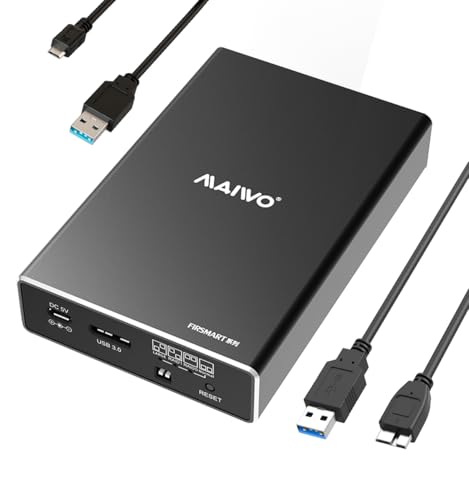
- Four modes: RAID 0, RAID 1, NORMAL, and LARGE/JBOD
- USB 3.0 with UASP and up to 5Gbps bandwidth
- Supports two 2.5-inch SATA drives, up to 12TB total
Best For: Portable dual-drive SSD or HDD setups
Best High-Capacity DAS
TERRAMASTER D6-320 Six-Bay Enclosure

- Six bays support 3.5-inch and 2.5-inch SATA drives
- Up to 132TB total capacity with supported drives
- USB 3.2 Gen 2 Type-C, hot swap, and temperature-controlled fan
Best For: Large desktop storage pools without RAID arrays
Best Value Dual-Bay Option
Vantec NexStar GX RAID Enclosure

- Supports Individual, RAID 0, and RAID 1 modes
- USB 3.0 with UASP and up to 5Gbps speeds
- Aluminum housing with vents and included AC adapter
Best For: Budget-conscious dual-drive RAID setups
Best Desktop RAID Flexibility

- Hardware RAID supports modes from RAID 0 to RAID 10 and RAID 5
- Five bays accept 2.5-inch and 3.5-inch SATA drives
- Built-in 150W power supply and 80mm cooling fan
Best For: High-capacity workstation backups and media storage
Most Versatile

- Combines two SATA bays with three M.2 NVMe bays
- Offers RAID 0, RAID 1, Normal, and JBOD modes
- Supports up to 68TB and USB 3.2 Gen 2
Best For: Users needing hybrid HDD and NVMe storage flexibility
Best Simple Dual-Bay Pick

- Supports 2.5- and 3.5-inch SATA drives
- Provides four RAID and storage modes
- Includes tool-free installation and USB-A/C 3.0
Best For: Basic two-drive SATA RAID storage at home or work
High-Capacity Pick
Yottamaster FS5RU3 5-Bay RAID Enclosure
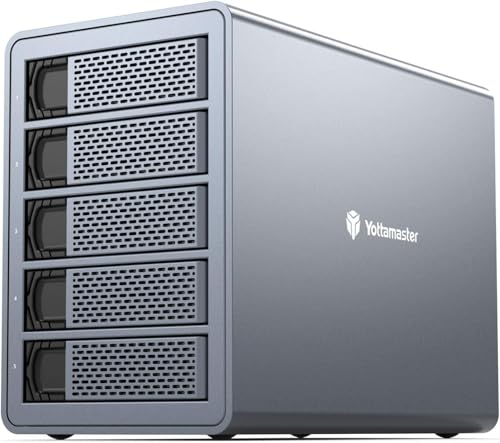
- Five bays support up to 120TB total storage
- Hardware RAID 0/1/5/10, JBOD, and CLONE modes
- USB 3.0, aluminum build, and built-in cooling fan
Best For: Large media libraries, backups, and desktop DAS storage
Maximum-Bay Option

- Eight bays support up to 160TB total capacity
- Eight RAID and storage modes are available
- USB A/C 3.0, eSATA cable, aluminum body, and dual fans
Best For: High-capacity desktop storage and multi-drive workstations
Compact Four-Bay Choice

- Four bays support up to 80TB of SATA storage
- Seven RAID and storage modes are supported
- USB A/C 3.0 and eSATA connectivity in an aluminum enclosure
Best For: Flexible four-drive desktop DAS setups
Best Compact RAID Pick – MAIWO Dual-Bay 2.5-Inch RAID Enclosure
For shoppers comparing portable raid enclosures, the MAIWO K25272 is a compact dual-bay option for 2.5-inch SATA SSDs and hard drives. It offers USB 3.0 with UASP, four selectable modes, tool-free installation, and a 12TB total capacity limit.
Best For: Users who need a small, portable enclosure for two 2.5-inch SATA drives and flexible RAID configurations.
Pros:
- Supports NORMAL, RAID 0, RAID 1, and LARGE/JBOD modes.
- USB 3.0 provides up to 5Gbps bandwidth with UASP support.
- Compact aluminum enclosure with tool-free installation and hot swapping.
- Supports up to 6TB per bay, or 12TB total.
Cons:
- Supports only 2.5-inch SATA drives.
- Additional power is required, with a separate Micro USB power cable included.
- Drives are not included.
The MAIWO is a practical choice when portability and straightforward RAID switching matter more than maximum drive capacity. Its dual-bay design suits laptop drives, SSD upgrades, and compact backup setups.
Best High-Capacity DAS – TERRAMASTER D6-320 Six-Bay Enclosure
The TERRAMASTER D6-320 is a six-bay DAS for shoppers who need much more capacity than typical portable raid enclosures provide. Its USB 3.2 Gen 2 Type-C connection supports up to 10Gbps, while hot swapping and automatic fan control simplify everyday storage management.
Best For: Desktop users needing up to six individual SATA drives and up to 132TB of total storage.
Pros:
- Accepts six 3.5-inch or 2.5-inch SATA HDDs or SSDs.
- Supports up to 22TB per drive and 132TB total capacity.
- USB 3.2 Gen 2 Type-C delivers up to 10Gbps transfer speeds.
- Offers plug-and-play compatibility with Windows, Mac, and Linux, plus hot swapping.
Cons:
- Does not support RAID arrays; drives operate individually.
- Larger and heavier than compact portable enclosures.
- Diskless design requires purchasing drives separately.
The D6-320 is best viewed as a high-capacity desktop DAS rather than a RAID enclosure. It makes sense for users who prioritize drive count, individual-disk access, and broad operating-system compatibility.
Best Value Dual-Bay Option – Vantec NexStar GX RAID Enclosure
Vantec Nexstar GX USB 3.0 Dual 2.5" SATA SSD/HDD RAID Enclosure, Black (NST-272S3-BK)
Check Price On AmazonThe Vantec NexStar GX is a compact dual-bay choice among portable raid enclosures, supporting two 2.5-inch SATA SSDs or hard drives. It combines USB 3.0 connectivity, UASP, RAID 0 and RAID 1, and an aluminum housing with front vents for heat dissipation.
Best For: Users wanting a small two-drive enclosure with basic RAID protection and broad Windows, Mac, and Linux support.
Pros:
- Supports Individual, RAID 0, and RAID 1 configurations.
- Includes automatic RAID 1 rebuild support.
- USB 3.0 offers speeds up to 5Gbps with UASP support.
- Includes an AC adapter, stand, cables, and installation hardware.
Cons:
- Designed for 2.5-inch drives only.
- Hard drives or SSDs are not included.
- Capacity support is listed as over 2TB per drive, so larger-drive compatibility should be verified.
The NexStar GX is a straightforward option for dual-drive backups, mirrored storage, or faster striped storage. Its included power adapter and automatic RAID 1 rebuild feature add convenience for routine use.
Best Desktop RAID Flexibility – ORICO Five-Bay RAID Enclosure
The ORICO five-bay enclosure is a desktop-focused option for shoppers seeking portable raid enclosures with more drive capacity and hardware RAID control. It supports 2.5-inch and 3.5-inch SATA drives, multiple RAID modes, a built-in 150W power supply, and USB 3.0 connectivity.
Best For: Workstations, media libraries, and backup projects that need five drives and hardware RAID flexibility.
Pros:
- Hardware controller supports RAID 0, 1, 3, 5, 10, JBOD, Clone, and Clear modes.
- Accepts both 2.5-inch and 3.5-inch SATA HDDs and SSDs.
- Supports up to 22TB per drive and 110TB total capacity.
- Built-in 150W power supply and 80mm cooling fan support multi-drive operation.
Cons:
- USB 3.0 is slower than newer USB 3.2 Gen 2 interfaces.
- Its five-bay desktop design is less portable than compact dual-bay models.
- Drives are not included.
The ORICO stands out when RAID variety and high capacity are more important than travel-friendly size. Its built-in power supply and cooling system make it better suited to sustained desktop workloads and large storage projects.
Most Versatile – Hybrid 5-Bay RAID Enclosure
For shoppers comparing portable raid enclosures, this hybrid CENMATE model stands out by combining two 2.5/3.5-inch SATA drives with three M.2 NVMe SSD bays. It offers four RAID modes, USB 3.2 Gen 2 connectivity, and tool-free drive installation in an aluminum enclosure with continuous fan cooling.
Best For: Users who need high-capacity hybrid HDD and NVMe storage in one enclosure.
Pros:
- Supports RAID 0, RAID 1, Normal, and JBOD configurations.
- Holds up to two SATA drives and three M.2 NVMe SSDs.
- Supports up to 68TB total capacity based on the listed drive limits.
- Includes USB-A and USB-C 3.2 Gen 2 connectivity and tool-free trays.
Cons:
- The continuously running fan may be noticeable to noise-sensitive users.
- RAID configuration can result in data loss, and the notes indicate macOS has no RAID software support.
This is the most flexible option of the three, especially if you want both large HDD capacity and faster NVMe storage. Its larger capacity and active cooling come with a less minimal, less quiet design.
Best for Mobile Flash Workflows – ORICO 4-Bay All-Flash Enclosure
Among portable raid enclosures, the ORICO 2.5-inch all-flash design is a strong fit for mobile editing and photography workflows. It supports multiple RAID configurations, adds USB and SD/TF expansion, and uses a compact solid-state-oriented design that is easier to carry than traditional 3.5-inch enclosures.
Best For: Video editors, photographers, and creators transporting 2.5-inch SSD or HDD storage.
Pros:
- Supports seven modes: RAID 0, 1, 3, 5, 10, JBOD, and CLEAR.
- Provides four bays for 2.5-inch drives and supports up to 40TB across the listed capacity configuration.
- Includes two USB 3.2 10Gbps ports plus SD and TF 3.0 card slots.
- Its compact all-flash design is described as more than 50% smaller than traditional 3.5-inch HDD enclosures.
Cons:
- It does not support 3.5-inch drives.
- The supplied details list 32TB of memory storage capacity, while the product notes describe up to 40TB across five bays; verify the intended configuration before purchase.
This ORICO enclosure prioritizes portability and workflow connectivity over large 3.5-inch drive support. It is particularly appealing when card imports, multiple RAID choices, and a backpack-friendly form factor matter.
Best Simple Dual-Bay Pick – CENMATE 2-Bay RAID Enclosure
For a straightforward portable raid enclosures setup, this dual-bay CENMATE model supports both 2.5- and 3.5-inch SATA HDDs and SSDs. It provides four RAID modes, USB 3.0 connectivity, tool-free installation, and an aluminum body with a built-in cooling fan.
Best For: Home or small-business users who want a simple two-drive RAID enclosure for SATA storage.
Pros:
- Accepts both 2.5- and 3.5-inch SATA HDDs and SSDs.
- Supports RAID 0, RAID 1, Normal, and JBOD modes.
- Offers up to 20TB per hard drive according to the supplied notes.
- Includes USB-A and USB-C 3.0 connectivity and tool-free drive access.
Cons:
- USB 3.0 limits transfer performance to up to 5Gbps.
- The fan is rated at approximately 40–50 decibels and may be too loud for noise-sensitive users.
- The notes indicate macOS has no RAID software support.
This is the practical choice for buyers who do not need NVMe support or a large number of bays. It offers broad SATA drive compatibility, but its USB 3.0 interface and audible fan make it less suited to high-speed or quiet desktop setups.
High-Capacity Pick – Yottamaster FS5RU3 5-Bay RAID Enclosure
The Yottamaster FS5RU3 is a strong choice among portable RAID enclosures when you need substantial direct-attached storage in a five-drive format. It supports up to 120TB, multiple hardware RAID modes, and both 2.5-inch and 3.5-inch SATA drives, making it suitable for demanding media and backup workflows.
Best For: Video editors, photographers, and users building large desktop backup or archive systems.
Pros:
- Supports five drives and up to 120TB of total capacity.
- Offers RAID 0/1/5/10, JBOD, CLONE, and Normal modes.
- Aluminum enclosure, removable trays, and an 80mm low-noise cooling fan help with installation and heat management.
- Works with Windows, Linux, and Mac systems over USB 3.0 at up to 5Gbps.
Cons:
- This is a DAS enclosure rather than a network-attached storage system.
- RAID capacity and performance depend on the installed drives and selected mode.
Choose this model if five bays and flexible hardware RAID are more important than a smaller footprint. Its 120TB ceiling and drive-format flexibility give it room for growing media libraries and long-term archives.
Maximum-Bay Option – CENMATE 8-Bay RAID Enclosure
The CENMATE 8-bay enclosure is designed for users who need to consolidate many SATA drives into one direct-attached system. Among portable RAID enclosures, it stands out for its eight bays, up to 160TB capacity, USB A/C connectivity, and broad selection of RAID configurations.
Best For: Individuals and small workstations that need maximum drive capacity and multiple RAID layouts.
Pros:
- Holds up to eight 2.5-inch or 3.5-inch SATA HDDs or SSDs, with capacity up to 160TB.
- Supports eight modes, including CLONE, NORMAL, RAID 0, RAID 5, RAID 50, and RAID 00.
- Includes USB 3.0 Type-A and Type-C connectivity, plus an eSATA cable.
- Aluminum construction, two fans, and a 12V 20A power adapter support extended operation.
Cons:
- At least two drives must be installed, with one in each four-drive group.
- The listed fan noise is approximately 40–50 decibels.
- Changing RAID modes requires a manual power-off, switch, and reset procedure and may erase data.
This is the capacity-focused choice in the group, but it demands careful setup. Follow the staged drive-testing and RAID instructions, and maintain a separate backup before changing modes or initializing the enclosure.
Compact Four-Bay Choice – CENMATE 4-Bay RAID Enclosure
The CENMATE four-bay model offers a more compact way to build a multi-drive direct-attached array. It supports up to 80TB, accepts both 2.5-inch and 3.5-inch SATA drives, and provides USB A/C 3.0 plus eSATA connectivity for compatible systems.
Best For: Users who want flexible four-drive storage without moving to an eight-bay enclosure.
Pros:
- Supports four SATA HDDs or SSDs with up to 80TB total capacity.
- Provides RAID 0/1/3/5/10, CLONE, LARGE, and NORMAL modes.
- Includes USB A/C 3.0 and eSATA connections, with Windows, Mac, and Linux compatibility.
- Aluminum construction and built-in fans help manage heat during operation.
Cons:
- Hot-swapping is not supported.
- The eSATA connection requires a computer port with RAID functionality to access multiple bays.
- Fan noise is listed at approximately 40–50 decibels.
This enclosure is a practical middle ground for users who need RAID flexibility but do not require eight bays. USB is the simpler connection choice, while eSATA can be useful only when the host system supports the required RAID functionality.
How We Picked These Portable Raid Enclosures
We focused on enclosures that offer practical multi-drive storage rather than simply adding another external drive bay. The selection covers dual-, four-, five-, six-, and eight-bay designs, along with models for SATA HDDs, SATA SSDs, and selected M.2 NVMe drives.
We compared advertised RAID modes, drive compatibility, maximum capacity, connection standards, cooling provisions, installation style, and portability. Because RAID is not a substitute for backup, we also favored products whose configurations can be understood and managed without unnecessary complexity.
Actual performance depends on the drives, host computer, cable, RAID mode, and operating system. Treat stated transfer rates and maximum capacities as manufacturer specifications rather than guaranteed real-world results.
Quick Comparison
| Best For | Recommended Configuration | What to Prioritize |
|---|---|---|
| Travel and small desks | Two-bay enclosure | Compact size, USB 3.x, tool-free access |
| Large media libraries | Four- to six-bay enclosure | Capacity, cooling, stable power delivery |
| Maximum expansion | Eight-bay enclosure | Drive support, enclosure ventilation, RAID management |
| High-speed working files | All-flash or NVMe-capable model | USB 3.2 bandwidth, SSD thermals, compatible slots |
| Simple redundant storage | RAID 1 dual-bay model | Mirroring support and easy drive replacement |
Key Buying Factors for Portable Raid Enclosures
Bay Count and Drive Type
Choose the smallest enclosure that accommodates your current and near-term needs. Two bays are easier to carry and manage, while four or more bays provide better capacity scaling. Check whether the enclosure accepts 2.5-inch drives, 3.5-inch drives, M.2 modules, or a combination of formats.
RAID Modes and Usable Capacity
RAID 0 can improve throughput but provides no drive failure protection. RAID 1 mirrors data and sacrifices half the raw capacity for redundancy. JBOD presents drives individually, while spanning or normal modes may make expansion simpler. Confirm the supported modes before purchasing, and keep a separate backup of important files.
Connectivity and Performance
USB 3.0 and USB 3.2 enclosures can be suitable for backups and general storage, but the host port and cable must support the advertised speed. A multi-drive enclosure may still be limited by one shared USB connection, especially when several disks operate simultaneously.
Cooling, Power, and Installation
Fans and aluminum construction can help manage heat in densely populated enclosures, particularly with 3.5-inch hard drives. Consider fan noise, external power requirements, tool-free trays, included cables, and access to replacement drives. A larger power adapter is normal for high-bay models.
Who Should Buy Which Portable Raid Enclosures?
Choose a compact two-bay model if portability, straightforward setup, or RAID 1 redundancy matters most. These are a practical fit for home backups, photographers, and small workstations.
Choose a four- to six-bay enclosure if you need a growing media archive, shared project storage, or more flexible RAID layouts without moving to a full NAS. Prioritize cooling and capacity when using several mechanical drives.
Choose an eight-bay enclosure for large collections, intensive local storage, or future expansion. It is less convenient to transport but offers the most room to scale.
Choose an all-flash or NVMe-capable enclosure for quieter operation and responsive file access. Verify drive-slot compatibility, thermal management, and whether the connection can take advantage of the drives’ potential speed.