
The best laser cutting machines for small businesses balance cutting power, work area, speed, safety, and ease of use. The right model can help you produce signs, personalized gifts, packaging, décor, and custom merchandise without overwhelming your workspace or budget.
These 10 machines cover a range of small-business needs, including enclosed systems for safer operation, large-bed engravers for batch work, and compact options for makers testing a new product line.
Best 10 Laser Cutting Machines for Small Businesses Picks for 2026
Best for High-Output Production

- 40W laser with substantial cutting power
- Large bed and AutoPassthrough for bigger jobs
- Enclosed Class 1 safety design
Best For: Large signs, batch production, and thicker materials
Best for Large-Bed Batch Work
LASER TREE 20W Large-Format Engraver
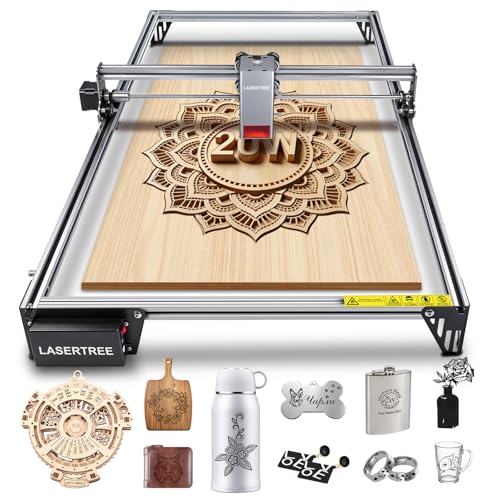
- 400-by-800mm work area
- 20W output for plywood and acrylic cutting
- 10,000mm/min maximum engraving speed
Best For: Oversized signs and small-batch production
Best for Enclosed Creative Workflows

- Dual cameras support precise placement
- Enclosed Class 1 design
- Optional printing and specialty laser modules
Best For: Personalized gifts and home-based craft businesses
Best for Beginner Product Customization

- 15W engraving and cutting capability
- Built-in touchscreen creative tools
- 400-by-400mm workspace and easy setup
Best For: New shops making personalized gifts and craft-market products
Best Smart Enclosed Pick
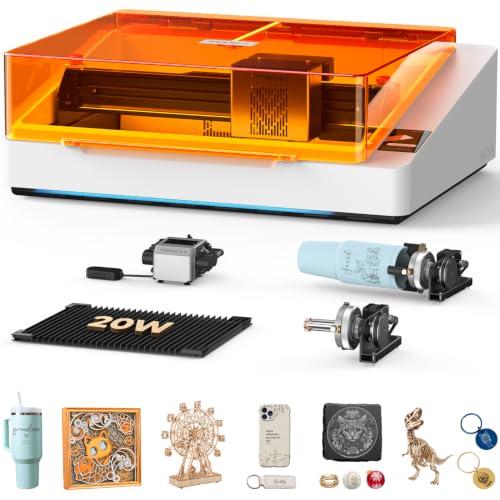
- 5MP AI camera for visual positioning
- AI autofocus and material recognition
- Enclosed Class 1 design with rotary support
Best For: Beginners and custom-product businesses
Best Expandable Open-Frame Option

- True 12W output for 100+ materials
- 300×300mm work area
- Compatible with three major software options
Best For: Growing maker businesses and detailed flat projects
Best High-Speed Enclosed Value

- Up to 20,000mm/min engraving speed
- Enclosed 300×300mm work area
- Wi-Fi, USB, app, and TF-card control
Best For: Batch personalization in home workshops and small shops
High-Speed Power Pick

- 20W laser with speeds up to 400mm/s
- Supports wood, acrylic, leather, and compatible metal
- Includes protective cover and multiple software options
Best For: Fast personalized gifts and small-batch engraving
Beginner-Friendly Compact Choice

- Compact A4 work area for desk-friendly projects
- Supports app, computer, and offline TF-card control
- Upgradeable with an optional IR laser head
Best For: Beginners and small businesses making compact personalized goods
Enclosed Batch-Production Option
L2 MAX 20W Enclosed Laser Cutter

- 300×300mm work area for larger or multiple projects
- 20W power and speeds up to 20,000mm/min
- Enclosed design with flame, tilt, and shutdown protections
Best For: Small-batch production and larger customized products
Best for High-Output Production – xTool S1 40W Rotary Bundle
For small businesses that need serious cutting capacity, the xTool S1 40W is one of the most production-oriented laser cutting machines for small businesses in this lineup. Its large bed, 600mm/s engraving speed, rotary bundle, and 40W laser are suited to larger signs, batch work, and thicker materials.
Best For: Small businesses producing larger signs, dog tags, personalized goods, and projects requiring deeper cuts or rotary engraving.
Pros:
- 40W power can cut up to 18mm cherry wood in a single pass, according to the supplied specifications.
- Large 23.93-by-15.16-inch bed and AutoPassthrough support oversized projects.
- Enclosed Class 1 design includes flame sensors, emergency stop, and lid-open protection.
- Auto-focus, XCS software, templates, and AI-assisted design can shorten the learning curve.
Cons:
- At 86.8 pounds, it is substantially heavier than the other listed machines.
- The higher-power configuration may be more than needed for light craft engraving.
The S1 stands out when throughput, work area, and cutting strength matter more than compactness. Its rotary and passthrough features also give a growing shop room to expand its product range.
Best for Large-Bed Batch Work – LASER TREE 20W Large-Format Engraver
The LASER TREE 20W combines a wide 400-by-800mm work area with fast engraving, making it a practical option among laser cutting machines for small businesses handling signs, murals, and repeat orders. Its open design and software compatibility favor users comfortable setting up a more hands-on machine.
Best For: Small businesses and makers processing oversized designs or multiple smaller pieces in one batch.
Pros:
- Large 400-by-800mm work area accommodates signs, murals, and batch layouts.
- 20W optical output is specified for one-pass cutting of 10mm plywood and 8mm acrylic.
- Maximum engraving speed is listed at 10,000mm/min for faster production cycles.
- Works with LightBurn and LaserGRBL on Windows and Mac, with common file formats supported.
Cons:
- The open-format machine may require more attention to workspace safety and setup than an enclosed model.
- Fixed focal length simplifies focusing but offers less flexibility than automatic focusing systems.
If usable area is your priority, this LASER TREE model offers one of the broadest workspaces in the group. It is especially compelling for commercial layouts and batch work, provided you are prepared for a more hands-on operating environment.
Best for Enclosed Creative Workflows – xTool M2 10W Laser Engraver
The xTool M2 is a compact, enclosed choice for entrepreneurs prioritizing easy positioning and creative flexibility over maximum cutting power. Among laser cutting machines for small businesses, its dual cameras, templates, and optional expansion modules make it appealing for personalized gifts, décor, and home-based side hustles.
Best For: Home crafters and small shops making personalized gifts, stickers, décor, and light craft projects.
Pros:
- Dual cameras provide a real-time preview and a “Place & Go” workflow for positioning designs.
- Fully enclosed Class 1 construction is designed for safer use around family members.
- xTool Studio includes templates and an AI image generator for beginner-friendly design work.
- Optional modules can add CMYK printing or finer engraving on metal and plastic.
Cons:
- The included configuration uses a 10W laser, so it is less focused on heavy cutting than the 40W xTool S1.
- CMYK and rotary capabilities require separately sold modules.
The M2 is a strong fit when workflow simplicity, camera-assisted placement, and enclosure are central buying considerations. Be sure to budget for optional modules if your business needs full-color printing or rotary work.
Best for Beginner Product Customization – AlgoLaser MK3 15W
The AlgoLaser MK3 offers a balanced starting point for makers building a small product line. It combines 15W engraving and cutting with a 400-by-400mm work area, built-in creative controls, and compatibility with LightBurn and LaserGRBL, making it a flexible entry among laser cutting machines for small businesses.
Best For: Beginners and growing craft businesses creating personalized gifts, signs, ornaments, event favors, and coordinated product batches.
Pros:
- 15W diode laser supports both engraving and cutting in one machine.
- Built-in AlgoOS, touchscreen tools, and more than 400 projects allow offline creative work.
- 95% pre-assembled setup and built-in focus stick can simplify initial preparation.
- 400-by-400mm workspace provides room for signs, sets, and multiple components.
Cons:
- The 400-by-400mm work area is smaller than the LASER TREE’s large-format workspace.
- Advanced computer-based design requires a compatible LightBurn or LaserGRBL setup.
The MK3 is a practical middle ground for a new customization business: more capable than a basic engraver, but still designed to reduce setup friction. Its built-in tools are particularly useful when you want to prototype products before committing to a more complex workflow.
Best Smart Enclosed Pick – TOOCAA NOVA 20W
For small businesses seeking laser cutting machines for small businesses, the TOOCAA NOVA 20W emphasizes an approachable, streamlined workflow. Its 5MP AI camera, automatic focusing, material recognition, enclosed Class 1 design, and built-in rotary support make it well suited to personalized products and indoor workspaces.
Best For: Beginners and small businesses producing gifts, signs, tumblers, décor, and other customized items.
Pros:
- 5MP AI camera enables live previews, one-click calibration, and visual design positioning.
- AI material recognition and three-second autofocus reduce setup and trial-and-error.
- Fully enclosed Class 1 design includes flame detection, emergency stop, lid-open stop, tilt protection, and child lock.
- Built-in 360° rotary support handles tumblers, bottles, rings, and other cylindrical projects.
Cons:
- The 33.3-pound enclosed unit is less portable than an open-frame machine.
- Its feature-rich AI workflow may be more than users need for basic engraving only.
The NOVA is a strong convenience-focused choice when accurate placement, safer indoor operation, and product variety matter more than minimizing the machine footprint or initial complexity.
Best Expandable Open-Frame Option – ACMER S2 12W
The ACMER S2 is a flexible option among laser cutting machines for small businesses, pairing true 12W output with a 300×300mm workspace. Its broad software compatibility and optional accessories make it useful for businesses that want to start with flat projects and expand into rotary engraving or cleaner cutting later.
Best For: Makers and small businesses needing detailed engraving, a generous work area, and an upgrade-friendly platform.
Pros:
- True 12W laser power supports engraving and cutting across more than 100 materials.
- 0.01mm positioning accuracy and a 0.08 × 0.08mm spot support fine text, photos, and intricate artwork.
- 300×300mm workspace accommodates signs, layered designs, and multi-piece layouts.
- Works with ACMER Studio, LightBurn, and LaserGRBL on Windows, macOS, and Linux.
Cons:
- Rotary modules, risers, air assist, and other expansion accessories are optional.
- The supplied safety setup centers on a protective shield and goggles rather than a fully enclosed cabinet.
The S2 makes sense for buyers who value software choice and a growth path. It offers useful capability at the outset while leaving room to add accessories as production needs develop.
Best High-Speed Enclosed Value – L2 MAX 10W
For buyers comparing laser cutting machines for small businesses, the L2 MAX 10W combines a 300×300mm work area with speeds up to 20,000mm/min. Its 360° enclosure, modular assembly, multiple control methods, and optional rotary and air-assist compatibility make it a practical fit for custom work in a home or workshop.
Best For: Small shops and DIY makers producing batches of personalized gifts, signs, leather goods, and wood crafts.
Pros:
- Up to 20,000mm/min engraving speed can help reduce time on repeated jobs.
- 300×300mm area supports larger designs or multiple smaller pieces in one setup.
- 360° enclosure helps contain fumes, dust, and operating noise.
- Supports LightBurn, LaserGRBL, and CutLabX, plus Wi-Fi, USB, app, and TF-card control.
Cons:
- The 10W laser has less stated power than the 12W and 20W options in this roundup.
- Air assist and rotary roller functions require optional accessories.
- Its five-part modular assembly still requires setup before use.
The L2 MAX stands out when speed, enclosure, and connectivity are priorities. It is especially appealing for repeat personalization work where the larger bed and multiple control options can support a flexible workflow.
High-Speed Power Pick – ATOMSTACK A20 Pro V2
For small businesses that need laser cutting machines for small businesses with strong output and fast turnaround, the ATOMSTACK A20 Pro V2 offers 20W power, speeds up to 400mm/s, and support for wood, acrylic, leather, and compatible metal projects.
Best For: Personalized gifts, business cards, and small-batch engraving where speed and cutting power are priorities.
Pros:
- 20W output supports demanding cutting and engraving work.
- Integrated linear-guide structure and cross-line light are designed for precise operation.
- Works with ATOMSTACK software, LightBurn, and LaserGRBL.
- Includes a magnetic protective cover, safety glasses, and tilt-angle safety beep.
Cons:
- Its 22.83-inch length may require dedicated workspace.
- The supplied notes do not specify a fully enclosed operating design.
The A20 Pro V2 is a practical choice when throughput, modular construction, and broad software compatibility matter more than the smallest footprint. Lifetime technical support and a stated 1-year warranty add useful purchasing reassurance.
Beginner-Friendly Compact Choice – K15 Pro 10W
The K15 Pro is one of the more approachable laser cutting machines for small businesses, combining a compact A4 work area with wireless, offline, and computer-based control. Its 10W diode module is intended for common craft materials and repeatable small orders.
Best For: Beginners making coasters, keychains, pet tags, jewelry blanks, tumblers, and other compact personalized products.
Pros:
- Assembles in about three minutes with six screws.
- A4 work area fits under a desk while accommodating many everyday projects.
- Supports CutLabX, LightBurn, LaserGRBL, app control, and TF-card offline jobs.
- One-touch focusing, smart memory, and a dual-fan design support repeat work.
Cons:
- The 10W laser is less powerful than the 20W alternatives in this roundup.
- The optional IR head is needed for bare-metal engraving.
- The supplied notes do not provide the complete expansion pricing or configuration.
Choose the K15 Pro if easy setup, a small footprint, and flexible control are more important than maximum cutting capacity. Its stated 300-plus material compatibility and upgrade path make it a sensible starting point for a growing craft business.
Enclosed Batch-Production Option – L2 MAX 20W Enclosed Laser Cutter
For businesses handling larger designs or multiple pieces, the L2 MAX is a compelling laser cutting machine for small businesses. It pairs a 20W laser with a 300×300mm work area, speeds up to 20,000mm/min, and a fully enclosed operating design.
Best For: Small-batch signs, ornaments, gifts, wood products, and customized items requiring more workspace and faster production.
Pros:
- 300×300mm work area accommodates larger designs or multiple pieces.
- 20W output is suited to thicker wood and demanding cutting tasks.
- Fully enclosed design helps shield users from direct laser exposure and contain fumes, dust, and noise.
- Offers LightBurn, LaserGRBL, CutLabX, Wi-Fi, USB, app, and TF-card control.
Cons:
- At 16 pounds and over 21 inches wide, it needs a substantial workspace.
- The supplied notes do not state the exact thickness limits for every material.
The L2 MAX stands out for operators who want a larger work area, enclosed operation, and strong production-oriented specifications in one machine. Its safety features and flexible connectivity are useful for a home workshop or small commercial workspace.
How We Picked the Best Laser Cutting Machines for Small Businesses
We compared these machines by focusing on the factors that matter most in a working shop: laser power, usable work area, advertised speed, enclosure and safety features, positioning systems, material compatibility, software support, and setup requirements. We also considered whether each machine is better suited to occasional custom orders, regular batch production, or a growing business that may need more capacity later.
Specifications can vary by material, focus settings, air assist, and cutting passes. Treat maximum speed and cutting claims as best-case figures, and confirm the manufacturer’s current compatibility, warranty, ventilation guidance, and included accessories before purchasing.
Quick Comparison
| Best For | What to Prioritize | Models to Consider |
|---|---|---|
| Enclosed, user-friendly operation | Class 1 enclosure, camera alignment, filtration or ventilation options | xTool S1, xTool M2, TOOCAA NOVA |
| Larger signs and batch jobs | Work area, repeatable positioning, air assist, sturdy frame | LASER TREE 20W, AlgoLaser MK3, ATOMSTACK A20 PRO V2 |
| Personalized gifts and craft products | Fine detail, rotary support, material presets, camera alignment | xTool S1, TOOCAA NOVA, K15 Pro |
| Budget-conscious experimentation | Reliable software, upgrade path, replacement parts, basic safety equipment | ACMER S2, 10W 300×300mm models |
Key Buying Factors for Laser Cutting Machines for Small Businesses
Laser Power and Material Goals
Higher optical power generally improves cutting performance and can reduce the number of passes, but it does not automatically produce better engraving. A 10W machine can suit wood, leather, paper, and coated materials, while 15W and 20W systems offer more flexibility for thicker stock. Confirm whether your target materials require a diode, CO2, or other laser type; transparent acrylic and some plastics may need a different technology.
Work Area and Production Flow
A near-A4 bed is convenient for small products, but a 300×300mm or larger work area is more practical for signs, panels, and batch layouts. Measure your available table space, including room for ventilation, cable access, and material loading.
Safety, Ventilation, and Software
Fully enclosed, Class 1 designs can be easier to manage in shared spaces, but they still require proper ventilation and safe operating habits. Open-frame machines need especially careful eye protection, controlled access, and fume management. Also check software compatibility, camera accuracy, autofocus, offline operation, and the availability of replacement lenses and belts.
Running Cost and Support
Include air assist, honeycomb panels, rotary attachments, filters, exhaust equipment, spare lenses, and maintenance in your budget. Responsive support and accessible documentation can save more time than a small difference in purchase price.
Who Should Buy Which Laser Cutting Machines for Small Businesses?
Choose an enclosed model such as the xTool S1, xTool M2, or TOOCAA NOVA if safety, simple alignment, and a polished workflow matter most. Select a larger-bed 15W or 20W machine if you make signs, larger décor, or repeated batches. A 10W system is a sensible starting point for a new side business focused on engraving and lightweight cuts. Buyers seeking maximum flexibility should prioritize a 20W model with air assist, camera positioning, strong software support, and an upgrade path rather than choosing solely by headline speed.