
A tall drafting desk can make it easier to move between sketches, models, and a computer—but a standard office chair may leave you perched too low with nowhere to rest your feet.
These 10 drafting chairs offer different approaches to seat height, foot support, armrests, and capacity. The right choice depends on your workstation measurements and how you work throughout the day.
Best 10 Drafting Chair for Architects Picks for 2026
Best for Compact Workspaces

- Flip-up arms save desk space
- Adjustable lumbar support and foot ring
- 250-pound stated weight limit
Best For: Standing-desk users who need tuck-away armrests
Best for Adjustable Foot Support

- Locking foot ring adjusts across 9.45 inches
- 7.9-inch chair-height adjustment
- 300-pound stated weight capacity
Best For: Changing high-desk setups that call for adjustable foot support
Best for Lumbar Adjustment

- Lumbar support adjusts vertically by 2 inches
- Locking adjustable foot ring
- Flip-up arms and 300-pound stated capacity
Best For: High-desk work requiring adjustable lower-back support
Best for High-Back Support

- High-back breathable mesh
- Adjustable seat tilt and tilt tension
- Foot ring and padded flip-up arms
Best For: Drafting-table users who want a high backrest and tilt controls
Heavy-Duty Pick
BOLISS 400 lb High-Back Drafting Chair

- 400-pound weight capacity
- Double-layer foam seat
- Adjustable foot ring and flip-up arms
Best For: Higher-capacity seating at a tall desk
Adjustability Pick
ErGear Drafting Chair with Flip-Up Arms
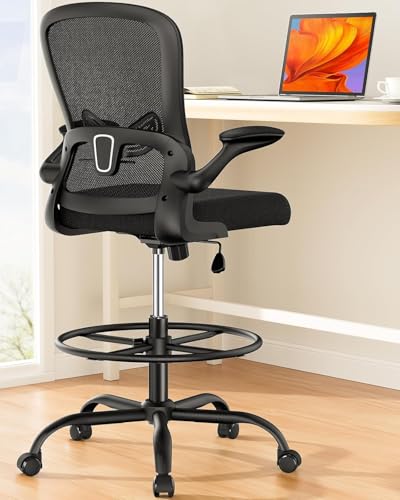
- 8-inch seat-height adjustment
- Adjustable lumbar support and foot ring
- Mesh back and flip-up arms
Best For: Fine-tuning seating at tall work surfaces
Best for Flexible Workstations
Synorla Ergonomic Tall Drafting Chair

- Adjustable lumbar support and footrest ring
- Flip-up arms for desk access
- Breathable mesh back and 3-inch cushion
Best For: Switching between drafting tables and standard desks
Best for Floor-Friendly Rolling
HYLONE Adjustable Drafting Chair

- Upgraded rubber casters
- Thick foam seat and adjustable foot ring
- Flip-up arms for compact storage
Best For: Rolling around an indoor drawing workspace
Best for a Roomier Seat
HYLONE 400lbs Heavy Duty Drafting Chair
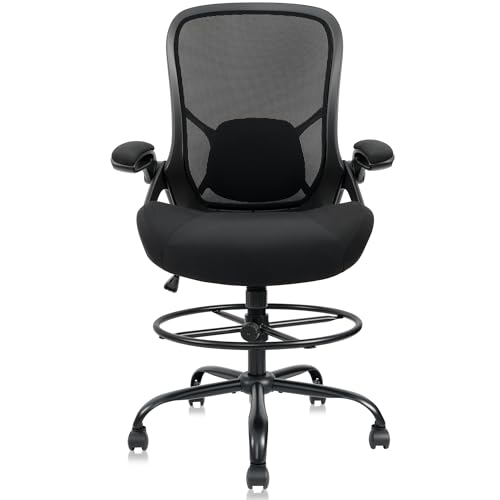
- 5-inch-thick seat cushion
- 28-inch five-star base
- Mesh back and adjustable foot ring
Best For: A thicker cushion at a raised workstation
Best for Compact Workspaces – Primy Drafting Chair
If you need a drafting chair for architects that can tuck closer to a desk, the Primy pairs 90-degree flip-up arms with an adjustable foot ring. Its mesh back and thick foam seat suit work at elevated surfaces.
Best For: Architects using standing desks who want armrests they can move out of the way.
Pros:
- Flip-up arms help save space when the chair is not in use.
- Adjustable lumbar support and a curved backrest offer a more customizable fit.
- Breathable mesh back and a 3-inch-thick foam cushion.
Cons:
- 250-pound stated weight limit is lower than the 300-pound limits of two other chairs in this roundup.
- Assembly is required.
The Primy is a practical choice when desk clearance matters. Check the chair’s height against your work surface before ordering; the supplied dimensions give differing seat-height figures.
Best for Adjustable Foot Support – Kensaker Drafting Chair
The Kensaker is a drafting chair for architects who want to fine-tune foot placement at a raised drawing surface. Its foot ring adjusts across a stated 9.45-inch range and uses a locking knob to help keep the chosen position.
Best For: Architects who switch between elevated workstations and want a height-adjustable, locking foot ring.
Pros:
- 7.9-inch chair-height adjustment and a 300-pound stated capacity.
- Foot-ring locking knob helps prevent the ring from sliding down.
- Flip-up arms and vertically adjustable lumbar support add fit and clearance options.
Cons:
- Assembly is required; the seller estimates 15 to 20 minutes.
- Listed surface recommendation is hard flooring, so verify suitability for your floor.
The combination of a locking foot ring and height adjustment makes this a useful option for shared or changing high-desk setups. Measure your work surface and preferred seated height before buying.
Best for Lumbar Adjustment – ORRSAKER Drafting Chair
For a drafting chair for architects with an adjustable lower-back fit, the ORRSAKER offers 2 inches of vertical lumbar adjustment. It also combines a tall-seat height adjustment, locking foot ring, and flip-up arms for work at high desks.
Best For: Architects who want to adjust lumbar and foot support while working at a standing desk or drafting table.
Pros:
- 2-inch lumbar adjustment and a stated 7.9-inch chair-height range.
- Anti-slip foot-ring lock helps hold the selected position.
- Dual-layer mesh, a 3-inch foam cushion, and a 300-pound stated capacity.
Cons:
- Assembly is required, though tools and a guide are included.
- The listing recommends hard floors; check compatibility with your flooring.
This model covers several common fit adjustments without taking up armrest space when the arms are flipped up. Its listed specifications do not give a seat-height range, so confirm that fit before purchase.
Best for High-Back Support – HYLONE Drafting Chair
The HYLONE is a drafting chair for architects who prefer a taller backrest while working at an elevated desk. Its high-back mesh design is paired with built-in lumbar support, padded flip-up arms, and an adjustable foot ring.
Best For: Architects who prioritize a high backrest and want seat-tilt controls at a drafting table.
Pros:
- High-back mesh allows airflow and provides a larger backrest than a low-back design.
- Lift, seat tilt, and tilt-tension adjustments offer seating options.
- Adjustable foot ring and flip-up arms suit elevated work surfaces.
Cons:
- Built-in lumbar support is not described as adjustable.
- At a listed 37 pounds, it is heavier than the other chairs in this roundup.
Choose the HYLONE if backrest height and tilt adjustment matter more to you than a vertically adjustable lumbar pad. Check its listed seat and arm dimensions against your drafting table for clearance.
Heavy-Duty Pick – BOLISS 400 lb High-Back Drafting Chair
If you need a drafting chair for architects with a higher weight capacity, this BOLISS model supports up to 400 pounds. Its high back, double-layer foam seat, and adjustable foot ring are geared toward long sessions at a tall work surface.
Best For: Users who want a high-back drafting chair with a 400-pound capacity and a cushioned seat.
Pros:
- Double-layer seat cushion adds padding for extended sitting.
- Adjustable-height foot ring helps support your legs at a tall desk.
- Padded arms flip up to clear the work area or tuck the chair under a desk.
Cons:
- At 27.3 inches wide, it needs more room than the narrower chairs listed here.
- Assembly is required.
Choose it when capacity and seat cushioning are priorities. Check the chair’s width against your desk clearance before ordering.
Adjustability Pick – ErGear Drafting Chair with Flip-Up Arms
For a drafting chair for architects who alternate between tall desks and other work surfaces, the ErGear offers 8 inches of seat-height adjustment. A height-adjustable lumbar support and foot ring give you more ways to set up the chair for your position.
Best For: Users who want adjustable back and foot support for drafting or standing-desk work.
Pros:
- Lumbar support adjusts vertically by 2 inches.
- The 19.7-inch foot ring adjusts by 5 inches and locks in place.
- Breathable mesh back and flip-up padded arms suit longer work sessions and under-desk storage.
Cons:
- Its 300-pound capacity is lower than the BOLISS chair’s 400-pound rating.
- Assembly is required.
This is a practical choice when fit adjustments matter more than maximum weight capacity. Confirm that its seat-height range works with your desk before buying.
Armless Pick – Boss Ergonomic Works Mid-Back Drafting Chair
If armrests get in the way of drawing or moving close to a work surface, this armless model is a straightforward drafting chair for architects to consider. The Boss Ergonomic Works pairs a mid-back design with tweed upholstery, a chrome-finished foot ring, and adjustable seat height.
Best For: Users who prefer an armless chair and an unobstructed reach across their drafting surface.
Pros:
- Armless design keeps armrests out of the way.
- Gas-lift seat adjustment helps position you relative to the work surface.
- Five-star base, dual-wheel casters, and a 20-inch foot ring support movement and foot placement.
Cons:
- No armrests for users who want elbow support.
- Its 275-pound capacity is lower than the other two chairs listed here.
Pick this chair for its simple armless layout rather than extensive adjustments. The supplied seat-height figures are inconsistent, so verify the height range before purchasing for a specific desk.
Best for Flexible Workstations – Synorla Ergonomic Tall Drafting Chair
If you move between a raised drafting table and a standard desk, this drafting chair for architects offers useful adjustments without changing seats. Its adjustable lumbar support, flip-up arms, and repositionable foot ring help tailor the setup to each task.
Best For: Architects who alternate between drafting tables and standard office desks.
Pros:
- Adjustable seat height, lumbar support, and footrest ring.
- Flip-up arms make it easier to move close to a work surface.
- Breathable mesh back and 3-inch foam seat cushion.
- PU casters are designed for quiet movement and floor protection.
Cons:
- Assembly is required.
- Rated for a maximum of 300 pounds.
The combination of lumbar adjustment and movable foot support makes this a practical choice when your working height changes throughout the day. Check that its seat-height range suits your particular drafting table before buying.
Best for Floor-Friendly Rolling – HYLONE Adjustable Drafting Chair
For an architect’s workspace where a chair rolls between a drawing surface and nearby materials, this drafting chair for architects stands out for its upgraded rubber casters. It also pairs a thick foam seat with adjustable height and a movable foot ring.
Best For: Architects who want a tall chair with rubber casters for moving around an indoor workspace.
Pros:
- Rubber casters are designed to roll quietly without scratching floors.
- Adjustable seat height and foot ring accommodate raised work surfaces.
- Flip-up arms save space when the chair is tucked away.
- Components are described as meeting BIFMA-level tests.
Cons:
- Lumbar support is built into the backrest rather than listed as adjustable.
- Assembly is required.
This is a sensible pick if floor-friendly mobility matters as much as seat cushioning. Its fixed lumbar contour may be less adaptable than a chair with adjustable lumbar support.
Best for a Roomier Seat – HYLONE 400lbs Heavy Duty Drafting Chair
If seat padding and a stable base are priorities, this drafting chair for architects combines a 5-inch-thick cushion with a 28-inch five-star base. Its mesh back, adjustable foot ring, and flip-up arms suit work at elevated surfaces.
Best For: Architects seeking a thicker seat cushion and a wide base for a raised workstation.
Pros:
- 5-inch-thick seat cushion and breathable nylon mesh back.
- Adjustable footrest ring supports different leg positions.
- Flip-up arms help free space near a desk.
- 28-inch five-star base and casters designed for multiple floor types.
Cons:
- The listed 44–52-inch height range does not clearly identify seat height; verify fit against your desk.
- Specific lumbar adjustment is not described in the supplied features.
Choose this model primarily for its substantial cushion and wide base. Before ordering, confirm its working-height measurements so the seat and foot ring align with your drafting surface.
How We Picked the Best Drafting Chair for Architects
We focused on chairs designed for elevated workstations and compared the features most relevant to architects: seat-height adjustment, foot support, back design, armrest clearance, and stated weight capacity. The selection includes mesh-backed options, armless seating, and heavy-duty models so buyers can match a chair to their workspace rather than rely on a single comfort claim. Product names alone do not establish long-term durability or ergonomic performance; check current specifications, warranty terms, and owner feedback before ordering.
Quick Comparison: Match the Chair to the Workspace
For desks where armrests might strike the work surface, consider the armless Boss Office Products B1615-BK or a model with flip-up arms, such as the Primy, Kensaker, ORRSAKER, ErGear, Synorla, or listed HYLONE options. If foot placement is your priority, start by comparing chairs that explicitly list an adjustable foot ring, including Kensaker and ORRSAKER. For a higher stated weight capacity, compare the BOLISS 400 lb model with the HYLONE 400 lb model, then confirm each chair’s full dimensions and adjustment range. These are starting points, not substitutes for checking fit.
Key Buying Factors for a Drafting Chair for Architects
Seat Height and Desk Clearance
Measure from the floor to the underside of your desk, then compare that measurement with each chair’s published seat-height range. At your preferred working height, your elbows should reach the drawing surface or keyboard without raised shoulders. Allow space for the seat and any armrests to move under the desk; a chair that reaches the right height but cannot tuck in may force you to lean forward.
Foot Support and Seat Fit
At drafting height, your feet may not reach the floor. Look for a stable foot ring positioned where you can rest your feet without pressure beneath your thighs. An adjustable ring gives you more room to tune the fit. Check seat width and depth as well: a wide cushion can offer more room, while a seat that is too deep may prevent you from using the backrest comfortably.
Backrest, Arms, and Movement
Consider how often you alternate between drawing, computer work, and standing. A supportive backrest matters when seated for extended periods, but lumbar features should align with your back in your usual working posture. Flip-up arms can provide support for keyboard work while clearing space when you draw or pull close to a table. Also check the base footprint and caster suitability for your floor.
Who Should Buy Which Drafting Chair for Architects?
Choose an armless chair if close access to a drafting table is essential. Choose flip-up arms if you switch between sketching and keyboard work. Prioritize an adjustable foot ring if several people share the station or you regularly change seat height. If you need a higher-capacity chair, compare the stated limits of the BOLISS and HYLONE 400 lb models, but verify seat dimensions and warranty coverage too. Above all, the best Drafting Chair for Architects is the one that fits your desk, supports your feet, and lets you work without reaching or hunching.