
When it comes to setting up your ideal workspace, finding the right desk for your MacBook is essential. It needs to blend style with functionality, offering features that enhance your productivity. From electric height adjustments to ample surface space, the options are plentiful. But how do you choose the best one for your needs? Let’s explore the top desks that strike the perfect balance between aesthetics and ergonomic design.
ErGear Height Adjustable Electric Standing Desk (48 x 24 Inches)

If you’re seeking a versatile workspace for your MacBook setup, the ErGear Height Adjustable Electric Standing Desk is an excellent choice. With dimensions of 48 x 24 inches, it fits perfectly in both home offices and gaming setups. You’ll love the effortless electric height adjustment, ranging from 28.35 to 46.46 inches, allowing you to switch between sitting and standing with ease. The quiet, powerful lift motor even lets you save up to four preferred height settings. Plus, its heavy-duty alloy steel frame guarantees stability and durability for years, while low-VOC materials promote a healthier indoor environment. Assembly is quick and simple!
Best For: Individuals seeking a versatile and ergonomic workspace for home offices, gaming setups, or productivity tasks.
Pros:
- Electric height adjustment allows for easy transition between sitting and standing positions.
- Memory presets enable users to save preferred height settings for quick adjustments.
- Durable construction with a heavy-duty alloy steel frame ensures stability and long-lasting use.
Cons:
- Size may be limited for users who require a larger workspace.
- Initial assembly may take some time, despite the included tools.
- Electric components could potentially require maintenance over time.
Veken 55 Inch Large Electric Standing Desk

The Veken 55 Inch Large Electric Standing Desk is ideal for anyone who craves flexibility in their workspace, whether you’re tackling a work project, diving into a study session, or enjoying a gaming marathon. With an adjustable height ranging from 28.3 to 46.5 inches, you can effortlessly switch between sitting and standing. You’ll love the customizable memory presets that save your preferred heights. Assembly is quick and easy, thanks to pre-drilled holes and a detailed manual. Plus, the integrated cable management keeps your cords organized, maintaining a clean and ergonomic environment that boosts your productivity and focus.
Best For: Those seeking a versatile and ergonomic workspace solution for home office use, studying, or gaming.
Pros:
- Effortless height adjustment with customizable memory presets for preferred settings.
- Quick assembly with clearly labeled parts and detailed instructions.
- Integrated cable management system keeps cords organized, promoting a clean workspace.
Cons:
- Limited color options may not fit all aesthetic preferences.
- Weight capacity might not accommodate heavier equipment.
- Electric components could require maintenance or replacement over time.
AODK 59 Inch Gaming Desk with LED Light

For gamers seeking an immersive experience, the AODK 59 Inch Gaming Desk with LED Light stands out as an excellent choice. Its sleek black design features a reversible computer desk with storage shelves and an elevated desktop stand, ideal for panoramic cases. The built-in RGB LED lighting creates an engaging atmosphere, syncing seamlessly with your PC’s internal lights. Plus, with three fabric drawers, you can easily manage cables and accessories. Reinforced with a heavy-duty steel frame, this desk guarantees stability during intense gaming sessions. With a customer rating of 4.6 stars, it’s a solid investment for your gaming setup.
Best For: Gamers looking for a stylish and functional desk that enhances their gaming experience with integrated RGB lighting and ample storage.
Pros:
- Integrated RGB LED lighting creates an immersive gaming atmosphere.
- Heavy-duty steel frame ensures stability during intense gaming sessions.
- Three built-in fabric drawers help keep cables and accessories organized.
Cons:
- Requires assembly, which may be time-consuming for some users.
- Limited color options, as it only comes in black.
- Weight capacity may not support extremely heavy setups beyond middle-tower cases.
FLEXISPOT EN1 Electric Adjustable Standing Desk (48″x24″)

Designed with versatility in mind, the FLEXISPOT EN1 Electric Adjustable Standing Desk is perfect for anyone needing a stable and spacious workspace for their MacBook setup. Its seamless, one-piece desktop guarantees zero wobble, making it ideal for home offices and creative environments. With a hefty capacity of 176 lbs, it supports all your gear effortlessly. You’ll love the smooth height adjustment, ranging from 28.9″ to 46.5″, along with four memory presets to switch between sitting and standing positions easily. Plus, assembly is quick and straightforward, ensuring you can focus on your work without hassle.
Best For: Professionals, creatives, and gamers seeking a stable and adjustable workspace for enhanced productivity and comfort.
Pros:
- Spacious 48″x24″ desktop accommodates multiple devices and accessories.
- Smooth electric height adjustment with four memory presets for easy transition between sitting and standing.
- Quick and easy assembly process, making it user-friendly for first-time standing desk users.
Cons:
- Limited size option may not cater to those needing larger work surfaces.
- Electric components may require occasional maintenance or troubleshooting.
- Higher initial cost compared to non-adjustable desks.
FEZIBO Electric Height Adjustable Standing Desk

Looking for a desk that adapts to your workflow? The FEZIBO Electric Height Adjustable Standing Desk is just what you need. With dimensions of 48 × 24 inches, it’s perfect for your MacBook setup. You can easily switch between sitting and standing positions with one-touch height adjustments ranging from 28.3 to 46.5 inches. Made from sustainably sourced wood, it’s both stylish and eco-friendly. Its reinforced steel frame guarantees stability, and assembly takes only about 30 minutes. Plus, with customizable memory presets, you can find your ideal height with ease. Upgrade your workspace with the FEZIBO for peak comfort and productivity.
Best For: Those seeking a versatile and ergonomic workspace solution that accommodates both sitting and standing positions.
Pros:
- One-touch height adjustment allows for quick and easy transitions between sitting and standing.
- Sturdy construction with a reinforced steel frame ensures stability and a wobble-free experience.
- Customizable memory presets enable users to save their preferred heights for convenience.
Cons:
- Limited weight capacity of 176 lbs may not suit all users or setups.
- Assembly required, which may take around 30 minutes and could be a hassle for some.
- Higher noise levels during height adjustments compared to some premium models.
OffiGo U Shaped Electric Standing Desk with Keyboard Tray

The OffiGo U Shaped Electric Standing Desk with Keyboard Tray is an ideal choice for anyone seeking a versatile and ergonomic workspace for their MacBook setup. With its electric height adjustment ranging from 28.3 to 46.5 inches and three preset buttons, you can easily find your perfect position. The large monitor stand accommodates dual monitors, while the keyboard tray promotes ergonomic use. Plus, it features a stylish semicircular design, LED light strip, and ample charging options with three power outlets and two USB ports. Engineered for stability, it supports up to 154 lbs, making it a reliable addition to your office.
Best For: Individuals seeking a stylish and ergonomic workspace for dual monitor setups and flexible working heights.
Pros:
- Electric height adjustment allows for customizable ergonomics with three preset positions.
- Ample charging options with three power outlets and two USB ports enhance convenience for multiple devices.
- Sturdy construction supports a maximum weight of 154 lbs, ensuring stability for various equipment.
Cons:
- Requires assembly, which may be time-consuming for some users.
- Weight of 59.5 lbs might make it challenging to move or adjust after setup.
- Limited color options, as it only comes in white, which may not suit all aesthetic preferences.
LOXP Adjustable Laptop Stand for MacBook Pro/Air (10-16″)
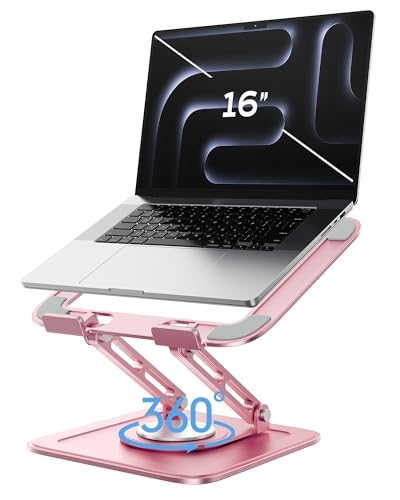
For anyone using a MacBook Pro or Air, the LOXP Adjustable Laptop Stand is a game changer. This versatile stand fits laptops from 10 to 16 inches, including various brands. Its foldable, portable design makes it a breeze to travel with. You can easily adjust the height and angle for ideal eye level alignment, while the 360° rotating base lets you position your laptop flexibly. Made from durable fiber metal, it’s stable and features non-slip silicone to prevent sliding. Whether at home, in the office, or outdoors, this stand enhances your comfort while working, whether seated or standing.
Best For: Individuals using 10-16 inch laptops, particularly MacBook Pro and Air users, who seek ergonomic comfort and portability while working.
Pros:
- Foldable and portable design allows for easy travel and storage.
- 360° rotating base provides flexible positioning for optimal viewing angles.
- Ergonomic height and angle adjustments promote better posture and comfort during use.
Cons:
- Limited to laptops within the 10-16 inch size range, excluding larger models.
- Color option is limited to pink, which may not appeal to all users.
- Potential for weight limitation if used with heavier laptops, despite its durable construction.
Claiks Electric Standing Desk (24×48 Inches, Adjustable Height)

Designed with versatility in mind, the Claiks Electric Standing Desk is perfect for anyone seeking a dynamic workspace for their MacBook setup. With a spacious 24×48 inch dual-panel desktop, you’ll have ample room for your device and accessories. The electric height adjustment, featuring three preset buttons, lets you easily switch between sitting and standing positions, promoting ergonomic comfort. Built with a sturdy steel frame, this desk supports up to 176 pounds, ensuring durability. At only 41.4 pounds, it’s manageable for assembly, and with detailed instructions included, you’ll be set up in no time. Elevate your workspace today!
Best For: Those looking for a versatile and ergonomic workspace that accommodates both sitting and standing positions.
Pros:
- Electric height adjustment with three preset buttons for easy customization.
- Spacious dual-panel desktop provides ample room for devices and accessories.
- Sturdy steel frame supports a weight capacity of up to 176 pounds for durability.
Cons:
- Assembly required, which may be challenging for a single person without assistance.
- Limited warranty coverage, which may not provide extensive protection.
- Weight of 41.4 pounds could be cumbersome for some during setup.
VIVO 32 inch Height Adjustable Desk Converter (DESK-V000K)

If you’re looking to enhance your MacBook setup with versatility and ergonomic benefits, the VIVO 32 inch Height Adjustable Desk Converter (DESK-V000K) is an excellent choice. This sit-to-stand riser lets you easily switch between sitting and standing, relieving muscle tension and boosting productivity. Weighing just 26 lbs, it features a sturdy steel base and an engineered wood top, supporting up to 33 lbs. The lift assist mechanism allows for smooth height adjustments from 4.5 to 20 inches. With minimal assembly required, you can quickly attach the keyboard tray and get to work. Plus, it comes with a 3-year warranty!
Best For: Professionals and students seeking an ergonomic workspace to improve posture and productivity while using laptops or desktop computers.
Pros:
- Adjustable Height: Easily switch between sitting and standing positions with a smooth lift assist mechanism.
- Sturdy Construction: Built with high-grade steel and engineered wood, ensuring durability and strength.
- Minimal Assembly Required: Quick setup with just the keyboard tray to attach, allowing immediate use.
Cons:
- Weight Limit: Maximum weight capacity of 33 lbs may not accommodate all equipment setups.
- Size Limitations: The 32-inch width may be too small for users with larger monitors or multiple devices.
- Fixed Keyboard Tray: The keyboard tray is not adjustable independently, which may not suit every user’s ergonomic needs.
DUMOS 47 Inch Computer Desk for Home Office
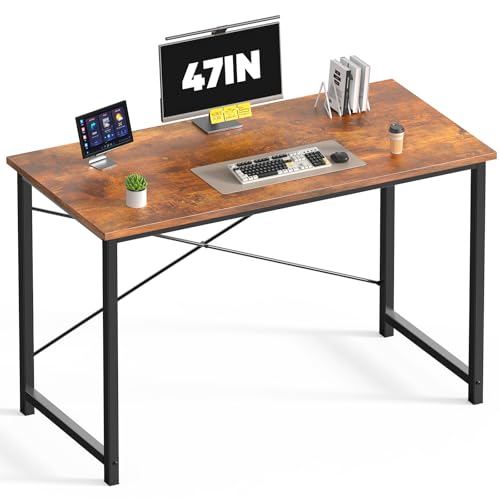
The DUMOS 47 Inch Computer Desk stands out as an ideal choice for anyone seeking a stylish and functional workspace for their MacBook setup. This modern writing table features a rectangular design in a warm wood brown, perfect for home offices or small spaces. Its scratch-resistant and water-resistant top, coupled with a sturdy steel frame, guarantees durability while supporting up to 265 lbs. Weighing only 19.4 pounds, it’s easy to move around. Assembly is a breeze, taking just minutes with the included tools. With a customer rating of 4.6 stars, it’s a highly recommended option for your workspace.
Best For: Individuals seeking a compact and modern desk for home offices or small spaces.
Pros:
- Scratch-resistant and water-resistant tabletop ensures longevity and easy maintenance.
- Sturdy steel frame with X-shaped reinforcement prevents wobbling and supports up to 265 lbs.
- Quick and easy assembly, allowing you to set it up in minutes.
Cons:
- Limited color options available, only offered in wood brown.
- Some users may find the size too small for larger work setups.
- Requires assembly, which may not appeal to those who prefer fully assembled furniture.
Factors to Consider When Choosing a Desk for Macbook Setup
When choosing a desk for your MacBook setup, think about several key factors that can enhance your workspace. Consider the desk size, height adjustment options, and the quality of materials used. Don’t forget the importance of ergonomic design and effective cable management to keep your area tidy and comfortable.
Desk Size Considerations
Choosing the right desk size for your MacBook setup involves several key factors that can greatly impact your productivity and comfort. First, consider the surface area; it should comfortably hold your laptop and any additional peripherals, like a mouse or external monitor. Aim for a desk depth of at least 24 inches to maintain a proper distance from the screen, reducing eye strain. The desk height is essential for an ergonomic posture, so look for options ranging from 28 to 30 inches. Also, make sure the desk fits your available space—compact desks around 48 inches wide work well for smaller areas, while larger setups may require desks over 60 inches. Don’t forget to plan for future needs, leaving room for expansions.
Height Adjustment Options
How can height adjustment options enhance your MacBook setup? A desk that allows you to easily switch between sitting and standing positions, typically ranging from 28 to 46 inches, can greatly boost your comfort. Electric height-adjustable desks often come with memory presets, letting you save your ideal heights for quick adjustments throughout the day. This flexibility promotes better ergonomics, reducing strain on your back and neck, especially during long hours of use. Many standing desks feature heavy-duty frames, supporting weights up to 176 lbs for stability at any height. Plus, smooth height adjustment mechanisms operate quietly, minimizing distractions as you shift between your preferred working positions. Investing in such a desk can transform your workspace experience.
Material Quality Importance
While you might focus on aesthetics and functionality when selecting a desk for your MacBook setup, material quality plays an essential role in ensuring durability and stability. High-quality materials like engineered wood and metal provide the strength needed to support your MacBook and any additional accessories. Look for scratch-resistant and water-resistant surfaces that protect against wear and tear, keeping your desk looking sleek over time. It’s also important to evaluate low-VOC materials, which help create a healthier indoor environment, especially for long hours of use. A desk’s weight capacity, influenced by its material, is critical for safely accommodating a laptop and peripherals. Finally, sturdy construction minimizes wobbling, ensuring your focus remains undisturbed while you work.
Cable Management Solutions
What good is a sleek MacBook setup if your cables are a tangled mess? Effective cable management solutions can greatly enhance your workspace organization by preventing clutter and ensuring easy access to devices. Look for desks with integrated cable management systems, which often feature cable clips or trays to keep cords tidy and out of sight. This not only contributes to a cleaner workstation but also reduces the risk of tangling or damage to your cables. Plus, proper cable management improves safety by minimizing tripping hazards and can prolong the lifespan of your cables by protecting them from wear and tear. Invest in a desk that prioritizes cable management, and enjoy a more efficient and aesthetically pleasing workspace.
Ergonomic Design Features
An ergonomic desk can transform your MacBook setup, making your work experience more comfortable and efficient. Look for height-adjustable desks that allow you to easily switch between sitting and standing positions, reducing strain during long hours. Customizable memory presets let you save your preferred heights for quick adjustments, promoting healthy posture. Ascertain your desk offers a spacious workspace to accommodate your MacBook and accessories, keeping your area organized and clutter-free. Rounded edges and arc-shaped legs enhance comfort and stability, minimizing the risk of injury during prolonged use. Finally, integrated cable management systems help maintain a clean workspace, reducing distractions and supporting better ergonomics while you work. Choose a desk that prioritizes these features for a superior setup.
Weight Capacity Requirements
When selecting a desk for your MacBook setup, it’s important to take into account its weight capacity to guarantee it can support not just your laptop, but also any additional accessories you might use, like monitors and docking stations. Aim for a desk with a weight capacity of around 150-200 lbs for added stability and durability, especially if you’ll use multiple devices. Always check the combined weight of your MacBook and peripherals; ideally, this shouldn’t exceed 75% of the desk’s maximum capacity for safety. Desks designed with reinforced frames can handle heavier loads, reducing wobbling or tipping. Meeting or exceeding your total equipment weight guarantees a longer desk lifespan and a safer working environment.
Assembly Ease Factors
After ensuring your desk can handle the weight of your MacBook and accessories, the next step is to contemplate how easily it can be assembled. Look for desks with pre-drilled holes and clearly labeled parts; this simplifies setup and saves you time. Detailed instruction manuals and video guides can make a big difference if you’re not familiar with furniture assembly. Opt for desks designed for quick assembly that require minimal lifting, especially if you won’t have help. Some desks even include all the necessary tools in the package, saving you from extra purchases. Finally, check customer ratings regarding assembly ease; high ratings typically indicate that the desk is user-friendly and designed for a hassle-free setup.
Aesthetic Compatibility Matters
Choosing the right desk for your MacBook setup goes beyond just functionality; aesthetic compatibility plays an essential role in creating a workspace you’ll enjoy. A desk that complements the sleek and minimalist design of your MacBook enhances your overall look. Consider matching the desk’s color and finish to your MacBook for a cohesive visual appeal that promotes harmony. The desk’s style—whether modern, rustic, or industrial—should reflect your taste and fit seamlessly with your existing decor. Don’t overlook materials; high-quality wood or metal can mirror the premium essence of your MacBook. An aesthetically pleasing desk not only elevates your workspace but can also boost your mood and productivity, making it vital to select one that resonates with your design preferences.